10 Common Issues with Data and How to Catch Them in 2026
|
9
min read

You're staring at a dashboard that looks calm, the job logs are green, and nothing in the warehouse is visibly broken. That's exactly when issues with data do the most damage. The numbers can drift, definitions can shift, and a model can keep scoring while the business is making decisions on stale, incomplete, or inconsistent inputs.
Most data failures don't announce themselves. They hide inside success states, empty columns, duplicate rows, delayed feeds, and metric logic that no one documented well enough. The core problem is rarely “the pipeline is down.” It's that the pipeline says it's fine while the report, model, or regulatory submission gradually becomes less trustworthy.
The list below ranks ten common data problems by how silently they fail, not by how often people talk about them. Each one includes what it looks like in practice, how to catch it early, and which digna modules fit the detection or mitigation work.
Table of Contents
1. Timeliness, Stale Data, and Broken Dashboards
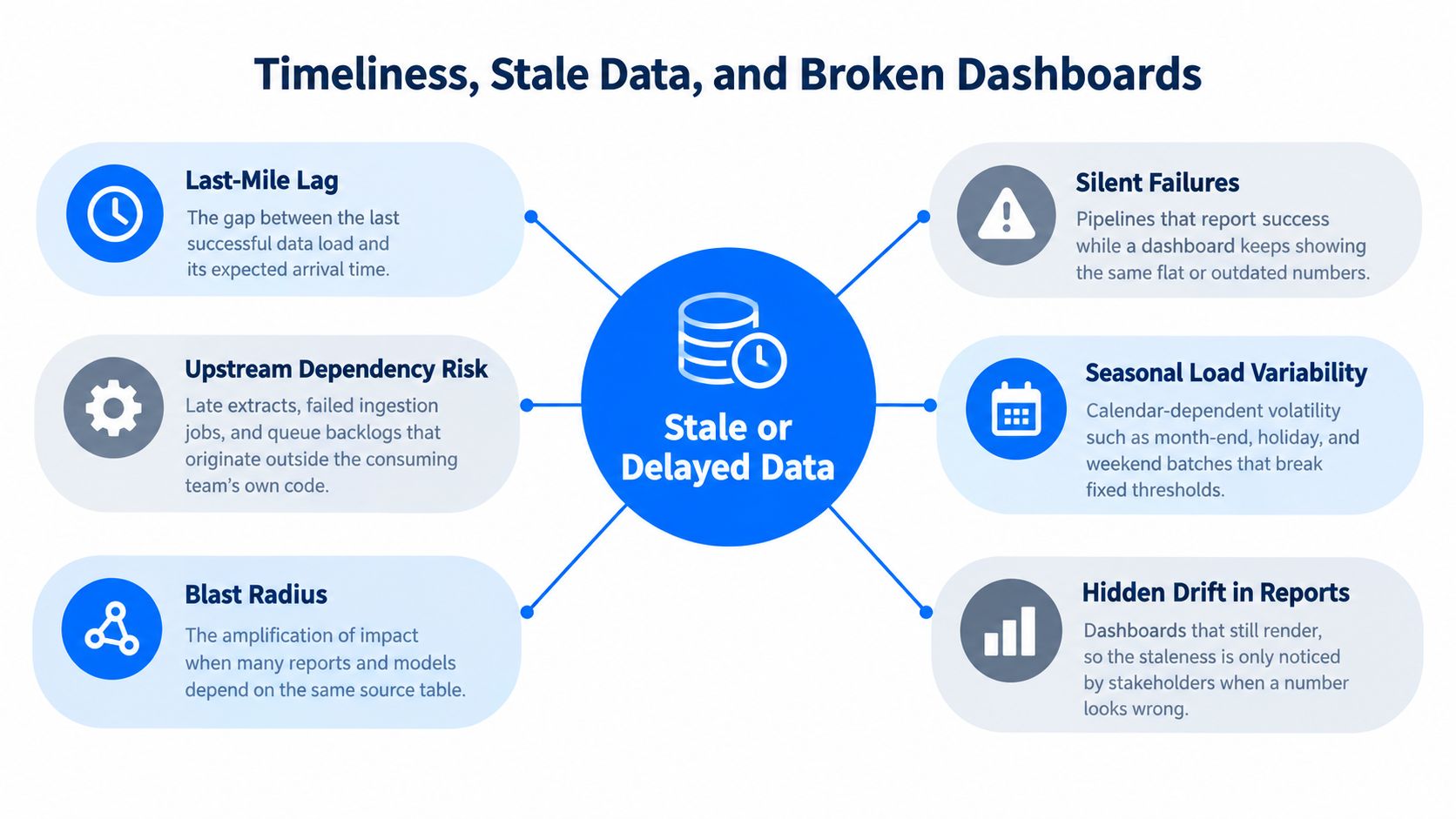
A dashboard can load cleanly while the numbers inside it are already old. Finance sees a report, sales sees a report, leadership sees a report, and the stale figure stays hidden until someone with domain context notices the mismatch.
That is how timeliness failures slip through. A source feed may stall after a late extract or queue backlog, while a dimension table refreshes on schedule with the wrong category mapping. The dashboard keeps rendering, but the meaning behind the numbers drifts. Delayed discovery is expensive in practice, and IBM's breach research shows how much time can pass before an issue is identified and contained, with breach identification and containment averaging 241 days, and detection plus escalation averaging USD 1.47 million in cost (IBM Cost of a Data Breach study).
Practical rule: the report is only as fresh as the tables feeding it.
What to watch
Expected arrival windows: Learn normal delivery times from history, then alert on late, missing, and unexpectedly early loads.
Dependency mapping: Track which dashboards depend on which tables so upstream failures surface before the meeting starts.
Schema and timing together: A feed that arrives on time but changes shape is still a failure.
Use digna Timeliness to learn delivery patterns and calculate expected arrival times. Pair it with digna Data Quality Management for anomaly detection, validation, and schema tracking on the tables that feed key dashboards. For a closer look at the operating model, see the digna guide to data timeliness monitoring.
2. Missing or Incomplete Loads
A load can finish cleanly and still be wrong. The files arrive, the schema matches, and the row count looks close enough to pass a quick check. What is missing is the region, source system, or time slice that never made it through.
That is how totals slip without an obvious alarm. Public Health England's COVID-19 reporting episode is a clear example, when roughly 16,000 positive test results were omitted for several days because a spreadsheet format exceeded the row limit of the older Excel format used to consolidate the data (How Public Health England's COVID-19 data collection went wrong). The failure looked like ordinary variation until someone checked the source.
Detection has to happen at the segment level. Total row counts are not enough, because a partial outage in one region or product line can leave the overall number looking normal. For the measurement side, see the digna guide on how to measure data completeness. Use digna Anomalies to learn normal volume patterns per table, then flag partial loads even when the pipeline job reports success.
Mitigation is repetitive work, and that is the point. Compare source and target counts at each stage, log expected versus actual rows, and keep the audit trail where someone can inspect it later. If a feed is supposed to contain every store, every day, a missing store on one date should stand out before it reaches a dashboard or a forecast.
3. Schema Drift
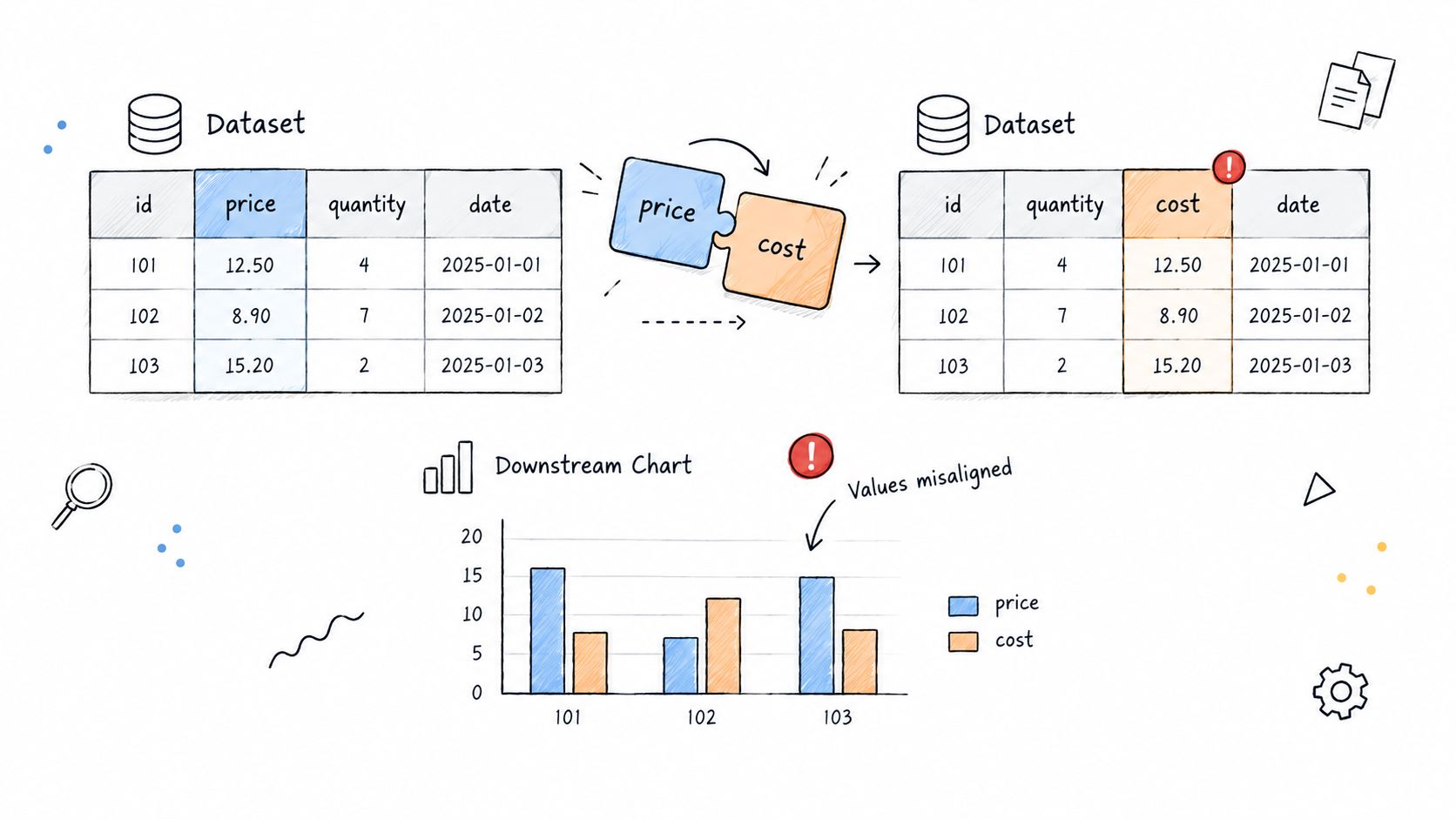
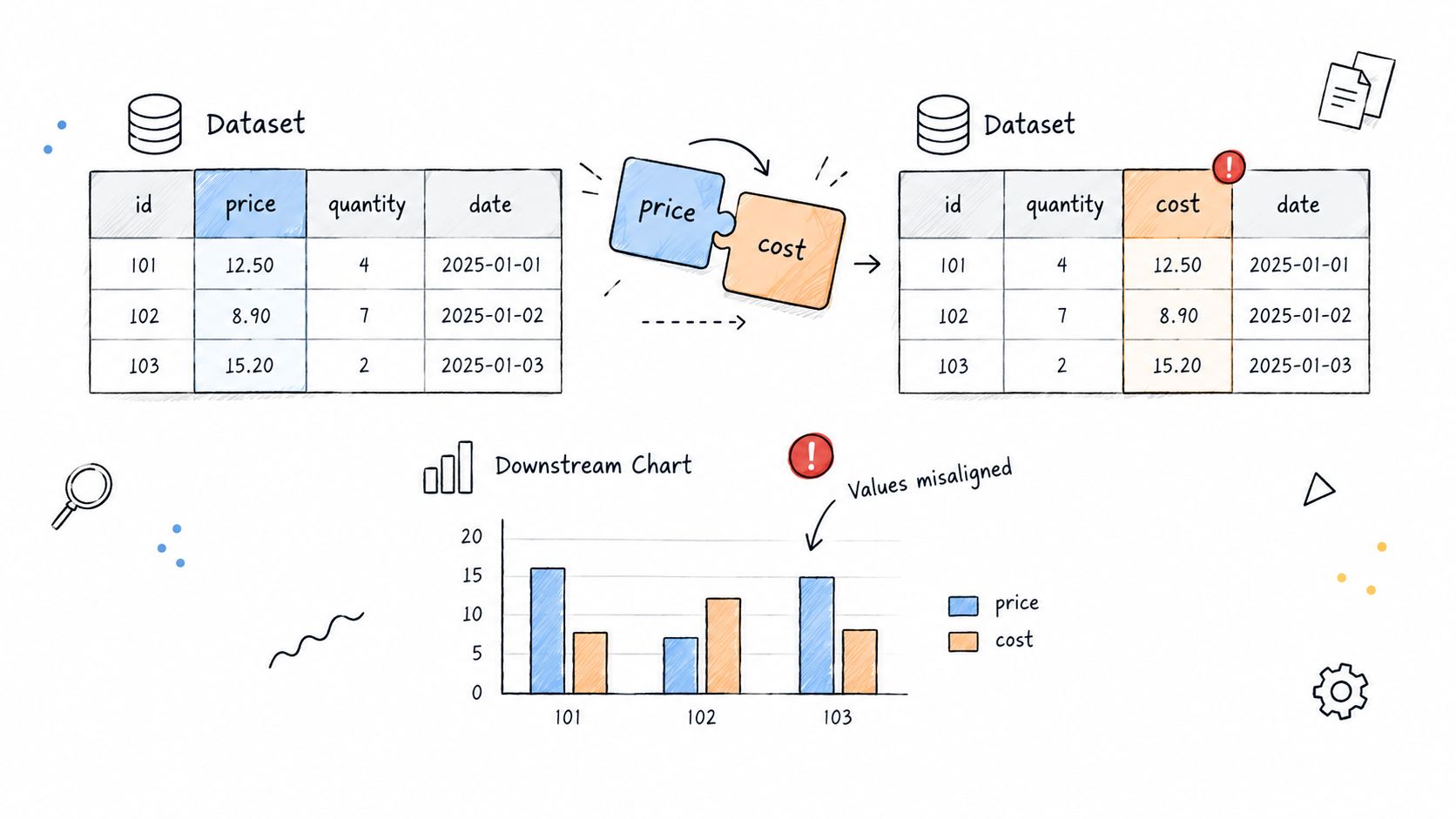
A field can change shape while the pipeline still reports success. A column is renamed, a type flips, or a source drops a field after a release, and downstream logic keeps running with the wrong assumptions. That usually shows up later as nulls, shifted values, broken calculations, or a model scoring on inputs it no longer understands.
The worst failures are the quiet ones. A monetary field that changes from decimal to text can break aggregation in the BI layer while the upstream job still looks healthy. A removed column can also get replaced with a default value, which keeps the feed alive and makes the numbers less truthful without creating an obvious error.
How to catch it early
Watch for added, removed, and retyped columns continuously, not just during deployment.
Classify changes by impact so breaking changes do not sit in the same queue as harmless additions.
Tie each change to the upstream source and every downstream asset that depends on it.
Use digna Schema Tracker to spot structural changes as they happen and map them to affected assets. The digna overview of schema types gives a practical way to group those changes before they spread through reporting or scoring logic. A schema contract will not stop every change, but it does stop the version of schema drift that only surfaces after a report has already gone wrong.
A clean visual example helps teams see how a field can be relabeled without anyone noticing. A diagram illustrating data misalignments where price is incorrectly relabeled as cost, leading to incorrect downstream charts.
4. Duplicate Records
Duplicates are sneaky because each individual row looks legitimate. The same customer, transaction, or policy appears twice, sometimes from retries, sometimes from overlapping source systems, and sometimes from merge logic that missed a key match. Nothing crashes, but the totals are now wrong.
The operational damage is obvious once you trace it. Billing inflates, customer counts overstate reality, and compliance reports start describing an organization that never existed. In a migration, duplicate accounts can make management reporting look healthier or larger than it is. In streaming systems, retry logic can write the same transaction multiple times during a network issue, and the result is inflated revenue, volume, or activity.
A good control pattern starts with explicit business keys. If you don't define uniqueness for the entity, you're leaving the de-duplication rule to chance. Use digna Data Validation to enforce key uniqueness and record-level violations, then make ingestion idempotent so retries don't create more rows. For fuzzy overlaps where exact matching isn't enough, the digna fuzzy matching guide gives teams a practical path for spotting records that are close enough to deserve review.
The absolute duplicate count matters less than the trend. A sudden rise usually tells you more than a steady baseline.
5. Null and Missing Values
Nulls are easy to dismiss because not every missing value is bad. The problem starts when null rates change without explanation, or when a field that should be populated begins arriving empty across a meaningful slice of records. That often points to a join failure, a parsing issue, or a source change that no one noticed.
A format mismatch in a join key can make records stop matching, and then a key customer attribute disappears downstream. A mobile app release can stop capturing a field entirely, which sends null rates soaring while the pipeline still looks healthy. The risk isn't just analytical, missing critical fields can skew models and distort operational decisions.
The right control here is rate-based, not absolute. A blanket “no nulls” rule creates noise, while a measured baseline catches meaningful shifts. Track optional and mandatory fields separately, and check for disguised missing values like sentinel strings or placeholder numbers. Use digna Anomalies to learn normal null-rate behavior per column, then alert on significant deviations instead of arguing over manual thresholds. The digna note on completeness as a data quality dimension is useful when teams need to separate true completeness from assumptions.
6. Invalid Formats and Out-of-Range Values
Invalid values often pass technical validation because the type is correct, but the content is wrong. A date may parse cleanly while still being impossible. A price may be numeric while being in the wrong unit. A postal code may match the expected length while failing every real-world constraint the business depends on.
Many teams confuse ingestion success with data correctness. A healthcare record with a birth date in the future can result from a day-month swap between systems. A retailer can ingest prices in cents from one source and in currency units from another, which makes the same product look 100 times too expensive or too cheap. The pipeline didn't break, the business logic did.
The answer is explicit domain control. Document allowed ranges and code lists for critical fields, then validate them at record level and keep the failing rows with reasons attached. Use digna Data Validation to enforce those rules on the columns that matter most, and combine rule checks with statistical detection when the bad values are only obvious against history. NIST's quality guidance is useful here too, because it frames information quality around utility, integrity, and objectivity, with acceptable error depending on the use case (NIST information quality standards).
7. Business Rule Violations and Referential Integrity Gaps
A shipment before the order date, a loan with no approval record, or a policy that points to a missing customer rarely breaks the pipeline. It breaks trust in the numbers. These failures slip past basic validation because the fields are present, but the business logic is wrong.
The quietest failures usually sit in relationships. A closed counterparty can still appear in exposure reporting if status updates do not reach every downstream table. Claims can keep referencing policy numbers that no longer exist in the master record. Finance notices it late, often after someone has already signed off on a report.
Rank these by how they fail. A missing foreign key is loud. A stale status flag is not.
1. Missing parent records A child record points to nothing, but the row still lands in reporting. Detect it by checking every foreign key against the master table, then review rejects daily. With digna Data Validation, keep the failed rows and the reason attached so ops and audit can trace the break.
2. Business dates that violate order An event arrives with dates that make no sense in sequence. Catch it with explicit sequence rules, such as approval before disbursement or policy start before claim date.
3. Status mismatches across systems One table says closed, another still says active. Compare lifecycle fields across sources and flag records that disagree on the current state.
4. Orphaned operational references An invoice, claim, or exposure remains linked to a deleted master record. Run referential checks where the data is stored, not only after aggregation.
5. Rules that exist only in someone's head Document the rule, name the owner, and make the test condition readable. A rule that no one can explain will not survive a review.
Keep the checks close to the data, preserve evidence, and route failures to the people who can fix the source.
8. Silent Data Drift and Distribution Shifts
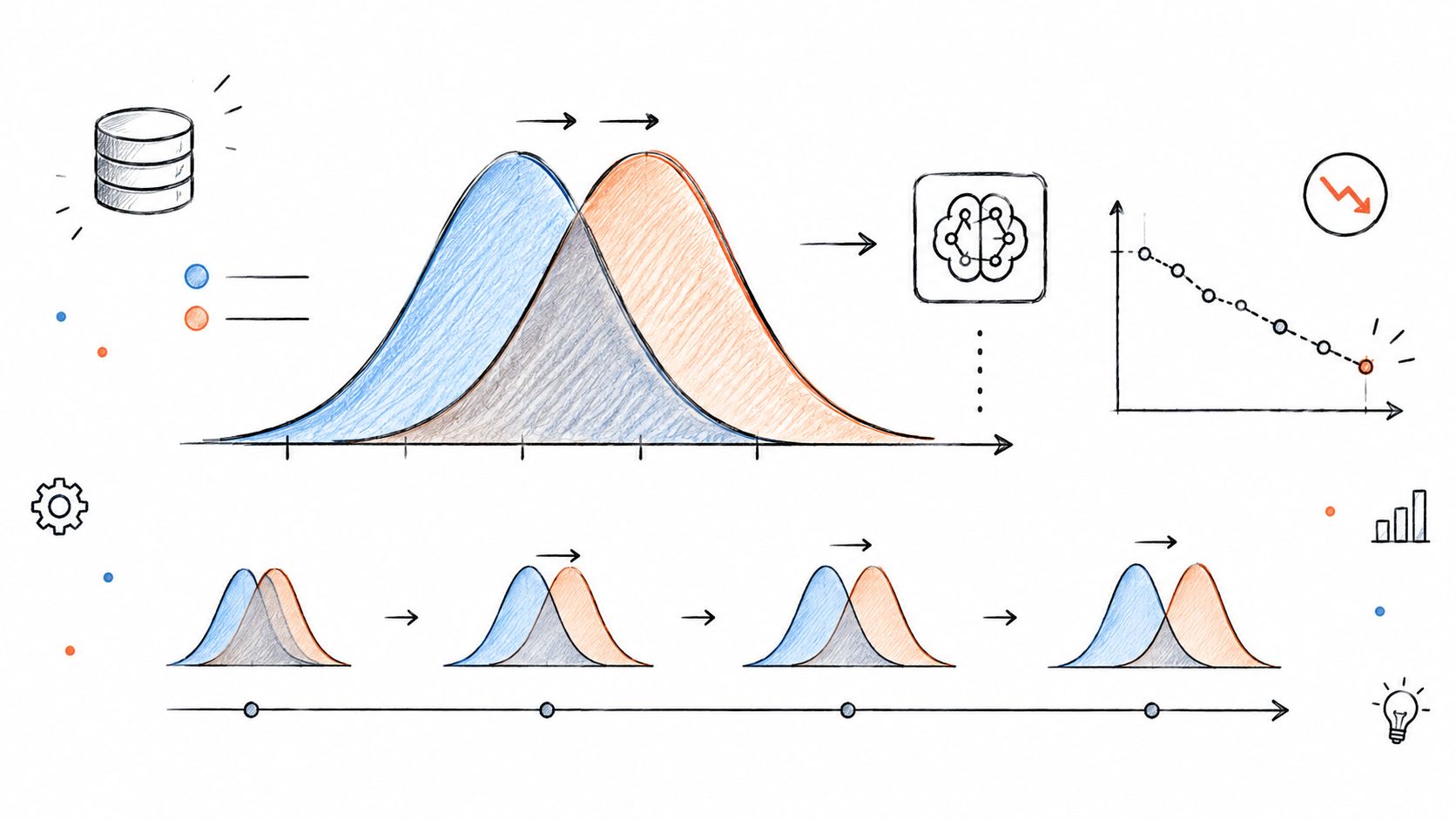
A pipeline can stay healthy while the data slowly stops meaning the same thing. The averages move, the mix changes, correlations weaken, and reports or models become less reliable without a failed job or a broken schema. That makes drift easy to miss and hard to dismiss.
Rank these issues by how quietly they fail. A loud outage gets attention. A quiet shift in behavior usually does not.
1. Feature distribution drift A scorecard keeps running, but one input now comes from a different customer segment than before. Check rolling distributions against a known baseline, then compare them to recent source releases and upstream mapping changes. With digna Anomalies, set expected ranges per dataset, and use digna Data Analytics to inspect whether the movement is isolated or part of a broader trend.
2. Label or outcome drift The target itself changes after policy, product, or routing changes. The model may look worse even though the pipeline is intact. Track outcome rates over time and review them against business events before treating the shift as model decay.
3. Silent unit or encoding changes A currency, status code, or category mapping changes upstream, but the feed still validates. The dashboard stays green while the numbers stop being comparable. Compare source deployments and transformation logs, then confirm the values still match the meaning downstream users expect.
4. Segment mix changes A report becomes dominated by a new region, channel, or device group, and the overall average moves with it. Break metrics down by segment before calling it a trend. If one segment explains most of the shift, the issue is composition, not performance.
5. Gradual correlation loss Two fields that used to move together no longer do. That often shows up after a sourcing change, a delayed feed, or a new business rule. Watch pairwise relationships and alert on sustained deviation, not just single-point spikes.
The useful habit is simple. Monitor distributions, tie alerts to source events, and keep the failed rows and context visible so analysts can tell drift from real change.
9. Inconsistent Definitions, Units, and Metric Logic
Two dashboards can both be “correct” and still disagree, which is why this category causes so much damage to trust. One team counts accounts, another counts unique customers, a third reports revenue in thousands, and a fourth converts time zones differently. The numbers are internally consistent but useless when compared.
This kind of mismatch stays hidden until leaders ask why the same quarter looks different in two systems. The Mars Climate Orbiter failure is the classic unit mismatch example, and it still matters because modern analytics has the same weakness at a higher speed. If finance, operations, and product each define “active customer” differently, every meeting turns into a reconciliation exercise.
A glossary helps, but only if it has owners, calculation logic, and units attached to each metric. Standardize conversions as early as possible, then reconcile critical metrics regularly and investigate differences above agreed tolerances. Use digna Business Monitoring to track KPIs on the underlying data so unexpected shifts surface even before definitions are fully harmonized. For teams that like a reliability lens on metric behavior, MTBF, MTTR, and OEE metrics explained is a useful adjacent reference.
If two teams use the same label for different logic, the label is the problem.
10. Uncontrolled Workload and Platform Consumption Spikes
A dashboard rollout, a backfill, or a new self-serve workflow can push a platform past its normal load before anyone notices. The warehouse still responds, but query latency rises, costs climb, and scheduled jobs start missing their windows.
Teams often file these spikes under infrastructure, yet query volume, storage growth, and runtime expansion are also data reliability problems. They usually fail without warning. The first symptom is rarely an outage. It is a slower model refresh, a delayed report, or a bill that no one budgeted for. Cloud utilization research keeps pointing to the same pattern, where unused or poorly managed capacity turns into waste and operational drag, which is why workload growth belongs in data checks as much as in infrastructure reviews.
Keep platform behavior visible
Track by workload owner: Attribute spikes to a team, pipeline, or dashboard before the pattern spreads.
Baseline by time pattern: Compare weekday, weekend, and release-window behavior before you alert.
Review with finance: Cost control works better when engineering and finance read the same trends.
Use digna Data Platform Observability to monitor workloads, consumption, availability, and performance metrics in one place. That makes it easier to spot the silent failure mode, where the system stays up while cost and latency move out of tolerance. For platform teams, that visibility is often the difference between a controlled increase and an expensive surprise.
Top 10 Data Issues Comparison
Issue | 🔄 Implementation complexity | 💡 Resource requirements | ⚡ Expected detection speed | 📊 Expected outcomes / Impact | ⭐ Ideal use cases / Key advantage |
|---|---|---|---|---|---|
Timeliness, Stale Data, and Broken Dashboards | Medium–High; requires SLA windows & dependency mapping | Moderate, monitoring, lineage, alerting | Slow if only dashboards; ⚡ fast with arrival-window learning | High impact across many reports; erodes stakeholder trust | Critical dashboards & SLA enforcement; quick upstream communication |
Missing or Incomplete Loads | Medium; needs segmented volume baselines and reconciliation | Moderate, row-count logs, per-partition checks | Medium; partial loads can be silent unless segmented checks run | Large risk to aggregates and trends; can misstate volumes | Batch/ETL pipelines and aggregated metrics; detect missing segments |
Schema Drift | Medium; requires continuous schema/contract tracking | Low–Moderate, schema registry or trackers | Medium–Fast with automated schema comparison | Breaks transforms, produces nulls or errors downstream | Systems with many producers; enforce schema contracts |
Duplicate Records | Medium; requires business-key design and idempotency | Low–Moderate, dedupe logic, matching tools | Medium; often visible after aggregation unless monitored | Inflated counts/sums and billing or customer analytics errors | Ingestion pipelines, customer identity resolution, billing |
Null and Missing Values | Low–Medium; column-level monitoring and expected-null baselines | Low, per-column checks and alerts | Fast with null-rate monitoring | Bias in analytics/ML and missing attributes for joins | ML features and mandatory fields; catch sudden null spikes |
Invalid Formats and Out-of-Range Values | Low–Medium; define rules for syntax/semantics/range | Low, validation rules and lookup lists | Fast via deterministic checks | Implausible or non-compliant values that distort metrics | Fields with known domains (dates, codes, prices); regulatory checks |
Business Rule Violations & Referential Gaps | High; cross-table logic and ownership required | High, integrity checks, owners, audit trails | Medium; can be expensive so often sampled | Compliance failures, reconciliation issues, audit risk | Regulated finance, risk, and reconciliation processes |
Silent Data Drift & Distribution Shifts | Medium–High; statistical baselines and relationship monitoring | Moderate–High, drift tooling, long-term baselines | Slow by nature; ⚡ faster with continuous drift detectors | Gradual model degradation and misleading trends | Production ML models and long-running analytical baselines |
Inconsistent Definitions, Units & Metric Logic | High; governance, glossary, and cross-team alignment | High, documentation, reconciliation, conversion layers | Slow, often found in reviews or audits | Conflicting dashboards and loss of confidence in KPIs | Cross-functional KPIs, executive reporting, consolidated metrics |
Uncontrolled Workload & Platform Consumption Spikes | Medium; baselining per workload and attribution | High, platform telemetry, cost controls, remediation playbooks | Medium–Fast via platform metrics and alerts | Cost overruns, delayed jobs, performance degradation | Shared data warehouses, FinOps, production scheduling and backfills |
Turn These Ten Checks Into a Standing Data Quality Routine
Start with the issues that affect your most-used dashboards and regulated reports. Assign each one an owner, a detection method, and an alert path, because “someone should look at that” is not a control. If the data supports finance, healthcare, public reporting, customer operations, or AI pipelines, the first job is to make failure visible before it reaches a meeting, a filing, or a model.
Review this list every quarter. New sources appear, schemas change, teams build new dashboards, and platform usage grows in ways that expose controls you didn't need six months ago. The systems that age well are the ones where timeliness, completeness, schema change, validation, and anomaly detection are monitored as a routine, not as a crisis response.
The most practical place to begin is with the three issues most likely to disrupt your critical reports this month. Set baselines for them first, then expand into the surrounding failure modes once the alerting is trustworthy. That's where digna fits well, because its modules cover timeliness, volume shifts, nulls, schema changes, record-level rules, business KPI monitoring, and platform observability in one operating model.
What matters most is consistency. If you can detect stale data, missing loads, and structural change early, you've already removed a large share of the silent failures that make data teams lose trust in their own outputs. If you can prove the business rule, the freshness window, and the source of change, the rest becomes manageable.
digna gives teams a practical way to monitor the data that drives reporting, operations, and AI. If you're dealing with stale feeds, drift, missing records, or schema changes, visit digna to see how its modules support timeliness, validation, anomaly detection, schema tracking, and platform observability inside your own environment.
Once an alert fires, the next question is who triages it and how quickly it gets fixed, and the data quality issue management process lays out those steps from detection to a closed fix.
Frequently asked questions
What are the most common issues with data?
The ten most common are stale data, missing or incomplete loads, schema drift, duplicate records, null values, invalid formats, business rule violations, silent distribution drift, inconsistent metric definitions and platform consumption spikes. This list ranks them by how silently they fail, not by how often teams talk about them.
How can you detect a partial data load when the job reports success?
Check volume at the segment level rather than as one total. A missing region or product line can leave the overall row count looking normal, so compare source and target counts per stage and per segment, and alert when a single store or date drops out.
Why is schema drift dangerous if the pipeline keeps running?
Downstream logic keeps working on wrong assumptions. A renamed column, a decimal field turned into text, or a dropped field replaced by a default value can produce nulls, broken aggregations and misleading numbers without any visible error. Tracking added, removed and retyped columns continuously catches it before reports go wrong.
Should data quality rules ban null values entirely?
No. A blanket no-nulls rule creates noise, because some fields are legitimately optional. Monitor null rates against a learned baseline per column instead, track optional and mandatory fields separately, and watch for disguised missing values such as sentinel strings or placeholder numbers that look populated but are not.
Where should a team start when building a data quality routine?
Begin with the three issues most likely to disrupt your critical reports this month. Give each one an owner, a detection method and an alert path, set baselines, then expand to the surrounding failure modes once alerting is trustworthy. Review the list quarterly as sources, schemas and dashboards change.