Define Aggregated Data: Methods, Examples, and Watch-Outs
|
7
min read

Aggregated data is information produced by grouping individual records into categories and combining their values into summary measures such as counts, sums, averages, or rates. That sounds simple, but “just make a dashboard” is the advice that causes the most trouble, because aggregation changes both the meaning and the risk profile of the underlying records.
Table of Contents
What Aggregated Data Actually Means
Aggregated data is summary information derived from lower-level records, not a separate kind of data that appears on its own. The mental model is two-sided, on one side you have individual events, transactions, or observations, and on the other side you have group-level totals, averages, or rates that collapse many rows into fewer outputs.
A clean example is a database with 1 million individual customer transactions being summarized into 12 monthly totals for each market. You no longer see each purchase, but you can compare markets, track seasonality, and spot broad patterns much faster. The Australian Bureau of Statistics describes aggregation as grouping information into categories and combining values within those categories, often as tables, which is why people also call it tabular data or macrodata ABS glossary.

The working definition that holds up in practice
Think of aggregation as a transformation applied to raw observations. A customer transaction becomes a monthly revenue total, a stream of telemetry events becomes an hourly error count, and a census of households becomes a tabulation of population characteristics. That's the basic move, reduce many records into fewer summaries.
Practical rule: If the output can answer a group question but not a person question, it's aggregated. If you can still trace the output back to a single record without extra context, treat it as a privacy and disclosure risk.
That distinction matters because the same output can be useful for reporting and still sensitive enough to need controls. If you want a second source of terminology while you think through how vendors describe this space, the pricing data research collection from Wine Labs is a useful adjacent reference point for how structured summaries are presented in market research.
Core Aggregation Methods Explained
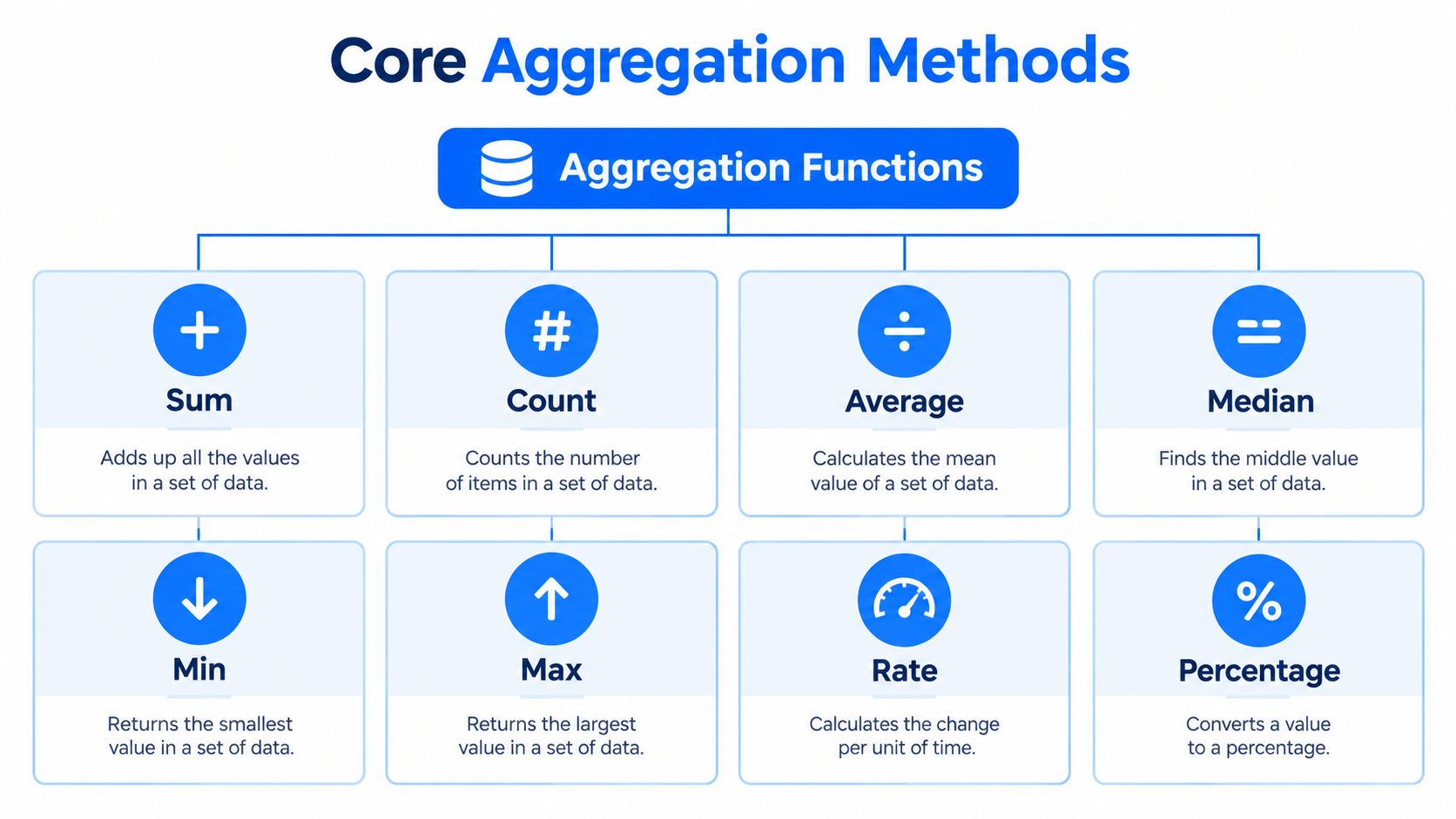
Aggregation gets easier once you stop treating it like one thing. In practice, teams reach for a small set of functions, and each one answers a different question about the same underlying rows.
The main functions and what they preserve
Sum adds values together. If five orders are worth 20, 30, 10, 40, and 50, the sum is 150, which is the right choice when you care about volume, revenue, units sold, or total time spent.
Count tells you how many records are in the group. It preserves activity volume, but not value size, so it works for transactions, tickets, users, or events when the question is “how many?”
Average gives the arithmetic mean. It helps when you want a typical value, but it can be misleading if a few large outliers pull the result away from what most rows look like.
Median gives the middle value after sorting. Use it when the distribution is skewed, because it resists extreme values better than the average.
Min and max keep the smallest and largest values. They're useful for range checks, but they throw away everything in the middle.
Rates and percentages need denominator discipline
Rate is a ratio, such as conversions divided by visitors. Percentage is the same idea expressed on a 100-point scale. Both are only meaningful if the denominator is stable and clearly defined.
A common mistake is averaging percentages across groups with unequal denominators. That can make a small group count the same as a large one, which distorts the result. If the question is “what share of all traffic converted?”, the denominator has to be all traffic, not an average of monthly conversion rates.
Rule of thumb: Use the simplest function that preserves the decision you need to make, and nothing more. If the business question is about scale, use sum or count. If it's about typical behavior, use median before average when the data is skewed.
Rollups, Windows, and Time-Based Aggregations
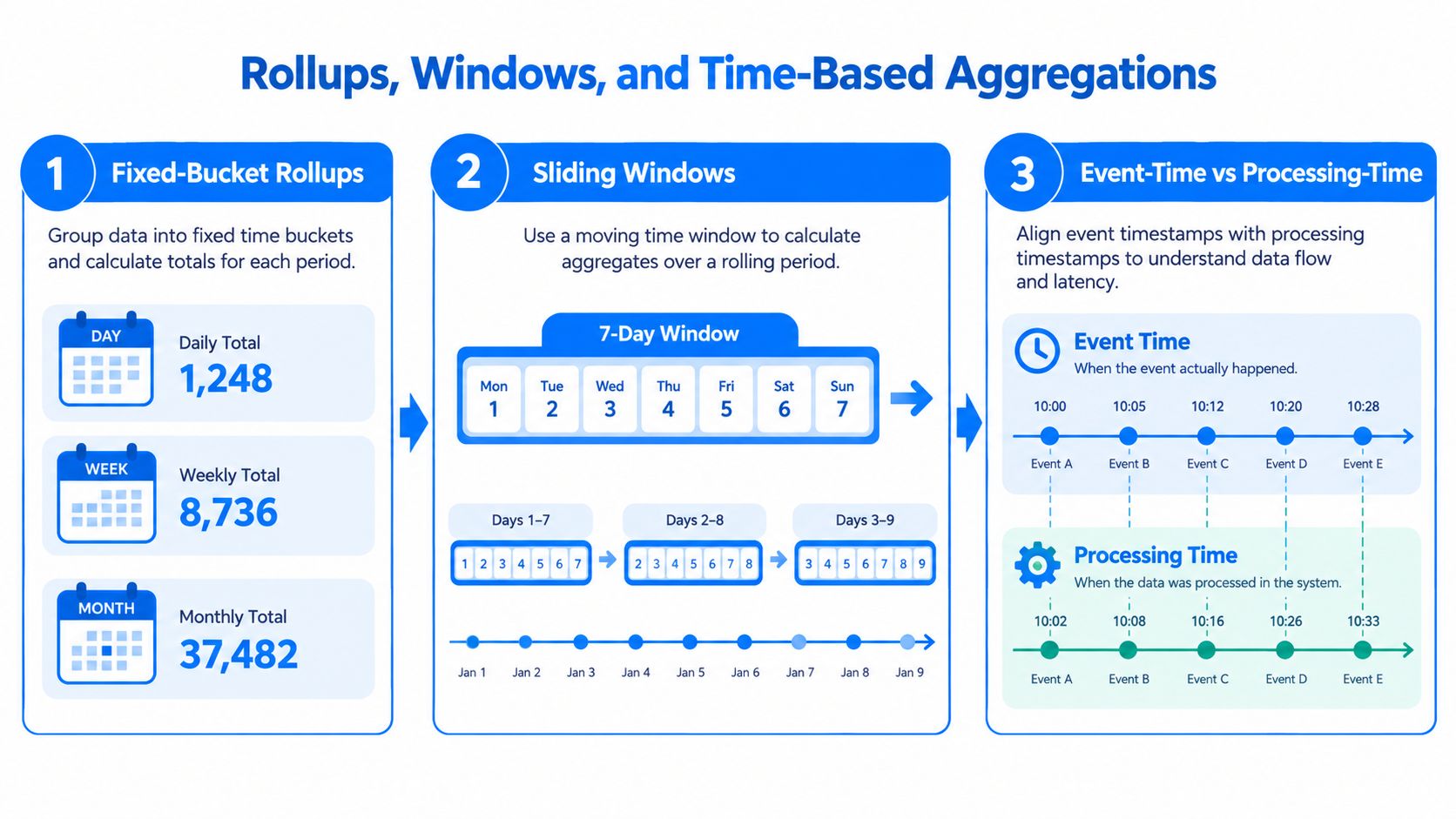
Time turns aggregation into a governed decision, not just a calculation. The same purchase table can produce daily revenue, weekly totals, monthly close numbers, or a rolling trend line, and each version answers a different operational question.
Fixed buckets and rolling views
A fixed-bucket rollup groups records into calendar periods such as day, week, or month. If a sales team wants monthly revenue by region, the bucket boundary is the month, and every order lands in one bucket or another based on its date. That makes recurring reports easy to compare, but it also means the cutoff rule has to be explicit.
A sliding window keeps the bucket moving. A rolling 7-day average smooths day-to-day noise and shows the trend that a single daily total would hide. The trade-off is that each new day changes the result, so yesterday's number can shift when late records arrive.
Event time and processing time are not the same thing
Event time is when the sale, click, or sensor reading occurred. Processing time is when your system received it. If shipments arrive late, an event-time dashboard stays faithful to reality, while a processing-time dashboard can look complete too early and then change later.
That's why late-arriving data breaks naive dashboards, and why teams pair rollups with types of anomaly detection to catch aggregates that drift from their baseline. The raw records can be correct and the aggregate can still be wrong for the report window you chose.
For engineering teams handling these rollups inside SQL engines and pipeline jobs, in-database processing keeps the logic close to the data and reduces unnecessary movement.
Where Aggregation Happens in Modern Data Systems
Aggregation shows up wherever a downstream user needs faster or simpler answers than raw records can provide. The storage layer changes, but the pattern stays the same: group records, summarize them, and serve them in a form people can use.

The usual homes for rollups
Operational databases often power real-time dashboards, especially when a team wants service-level visibility from live transactions. The failure mode is freshness pressure, because heavy rollups can slow the same system that's trying to serve application traffic.
Data warehouses usually hold dimensional models and pre-computed fact tables. That's where finance, sales, and executive reporting often live, but warehouse rollups can drift out of sync with source tables if refresh logic is incomplete or partitioning is inconsistent.
Data lakes and lakehouses support batch and streaming pipelines, which makes them flexible for mixed workloads. The trade-off is complexity, because streaming windows can drop late events and batch jobs can hide problems until the next run.
Choosing the home by the question
Observability platforms use metric rollups for alerting and trend analysis, because alerts need fast summaries rather than raw logs. If you need architectural guidance for modern stack design, the modern data architecture approaches overview from Ekipa is a useful reference for how these layers usually fit together.
When aggregation runs close to production systems, query shape matters as much as math. A fast dashboard built on the wrong grouping can be more dangerous than a slow one that's obviously incomplete.
Why Aggregated Data Matters for Analytics and Observability
Dashboards, executive reporting, regulatory submissions, and machine-learning features all depend on aggregated views. That means one weak aggregate can propagate errors everywhere downstream, even when the raw source data is still intact.
The observability angle is just as important. An unusual total or rate is often the first clue that something changed upstream, whether that's a broken join, a missed partition, a delayed feed, or a schema shift. Aggregated metrics make those signals visible quickly, which is why teams monitor them first.
What aggregation hides if you don't carry context with it
A total can conceal a shrinking population. An average can hide a long tail. A rate can look stable while the denominator changes. That's why good aggregates carry metadata alongside the number, including record counts, coverage, and the grouping dimensions that shaped the result.
For teams building monitoring views, the question isn't only “what is the metric?” It's also “what records fed it, what got excluded, and what changed since last time?” The answer determines whether the number is trustworthy or just tidy.
If you already work with monitoring stacks, the what is data observability page is a practical companion to this idea because it frames metrics as things to inspect, not just display.
Privacy and Disclosure Risk in Aggregated Outputs
Aggregation improves privacy in many cases, but it is not synonymous with anonymity. NIST defines aggregated information as data collected across multiple individuals to make comparisons or identify patterns, and it also warns that compiling data can create additional risk because the totality of the data may reveal a more complete picture or enable de-anonymization NIST aggregated information.
Why small groups still create exposure
Disclosure control rules exist because small cells can still point back to people or organizations. Turkish official-statistics guidance treats an aggregated table cell as confidential when it contains fewer than 3 statistical units, and it also flags dominance cases where one unit contributes more than 80% of a cell's value or two units contribute more than 90% NIST data aggregation. The UK Care Quality Commission also cites a rule of thumb to avoid groups of 10 or fewer, with groups of 5 or fewer only in especially low-risk situations CQC anonymisation guidance.
Those aren't universal safe harbors. Risk still depends on geography, time granularity, outside knowledge, and what a determined viewer can infer by combining views.
The controls that belong in the release process
Generalization broadens a narrow category into a wider one, such as state instead of county. Suppression hides the value entirely when a cell is too small. Perturbation changes the released value to reduce disclosure risk without discarding the whole metric. In practice, those controls work together, not in isolation.
A common mistake is assuming a dashboard is safe because it no longer shows names. Narrow filters can recreate identification risk very quickly, especially by geography, date range, or customer segment. If you let users drill too far, the aggregate can stop behaving like a group and start behaving like a single row in disguise.
Customer data protection guidance is relevant here because privacy controls only work when they're evaluated against the exact release context, not against the label “aggregated” alone.
Validation and Data Quality Considerations
An aggregate can be mathematically correct and still be misleading. That's why aggregated outputs need their own quality checks, not just a pass/fail on the source rows.
The checks that catch the most common failures
Averages can hide Simpson's paradox, where a trend reverses after splitting by a relevant dimension. A KPI can look healthy in the rollup while one region or segment is deteriorating underneath it. That's not a math error, it's a grouping error.
The practical guardrails are straightforward:
Minimum group size: Confirm that each published group is large enough to reduce both disclosure risk and noisy conclusions.
Denominator stability: Check whether the population behind a rate changed in a way that makes comparisons uneven.
Null handling: Decide whether missing values are excluded, imputed, or treated as zero before the rollup runs.
Duplicate handling: Remove or flag repeated records before they inflate totals.
Late-arriving data: Reconcile event time with processing time so the dashboard doesn't pretend to be final too early.
Lineage: Keep the path from the aggregate back to the source records and grouping logic.
Signals that should trigger investigation
If the aggregated population suddenly shrinks, becomes highly concentrated, or changes dimensions in a way that increases disclosure risk, someone should review the pipeline immediately. Those are not cosmetic changes. They usually mean the definition, the source feed, or the release context shifted.
For quality and rule enforcement work, data validation rules, checks, and continuous data quality is a relevant companion topic because the point of validation is to make the aggregate trustworthy, not just computed.
Practical rule: Don't ask whether the metric is “right” until you've checked whether the group, denominator, and lineage still mean what you think they mean.
A Worked Example From Raw Records to Trusted Aggregate
Start with a stream of customer purchase events. Each record has a timestamp, region, order value, and shipment status. The first aggregate is simple, sum the order values and count the orders by day and region to get daily revenue and order volume.
Building the trend without losing the decision context
Next, add a rolling 7-day average on top of the daily totals. That smooths out weekend swings and gives the team a steadier trend line for operations review. If a late shipment lands after the daily close, the event-time version of the aggregate should be recomputed, while the processing-time view can remain as the audit trail for when the system learned about it.
The privacy decision comes next. If one region has too few orders, or if one merchant contributes almost everything in that region, the team should collapse the geography or suppress the cell rather than publish a brittle number. That keeps the dashboard useful without making a person or vendor easier to infer.
Treat the aggregate as a monitored asset
Once the metric is live, it becomes part of observability. If the daily revenue total drops sharply but the order count does not, that's a signal to inspect pricing, refunds, or missing values. If the population behind the metric suddenly changes, the team should examine the filter logic before anyone trusts the chart.
The point of the example is simple. Aggregation is not the final step. It's the point where correctness, privacy, and operational trust all meet.
Quick Reference for Working With Aggregated Data
Definition: Aggregated data is group-level information created by combining individual records into summaries such as counts, totals, averages, rates, or distributions.
Common functions:
Sum for volume. Count for record frequency. Average for typical value. Median for skewed distributions. Min and max for range checks. Rate and percentage for ratios, with a carefully defined denominator.
Privacy thresholds to remember:
Small groups can still disclose information. Watch for fewer than 3 units, dominance patterns above 80% or 90%, and low-count groups around 10 or fewer when evaluating release risk.
Validation checks to keep in place:
Minimum group size, denominator stability, null handling, duplicate handling, late-arriving data handling, and lineage back to source records.
Operational mindset:
Aggregation is a governed transformation, not a guaranteed privacy outcome or a guaranteed quality outcome.
digna helps teams monitor the data behind these aggregates, not just the dashboard on top of them. If you need anomaly detection, validation, timeliness tracking, schema monitoring, and in-database execution inside your own environment, visit digna and see how it fits into your data stack.
For a catalog of the volume, freshness and distribution metrics that keep aggregates like these trustworthy over time, see data observability metrics.
Frequently asked questions
What is aggregated data?
Aggregated data is group-level summary information created by combining individual records into counts, sums, averages, rates or distributions. For example, 1 million customer transactions can be summarized into 12 monthly totals per market, which lets you compare markets and spot seasonality without looking at each purchase.
What are the most common aggregation functions?
Sum, count, average, median, min, max, rate and percentage cover most reporting work. Each preserves something different: sum keeps volume, count keeps activity, median resists outliers in skewed data, and min and max support range checks. Rates and percentages only mean something when the denominator is stable and clearly defined.
Is aggregated data anonymous?
Not automatically. Aggregation reduces privacy risk, but small or dominated groups can still point back to people or organizations. Some official-statistics guidance treats a cell as confidential when it has fewer than 3 units or when one unit contributes more than 80% of its value, so suppression or generalization may be needed.
Why shouldn't you average percentages across groups?
Averaging percentages from groups of unequal size makes a small group count as much as a large one, which distorts the result. If the question is what share of all traffic converted, divide total conversions by total traffic instead of averaging monthly conversion rates.
How do you validate aggregated data?
Check the aggregate itself, not just the source rows: minimum group size, denominator stability, null and duplicate handling, late-arriving data and lineage back to the source records. Then keep monitoring it. If daily revenue drops sharply while the order count holds steady, inspect pricing, refunds or missing values.


