What Is a Batch Process? Guide for Data Engineers
|
8
min read

Your month-end load finished at 3:12 AM. The scheduler says green. The warehouse is populated. Then finance opens the reconciliation dashboard and spots gaps, duplicate rows, or totals that don't tie out. That's the moment many engineers start asking a basic question with very practical consequences: what is a batch process, really?
In day-to-day work, a batch process isn't an academic concept. It's the mechanism behind payroll runs, nightly ETL, billing cycles, inventory reconciliation, compliance extracts, and report refreshes. It exists because many data jobs don't need instant answers. They need consistency, predictable execution, and enough structure that teams can run heavy workloads without fighting daytime traffic on shared systems.
Table of Contents
The Unseen Engine of Enterprise Data
A familiar scene in enterprise data teams goes like this. End-of-month closes in. Finance needs final numbers before business hours. Operations wants inventory corrected. Compliance expects extracts on time. The pipelines behind all of that usually aren't event-driven masterpieces. They're disciplined, scheduled jobs that collect data, process it in groups, and deliver complete outputs when the business needs them.
That model has lasted because it solves a real problem. Many workloads are heavy, repetitive, and not interactive. Nobody needs every payroll calculation the instant one employee record changes. Teams need the full run to complete correctly, on schedule, with traceable outputs.
Batch processing has been carrying that load for a very long time. Its roots trace back to the 1890s with Herman Hollerith's punch cards, and it became the dominant enterprise approach in the 1950s and 1960s with mainframes. That shift reduced operational overhead by an estimated 30–50% compared to manual processing, establishing batch as the backbone for billing, payroll, and inventory systems.
Why the model survived
The reason isn't nostalgia. It's operational fit.
Grouped work is easier to plan: teams know when jobs start, when data should land, and which downstream consumers depend on it.
Shared infrastructure is used more efficiently: heavy jobs run during designated windows instead of competing with interactive workloads all day.
Auditable outputs matter: finance, healthcare, and public sector teams often need a complete, reviewable processing cycle.
Practical rule: If the business cares more about completeness, repeatability, and traceability than sub-second latency, batch is usually still the right default.
For engineers who want a broader primer before getting into architecture and observability, Webclaw has a useful piece on understanding batch processing concepts.
Deconstructing the Batch Process
A batch process is easier to understand with an ordinary analogy. Think of weekly laundry. You don't wash one sock the moment it hits the basket. You collect enough clothes, run a full load at a planned time, and optimize effort and machine use. Data teams do the same thing with records.
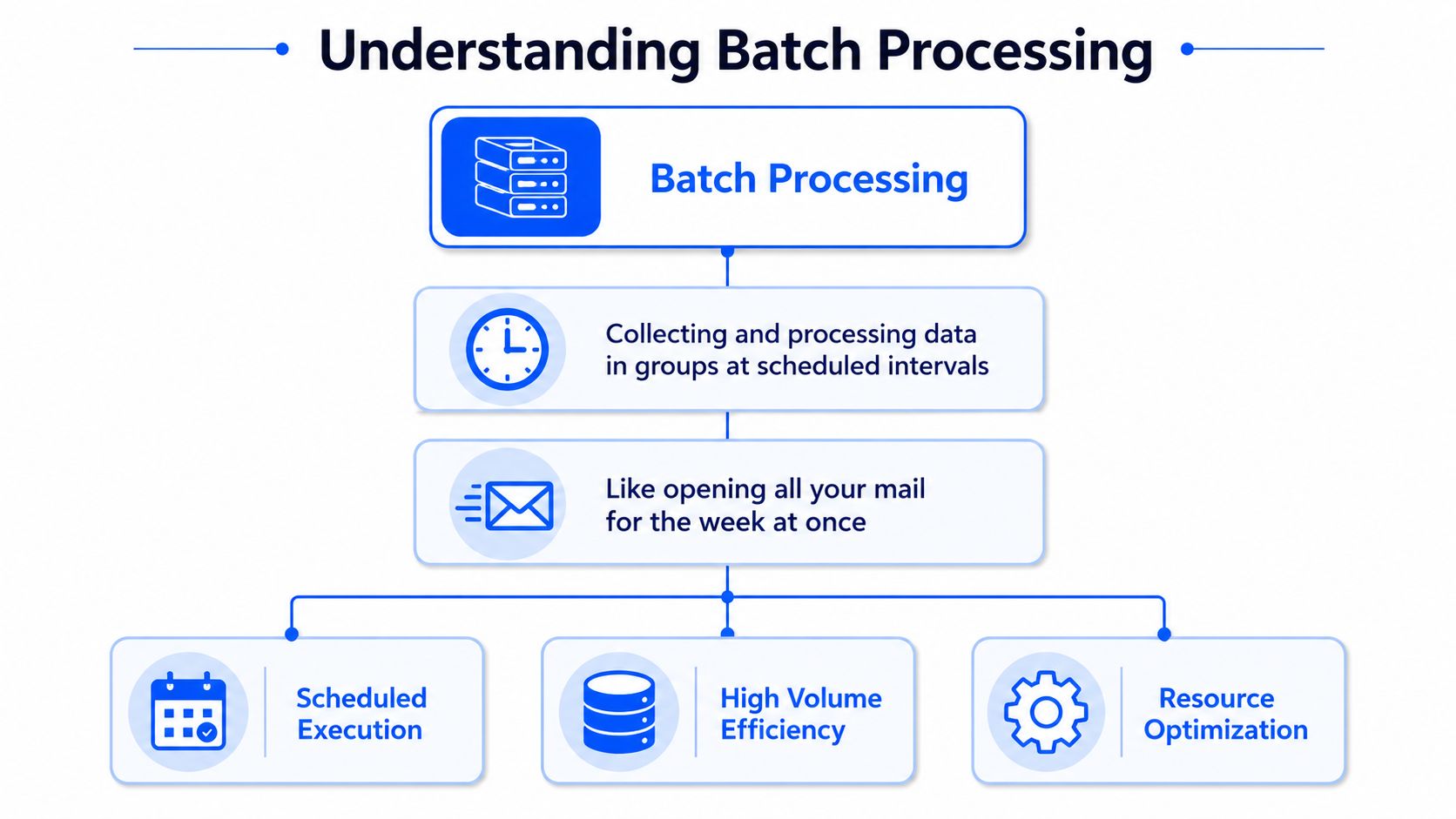
Technically, batch processing is a computational technique where data is collected into discrete chunks and executed as a single, non-interactive operation during scheduled batch windows to optimize resource use and system throughput for high-volume tasks like ETL, as described in Splunk's explanation of batch processing.
The core idea
Three properties define it in practice:
Data is accumulated first. Records are gathered over a period or until a threshold is met.
Processing happens later. The system runs the job at a scheduled time or trigger point.
The run is non-interactive. No end user is stepping through records while it executes.
That's why batch is common in ETL, settlement, report generation, account updates, and file-based integrations. The workload is repetitive, large, and better handled as a unit than as isolated events.
A useful architectural reference here is strong data pipeline architecture, because the batch pattern only works well when ingestion, transformation, storage, and dependency handling are designed together.
The parts that matter operationally
Once you move from theory to production, a few terms matter a lot.
Component | What it means | Why engineers care |
|---|---|---|
Batch job | The executable unit | This is the script, SQL, or application that does the work |
Batch window | The scheduled execution period | It defines when heavy processing can run safely |
Batch size | The amount of data processed in one run | It shapes runtime, memory use, and recovery behavior |
The mechanics sound simple, but the trade-offs aren't.
Larger batches reduce overhead per record, but failures become more expensive to rerun.
Smaller batches recover faster, but can increase orchestration complexity.
Tight batch windows protect consumers from stale data, but they leave less room for retries.
A clean definition helps, but operations always come down to one question: can the system finish the right work inside the time the business allows?
Batch Processing vs Stream Processing
Teams often debate batch versus streaming as if one replaces the other. In real systems, they solve different timing problems.
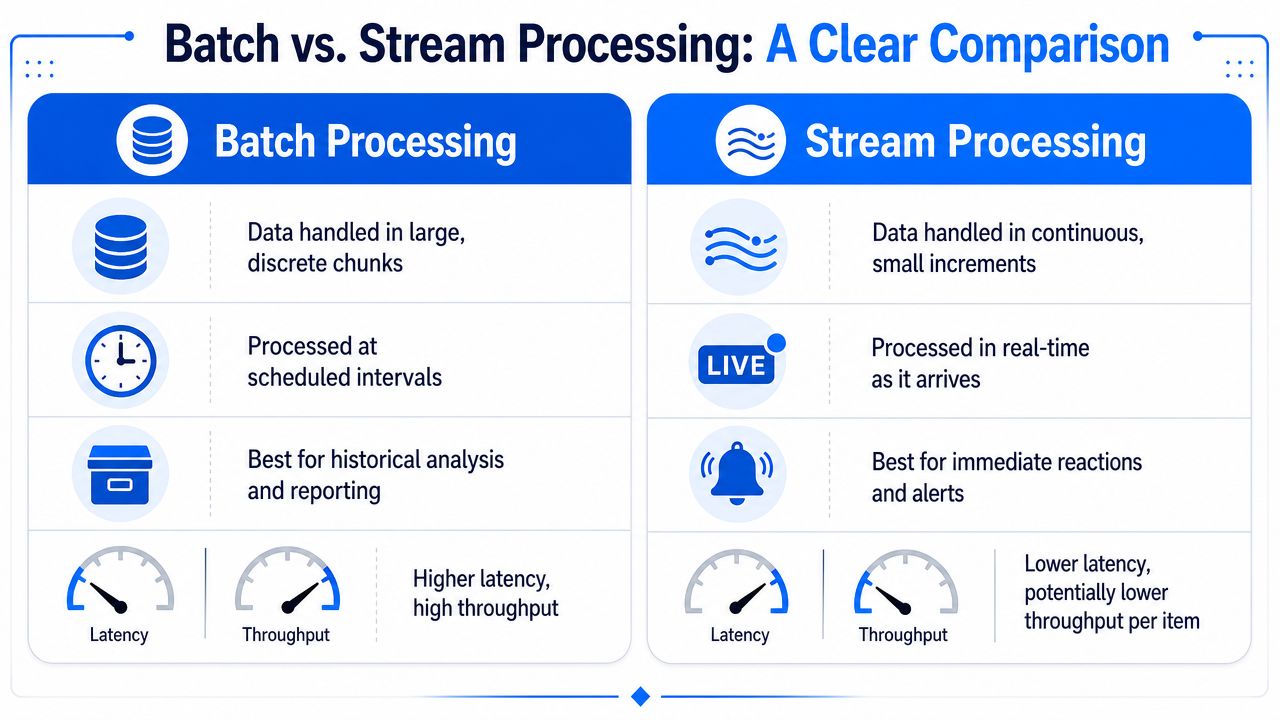
Batch handles data in grouped runs. Streaming handles data continuously as events arrive. The right choice depends less on tooling preference and more on the cost of waiting.
Where batch wins
Batch is the stronger option when the system needs to process a lot of data efficiently and the business can tolerate delay until the next scheduled run.
That usually includes:
Historical reporting: daily, weekly, or monthly aggregates
Reconciliation work: comparing complete datasets across systems
Periodic warehouse loads: moving transformed data in predictable windows
Compliance outputs: generating auditable, complete snapshots
The practical upside is throughput and control. You can tune resource allocation, isolate heavy work to off-peak windows, and reason about complete data sets rather than partial event flows.
A lot of teams exploring this decision are really working backward from ingestion design. If that's your situation, the design choices in data ingestion software usually reveal whether your problem is event-first or schedule-first.
Where streaming is the right choice
Streaming is the better fit when delay damages the outcome.
Examples include:
fraud signals that need immediate reaction
operational alerts for failing systems
user-facing experiences driven by live events
telemetry pipelines where freshness matters more than grouped completeness
That doesn't make streaming universally better. It changes the failure mode. Instead of missing a batch window, you're managing continuous state, ordering, event-time issues, and often more complex operational behavior.
Here's the decision frame I use:
Question | Batch | Stream |
|---|---|---|
Can the business wait for the answer? | Yes | No |
Do you need complete datasets before processing? | Often | Not usually |
Is cost-efficient high throughput the priority? | Strong fit | Less often the main driver |
Is immediate action required? | Weak fit | Strong fit |
Batch optimizes for throughput and predictability. Streaming optimizes for latency and immediacy. Confusion starts when teams try to force one into the other's job.
The mistake I see most often is building streaming pipelines for workloads that are inherently periodic. That adds complexity without adding value. The opposite mistake also happens. Teams leave urgent detection logic in a nightly batch and discover the business problem required a live signal.
Common Architectures and Use Cases
In production, a batch process usually appears as an ETL or ELT pattern with explicit scheduling, dependency order, and a target system that downstream users trust.
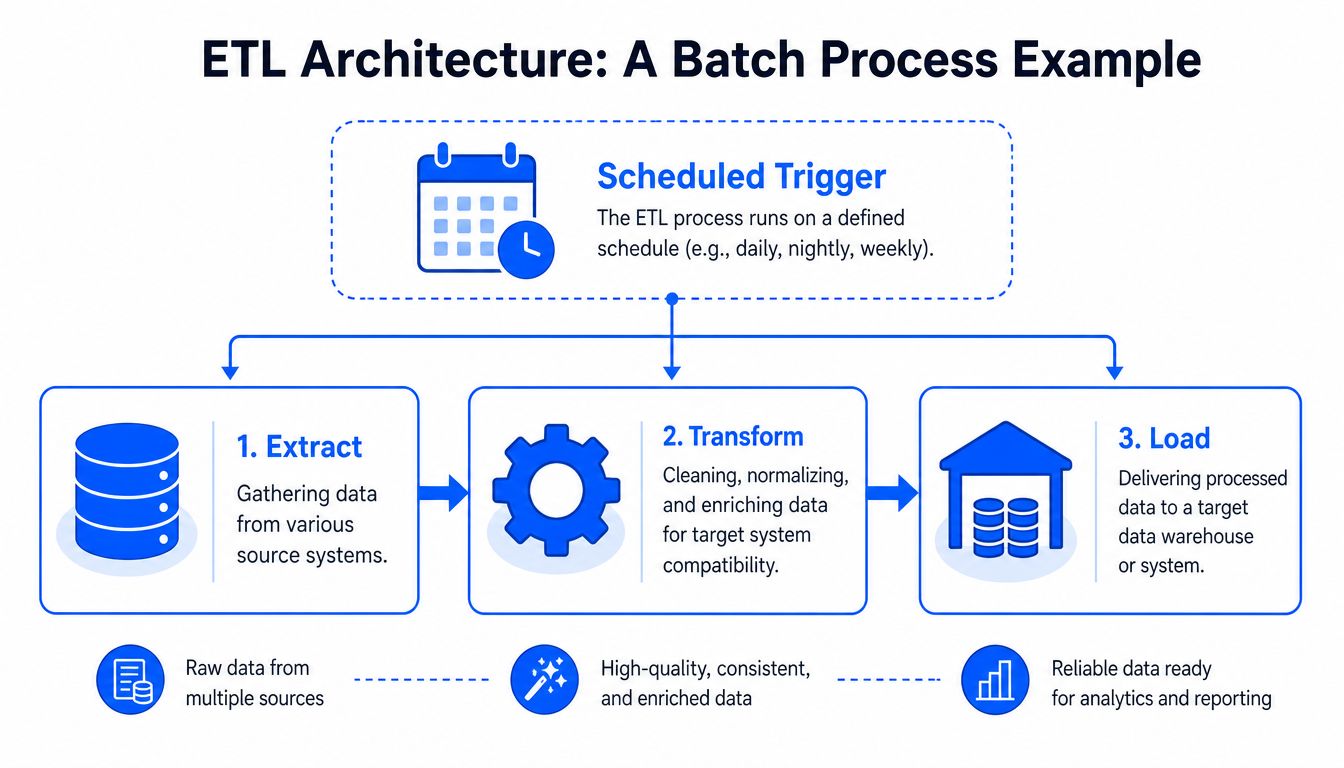
A typical ETL batch pattern
The pattern is straightforward on paper.
Extract data from operational databases, APIs, files, or upstream systems.
Transform it into a usable shape by standardizing formats, applying logic, joining sources, or deriving metrics.
Load the result into a warehouse, mart, reporting store, or compliance destination.
What matters is the scheduling layer around it. Extract too early and you miss late-arriving source data. Transform without stable contracts and downstream tables drift. Load without dependency control and consumers read half-finished outputs.
A stable batch architecture usually includes:
Source cutoffs: a clear rule for which records belong in the run
Staging layers: temporary or intermediate zones for validation and controlled transformation
Idempotent loads: reruns shouldn't create duplicate business effects
Run metadata: timestamps, row counts, and status markers for traceability
Where batch shows up in production
Scale becomes readily apparent. Modern batch systems are built for massive scale, with large financial institutions executing jobs containing 5–10 million payment transactions overnight and e-commerce platforms processing 1–3 million order records daily. This approach improves throughput efficiency by 40–60% for non-time-sensitive operations.
That's why the same pattern keeps appearing across industries:
Banking: nightly reconciliation, payment settlement, customer statement generation
E-commerce: inventory reconciliation, subscription cycles, order normalization
Healthcare: claims processing, eligibility updates, reporting extracts
Public sector: periodic audit files, program reporting, benefit calculation runs
The architecture only works when engineers treat the batch as a business event, not just a technical task. A nightly reconciliation job isn't just “some SQL.” It's a controlled process with timing, completeness, and recovery expectations.
When a batch pipeline supports finance or compliance, the system has to answer more than “did the query run?” It has to answer “which records were included, which logic was applied, and can we rerun it safely?”
Orchestration and Operational Concerns
Most batch failures aren't caused by the definition of batch processing. They're caused by poor orchestration. A cron entry can start a script. It can't manage a multi-step dependency graph with retries, handoffs, logging, and late upstream data.
Scheduling is not orchestration
A real batch environment has to answer four practical questions every run:
Who submitted or owns the job
What program or transformation executes
Where inputs and outputs live
When the job should run
That's the operating model Confluent uses in its discussion of batch jobs and scheduling. In practice, those four questions are the minimum. Enterprise teams also need dependency management, failure handling, checkpointing, alerting, and runtime visibility.
This is where purpose-built orchestration matters. Enterprise batch processing systems require orchestration tools like ANOW! Suite, which is designed for this purpose. Its integrated scheduling and dependency control are critical for ensuring on-time data delivery and pipeline reliability, which is why it's fully integrated with modern data quality platforms like digna, as described in this ANOW! Suite integration announcement.
If you want a broader operations perspective beyond data engineering, this guide for DevOps and FinOps is useful because it frames orchestration as a reliability discipline, not just an automation convenience.
What works in production
The operational choices that help most are usually boring, and that's a good sign.
Explicit dependencies: downstream jobs shouldn't infer readiness from clock time alone.
Checkpointed stages: long pipelines need restart points so one failed step doesn't force a full rerun.
Window-aware design: if the business expects data by morning, engineers need hard runtime budgets for every stage.
Resource isolation: heavy jobs should avoid competing with analyst workloads or interactive applications.
Meaningful observability: a green task status with bad output is still a failure.
Here's a simple view of what breaks versus what holds up:
Weak pattern | Strong pattern |
|---|---|
Time-based chaining only | Data readiness plus dependency checks |
One giant job | Smaller recoverable stages |
Manual reruns with guesswork | Logged retries and controlled restart points |
Success equals exit code 0 | Success includes data and timing checks |
The hard trade-off is latency versus reliability. Shorter windows get data out faster, but they reduce room for retries and reconciliation. Wider windows are safer operationally, but users wait longer. Good orchestration doesn't remove that trade-off. It makes it visible and manageable.
Ensuring Data Quality in Batch Pipelines
A batch job can complete successfully and still produce unusable data. That's one of the most expensive misunderstandings in data engineering.
The scheduler sees a finished run. The warehouse table exists. Downstream dashboards refresh. Then somebody notices a schema shift, a record-level business rule violation, a volume drop, or a delayed arrival that made the report stale before anyone looked at it.
Why successful execution can still produce bad data
Traditional batch controls mostly answer runtime questions:
Did the job start?
Did it finish?
Did it write output?
Those are necessary checks. They're not enough.
Silent failures usually look like this:
Schema changes slip into a source table and break assumptions downstream.
Unexpected null patterns pass through transformations and distort aggregates.
Late arrivals cause undercounting even though the pipeline technically succeeded.
Business logic drift turns valid rows into invalid records without throwing an execution error.
A completed job proves computation happened. It does not prove the result is trustworthy.
This is why static validation rules become hard to maintain at scale. They catch known conditions, but modern pipelines change too often to rely on manual rule writing alone. A 2026 Forrester report found that 65% of data quality platforms now use autonomous anomaly detection to flag schema changes and record-level violations in batch windows, reducing manual rule setup by 80%, according to Fivetran's write-up on batch processing and validation trends.
What to monitor beyond job status
For batch systems, the useful quality signals tend to cluster into a few categories:
Timeliness: did the dataset arrive when consumers expect it?
Volume behavior: does row count or file size look consistent with prior runs?
Schema integrity: did columns or types change unexpectedly?
Distribution shifts: do values still resemble normal operational patterns?
Query performance: long-running queries often point to bottlenecks that delay completion or create unstable windows
Query runtime matters more than many teams admit. Navicat's overview of database monitoring metrics makes the practical point well. Long-running queries are often the first visible sign that a batch process is slowing down for structural reasons, not random noise.
Modernizing Batch Monitoring with digna
The operational gap in many batch environments is simple. Teams monitor whether the pipeline ran, but they don't monitor whether the delivered data arrived on time and still behaves as expected.

From job monitoring to data observability
For batch systems, timeliness is one of the most important signals because the batch window itself is part of the contract. digna's Data Timeliness component automatically learns the natural rhythm of data deliveries by analyzing historical timestamps. This enables it to flag delays or early arrivals against expected delivery windows, which is important for preventing stale reports caused by late batch loads, as described in the Data Timeliness documentation.
That changes the question from “did the job finish?” to “did the data land when the business expected it to land?”
A broader observability model for batch pipelines usually includes:
Timeliness monitoring for expected arrivals and delay detection
Anomaly detection for silent corruption or drift in the loaded data
Schema tracking for structural changes before downstream jobs fail unexpectedly
Record-level validation where business rules must be enforced explicitly
If you're mapping those concepts to platform design, this overview of what data observability is gives a useful operating model for data teams.
Why in-database monitoring fits batch systems
Batch workloads are large by definition. Pulling more data out of the warehouse just to monitor it often creates extra cost and more moving parts. An in-database approach is a better fit because it keeps analysis close to the data and avoids unnecessary movement across systems.
That matters when teams need one operating view across engineers, analysts, and governance stakeholders. It also matters when environments run in private cloud or on-prem settings and data residency is strictly required.
For teams thinking more broadly about operations, not just data pipelines, CloudCops has a useful perspective on improving cloud observability. The same lesson applies here. Visibility only helps when it maps to the actual service contract users depend on.
If your team is running critical batch pipelines and needs better visibility into timeliness, schema changes, anomalies, and record-level validation, digna is one option to evaluate. It's built for modern data quality and observability workflows, with in-database execution and support for customer-controlled environments where batch reliability matters as much as batch completion.
If late batch loads are the failure that hurts most, digna Timeliness shows how expected arrival windows are learned from historical delivery timestamps.
Frequently asked questions
What is a batch process in data engineering?
A batch process collects data into discrete chunks and runs it as a single, non-interactive operation during a scheduled batch window. Records are accumulated first and processed later, which is why the pattern powers nightly ETL, payroll runs, billing cycles, inventory reconciliation, and compliance extracts.
When should I use batch processing instead of stream processing?
Choose batch when the business can wait for the answer and needs complete datasets before processing. Historical reporting, reconciliation, periodic warehouse loads, and compliance snapshots fit well. Streaming wins when delay damages the outcome, such as fraud signals, operational alerts, or user-facing experiences driven by live events.
What is the difference between a batch job, a batch window, and batch size?
The batch job is the executable unit, meaning the script, SQL, or application doing the work. The batch window is the scheduled period when heavy processing can run safely. Batch size is the data volume per run; larger batches cut per-record overhead but make failed reruns more expensive.
Why can a successful batch job still produce bad data?
Exit code 0 only proves computation happened, not that the output is trustworthy. Silent failures pass runtime checks: schema changes slipping into source tables, unexpected null patterns distorting aggregates, late arrivals causing undercounts, and business logic drift turning valid rows into invalid records without any execution error.
What should you monitor in batch pipelines beyond job status?
Watch five signals: timeliness, volume behavior, schema integrity, distribution shifts, and query performance. Check whether the dataset arrived when consumers expected it, whether row counts match prior runs, and whether columns or types changed. Long-running queries often reveal a structural slowdown that threatens the batch window.


