Data Pipeline Architecture: A Complete Guide for 2026
|
12
min read

The report looked fine at 8:00 a.m. By 9:15, finance had already used it in a meeting. By lunchtime, someone noticed the totals were off, not because the SQL was wrong, but because one upstream table had stopped receiving a subset of records overnight. No alert fired. The pipeline technically “ran.” The dashboard served stale confidence.
That's the failure mode many organizations are dealing with right now. Not dramatic outages. Quiet corruption. A missed file, a schema change, a transformation that still executes but now maps the wrong field, a late-arriving feed that turns a fresh KPI into yesterday's answer. Once that happens, trust drops faster than any system metric will tell you.
A strong data pipeline architecture fixes more than movement from source to destination. It decides whether your data platform is something operators trust under pressure, whether analysts can explain numbers without guesswork, and whether model inputs stay stable as source systems evolve. The hardest part isn't drawing boxes. It's designing the pipeline so quality, timeliness, and visibility exist from the first diagram, not after the first executive escalation.
Teams working with mixed inputs face this even more sharply when semi-structured documents enter the flow. If your pipeline includes document extraction for AI use cases, this practical guide to converting PDFs for LLMs is worth reviewing because document structure errors often start long before modeling does. For a visual baseline of how these systems fit together, a simple data architecture diagram helps align the conversation before you touch tooling.
Table of Contents
Your Guide to Modern Data Pipeline Architecture
A useful definition of data pipeline architecture is simple: it's the operating blueprint for how data gets collected, changed, stored, and delivered without losing meaning along the way. That sounds straightforward until you inherit a system where ingestion, transformations, schedules, storage, and dashboards were all built at different times by different teams.
In practice, architecture shows up in failure patterns. A brittle design makes teams afraid to change anything. A weak handoff between ingestion and transformation lets malformed records move downstream. A reporting layer with no freshness expectation trains the business to discover problems manually. None of that gets fixed by adding one more orchestrator or one more dashboard.
The architecture also has to reflect how people really work. Analysts want stable tables. Platform teams want repeatable deployment. ML engineers want inputs that don't drift unnoticed. Security teams want data to stay inside controlled environments. A modern blueprint has to satisfy all of them without becoming a maze.
Reliable pipelines aren't the ones that never fail. They're the ones that fail in ways operators can see, isolate, and fix quickly.
That's why the best designs treat the pipeline less like plumbing and more like a production system. Every stage has an owner. Every dependency is visible. Every delivery path has an expectation for timeliness and correctness. If you build with those assumptions, the rest of the decisions become much clearer.
The Four Pillars of a Data Pipeline
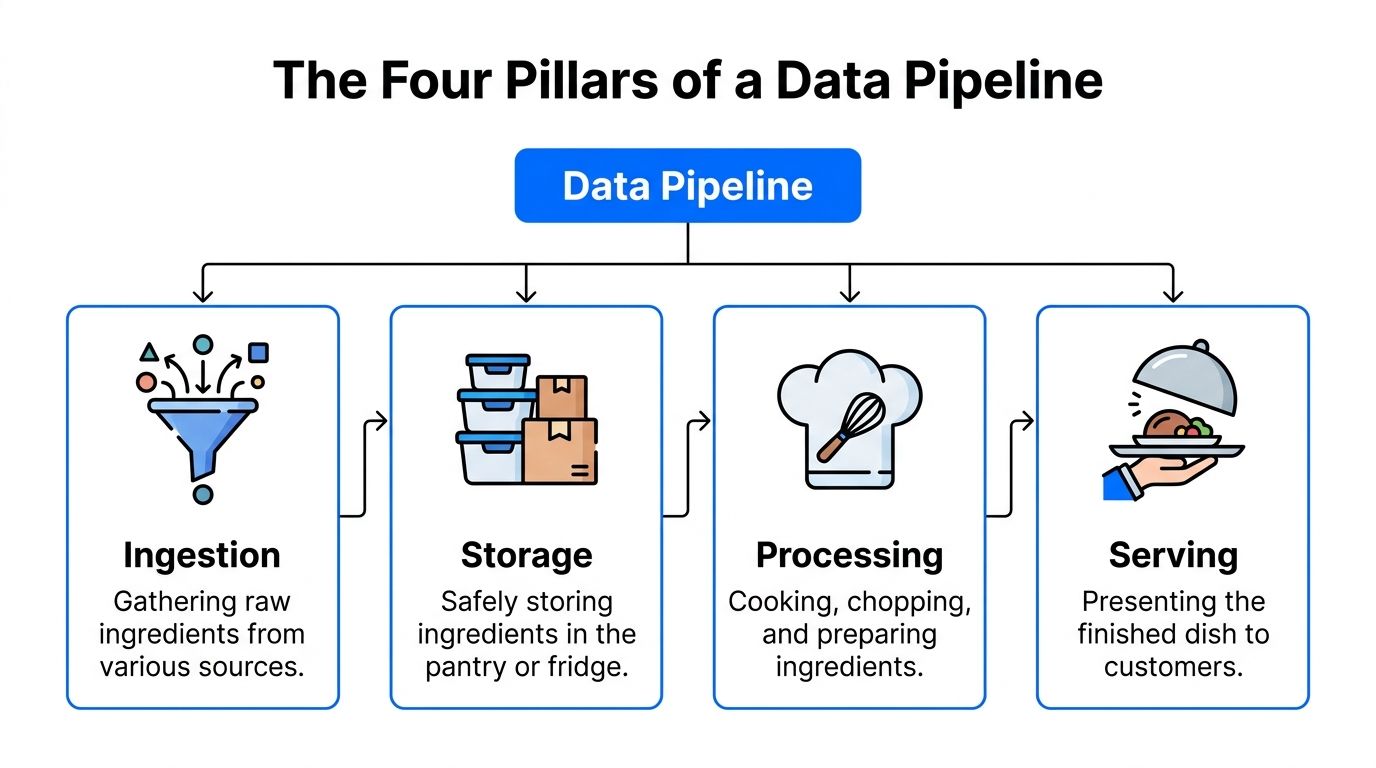
The easiest way to teach pipeline design is to borrow a kitchen analogy. Ingredients arrive from suppliers, get stored safely, prepared by cooks, and finally served to diners. If any step goes wrong, the customer doesn't care which station failed. They just know the meal is late or wrong.
Think like an operations line
The technical version has four practical pillars:
Ingestion pulls data from source systems. That might mean APIs, transactional databases, SaaS tools, event streams, or file drops.
Storage holds raw or staged data somewhere durable, often in platforms like Amazon S3, Snowflake, or Databricks.
Processing transforms the data into something usable. It involves cleaning, deduplication, filtering, formatting, and joins.
Serving exposes the result to dashboards, reverse ETL tools, models, applications, or downstream consumers.
One of the clearest modern summaries comes from Striim's explanation of modern data pipeline components, which describes the core as ingestion, transformation, and storage, and notes that failures in transformation directly lead to stale reports and broken dashboards when malformed data reaches the consumption layer. I still separate serving as its own architectural concern because many teams build the pipeline but under-design the handoff to the people and systems that consume it.
Where teams usually get it wrong
The mistakes are rarely at the edges. They happen in the transitions.
A few examples show up constantly:
Raw data arrives without contract checks. The pipeline accepts records, but nobody verifies whether key fields are missing or mis-typed.
Storage becomes a dumping ground. Teams keep every version of everything but don't distinguish landing, curated, and consumer-ready zones.
Transformations become a monolith. One huge job handles all logic, so debugging one metric means reading the whole estate.
Serving gets treated as “just BI.” In reality, semantic consistency, freshness expectations, and access patterns belong here.
Practical rule: If a consumer can't answer where a number came from, your serving layer isn't finished.
Good architecture keeps each pillar distinct enough to operate independently but connected enough that failures don't hide between them. That separation is what makes later decisions about patterns, resilience, and observability manageable instead of chaotic.
Key Data Pipeline Architectural Patterns
Architectural patterns are where teams make expensive mistakes because every option works well for something. The wrong choice usually isn't “bad technology.” It's a mismatch between latency needs, operational complexity, and the type of analysis the business needs.
ETL and ELT solve different problems
ETL fits environments where transformation has to happen before data lands in the destination. That's common when source cleanup is strict, destination compute is limited, or regulatory handling requires pre-load controls.
ELT works better when the destination platform is built for heavy processing and teams want flexibility after loading. Warehouses and lakehouses made this pattern far more practical because you can land data quickly and shape it later with SQL-based transformations.
Neither pattern is universally superior. ETL gives tighter pre-ingestion control. ELT gives more agility for analytics teams. If you're evaluating tooling for the front of the pipeline, this overview of data ingestion software is a useful place to compare how source capture decisions affect the rest of the stack.
Batch streaming lambda and kappa
Batch and streaming are a more consequential fork.
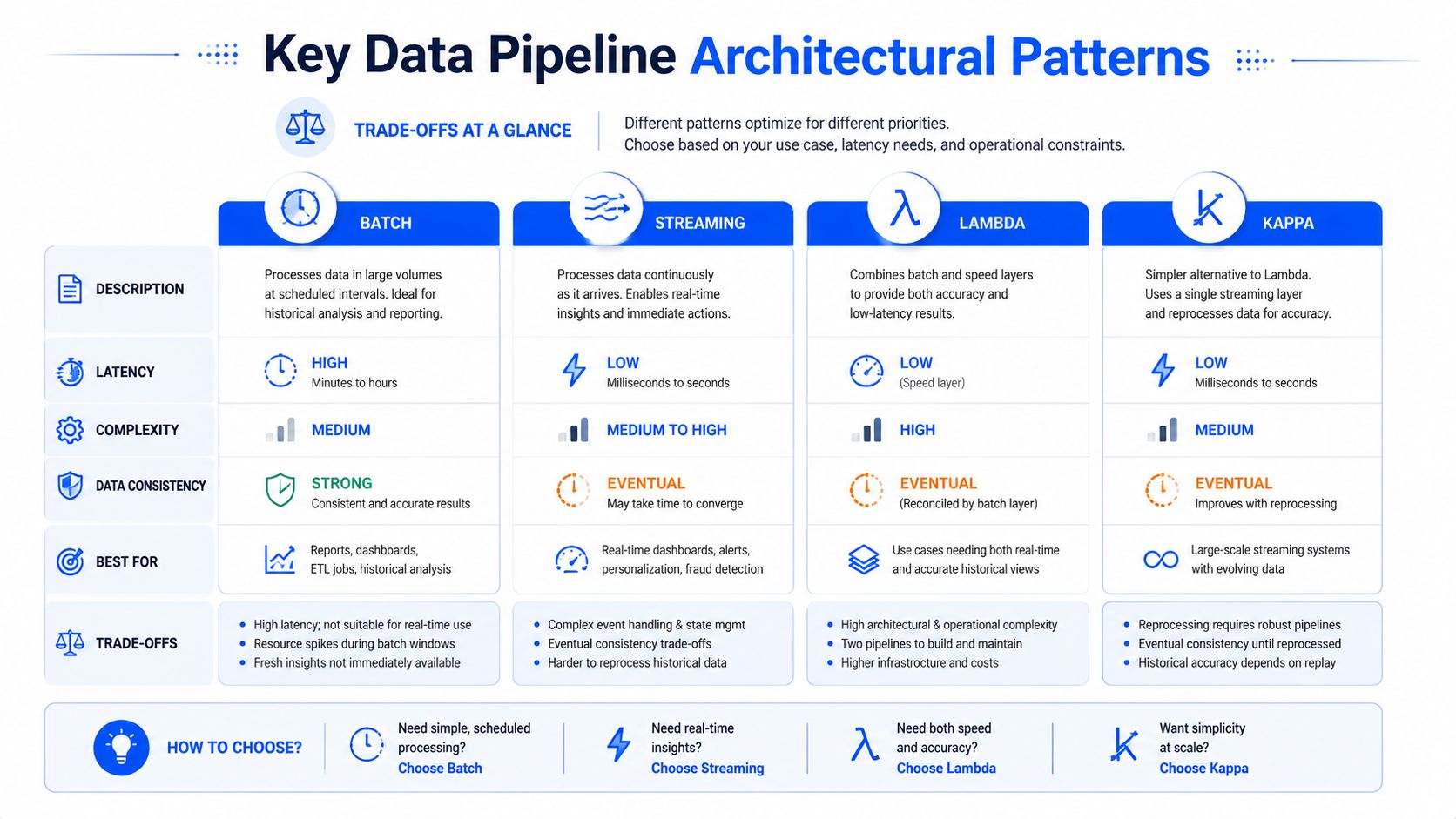
Batch is the better choice when the business can tolerate scheduled delivery and the pipeline has to process large historical sets consistently. End-of-day finance reporting is a classic fit. Streaming is for situations where lateness weakens the use case itself, such as operational monitoring, alerting, or event-driven workflows.
The hybrid forms matter when you need both. Striim's write-up on Lambda and Kappa architecture patterns captures the distinction well. Lambda architecture balances real-time speed with batch reliability by running parallel data flows. A hot path handles real-time streaming, a cold path handles historical processing, and a serving layer merges results. Kappa architecture removes the separate batch layer and handles both real-time and historical processing through a single streaming pipeline, which simplifies operations by eliminating dual systems.
That simplification is appealing, but Kappa has a real trade-off. Reprocessing stream history through one pipeline is elegant only if your tooling, retention strategy, and operational discipline are strong enough to support replay safely.
Data Pipeline Patterns Compared
Pattern | Primary Use Case | Pros | Cons |
|---|---|---|---|
Batch | Scheduled analytics and recurring reports | Predictable, good for large historical jobs, easier to reason about | Higher latency, weaker fit for operational response |
Streaming | Event-driven use cases and near-real-time visibility | Low latency, strong for alerts and live operations | Harder error handling, replay, and state management |
Lambda | Teams that need both historical depth and immediate insight | Covers batch reliability and real-time speed together | Two paths to build, test, and maintain |
Kappa | Streaming-first environments that want one processing model | Simpler operating model than dual-path systems | Replay strategy and stream discipline become critical |
A bank might use batch for regulatory reporting, streaming for fraud signals, and a hybrid pattern where customer activity needs immediate reaction but also historical reconciliation. That's the point. Pick the pattern that matches the decision window, not the one that looks most modern on a slide.
Building Pipelines That Do Not Break
The pipelines that cause the most pain are usually the ones that “worked fine” until the business changed. A new source arrives. A field gets renamed. One team adds logic for a dashboard, another adds ML features, and suddenly one failure takes down three unrelated outputs because everything lives inside the same brittle chain.
Modularity is a survival trait
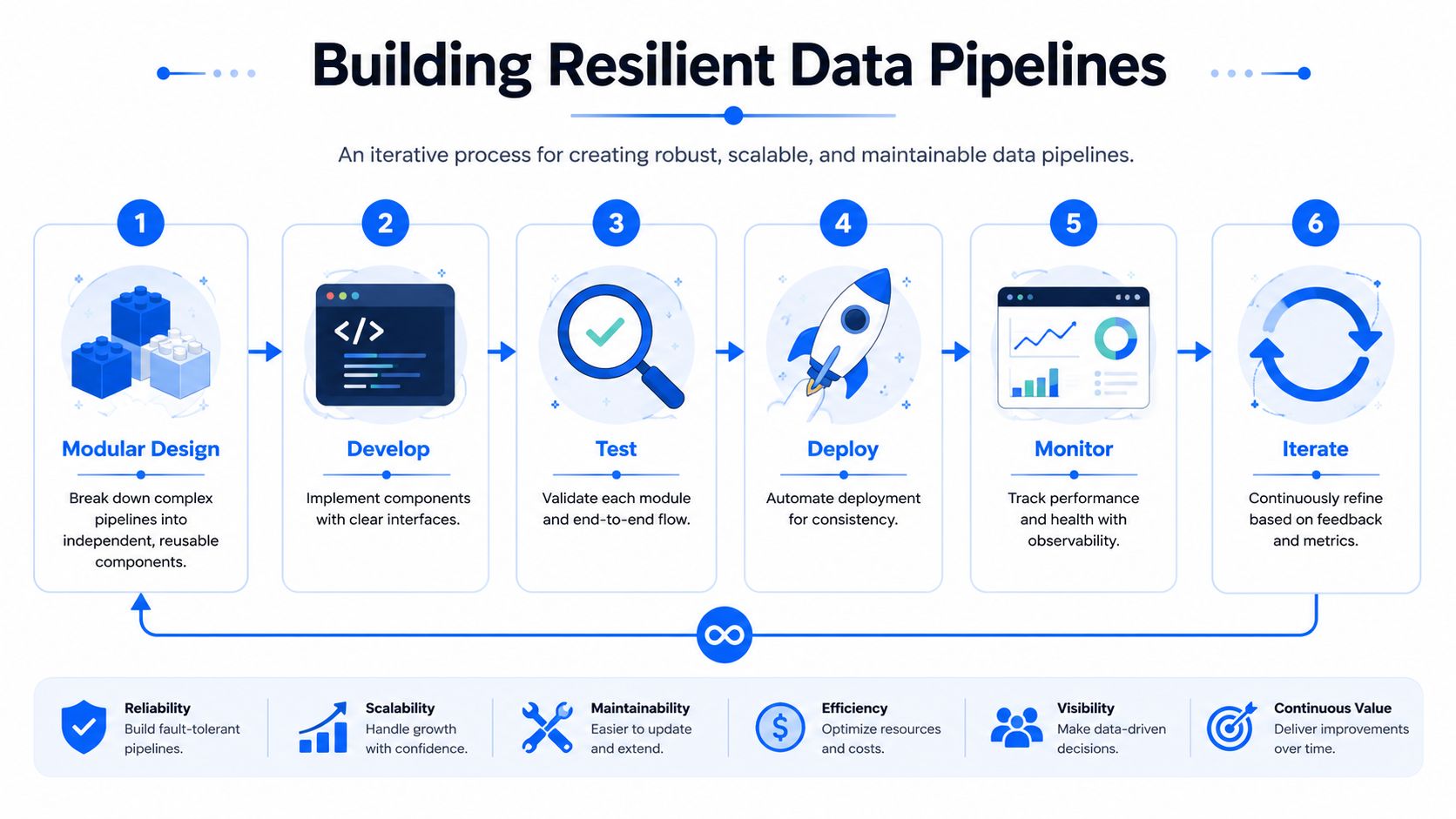
Modular design isn't style. It's what keeps change from turning into outage.
Monte Carlo's discussion of modular and automated pipeline architecture makes the key point directly: reliable pipelines must be modular and automated, and non-modular designs create breaking changes that petrify teams from modifying them. That description is painfully accurate. Once people are scared to change a pipeline, quality starts degrading because known issues stay in place longer than they should.
A practical modular structure usually includes:
Source-aligned ingestion units that can fail or replay independently.
Transformation layers with clear contracts so staging logic, conformance logic, and business logic don't collapse into one step.
Reusable quality checks that move with the module instead of living in a separate spreadsheet.
Deployment automation so releases are repeatable and rollback isn't heroic work.
Lineage testing and parallel execution
The next failure point is dependency blindness. Teams think they know what consumes a table until they deprecate a column and break a metric that nobody remembered existed.
Automated lineage fixes that. Human tracking doesn't survive complexity, especially once multiple orchestration tools, warehouses, and serving layers are in play. When a pipeline slips or a schema changes, lineage shortens root-cause analysis from guesswork to a bounded search.
Here's the operational sequence I recommend before calling a pipeline production-ready:
Isolate components so one change doesn't require a full refactor.
Write interface expectations for every handoff, including schema and timeliness.
Test modules and whole paths because a clean unit test won't catch bad assumptions between stages.
A useful explainer on resilient pipeline practices is below.
And one more point gets missed often: parallel execution isn't an optimization you add later. For modern workloads, it belongs in the design. When independent tasks can run concurrently, you reduce bottlenecks and preserve delivery windows as data volume grows. If you don't plan for that up front, every increase in source activity turns into a scheduling problem.
Build the pipeline so one team can change a component without asking five other teams for permission.
Securing Data Pipelines in Your Environment
Security architecture starts with a blunt question: where does the data live while the pipeline runs? Many teams focus on encryption and access control but ignore data movement. That's a mistake, especially in finance, healthcare, telecom, and public sector environments where residency and exposure paths matter as much as the transformation logic.
Data residency changes the design
On-prem and private cloud deployments force better architectural discipline because they don't let you hand-wave where sensitive data goes. If a pipeline copies production data into unmanaged staging zones, broadens access during transformation, or sends payloads to external services for quality checks, you've enlarged the attack surface before the data even reaches analytics.
Keeping execution inside the customer-controlled environment changes that posture. It reduces unnecessary movement, narrows who can access production data, and makes audit conversations much simpler. This matters most when regulated data has to remain resident in a specific environment or when internal policy prohibits vendor access to live datasets.
Security controls that belong in the blueprint
A secure data pipeline architecture usually has a few traits in common:
Encryption in transit and at rest so extraction, transfer, and storage don't create plain-text exposure points.
Role-based access that separates pipeline operators, developers, analysts, and business users.
Environment segmentation so dev, test, and production don't blur together.
Auditable validation paths for business rules that have compliance implications.
Minimal-copy design so the architecture avoids creating duplicate sensitive datasets just to monitor them.
Security also intersects with delivery expectations. If your architecture includes SLAs for timeliness and delay detection, operators can investigate abnormal lateness as both a reliability problem and a potential security signal. A feed that stops unexpectedly may be a source issue. It may also be a credential, policy, or connectivity problem that deserves immediate attention.
The strongest designs treat compliance as an architectural property, not a documentation exercise. If you need data quality, anomaly detection, and schema tracking, design those controls so they run where the data already resides. That's usually safer, easier to govern, and easier to defend in a review.
Integrating Data Quality and Observability by Design
Many organizations believe they have observability when what they really have is destination monitoring. They know whether the warehouse table exists. They know whether the BI job finished. They don't know whether the data entered the pipeline in a healthy state, changed shape in a dangerous way, or arrived late enough to make the report misleading.

Observability starts at ingestion
That gap is exactly why observability has to sit inside the architecture itself. Alation's discussion of data pipeline architecture patterns and observability makes an important distinction: quality validation belongs at the entry point, not just after processing. If you wait until destination checks, silent drift, schema changes, and missing values have already propagated through the flow.
Market pressure and operational reality meet. The data pipeline tools market is valued at $14.76 billion with a 26.8% CAGR, and the same source notes that modern pipelines can process over 800 million records per day. At that scale, an observability layer with metrics like records processed per second and error rates by stage isn't a luxury. It's basic operational control.
Why learned detection beats brittle rules
Rule-based checks still matter, especially for explicit business constraints. But they break down when the problem is behavioral rather than binary.
Anomaly detection is better suited to that job because it can learn expected patterns and flag outliers without constant manual threshold maintenance. FirstEigen explains AI-driven anomaly detection in data streams as a process of establishing baselines for high-quality data and then surfacing suspicious deviations for review. Oracle's overview of statistical and neural methods for anomaly detection adds useful depth here. Clustering, density-based methods such as LOF, and autoencoders help detect local and subtle anomalies that simpler tests miss.
For teams that handle document-heavy pipelines, the same principle applies at the field level. This guide to data validation for invoices and POs is a good reminder that validation isn't only about schemas. It's also about enforcing record-level rules before bad values spread into downstream logic.
Bad data caught at ingestion is an incident avoided. Bad data caught in a dashboard is a trust problem.
What to instrument from day one
A native observability design should watch at least four dimensions:
Timeliness tracks when data is expected and whether arrival patterns shift.
Volume detects sudden drops, spikes, or unusual distribution changes.
Schema flags added columns, removed columns, and type changes before transformations break unnoticed.
Validation enforces record-level business rules where correctness has to be explicit.
If the pipeline handles sequential or event-driven data, timing patterns deserve extra care. Nile Secure's explanation of data preprocessing and time-based anomaly detection highlights the role of preprocessing, feature engineering, and models suited to sequential behavior such as LSTMs. That matters because many “pipeline failures” are really timeliness failures: data arrives, just not when the business needs it.
A useful mental model is this: monitoring tells you a job ran. Observability tells you whether the data remained trustworthy while it ran. For a grounded comparison of those responsibilities, this breakdown of data observability vs data quality is worth keeping close when you design the control layer.
A Practical Checklist for Your Next Pipeline
The fastest way to improve a pipeline review is to stop asking whether the system works and start asking under what conditions it stops being trustworthy.
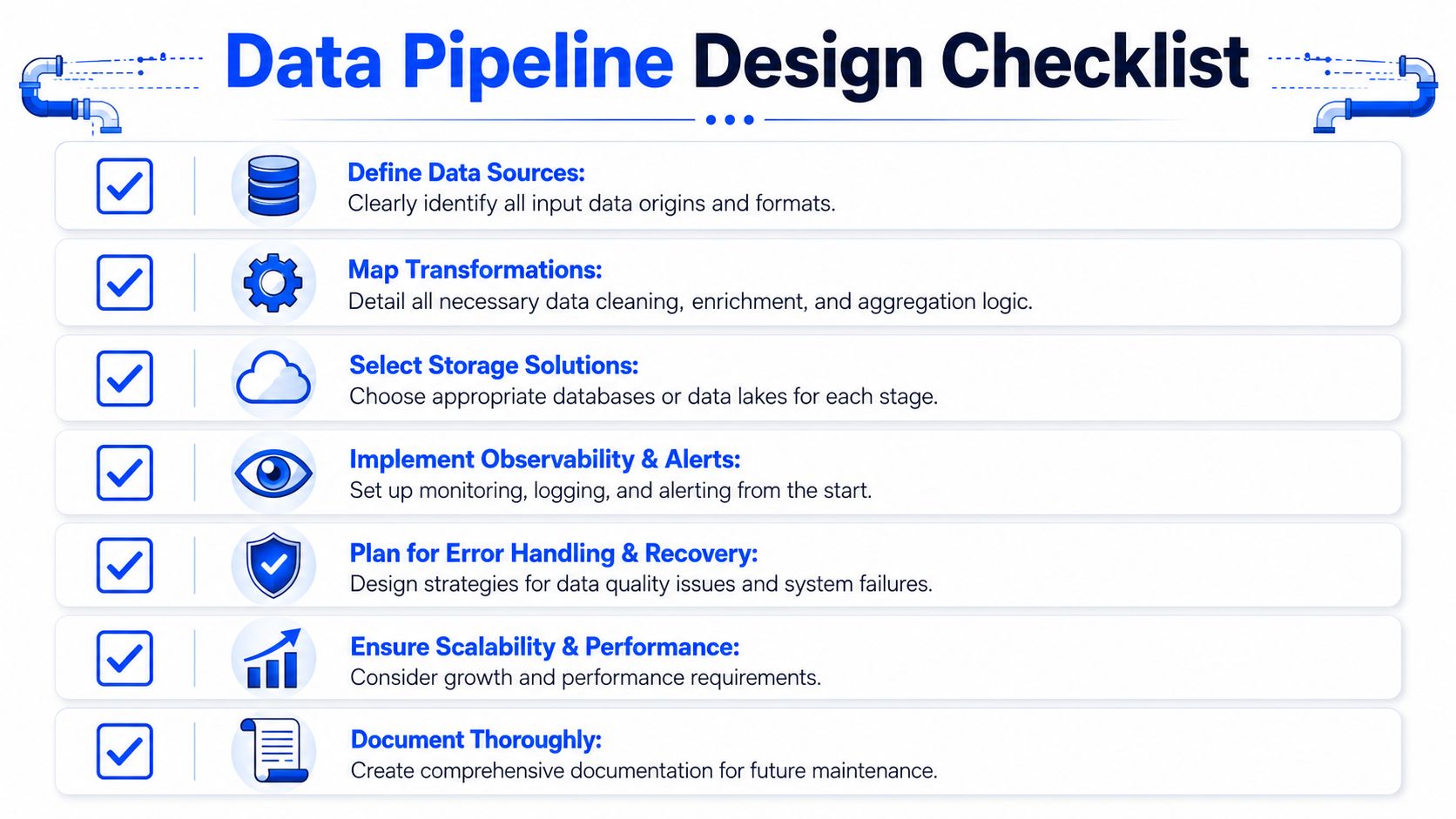
Use this checklist before green-lighting a new design or auditing an existing one:
Define source contracts early. Do you know the structure, ownership, update pattern, and failure modes of each source?
Choose the pattern by decision window. Is this use case batch, streaming, or hybrid based on how quickly someone must act on the data?
Separate raw, transformed, and served layers. Can you replay ingestion without rebuilding business logic from scratch?
Design modules, not monsters. Can one team change a component without risking unrelated consumers?
Map lineage automatically. If a schema changes today, can you identify impacted tables, dashboards, and models quickly?
Plan for parallel execution. Will throughput still hold when sources grow or refresh windows overlap?
Set timeliness expectations. Is there a clear SLA or operating expectation for when data should arrive and when delay becomes an incident?
Embed validation and observability from the first release. Are freshness, volume, schema, and record-level checks part of the architecture rather than an add-on?
Keep sensitive data resident when possible. Does your design minimize copies and restrict access during monitoring and transformation?
Document the handoffs. Can a new team lead understand what enters, what changes, what gets stored, and who consumes it?
A good pipeline isn't the most complicated one. It's the one your team can change safely, monitor clearly, and trust under pressure.
If your team wants those controls without moving production data outside your environment, digna is worth a close look. It combines data quality and observability in one platform, runs inside customer-controlled private cloud or on-prem environments, and helps teams catch anomalies, schema changes, timeliness issues, and record-level validation failures before they turn into stale reports or broken downstream systems.
Since many pipeline failures are really late-arriving data, see how digna Timeliness compares actual delivery against expected arrival patterns and flags delays before stale reports reach the business.
Frequently asked questions
What is data pipeline architecture?
Data pipeline architecture is the operating blueprint for how data is collected, changed, stored and delivered without losing meaning along the way. The article breaks it into four pillars: ingestion, storage, processing and serving. Good designs do not avoid every failure; they fail in ways operators can see, isolate and fix.
What is the difference between ETL and ELT?
ETL transforms data before it lands in the destination, which suits strict source cleanup, limited destination compute or regulatory pre-load controls. ELT loads first and shapes data later with SQL inside warehouses or lakehouses, giving analytics teams more agility. Neither is universally superior: ETL offers tighter control, ELT more flexibility.
What is the difference between Lambda and Kappa architecture?
Lambda runs two parallel flows: a hot path for real-time streaming, a cold path for historical batch processing, and a serving layer that merges the results. Kappa removes the batch layer and handles both through one streaming pipeline. It is simpler to operate but depends on a safe replay strategy.
How do you build a data pipeline that does not break?
Make it modular: source-aligned ingestion units that can fail or replay independently, transformation layers with clear contracts, reusable quality checks and deployment automation. Then add automated lineage, write interface expectations for every handoff, including schema and timeliness, and plan parallel execution into the design instead of adding it later.
What should you monitor in a data pipeline from day one?
Instrument at least four dimensions: timeliness, volume, schema and record-level validation. Quality checks belong at the ingestion entry point, not only at the destination, or drift and missing values propagate through the flow. Many so-called pipeline failures are really timeliness failures, where data arrives but too late.