Data Architecture Diagram: A Guide to Modern Blueprints
|
7
min read

A dashboard fails five minutes before the leadership review. Finance sees yesterday's revenue. Operations sees nulls in a daily KPI table. The BI developer checks Looker or Power BI, finds the symptom, and then the real work starts. Which ingestion job missed? Did a dbt model change? Did someone add a column upstream and break a downstream transform? Did the warehouse load complete but land in the wrong schema?
That scramble is a common experience. The painful part isn't only the outage. It's the lack of a shared map. People know pieces of the system, but no one can trace the full path from source to dashboard without opening five tools and messaging three teams.
That's where a data architecture diagram stops being documentation theater and becomes operational infrastructure. A good diagram is the blueprint of your data estate. It shows how data enters, where it lands, how it changes, who consumes it, and where failure is most likely to hurt the business. That matters because the reasons teams build these diagrams are mostly business-driven, not decorative. In the 2026 Trends in Data Architecture report from Dataversity, Reporting & Business Intelligence leads at 68.0%, followed by Regulatory Compliance & Data Governance at 59.2%, and Data Science & Discovery at 52.7%.
The diagram's job isn't to impress architects. It's to prevent broken dashboards, shorten incident response, support governance, and keep analytics and AI systems trustworthy when the platform changes underneath them.
Table of Contents
Introduction More Than Just Lines and Boxes
A weak data architecture diagram usually looks busy and tells you nothing. It has boxes for Snowflake, S3, Kafka, dbt, and Tableau, all connected with arrows that mean “something happens here.” It may be accurate at a glance, but it won't help when a report goes stale or a compliance team asks where sensitive records move.
A strong diagram behaves more like a house blueprint. A blueprint doesn't just show that a house has rooms. It shows structure, flow, entry points, utilities, and constraints. In data work, that means source systems, ingestion paths, storage zones, transformation logic, access layers, and ownership boundaries.
Practical rule: If your diagram can't help an on-call engineer explain why a dashboard broke, it isn't finished.
The other mistake is treating the diagram like a one-time artifact for an architecture review. Real platforms don't sit still. New SaaS connectors appear. Data contracts drift. A machine learning feature table gets added quickly to meet a delivery deadline, then eventually becomes business critical. If the diagram doesn't evolve with those changes, the team stops trusting it.
That loss of trust creates real business damage. Broken reports slow decisions. Poor lineage visibility makes root-cause analysis slower. Governance reviews become manual hunts across systems. AI initiatives inherit unstable inputs and fail in less visible ways than BI. The craft of diagramming sits right in the middle of those outcomes. Done well, it gives engineers a shared operational map and gives business stakeholders confidence that the platform isn't running on tribal knowledge.
What Is a Data Architecture Diagram
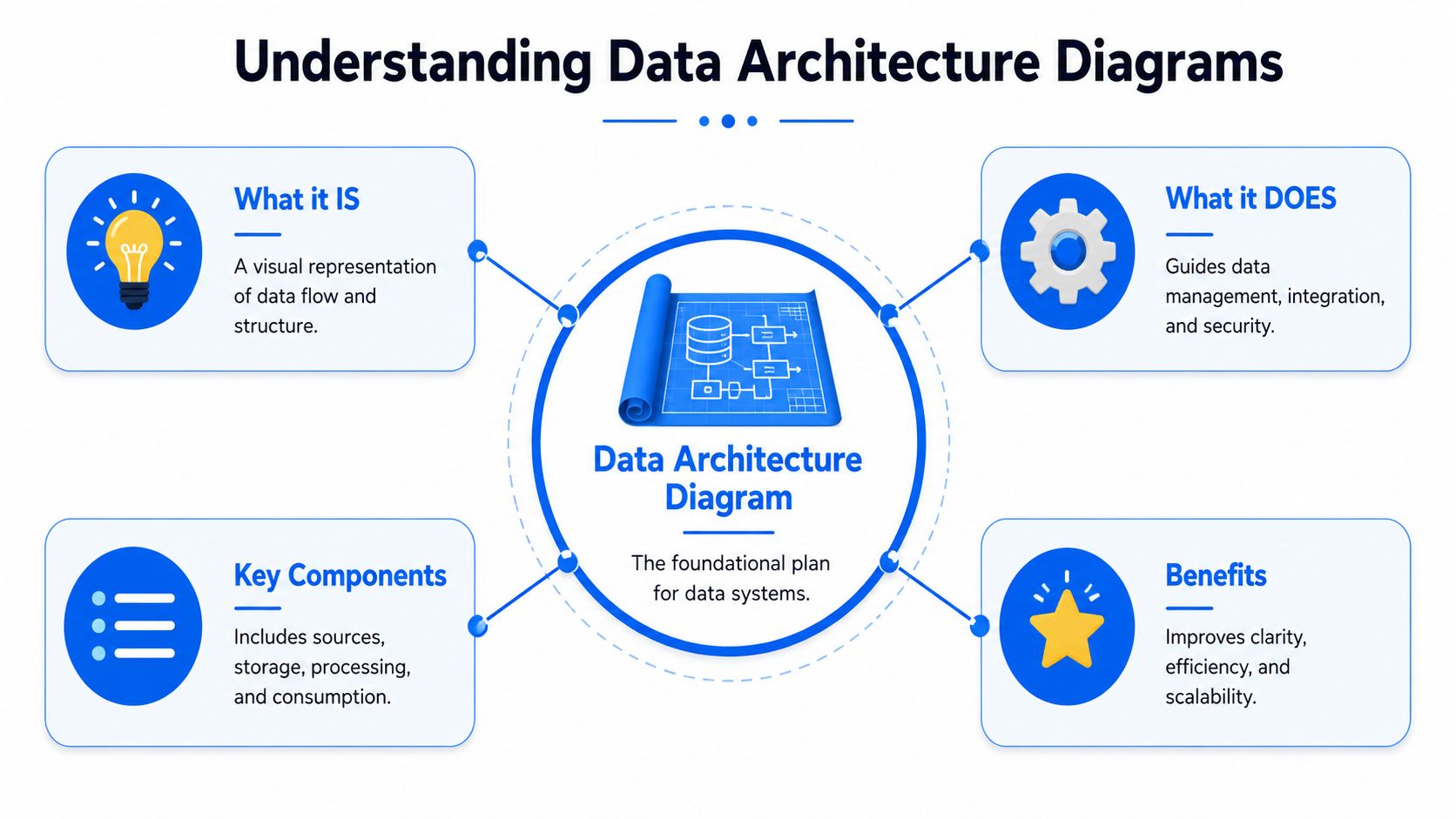
A data architecture diagram is a visual map of how data moves through an organization. The most useful mental model isn't a server rack diagram. It's a city plan. A city plan shows roads, utilities, zones, and how people move between them. Your data diagram should show where data originates, the routes it takes, the places it's stored, the rules that shape it, and the destinations where people and applications use it.
A practical guide from Instaclustr describes it as a visual mapping tool that defines the end-to-end flow from ingestion sources to consumption endpoints, including data sources, storage layers, transformation processes, and delivery mechanisms. That's the right baseline. The value comes from making those relationships visible enough to spot bottlenecks, hidden dependencies, and weak handoffs.
What belongs in the diagram
A useful diagram usually includes these elements:
Data sources such as SaaS applications, transactional databases, event streams, flat files, APIs, and partner feeds.
Storage layers such as a landing zone in object storage, a raw lake, a warehouse, curated marts, or a lakehouse.
Transformation components such as ETL jobs, ELT pipelines, dbt models, Spark jobs, orchestration layers, and validation steps.
Consumption endpoints such as dashboards, notebooks, reverse ETL targets, internal APIs, and ML feature consumers.
Control points such as access boundaries, sensitive-data zones, ownership labels, and operational dependencies.
You don't need every implementation detail in every diagram. What you need is the right amount of truth for the audience.
Why teams actually need one
The biggest benefit is shared understanding. Engineers use the diagram to reason about dependencies. Analytics teams use it to understand why a trusted metric lives in one table and not another. Governance teams use it to trace where controlled data moves. Leaders use it to see whether the platform supports reporting, regulatory needs, and AI ambitions without asking six people for six different explanations.
A diagram earns its keep when it reduces argument during incidents and ambiguity during planning.
That's why “boxes and arrows” isn't an insult when they're done well. A good data architecture diagram compresses complexity into a form the whole organization can use.
The Common Layers of Modern Data Architecture
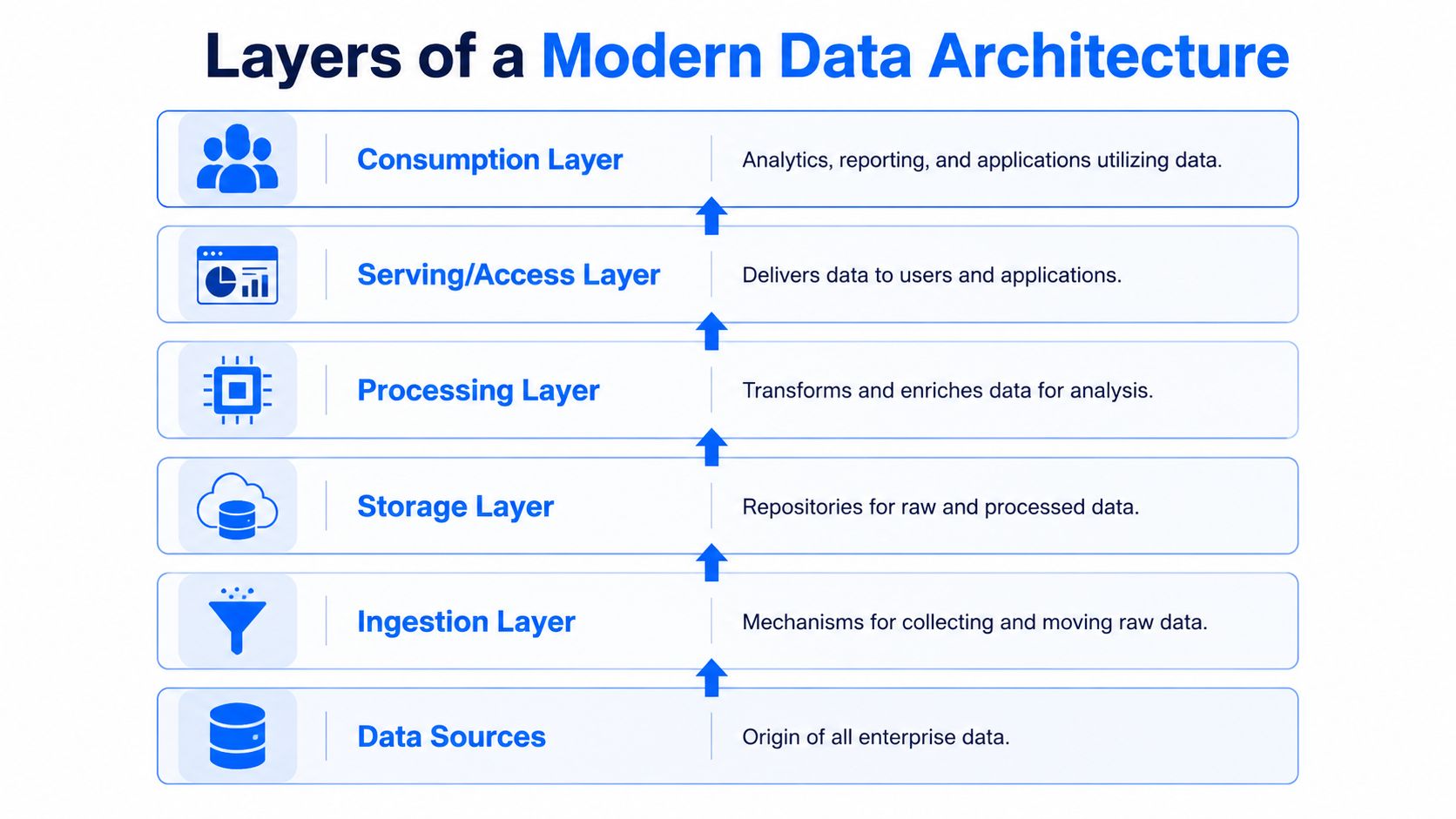
Modern platforms are easier to reason about when you stop thinking in tools and start thinking in layers. The tools change. The layers usually don't. When a team says its diagram feels chaotic, the root problem is often that source systems, processing jobs, serving endpoints, and governance controls are all drawn on the same visual plane.
Data sources and ingestion
At the bottom sit the systems that produce data. These include product databases, CRM platforms, ERP systems, payment processors, CSV drops from vendors, event streams from apps, and external APIs. The diagram should distinguish between batch and streaming sources because they create very different operational expectations.
The ingestion layer sits directly above them. Connectors, custom jobs, and stream processors pull or receive data within this layer. If a dashboard depends on daily Salesforce ingestion, the diagram should show that cadence and handoff clearly. If a fraud use case consumes events through Kafka or another stream, don't hide that behind the same generic arrow as a nightly file load.
A practical rule is to label the ingestion path by method, not just by tool. “API pull every hour,” “CDC from OLTP,” and “nightly SFTP file” tell the reader far more than a vendor logo alone.
Storage and processing
Storage is where many diagrams get vague. Teams draw one large “data platform” box and lose the architectural choices that matter. Separate raw storage from refined storage. Separate object storage from analytical serving layers. If you use both a data lake and curated marts, show both.
If you're deciding how to frame these zones, this comparison of data lake vs data mart is useful because it mirrors the practical distinction architects need to show visually. Lakes tend to hold broader, less curated data. Marts exist to serve specific analytical domains or stakeholder groups. When a team collapses them into one storage box, readers can't tell where standardization happens or where business-ready data starts.
Processing sits between storage and serving, though in some architectures it happens inside the warehouse or lakehouse rather than in a separate compute estate. This layer includes SQL transformations, Spark workloads, Python jobs, orchestration, and rule-based checks. The key is to show where raw data becomes trusted data. If you don't mark that transition, business users will assume every table in the platform is equally safe to use.
Serving and cross-cutting controls
The serving layer exposes data to BI tools, APIs, downstream apps, notebooks, and ML systems. This is the layer business users feel. If a board dashboard fails, the symptom surfaces in this layer, even if the cause sits much lower.
Across all of these layers, governance and observability should be drawn as cross-cutting capabilities, not a footer note. Access controls, ownership, policy zones, lineage, freshness checks, and quality gates affect every stage. If they appear only in a corner legend, readers treat them as optional. They aren't.
A clean layered diagram often includes these visual conventions:
Horizontal layers to separate source, ingest, store, process, serve, and consume.
Directional arrows to show data flow and, where useful, timing or mode.
Boundary markers for domains, environments, or trust zones.
Ownership labels so someone can answer “who fixes this?” without leaving the page.
The result is a diagram that behaves like a system map instead of a vendor collage.
Common Diagram Types and Architectural Patterns
A single data architecture diagram rarely survives contact with real work. The version used in a steering committee can look perfectly clear and still be useless at 2 a.m. when an ingestion job stalls and the sales dashboard goes stale. Good teams solve that by drawing for the decision at hand, then showing where the system changes over time, not just where data sits.
Choose the diagram type before you choose the tool
The practical split is conceptual, logical, and physical. Microsoft's Cloud Adoption Framework guidance on data architecture patterns maps well to this distinction because it ties architecture views to implementation choices and operating constraints, not just presentation style.
Diagram Type | Audience | Level of Detail | Purpose |
|---|---|---|---|
Conceptual | Executives, domain leaders, governance stakeholders | High-level | Show business domains, major flows, ownership, and strategic shape |
Logical | Architects, analytics leads, senior engineers | Medium | Show data entities, movement, processing stages, and domain boundaries |
Physical | Platform engineers, implementation teams, operations | Detailed | Show real systems, schemas, jobs, interfaces, and deployment-relevant dependencies |
A conceptual diagram shows the business story. Customer data enters from product and operational systems, passes through governed platforms, then reaches reporting, reverse ETL, and ML use cases.
A logical diagram shows how that story works. It adds ingestion modes, storage zones, transformation stages, semantic models, and trust boundaries.
A physical diagram shows what can break. It names the warehouse, object storage, orchestration tool, streaming platform, schemas, critical tables, and the checks that stop bad data before it reaches finance or a model feature store.
If stakeholders keep asking for more detail, they often need a different diagram, not a denser one.
How modern patterns change the picture
Architecture patterns change both the shape of the system and the failure modes you need to expose. A centralized warehouse pattern usually centers on curated models, tight control, and shared definitions. A lake pattern shows broader ingestion and multiple processing routes. A mesh-oriented pattern shifts attention to domain boundaries, contracts, and ownership handoffs.
If you're modeling decentralized ownership, this primer on what data mesh means in modern architectures is useful because the diagram stops being one central platform box and becomes a map of domain data products with shared policy and interoperability rules.
Lakehouse diagrams need special care. In practice, teams often draw them in an oversimplified way, as if one box labeled "lakehouse" explains the operating model. It does not. A useful lakehouse diagram shows where open storage meets warehouse-style performance, where metadata is managed, how batch and streaming paths converge, and where quality checks block untrusted data. Without that detail, the diagram hides the exact places where broken dashboards and unreliable AI features usually begin.
Pattern choice should reflect operating reality:
Warehouse-first fits regulated reporting, stable metrics, and centralized definition management.
Lake-first fits varied source data, data science exploration, and lower-cost raw retention.
Lakehouse fits teams that want shared storage with multiple compute patterns and governed self-service.
Mesh-oriented fits organizations where domains own data products and a central team cannot keep up with every request.
The trade-off is never abstract. Centralization improves consistency but can slow delivery. Decentralization speeds local decisions but raises the cost of governance, interoperability, and support.
Static diagrams fail fast in dynamic systems
This is the gap many architecture diagrams miss. They show boxes and arrows as if pipelines run in a steady state, but production data systems behave more like roads than floor plans. Volume spikes. Schemas drift. Upstream APIs slow down. Freshness targets get missed. A diagram that ignores those dynamics becomes decorative.
A better pattern diagram marks dynamic behavior directly on the page. Show which flows are batch versus streaming. Mark quality gates before trusted zones. Label high-risk handoffs, such as CDC replication, third-party APIs, and ML feature pipelines. Add simple observability signals like lineage coverage, freshness checks, SLA boundaries, or ownership for incident response.
That extra layer keeps the diagram useful after the architecture review. It helps an engineer trace why a KPI broke, helps an analyst judge whether a table is safe to use, and helps an ML team avoid training on stale or incomplete data.
The right pattern is the one your team can operate reliably, explain clearly, and govern without guesswork.
How to Create Your Data Architecture Diagram Step by Step
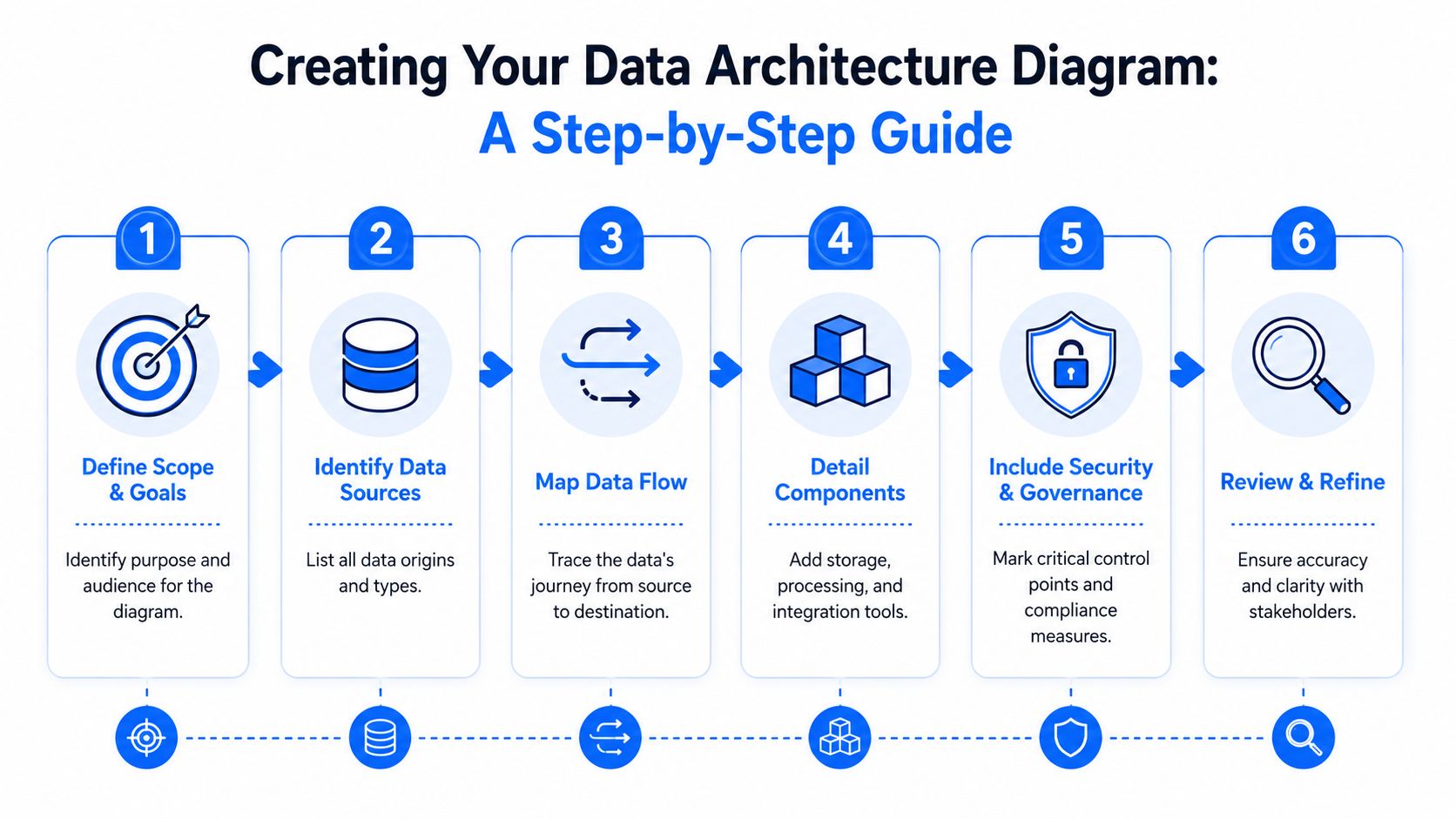
Most bad diagrams fail before anyone draws the first box. They start in a tool instead of with a question. If you don't decide who the diagram is for and what decision it should support, you'll produce something that looks complete and helps no one.
Start with scope not software
Begin with scope. Are you mapping the whole enterprise platform, one domain, one critical pipeline, or one target-state migration? “Everything” is almost always too broad for a first useful version.
Then define the audience. A Head of Data wants to see ownership, business capabilities, and major risks. A platform engineer needs pipelines, storage boundaries, and failure points. If you mix both levels in one first draft, you'll end up with the classic unreadable god diagram.
Use this sequence:
State the question the diagram must answer. Examples include “Why does this KPI break?”, “How does regulated data move?”, or “What changes in the target architecture?”
Fix the scope boundary around one platform, domain, or workflow.
Name the audience and cut detail they won't use.
Choose one notation style and stick to it. Consistency beats cleverness every time.
Map the path that data actually takes
Once scope is set, inventory the actual path of data. Don't rely on memory. Pull from orchestrators, warehouse schemas, data catalogs, dbt lineage views, connector configs, and incident tickets. The architecture people think they have and the one they operate are often different.
Map from left to right or bottom to top, but stay consistent. Include:
Source systems with enough context to understand their role.
Ingestion mechanisms and whether they are batch, CDC, event, or file-based.
Landing and storage zones such as raw, staged, curated, and serving.
Transformation steps including orchestration and key dependencies.
Consumption endpoints including dashboards, downstream apps, data science workflows, and APIs.
Label the handoffs that create risk. For example, a file drop from an external vendor is a very different reliability profile from internal CDC replication. A manually maintained Excel feed deserves a warning symbol in your own mind, even if not physically on the page.
This is also the point where standard notation helps. Arrows should mean flow. Cylinders should mean storage. Dotted lines can indicate metadata, control, or indirect dependency. If every connector style means something different each time, the reader has to learn your personal visual language before they can understand the system.
A quick walkthrough can help teams align on what “good enough” looks like:
Add control points and review it with the people who run it
After the flow is mapped, add the controls people usually omit. Mark ownership by domain or team. Show where sensitive data enters. Indicate trust boundaries, quality gates, and critical dependencies for reporting or ML. At this juncture, the diagram stops being descriptive and becomes operational.
Review the draft with the people closest to reality:
Platform engineers catch missing infrastructure and orchestration details.
Analytics engineers catch transformation logic and semantic-layer issues.
BI developers catch downstream assumptions about curated data.
Governance or security leads catch policy and access blind spots.
A diagram reviewed only by architects usually reflects intended design. A diagram reviewed by operators reflects the system you actually have.
Finally, version it. Keep the source editable. Record changes alongside platform changes. If a schema, pipeline, or ownership model changes and the diagram doesn't, it starts decaying immediately.
Integrating Data Quality and Observability into Your Diagram
Static diagrams break first in the places your platform changes fastest. That's usually not storage. It's the living edges of the system. New source fields appear. A connector delivers late. A dbt model still runs but produces shifted meaning because an upstream type changed. The diagram still looks correct, yet the pipeline is already drifting away from the picture.
Why static diagrams fail in modern pipelines
The problem is especially sharp in analytics and ML workflows where schema evolution happens often and subtly. One source adds a nullable field. Another renames a column. A warehouse table receives a type change that doesn't fail ingestion but breaks a downstream feature calculation or dashboard filter. A static architecture diagram won't show any of that unless someone manually updates it, and by then the incident has already happened.
An industry summary from FanRuan's discussion of data architecture diagrams highlights the gap directly, noting that 68% of ML failures stem from silent schema changes and that diagrams rarely integrate automated schema tracking. Whether you run finance reporting, healthcare interoperability pipelines, or product analytics, the lesson is the same. A map that ignores drift becomes historical artwork.

For teams sorting out the relationship between monitoring pipeline health and enforcing correctness, this breakdown of data observability vs data quality is useful because architecture diagrams need room for both. One tells you that something changed or arrived late. The other tells you whether the data is valid for use.
What to add to make the diagram operational
A living data architecture diagram includes the system's health model, not just its structure. That doesn't mean drawing every alert. It means marking where reliability is established or lost.
Here's what works well in practice:
Freshness markers on ingestion paths so readers know which pipelines are expected hourly, daily, or event-driven.
Quality gates before trusted zones to show where records are validated before entering curated layers.
Schema watch points on volatile interfaces such as external APIs, source-aligned raw tables, and feature tables.
Critical-table monitoring labels on the curated tables that feed executive dashboards or production models.
Ownership tags on alerting boundaries so the right team responds when a signal fires.
This changes the purpose of the diagram. It no longer says only “data flows from A to B.” It says “this path must arrive by this expectation, this table is business critical, this transition includes validation, and this source is prone to schema drift.”
A practical notation set might look like this:
Marker | Meaning | Business outcome |
|---|---|---|
Clock icon | Freshness or timeliness expectation | Prevent stale reports and missed SLAs |
Shield icon | Validation or policy gate | Catch invalid records before they spread |
Eye icon | Observability checkpoint | Surface hidden failures earlier |
Schema badge | Structural change watch point | Protect downstream transforms and ML inputs |
Owner label | Team responsible for response | Shorten incident routing |
Don't treat observability as a sidecar tool outside the architecture. It belongs on the diagram because it defines whether the architecture is safe to operate.
When teams add these signals, review quality changes too. A source can be “up” and still be unusable. A dashboard can refresh on time and still be wrong. The operational diagram should make both risks visible.
Best Practices and Common Mistakes to Avoid
A data architecture diagram gets tested the first time a dashboard breaks at 8 a.m. or a model starts scoring on stale features. In that moment, nobody cares whether the diagram looks polished. They need to see what changed, who owns the failing path, and where quality checks should have caught the issue.
That standard changes how the diagram should be drawn and maintained. Treat it like a house blueprint used by builders and inspectors, not a poster made for a quarterly review. Good diagrams help teams ship changes safely, trace impact fast, and decide where to add controls before a bad record reaches finance, operations, or an ML system.
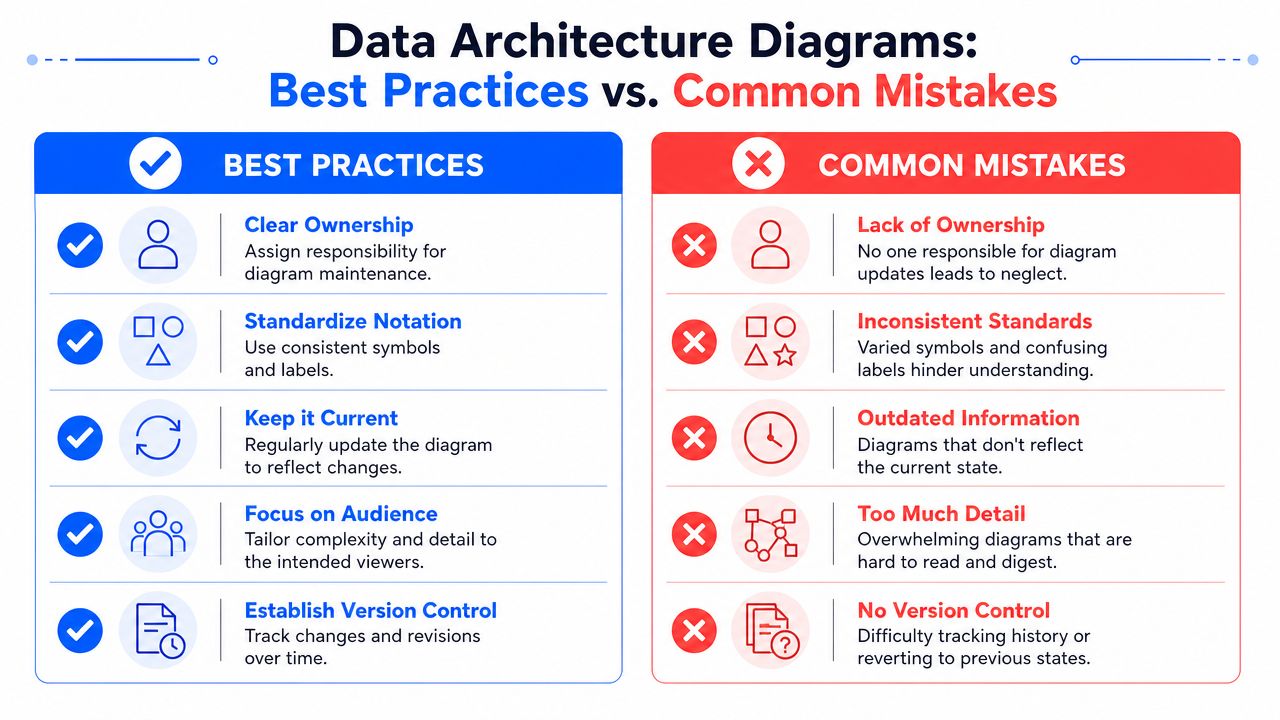
A practical checklist:
Make ownership explicit. Put a named team or role on every business-critical flow, shared dataset, and alert boundary.
Adapt the view to the audience. Platform engineers need system boundaries, handoffs, and failure points. Business stakeholders need the paths that affect reports, customer-facing products, and service levels.
Show transitions, not just boxes. Problems usually start at ingestion points, joins, schema changes, and cross-team handoffs.
Version the diagram with the platform. If the warehouse, orchestration path, or serving layer changes, the diagram changes too.
Mark operational signals on the diagram. Freshness targets, validation gates, schema watch points, and observability checkpoints should sit on the flow they protect.
Tie architecture to consumption. Label which paths feed dashboards, APIs, reverse ETL jobs, or feature stores so incident impact is obvious.
The common mistakes are just as predictable, and they usually come from treating the diagram as static documentation instead of an operating artifact.
The god diagram. One canvas tries to show every source, table, team, tool, and dependency. The result is unreadable during design reviews and useless during incidents.
Inconsistent notation. A storage icon means one thing in one domain and something else in another. Readers stop trusting the map.
Tool-first modeling. Vendor logos replace architecture decisions. The reader sees products, but not trust boundaries, quality gates, or business risk.
Snapshot thinking. The diagram reflects last quarter's pipeline, while the current system has already changed.
Missing runtime context. Data moves through the picture, but there is no sign of what must be fresh, what is allowed to fail, or what powers a critical executive report or production model.
The trade-off is straightforward. A cleaner, scoped diagram leaves some detail out. That is fine. Trying to include every detail usually hides the few details that matter when data quality slips or a pipeline stalls. I prefer a small set of layered diagrams that stay current over one master diagram that nobody updates.
A good data architecture diagram earns trust because it stays close to reality. It shows how data is supposed to flow, where it is likely to fail, and what business process breaks if it does.
If your team wants to move from static documentation to an operational view of data reliability, digna is worth a look. It focuses on modern data quality and observability, including anomaly detection, timeliness monitoring, record-level validation, and schema tracking, while executing inside customer-controlled environments. That makes it a strong fit for teams that need better visibility into pipeline health without giving up control of production data.
Frequently asked questions
What is a data architecture diagram?
It is a blueprint showing how data moves through an organisation: the sources, the ingestion paths, where data is stored and processed, how it is served to consumers, and the cross-cutting controls for security, governance and quality that apply along the way.
What should a data architecture diagram include?
Sources and ingestion mechanisms, storage and processing layers, serving and consumption endpoints, and the cross-cutting concerns. It should also show ownership and the direction of dependency, because that is what someone needs when a dashboard breaks and they must find the responsible upstream job.
What are the common types of architecture diagrams?
Conceptual diagrams show domains and relationships for non-technical stakeholders. Logical diagrams show datasets, flows and layers without vendor detail. Physical diagrams show actual systems and services. Choosing the type before the tool prevents a diagram that serves nobody.
Why do static architecture diagrams go stale so quickly?
Because the systems keep changing and the diagram does not. Within a few sprints a hand-drawn picture no longer reflects reality, so people stop trusting it. Diagrams that derive from live metadata and lineage survive; hand-maintained ones decay into decoration.
How does an architecture diagram help with data quality?
It turns an incident into a traceable path. When a KPI table shows nulls, the diagram tells you which ingestion job feeds it, what transforms sit between, and who owns each hop, which is the difference between a ten-minute diagnosis and an afternoon of guessing.