How to Set Up a Referential Integrity Check (Step by Step)
|
6
min read

A foreign key that points at nothing doesn't raise an error. The row loads, the next inner join drops it, and a report shows zero where there should be 82. A referential integrity check is a data validation rule that confirms every value in a child column, or set of columns, exists in the referenced parent table, and reports the rows that don't.
Most analytical platforms won't run it for you. Snowflake treats foreign keys on standard tables as optional and not enforced, and BigQuery states plainly that you are responsible for maintaining them. Redshift and Databricks behave the same way. The check has to live somewhere else.
This guide covers how to check referential integrity in practice: the decisions to make first (relationships, columns, NULLs, thresholds, timing), then the setup in digna: a handful of fields, no SQL. If you want the concept first, start with our guide to referential integrity and orphan records.
Key takeaways
Check the relationships your reports join on first: fact tables to dimensions and child records to parents, ranked by what breaks when they fail.
Use the exact join columns on both sides. A composite key is checked as a combination, and both column lists must have the same length and order.
A NULL foreign key does not fail a referential integrity check. If the reference is mandatory, add a separate not-null rule.
Use zero tolerance for financial and clinical data and a relative threshold for large tables with a known tail of late-arriving references.
In digna the check is a rule of type Referential Integrity: pick the columns, pick where they must exist, set two thresholds, save. It runs inside your database with every inspection.
Table of Contents
What is a referential integrity check?
Which relationships should you check first?
How do you choose the columns and composite keys?
What should a NULL foreign key mean?
Which threshold should a referential integrity check use?
When should a referential integrity check run?
How do you set up a referential integrity check in digna?
What does the equivalent SQL look like?
How do you read a failed referential integrity check?
Where should you start?
What is a referential integrity check?
A referential integrity check takes a column, or a set of columns, on a child table and confirms that every populated value also exists in the referenced parent table. Rows that find a parent pass. Rows that don't are orphans and fail. The result is a passed count, a failed count and, when you ask for them, the failing rows. You will also see it called a foreign key check or referential integrity validation.
A foreign key constraint acts at write time and rejects the insert. A check acts after the load and tells you how much of the loaded data points nowhere. Where declared keys are informational only, the check is the one you actually get.
Approach | When it acts | What happens to an orphan | Works where FKs aren't enforced | What you get back |
|---|---|---|---|---|
Foreign key constraint | At insert or update | Rejected; the load fails | No, the declaration is a hint | An error message |
Ad-hoc SQL query | When someone remembers to run it | Nothing until someone looks | Yes | A result set in someone's SQL client |
Referential integrity check in digna | With every inspection, scheduled or on demand | Loaded, counted and listed | Yes, and across database connections | Passed/failed counts, a status against your threshold, the failing rows |
Which relationships should you check first?
Check first the relationships your reports and downstream jobs actually join on: fact tables to their dimensions and child records to their parents. A broken link there changes numbers people read and sign. A relationship nobody queries can wait.
A quick inventory gets you a ranked list:
List the fact-to-dimension joins. Postings to accounts, claims to patients, call records to subscribers, medication administrations to the product master.
List the child-to-parent joins. Order lines to orders, diagnoses to encounters, collateral to loans.
Mark the ones that feed reports, billing or regulatory submissions. An inner join in those queries drops orphans without a trace.
Mark the ones loaded by different jobs or systems. A child that arrives before its parent is an orphan.
Start with the top five to ten. Add the rest once someone owns the results.
If you want to size the problem before you set anything up, the queries in finding orphan records with SQL give you a one-off count per relationship.
How do you choose the columns and composite keys?
Use exactly the columns the join uses, on both sides, in the same order. If the parent is identified by two columns, check them together as a composite key. Checking each column alone lets through combinations that exist nowhere in the parent.
Ward codes are a good example. If every hospital in a group has a ward called ICU-1, a row with hospital 2 and ICU-1 passes a single-column check on ward_code as long as hospital 1 has that ward. Only the pair (hospital_id, ward_code) catches it. digna checks the combination when you pick several columns, and rejects column lists of different length rather than checking a weaker condition.
Two more things to settle first:
Point at the parent's key, not a label. Check
product_codeagainst the master'sproduct_code, not against a product name that someone may edit.Make both sides comparable. A code stored as text with leading zeros on one side and as a number on the other produces orphans that aren't real. Normalise it in a view and check the view: in digna a data source can be a table, a view or a custom SQL statement.
What should a NULL foreign key mean?
Decide up front whether a NULL foreign key is allowed. A referential integrity check asks whether a value exists in the parent, and a NULL has no value to look up, so digna skips NULLs in this check. If the reference is mandatory, add a separate not-null rule, so a missing value and a dangling value show up as different findings.
Some references are legitimately optional: a referring physician, a promotion code, a parent account for a top-level customer. Others never are: every posting has an account, every administered dose has a product. Keeping them apart makes the fix obvious: a missing reference goes back to the capturing system, a dangling one to master data or load order.
What you want to catch | digna rule type | Example |
|---|---|---|
Value present but not in the parent | Referential Integrity |
|
Value missing where it is required | Rule |
|
Key appears more than once in the parent | Uniqueness |
|
The third row matters too: a duplicated parent key creates no orphans, but it doubles every row that joins to it.
Which threshold should a referential integrity check use?
Use zero tolerance for financial and clinical data, where one orphan is one wrong number in a statement or one dose missing from a patient's record. Use a relative threshold for very large tables where a small, known tail of late-arriving references is normal and only a jump above that tail deserves attention.
digna gives every rule a Threshold Mode. Absolute compares the number of failed records. Relative compares failed records divided by records evaluated, as a fraction, so 0.01 means one per cent. Each mode has two levels: above the Info threshold the status is Uncertain, above the Warn threshold it is Failed, otherwise Passed. Both default to zero, so a new rule fails on a single bad record until you decide otherwise.
Situation | Threshold Mode | Info | Warn | Effect |
|---|---|---|---|---|
Postings to accounts, doses to product master | Absolute | 0 | 0 | One orphan fails the run |
Same data, one stray record should flag before it fails | Absolute | 0 | 1 | One orphan is Uncertain, two or more Failed |
Event or call records with known late-arriving dimensions | Relative | 0.001 | 0.01 | Above 0.1% Uncertain, above 1% Failed |
Start strict and loosen only for a reason you can write down.
When should a referential integrity check run?
Run it after every load of the child table, and after loads of the parent too, because orphans appear whenever the two arrive out of order. In digna the rule runs with every inspection of its data source, scheduled or on demand, so align the inspection with the load rather than with the reporting calendar.
A month-end check finds a month of orphans at once, with the report already due. A check after each load finds one day's worth while the person who loaded it still remembers what changed. The cost is one join per run, executed inside the source database, with nothing copied out. When it fails, notify the team that owns the data.
How do you set up a referential integrity check in digna?
In digna a referential integrity check is a digna Data Validation rule of type Referential Integrity. You pick the columns on your data source, pick the data source and columns they must exist in, set two thresholds and save. There is no SQL to write, and the setup takes under a minute.
Go to Configuration, select the data source (here
hospital_medication_administrations), open the Data Validation tab and click Add Rule. The Add Data Validation Rule dialog opens.Enter a Name and a Description:
hc_product_in_master, "Every administered product exists in the pharmacy product master".Set Type to Referential Integrity. The other options are Rule and Uniqueness.
Under Attributes, pick the column on this data source:
product_code.Under must exist in, pick the Data Source (
hospital_medications) and its Attributes (product_code). For a composite key, pick several columns on both sides in the same order.Choose the Threshold Mode and set the Info threshold and Warn threshold. The example uses Absolute, Info 0, Warn 1.
Save. The rule runs with every inspection of the data source from now on.
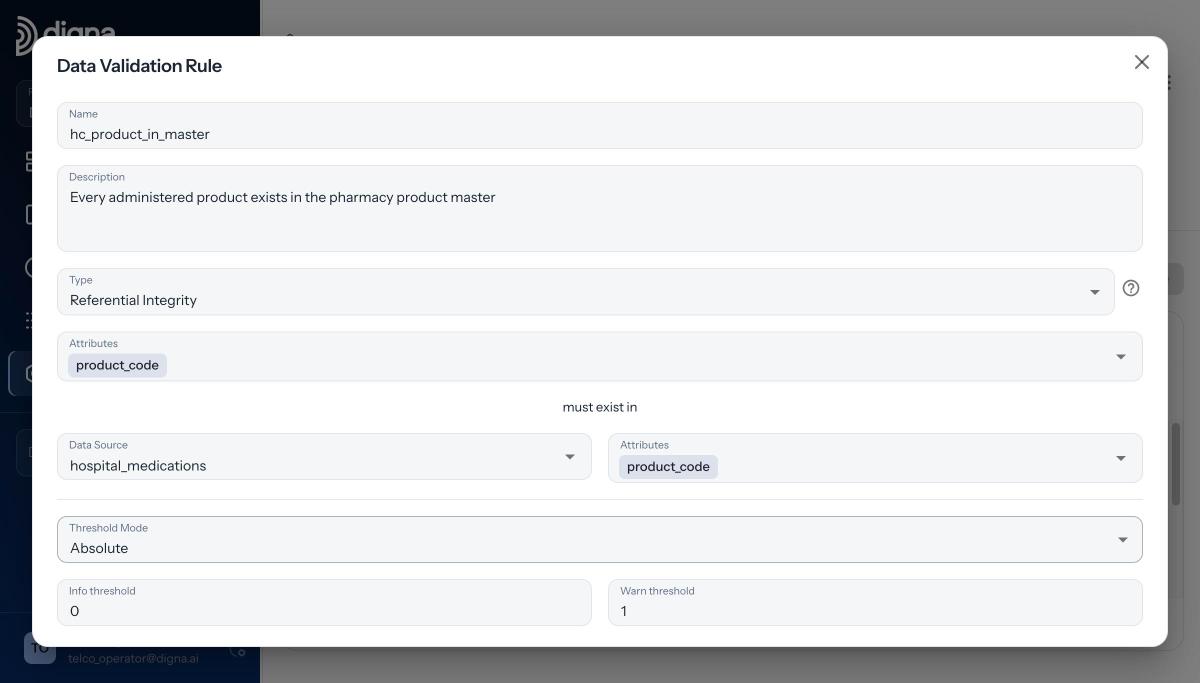
The complete rule: type, attributes, the data source they must exist in, and two thresholds. Demo data from Danubia Kliniken, a fictional Austrian hospital group.
With Info 0 and Warn 1, one orphan already turns the status Uncertain and anything more turns it Failed. Leave Warn at 0 if a single orphan must fail the run. The parent doesn't have to sit next to the child either: since Release 2026.01 the other side can be a table or view in another schema or on another database connection in the same project, which is covered in referential integrity across databases. The 2:26 video Referential Integrity in digna: Set Up in Under a Minute walks through the same steps.
Once you have many of these rules, keep them as code: Release 2026.06 added a Python SDK (pip install digna-sdk) and import and export of validation rules between environments.
What does the equivalent SQL look like?
Underneath, a referential integrity check is a left join from the child rows to the distinct parent keys, counting the rows that find no match and ignoring NULL keys. digna generates and runs this inside your database. Written by hand for the example above, the logic looks like this:
This is an illustration of the logic, not the literal statement digna sends. For a composite key the join condition gets one equality per column pair. The query is the easy part. The work is everything around it: running it after each load, comparing to a threshold, keeping history, getting the rows to the right people. The digna documentation describes how each rule kind becomes SQL.
How do you read a failed referential integrity check?
Read a failure in three steps: the status tells you the threshold was crossed, the counts tell you how big the gap is, and the failing records tell you why. Orphans that share one key usually mean missing master data. Orphans spread across many keys usually point to a failed parent load or a key format mismatch.
Back to the Danubia Kliniken example. On 2026-04-22, 82 administrations of a new product were recorded on the wards before the product reached the pharmacy product master. The rule hc_product_in_master failed: 4,244 of 4,326 rows passed.
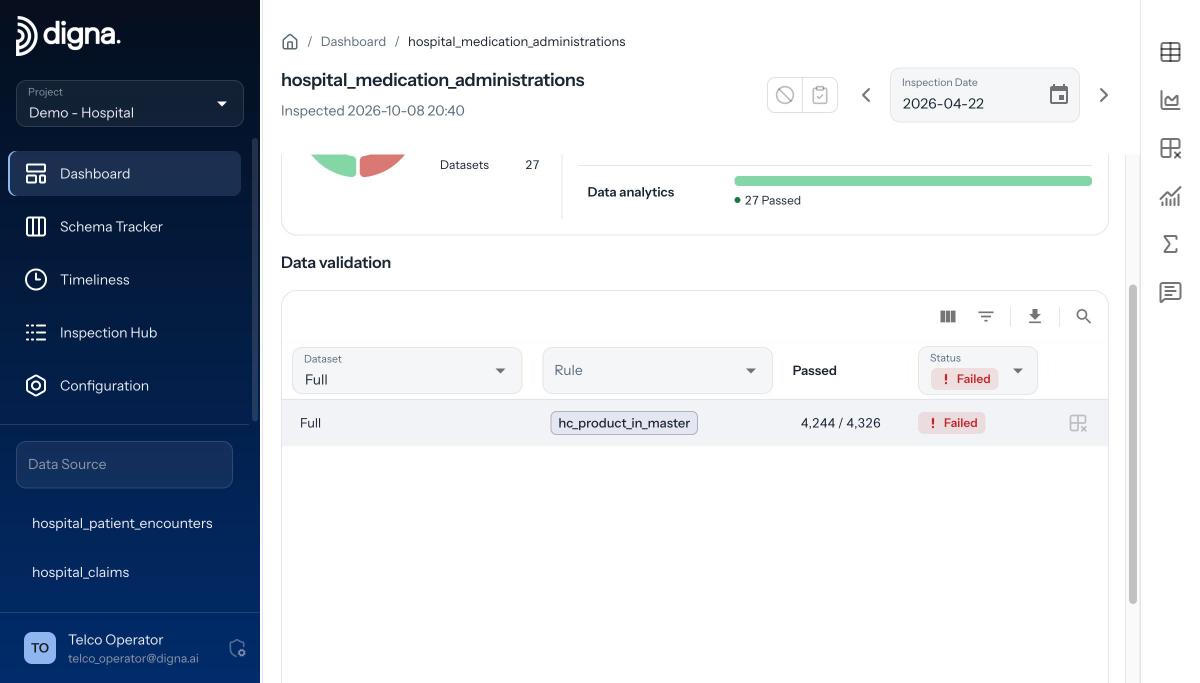
The result on the dashboard: 4,244 of 4,326 passed, status Failed.
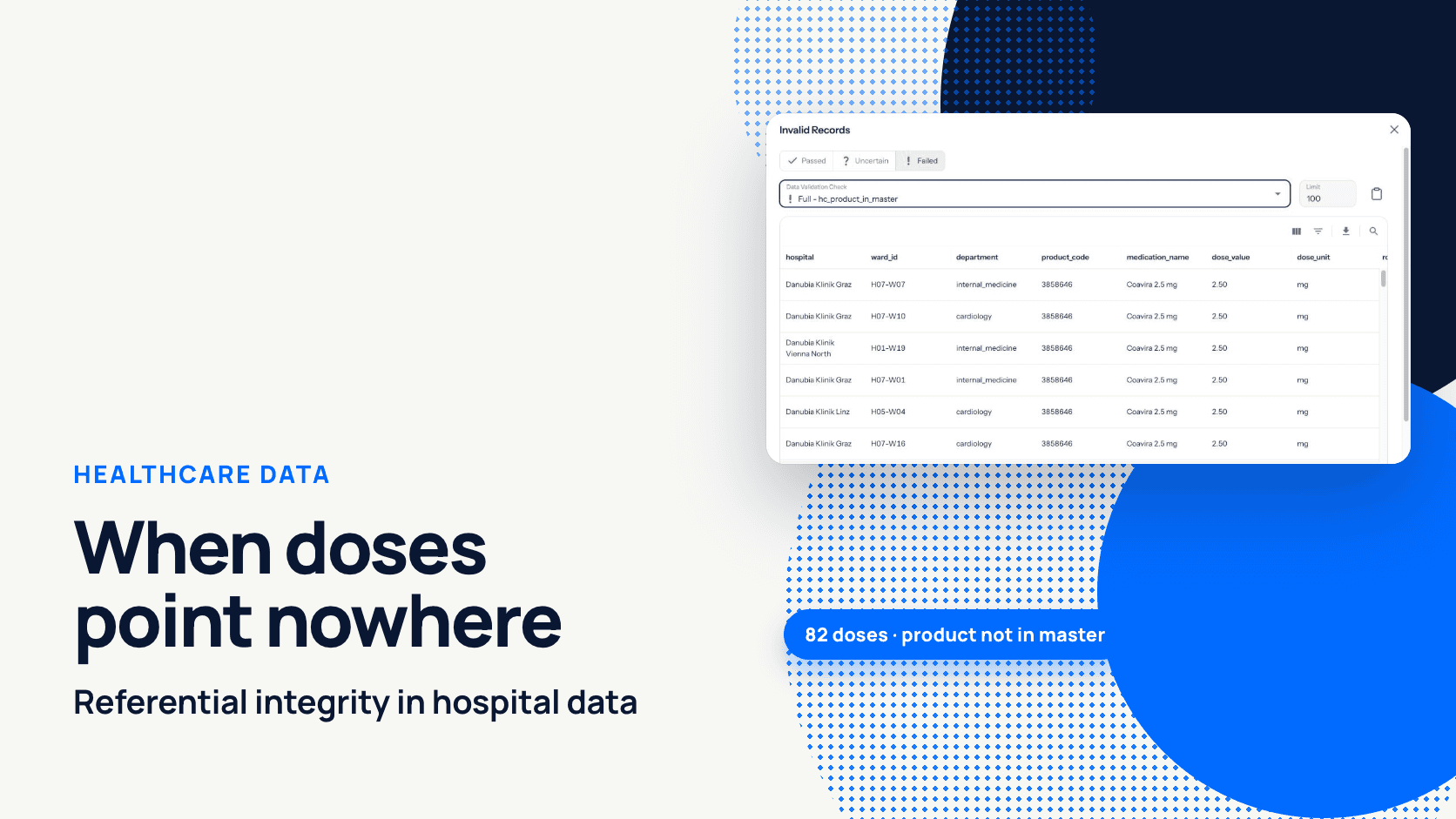
To see why, open the Invalid Records view, filter on Failed, pick the check, and digna lists every failing row. Here all 82 carry the same product_code, 3858646 (Coavira 2.5 mg). That is not 82 entry errors but one product missing from the master. Every report that joined doses to products showed 0 doses of it while nurses had given 82.

Invalid Records: every failing dose with hospital, ward, product code and medication name.
The common patterns:
One key, many rows: the parent record doesn't exist yet. Add it to the master data and re-run the inspection.
Many keys, one load: the parent load failed or ran late. Fix the load order.
Keys that look almost right: leading zeros, case or whitespace differ between systems. Normalise in a view.
Old keys: parent records were deleted or archived while children still refer to them.
The failing rows are exportable, so the owning team gets the records, not just a number.
Where should you start?
Pick the one relationship whose orphans would hurt most if they reached a report this month, and put a check on it after the next load. Each check is a handful of fields, runs inside your database, and your data never leaves your infrastructure. If you want to see it on your own tables, book a demo with the digna team.
Frequently asked questions
How do I check referential integrity with SQL?
Left-join the child table to the distinct key values of the parent and count rows where the parent side is NULL, skipping rows whose own foreign key is NULL. Those rows are orphans. Select them instead of counting to get the records to fix; scheduling, thresholds and history you build yourself.
Does a referential integrity check fail on NULL foreign keys?
No. In digna, referential integrity checks skip NULL values, because a NULL has nothing to look up in the parent table. When the reference is mandatory, add a separate Rule such as product_code IS NOT NULL, so a missing value and an orphaned value appear as different findings.
Can a referential integrity check use a composite key?
Yes. Select several attributes on the data source and the same number on the parent, in the same order, and digna checks the combination. Column lists of different length are rejected, because comparing a two-column key against one column would let through rows the full key would catch.
What threshold should a referential integrity check use?
For financial and clinical data, use Absolute mode with zero tolerance, so a single orphan fails the run. Very large tables with a known tail of late-arriving references suit a Relative threshold instead; in digna it is a fraction, so 0.01 means one per cent of evaluated rows.
How long does it take to set up a referential integrity check in digna?
Under a minute. Open the data source in Configuration, go to the Data Validation tab, click Add Rule, set Type to Referential Integrity, pick the attributes and the data source they must exist in, set two thresholds and save. digna generates the SQL and runs it inside your database.