Cross-Database Referential Integrity: How to Check It
|
6
min read

Your orders live in the data warehouse. The customers they point to live in the CRM, on another server, run by another team. Cross-database referential integrity means that every key in one system, such as an order's customer number, matches an existing record in the master table of another system. A foreign key can't guarantee that, because a declared foreign key generally works only inside one database. So when an order arrives with a customer number the CRM never issued, nothing fails. The row loads, a join drops it, and a report somewhere is quietly wrong.
This is the hardest variant of referential integrity. Inside one database you can at least declare the constraint; across a database, server or system boundary there is nothing to declare. The general concept is covered in our pillar post Can Your Data Still Find Its Parents? Understanding Referential Integrity. This post covers referential integrity between systems: where it breaks, what the usual workarounds cost, why key formats produce false alarms, and how to check it in digna without copying master data anywhere.
Key takeaways
A foreign key across databases is generally not possible: a declared constraint references tables in the same database, so cross-system references are unprotected by design.
The usual workarounds (federated queries, copied reference tables, ETL-time lookups, reconciliation exports) add data movement, pipelines or manual work.
Key format differences such as leading zeros, case, padding and data types create false orphans. Agree on a canonical key form before you compare.
Since Release 2026.01, digna Data Validation checks referential integrity across tables, views, schemas and different database connections in the same project, validating the data where it lives.
Setup is a handful of fields: key columns, the data source they must exist in, two thresholds. No SQL to write.
Table of Contents
Why can't a foreign key protect a reference across databases?
Where do references between systems break?
Customer master in the CRM, transactions in the warehouse
Product master in the ERP, orders in the order system
Patient master and clinical encounters
Core banking and the reporting warehouse
How do teams usually validate references across systems?
Why do key format mismatches create false orphans?
How do you check cross-database referential integrity in digna?
Which cross-system references should you check first?
Next step
Why can't a foreign key protect a reference across databases?
A foreign key can't protect a cross-database reference because it is a constraint the engine enforces on its own tables, looking up the referenced row in the same database on every insert, update and delete. A declared foreign key generally can't point at a table in another database, server or product, so there is nothing to check against.
Some engines let you query across databases, but querying is not constraining. An enforced constraint across systems would need the remote system to be available and consistent at every write, and separate systems exist precisely so that one keeps running while the other is down, migrated or reloading.
The warehouse side makes it worse. Many analytical platforms accept foreign key declarations without enforcing them even within one database: Snowflake describes them as optional and not enforced on standard tables, and BigQuery states that it doesn't enforce them. And the systems change independently: the CRM team merges duplicate customers, the ERP retires a product. Each change is valid in its own system and can still leave records elsewhere pointing at keys that no longer exist.
Where do references between systems break?
References between systems break wherever one system owns the master data and another records the activity: a transaction table that references a customer, product, patient or account maintained somewhere else, by another team, on its own release cycle and with its own rules for merging and retiring keys. Four situations come up again and again.
Customer master in the CRM, transactions in the warehouse
Sales operations maintains customers in the CRM; orders are loaded into the warehouse every night. When two CRM records are merged, one ID disappears. Orders in the warehouse still carry it, and revenue per customer, segment or region quietly drops rows.
Product master in the ERP, orders in the order system
A new product goes on sale before the ERP master record is released, or a discontinued product is removed while open orders still reference it. Order lines without a matching product vanish from margin and stock reports.
Patient master and clinical encounters
Hospitals keep patient identity in a patient master, often a master patient index, and record admissions, lab orders and medication in clinical systems. When duplicate patients are merged, encounters still referencing the retired ID lose their patient, which affects billing and clinical reporting.
Core banking and the reporting warehouse
Accounts and customers live in the core banking system. Management and regulatory reporting runs on a separate warehouse fed by several source systems. A posting that references an account missing from the reporting account dimension is either dropped from totals or lands in an "unknown" bucket. We go deeper into this case in referential integrity in banking data.
How do teams usually validate references across systems?
Teams usually validate references across systems in one of four ways: query the remote table through a linked server, database link or federated query; copy the reference table into the target system; look keys up during ETL; or export keys from both sides and reconcile them periodically. Each works, and each has a cost.
The underlying check is always the same anti-join. If both tables were reachable from one engine, it would look like this:
The workarounds differ in how they make crm.customers reachable from the system that holds sales_orders:
Approach | How it works | What it costs |
|---|---|---|
Linked servers, database links, federated queries | One engine queries the remote table directly and runs the join | Both systems must be up at query time; large cross-network joins are slow and put load on the source; credentials for the remote system are stored in the database; often blocked between network zones |
Copy the reference table into the warehouse | A pipeline replicates the master table next to the transactions | An extra pipeline to build and run; the check is only as fresh as the last copy; another copy of master data, often personal data, raises data protection and data residency questions |
ETL-time lookups | The load job looks up each key and rejects or flags unmatched rows | Covers only data flowing through that pipeline; checks once at load time, so later deletes and merges in the master go unseen; reject tables pile up unread |
Periodic reconciliation exports | Key lists from both systems are exported to files and compared | Manual and infrequent; results arrive weeks after the error; key files circulate by mail or shared drives |
None of these is wrong, but they share a problem: either data moves, or someone has to remember to run something. What you want is a scheduled check that reads each side where it lives and tells the owning team which records are orphaned.
Why do key format mismatches create false orphans?
Key format mismatches create false orphans because two systems can store the same business key in different forms: as text in one and a number in the other, with or without leading zeros, in different case or with trailing spaces. A byte-for-byte comparison then reports a missing parent that actually exists.
It is the most common reason a first cross-system check reports thousands of failures:
Mismatch | System A | System B |
|---|---|---|
Leading zeros |
|
|
Case |
|
|
Padding and whitespace |
|
|
Type casts |
|
|
System prefixes |
|
|
Fix it in three steps:
Agree on a canonical form for the key, for example a trimmed, upper-case string padded to ten digits.
Normalise one or both sides to that form in a view or a SQL statement, close to the source.
Check that the normalised master key is still unique. Trimming zeros or case can collapse two different keys into one, which would hide real orphans.
A normalising query looks like this (function names vary slightly between databases):
Don't normalise away real differences. If a prefix tells you which source system issued the key, a composite key of source system and number is safer than stripping the prefix.
How do you check cross-database referential integrity in digna?
In digna, a cross-database referential integrity check is a Data Validation rule of type Referential Integrity whose "must exist in" side points to a data source on another database connection in the same project. Since Release 2026.01 it validates the data where it lives, without replicating either table into the other system.
Two changes in the 2026.01 release make this work. Referential integrity checks run across tables and views, across schemas, and across different database connections within one project. And a data source is a logical layer backed by a table, a view or a custom SQL statement, which gives you a place to handle key formats: a custom SQL data source can trim, cast or pad the key before the comparison, much like the query above. Test that normalisation on real data before you rely on it. Database connections are global, so a CRM connection set up once can be reused by every project.
The rule itself is set up in a single dialog:
Go to Configuration, select the data source holding the referencing rows, open the Data Validation tab and click Add Rule. The Add Data Validation Rule dialog opens.
Enter a Name and a Description that says what must hold, for example "Every order references a customer in the CRM master".
Set Type to Referential Integrity.
Under Attributes, pick the key column or columns on this data source.
Under must exist in, pick the target Data Source, which can sit on another connection, and its matching Attributes. For a composite key, pick the columns on both sides in the same order.
Choose a Threshold Mode (Absolute or Relative) and set the Info threshold and Warn threshold.
Save. The rule runs with every inspection of the data source, scheduled or on demand.
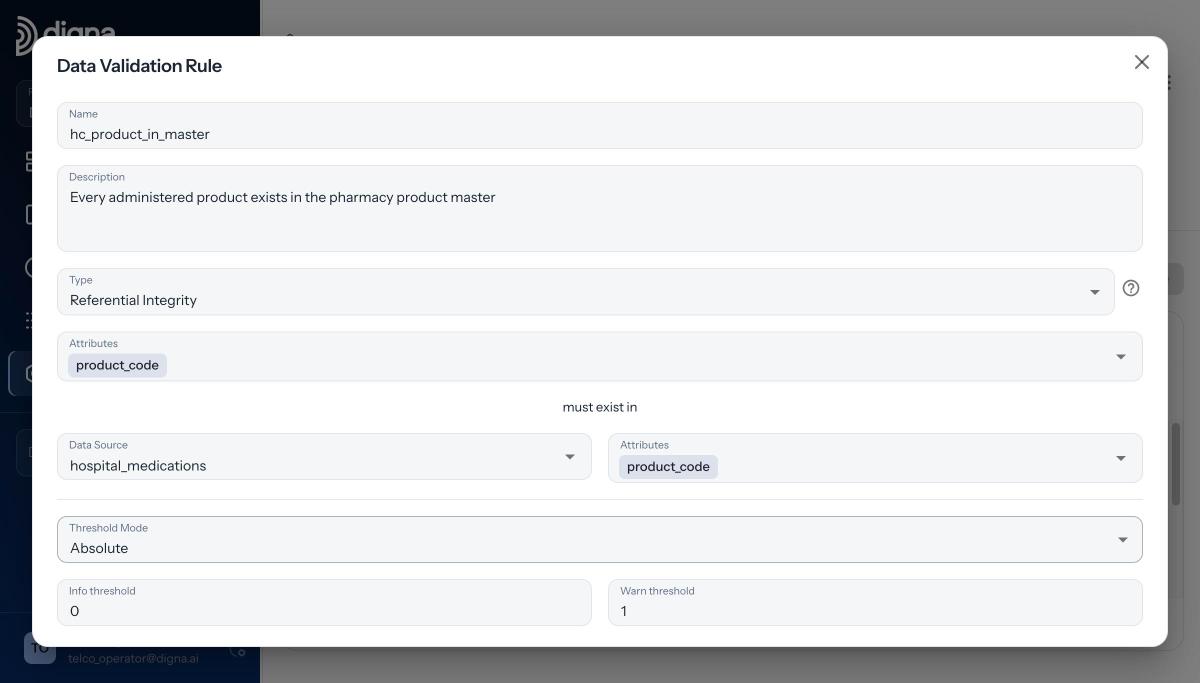
The referential integrity rule in digna: product_code must exist in the hospital_medications data source.
The screenshots come from our demo project, where both data sources sit on the same connection. The dialog is the same when the target data source sits on another connection: you choose it under "must exist in" like any other data source. The demo uses fictional data from Danubia Kliniken, a made-up Austrian hospital group.
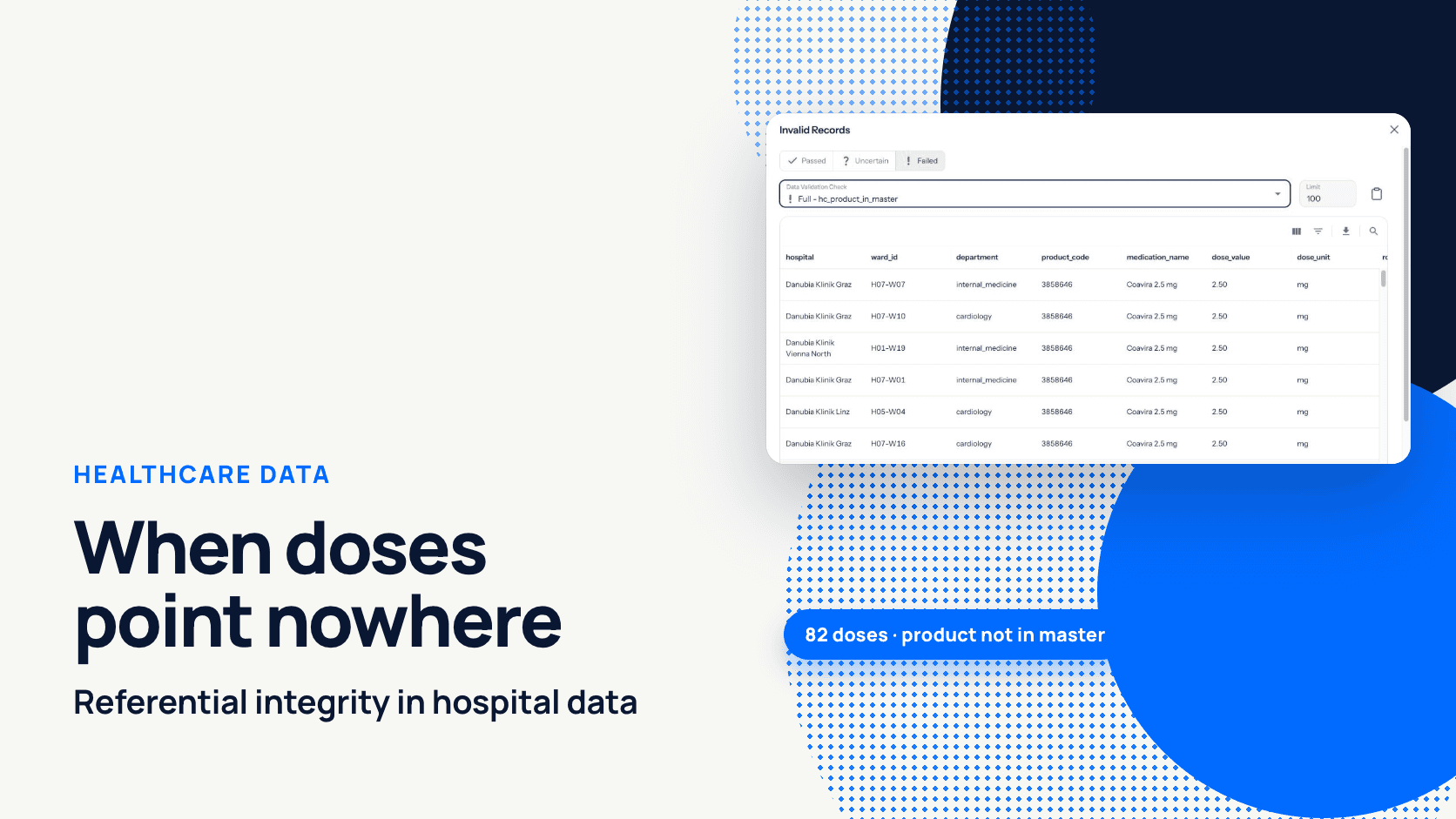
The rule hc_product_in_master says that every administered product must exist in the pharmacy product master. On 2026-04-22, the wards recorded 82 administrations of "Coavira 2.5 mg" (product code 3858646) before the product had been added to the master. Every report joining doses to products showed zero doses of the new product while nurses had given 82.
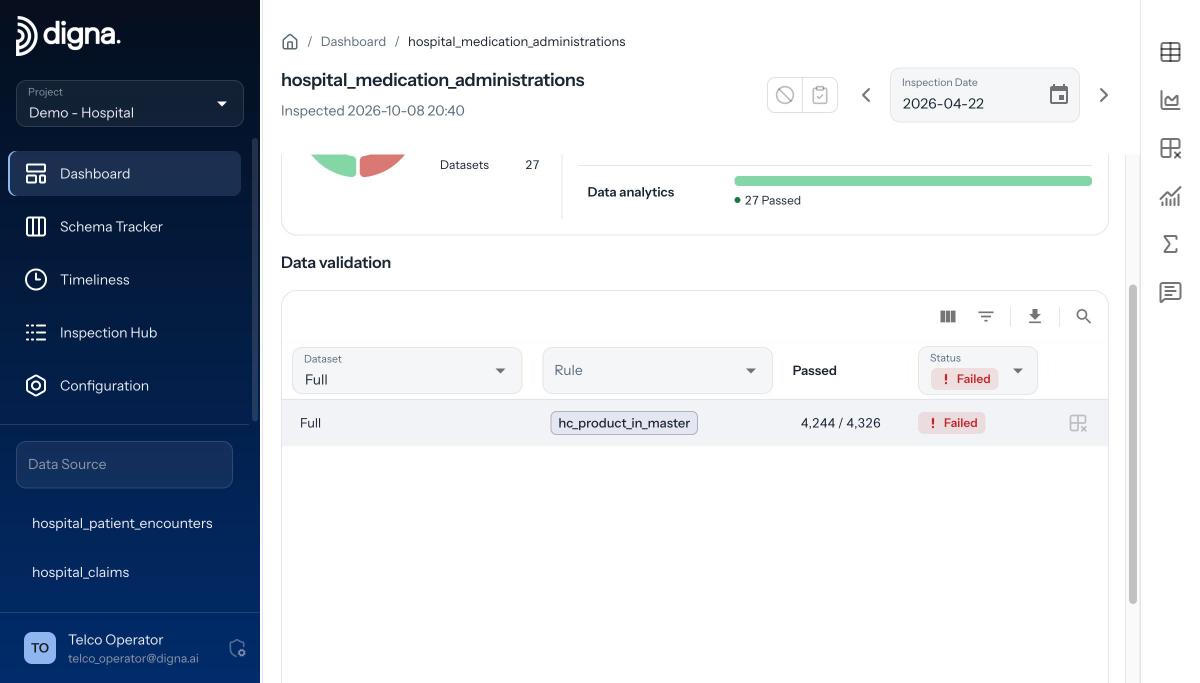
The result on 2026-04-22: 4,244 of 4,326 rows passed, 82 failed, status Failed.
digna reports passing and failing counts per rule, and returns the failing records themselves: the same query with the pass condition negated. In the Invalid Records view you filter on Passed, Uncertain or Failed, pick the check and see the rows, here with hospital, ward, product code and medication name. You can export them and notify the team that owns the data.
A few behaviours matter for cross-system checks:
Thresholds default to zero, so a new rule fails on a single orphan. If the master is known to lag the transactions by a few hours, raise the Info threshold so a small count shows as Uncertain instead of Failed, or use Relative mode.
NULL keys are skipped. A missing customer number does not fail the referential check. If the key is mandatory, add a separate Rule such as
customer_no IS NOT NULL.The column lists must be the same length. A mismatch is rejected rather than silently checking a weaker condition.
Checks run inside the source databases. digna sends SQL and receives counts, plus failing rows when you ask. Your data never leaves your infrastructure.
For the full walkthrough with every field, see how to set up a referential integrity check. The rule types, thresholds and result views are described on the digna Data Validation page and in the documentation.
Which cross-system references should you check first?
Check first the cross-system references that feed reports people act on, and the ones whose master data is regularly merged, renumbered or retired, because that is where an orphan turns directly into a wrong number. Start with a few rules and widen the scope once key-format false orphans are dealt with.
A practical order for master data validation across systems:
Transactions against the customer, account or patient master, because merges and closures happen there all the time.
Order lines and stock movements against the product master, because new products are often sold before the master record is complete.
Reference codes (country, currency, cost centre) against the system that owns the code list.
Pair each referential rule with a Uniqueness rule on the master key: a reference check against a master with duplicate keys can pass while the data is still wrong.
Next step
Foreign keys stop at the database boundary, and much of the data that matters crosses it. You don't need another pipeline to validate references across systems: one Referential Integrity rule per relationship, running where the data lives, shows after every inspection which records lost their parent. If you want to see it on your own landscape, book a demo with the digna team.
Frequently asked questions
Can you create a foreign key across databases?
Generally no. A declared foreign key references a table in the same database, because the engine checks it on every insert, update and delete. Across databases, servers or products there is nothing to declare, so cross-system references have to be validated by a scheduled check, such as an anti-join or a referential integrity rule.
How do you check referential integrity between two different databases?
Run an anti-join that returns keys in the referencing table with no match in the master table. Teams usually make both tables reachable through federated queries, copied reference tables, ETL-time lookups or reconciliation exports. In digna, a Referential Integrity rule can point at a data source on another connection, without replicating data.
Why does a cross-system check report orphans that actually exist?
Usually the key formats differ. One system stores '0004711' as text, the other 4711 as an integer, and case, trailing spaces or system prefixes cause the same false orphans. Agree on a canonical form, normalise the key in a view or SQL statement, and confirm the normalised master key is still unique.
Does digna copy the master table to compare keys across connections?
No. Since Release 2026.01, digna checks referential integrity across tables, views, schemas and database connections in one project without replicating data. Checks run inside your databases: digna sends SQL and receives counts, plus the failing rows when you ask for them. Your data never leaves your infrastructure.
Do NULL foreign keys fail a referential integrity check in digna?
They don't. Referential Integrity rules skip NULLs, so a row with an empty customer number is not counted as an orphan. When the key is mandatory, add a separate Rule with a condition such as customer_no IS NOT NULL, so missing keys and unmatched keys are reported as two distinct problems.