Healthcare Data Integrity: When Medication Doses Point Nowhere
|
6
min read
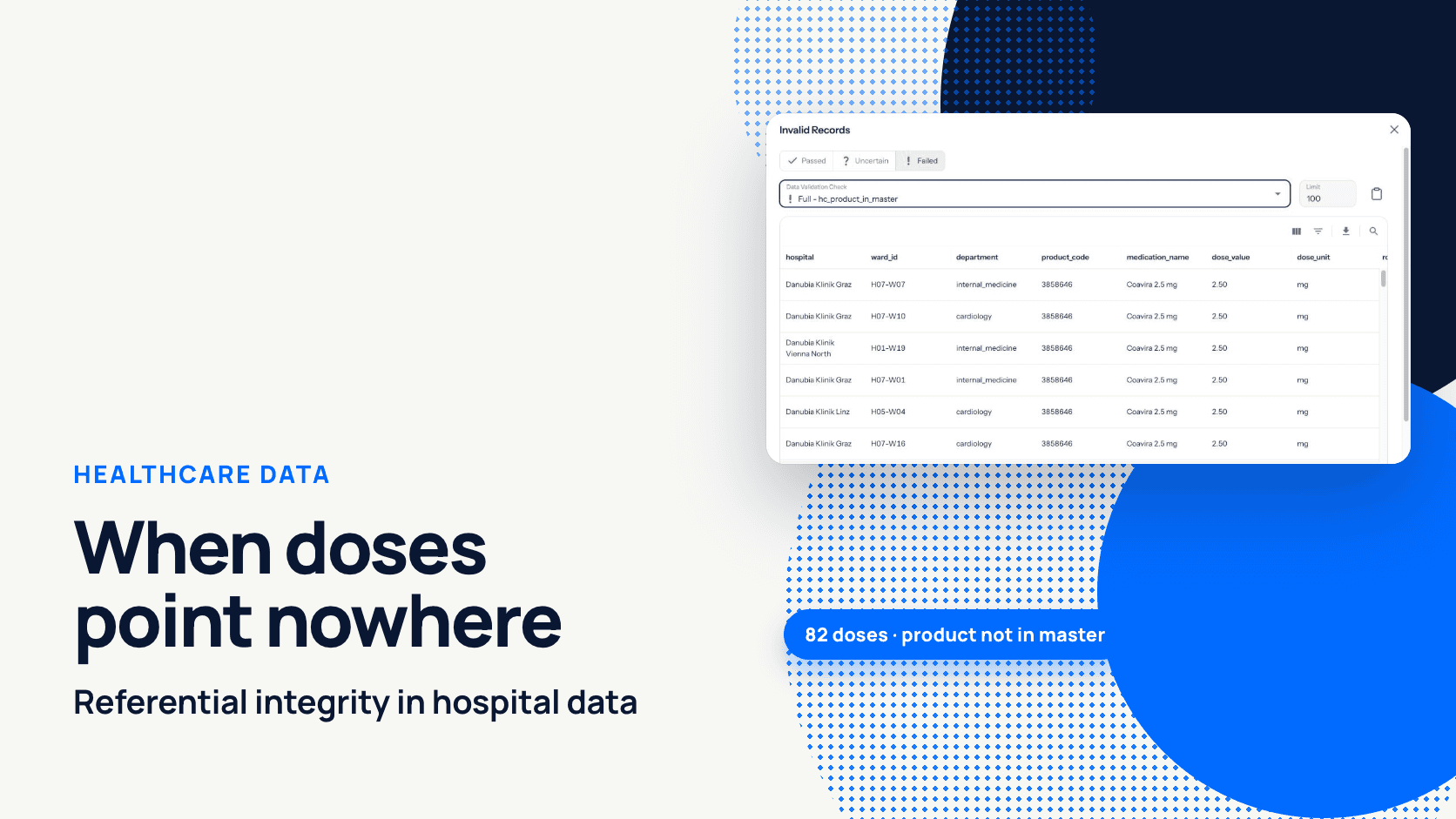
In digna's hospital demo data, on 22 April 2026, nurses at a hospital group gave 82 doses of a new medication. The pharmacy report for that day showed zero. Nothing failed. The doses were recorded, but the product was not yet in the pharmacy product master, so every report that joined doses to products dropped them. Referential integrity in healthcare data means that every record pointing to another record, such as a dose to a product, a lab result to an order or an encounter to a patient, points to a row that actually exists.
This post follows that case: how the gap appeared, how a referential integrity check in digna caught it, and what the team did next. Then it widens out to the hospital and payer relationships that deserve the same check.
For the general concept of orphan records, see the pillar post Can Your Data Still Find Its Parents? Understanding Referential Integrity. This one stays in the hospital.
Key takeaways
An orphaned dose is not wrong but invisible: the inner join removes it, so reports undercount without raising an error.
In the Danubia Kliniken demo, 82 of 4,326 medication administrations on 22 April referenced a product that was missing from the pharmacy product master.
A referential integrity rule in digna Data Validation is a handful of fields and no SQL, and it returns the failing records with hospital, ward and product code.
The fix usually sits in master data: add the product, re-run the inspection, and the report corrects itself.
The checks run inside the hospital's own database. Patient data never leaves its infrastructure.
Table of Contents
What happened at Danubia Kliniken on 22 April?
Why did nothing fail technically?
How did digna catch the missing product?
What does the team do next?
Which referential relationships matter in hospital and payer data?
Why does referential integrity break so often in healthcare?
Where do the checks run, and does patient data leave the hospital?
How do you get started?
What happened at Danubia Kliniken on 22 April?
A new product, Coavira 2.5 mg with product code 3858646, reached the wards before it reached the pharmacy product master. Nurses documented 82 administrations of it on 22 April 2026. Because the master had no matching row, every report that joined administrations to products counted zero doses of Coavira, while the medication administration records showed 82.
Danubia Kliniken is a fictional Austrian hospital group, and all figures in this post come from digna's demo data. The screenshots are real digna screens.
The sequence is ordinary. A product is ordered, delivered and given. The master record that names and prices it is maintained by another team, on another schedule. In the demo, the administrations table hospital_medication_administrations is loaded from the ward systems, and the product master hospital_medications is maintained by the pharmacy. For a day or a week, the two disagree.
Who notices? Usually not the data team. A ward manager compares a consumption report with what she knows was given, or a pharmacist sees stock fall without matching consumption. By then the wrong numbers have circulated for days.
Why did nothing fail technically?
Nothing failed because no single load was wrong. The administrations loaded, the master loaded and the report query ran. The fault lies in the relationship between two tables, and an inner join resolves a broken relationship by silently removing the row instead of raising an error.
A simplified version of the daily consumption report looks like this:
Coavira 2.5 mg does not appear in the result at all. A dashboard filtered on it shows 0. The 82 rows are still in the administrations table, but no query that goes through the master will ever see them.
Database constraints rarely catch this. Clinical source systems may enforce their own keys, but in a hospital data warehouse the eMAR extract and the pharmacy master usually come from different systems, and declared foreign keys are often not carried over or not enforced. So the check has to run on the data as it lands. Finding the orphans by hand is one query:
The query is easy. The hard part is running it for every relationship, on every load, and seeing the result before the report goes out. The sibling post Orphan records: find them with SQL and keep them out covers the SQL patterns, including composite keys and NULL handling, in more detail.
How did digna catch the missing product?
A referential integrity rule on the administrations data source checked every product_code against the pharmacy product master with each inspection. On 22 April, 4,244 of 4,326 rows passed and 82 failed, so the rule's status turned Failed on the dashboard, and the failing doses were one click away.
The rule
The rule lives in digna Data Validation, which has three kinds of rule: Rule, Uniqueness and Referential Integrity. Setting up this one took six steps:
In Configuration, select the data source
hospital_medication_administrations, open the Data Validation tab and click Add Rule. The dialog Add Data Validation Rule opens.Enter a Name and Description:
hc_product_in_master, "Every administered product exists in the pharmacy product master".Set Type to Referential Integrity.
Under Attributes, pick
product_codeon this data source.Under must exist in, pick the Data Source
hospital_medicationsand its Attributesproduct_code.Set Threshold Mode to Absolute, Info threshold 0 and Warn threshold 1, so a single orphaned dose already raises an Uncertain status and two or more fail the check. Save.
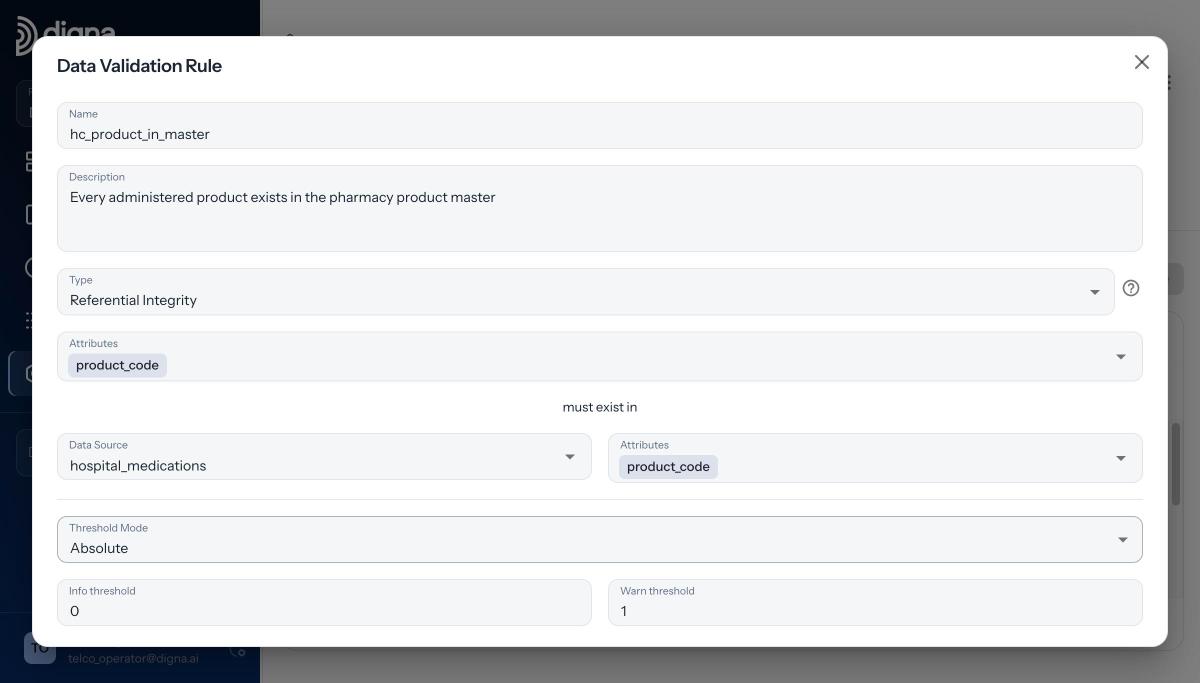
The rule: product_code on the administrations must exist in hospital_medications.product_code.
No SQL to write. From then on the rule runs with every inspection of the data source, scheduled or on demand. The video Referential Integrity in digna: Set Up in Under a Minute shows the same setup in real time, and How to set up a referential integrity check walks through every field, including composite keys.
The result
The inspection for 22 April evaluated 4,326 administrations. 4,244 found their product in the master; 82 did not. With a Warn threshold of 1, that is a Failed status on the dashboard, next to the other checks for the day.
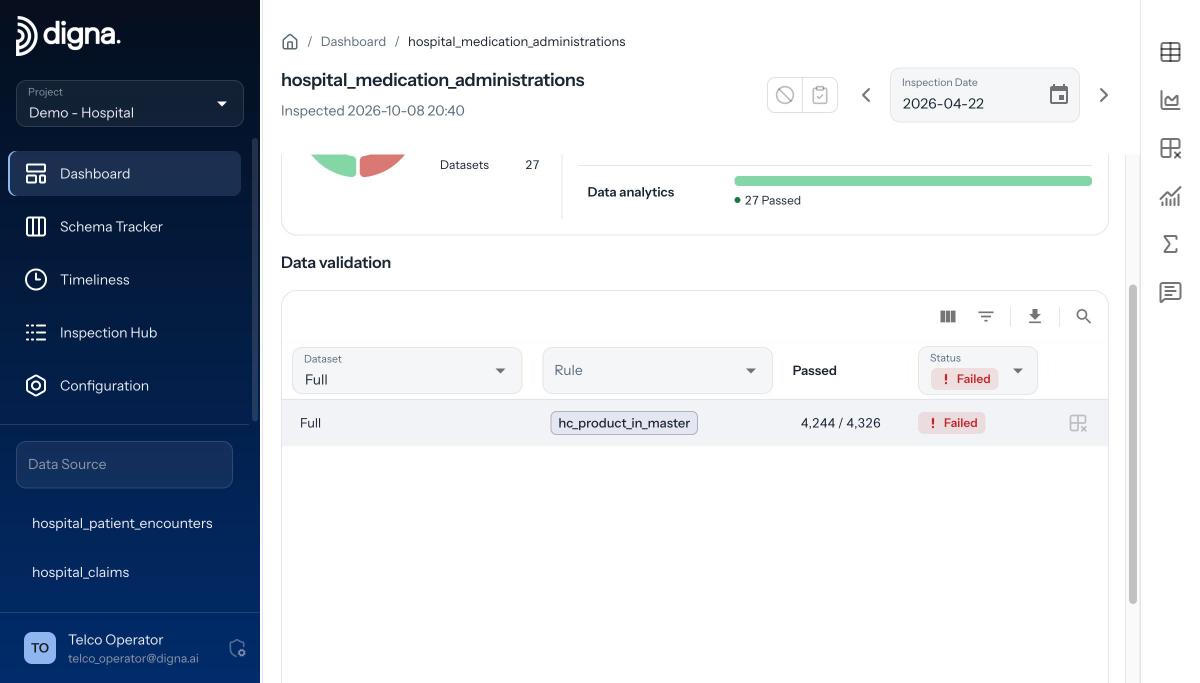
The dashboard on 22 April: hc_product_in_master, 4,244 of 4,326 passed, status Failed.
A count is enough to know that something is wrong. It is not enough to know what to do about it. For that you need the rows.
The failing records
digna returns the failing records themselves: the same check with the pass condition negated, run inside the source database. In the Invalid Records view, filter on Failed and pick the check Full - hc_product_in_master. Every row is a dose that points nowhere, with hospital, ward, department, product_code 3858646 and medication_name Coavira 2.5 mg.

Invalid Records: every failing dose with hospital, ward, department and product code.
That list answers the questions that otherwise travel by email for a week: which product, which wards, how many doses. It can be exported for whoever owns the fix.
What does the team do next?
The team fixes the master data, not the doses. The administrations are correct: nurses gave Coavira 2.5 mg and documented it. What was missing is the product row, so the remedy is to add it to the pharmacy product master, re-run the inspection and let the reports pick up the doses.
Read the failing records and confirm the pattern. The same product code, 3858646, on every failing row points to a missing master entry, not a typo in a ward system.
Notify the team that owns the product master, in this case the pharmacy, and attach the exported records.
The pharmacy adds Coavira 2.5 mg to
hospital_medications.Re-run the inspection of the administrations data source on demand. Once every product code resolves, the rule passes again and the doses appear in the reports.
Refresh the consumption report. The 82 doses appear, attributed to the right hospitals and wards.
If the failing records had shown dozens of different codes on a single ward, the cause would be different, perhaps a mapping problem in one interface, and so would the owner. The records tell you which case you are in. That is the main reason to look at rows rather than counts.
Teams that accept a short lag between first use and master entry can raise the thresholds or switch Threshold Mode to Relative. For medication data, Danubia keeps them strict.
Which referential relationships matter in hospital and payer data?
The relationships worth checking are the ones that reports and billing depend on: doses to products, encounters to patients, lab results to orders and encounters, bed occupancy to wards, and claims to insurers and policies. Each one, when broken, removes rows from a join without an error, and each one has a different owner.
Child record | Must exist in | What breaks if it's orphaned |
|---|---|---|
Medication administration (dose) | Pharmacy product master | Consumption, stock and cost reports undercount; a new product looks unused |
Pharmacy order | Product master; ward | Orders cannot be grouped by product or charged to a cost centre |
Patient encounter | Patient master | Case counts and readmission analyses lose stays; patient-level views are incomplete |
Lab result | Lab order; encounter | Results cannot be attributed to the requesting department or the stay; turnaround reports miss them |
Bed occupancy | Ward (hospital + ward code) | Occupancy per ward and department is understated; capacity dashboards are wrong |
Claim | Insurer; policy | Claims cannot be assigned to a payer; receivables and reconciliation per insurer are off |
Claim line | Encounter | Billed services without a matching stay; questions from the payer that nobody can answer quickly |
Two details matter in hospital data. First, composite keys: a ward code is often unique only within one hospital, so bed occupancy should be checked on hospital and ward together. In digna you pick several columns on both sides, in the same order, and the check is on the combination. Second, NULLs: referential checks skip null foreign keys, so a dose with no product code at all does not fail. If every administration must carry a product code, add a separate Rule, product_code IS NOT NULL.
Referential integrity is one layer of clinical data validation. Value ranges, plausibility checks and coding rules are another; Healthcare Data Validation: Clinical and Regulatory Rules at Scale covers those.
Why does referential integrity break so often in healthcare?
Referential integrity breaks often in healthcare because parent and child records are owned by different departments, live in different systems and load on different schedules. Pharmacy maintains products, admissions maintains patients, the lab system holds orders, facilities manages wards and finance manages insurers. Each is correct on its own terms; the joins between them are nobody's job.
Master data has many owners. A product, a ward or an insurer is created by the department that cares about it, through its own process. The systems that reference it learn about it later.
Systems load on different schedules. Ward documentation may arrive several times a day, while a master is refreshed nightly or after a change request. Any gap between the two produces orphans, even if both sides are eventually correct.
Codes change. Products are replaced, wards are merged or renamed, insurers change codes, lab catalogues are revised. Historical records still carry the old codes, and a master that only keeps current codes orphans them.
Sites merge. When a hospital group brings new sites onto shared reporting, code lists that were never designed to fit together meet in the same join.
The parent is in another database. The product master may sit in the pharmacy system and the administrations in the clinical data warehouse. Since Release 2026.01, digna checks referential integrity across different database connections in the same project, without replicating either table.
None of this signals a badly run hospital. It is the normal state of a hospital data warehouse fed by many systems. The difference is whether you find the gap the day it opens or the week someone complains.
Where do the checks run, and does patient data leave the hospital?
The checks run inside the hospital's own database, and patient data never leaves its infrastructure. digna runs on-premises or in the hospital's private cloud. It sends SQL to the source, receives counts, and fetches the failing rows only when you ask for them. No table is copied out, and the digna team never sees your data.
For clinical data that is a precondition, not a detail. Medication, lab and encounter data stay where your security and data protection teams already govern them.
Since Release 2026.06, rules can also live as code: the Python SDK (pip install digna-sdk) manages projects, inspections and rules from CI/CD, and validation rules can be exported from test and imported into production.
How do you get started?
Pick the one relationship whose failure would hurt most, usually doses to products or claims to insurers, and add a referential integrity rule for it. It takes a handful of fields. Then add the next one. After a few inspections you know which of your joins can be trusted and which ones quietly lose rows.
If you want to see the Danubia Kliniken checks running and talk through your own hospital or payer data, book a demo with the digna team.
Frequently asked questions
What is referential integrity in healthcare data?
It means every record that refers to another record points to a row that exists: a dose to a product in the pharmacy master, a lab result to its order, an encounter to a patient. When the parent is missing, joins drop the child row and reports undercount without any error.
Why do medication doses disappear from hospital reports?
Usually because the product is missing from the pharmacy product master. Reports join administrations to products, and an inner join silently removes doses with no matching product. In the Danubia Kliniken demo, 82 doses of a new product showed as zero in every report that went through the master.
How do you check eMAR data against the pharmacy product master?
Add a Referential Integrity rule on the administrations data source in digna Data Validation: pick product_code as the attribute, then under must exist in choose the product master and its product_code. Each inspection reports passing and failing rows and lists every orphaned dose.
Does patient data leave the hospital when digna runs these checks?
No. digna runs on-premises or in the hospital's private cloud, and every check executes inside the source database. digna sends SQL and receives counts, plus the failing rows when you open them. No table is copied out, and the digna team never sees your data.
Which tables in a hospital data warehouse need referential integrity checks?
Start with the joins that reports and billing rely on: medication administrations to the product master, encounters to patients, lab results to orders and encounters, bed occupancy to wards on hospital and ward code, and claims to insurers and policies. Each has a different owner to notify.


