Orphan Records: How to Find Them with SQL (and Keep Them Out)
|
6
min read

A payment row says account_id = 884213. The accounts table has no such account. Nothing errors, the load finishes green, and the next morning's branch report is short by exactly that payment, because the report joins payments to accounts and the join quietly drops it. An orphan record is a child row whose foreign key value has no matching row in the parent table it refers to.
Orphan records, or orphaned rows, turn up wherever foreign keys are not enforced: warehouses, staging layers, replicas, pipelines that load children before parents. Finding them is a standard SQL job, the anti join. There are four common ways to write it, and one of them reports "no orphans" the moment a single NULL appears.
This guide covers the patterns, the traps, and how to make the query a check that runs on every load. For the concept itself, see Can Your Data Still Find Its Parents? Understanding Referential Integrity.
Key takeaways
Inner joins hide orphan records: unmatched child rows vanish from the result instead of raising an error.
Find orphans with an anti join:
LEFT JOIN … IS NULL,NOT EXISTS, orEXCEPTon distinct keys.Avoid
NOT INon a nullable column: one NULL in the subquery returns zero rows, which looks like a clean result.Match composite keys on all columns together, and decide deliberately whether a NULL foreign key is an error.
A query you remember to run is not a control. In digna the same anti join is one Referential Integrity rule that runs with every inspection.
Table of Contents
What is an orphan record?
Why do inner joins hide orphan records?
How do you find orphan records with SQL?
LEFT JOIN … IS NULL
NOT EXISTS
EXCEPT (MINUS) on distinct keys
Why does NOT IN return no rows when there is a NULL?
Which anti-join pattern should you use?
How do you handle composite keys and NULL foreign keys?
How do you find orphan records in large tables?
What if the parent table is in another database?
How do you turn an orphan query into a standing check?
Find them once, then keep them out
What is an orphan record?
An orphan record is a row in a child table whose foreign key points to a parent key that does not exist: a payment whose account_id is not in accounts, or a medication administration whose product_code is not in medications. The row may be perfectly valid on its own. What is broken is the relationship.
Orphans always sit on the child side; an account with no payments is normal. The usual causes are mundane: the parent was deleted or never loaded, the child arrived before tomorrow's master data load, or the key formats differ ('00884213' against 884213, or a trailing space).
Operational databases such as PostgreSQL or Oracle enforce declared foreign keys, but warehouse copies usually don't carry the constraints over. Most cloud warehouses accept a FOREIGN KEY declaration without enforcing it; BigQuery's documentation states that it does not enforce primary and foreign key constraints. We cover why Snowflake, BigQuery, Redshift and Databricks don't enforce foreign keys separately.
Why do inner joins hide orphan records?
An inner join returns only rows that match on both sides, so a child row without a parent is simply not in the result. There is no error, no warning and no NULL to notice. Totals come out lower than they should, and nothing in the report itself shows the difference.
Every payment whose account_id is missing from accounts drops out before the SUM. The quickest way to see the gap is to count both ways:
If account_id is unique in accounts, the difference is your orphans plus any NULL account_id rows.
Declared but unchecked keys can make this worse. Amazon Redshift's planner assumes declared keys are valid, and AWS warns that invalid keys can make some queries return incorrect results.
How do you find orphan records with SQL?
You find orphan records with an anti join: a query that returns the child rows for which no matching parent row exists. In SQL you write it as LEFT JOIN … WHERE parent_key IS NULL, as NOT EXISTS, or as EXCEPT on the distinct key values. On non-null keys all three agree.
LEFT JOIN … IS NULL
Test a parent column that cannot be NULL in a matched row, ideally the join key. Put conditions on the parent into the ON clause: WHERE a.status = 'ACTIVE' is never true for an unmatched row, so the query would return nothing.
NOT EXISTS
This reads like the question. Duplicate parent keys don't multiply rows, and NULLs in accounts.account_id can't break it: an equality with NULL never matches.
EXCEPT (MINUS) on distinct keys
This returns the distinct missing key values, not the rows. Often the better first question: a handful of missing accounts can explain thousands of orphaned payments. Oracle has traditionally spelled the operator MINUS; BigQuery requires EXCEPT DISTINCT. Set operators treat two NULLs as equal, one more reason to filter NULL keys explicitly.
Why does NOT IN return no rows when there is a NULL?
NOT IN returns no rows if its subquery contains even one NULL, because SQL's three-valued logic makes every comparison with that NULL unknown. x NOT IN (1, 2, NULL) means x <> 1 AND x <> 2 AND x <> NULL. The last term is never true, so the whole condition is never true.
For a payment whose account exists, one comparison is false and the row is correctly excluded. For a missing account, every comparison with a real key is true but the one with NULL is unknown, so the condition is unknown, and WHERE keeps only true rows. The result is an empty set, indistinguishable from "no orphans".
It fails quietly, with a false all-clear, and warehouse key columns are often not declared NOT NULL. Payments whose own account_id is NULL never qualify either. Use NOT EXISTS, or at least add WHERE a.account_id IS NOT NULL inside the subquery.
Which anti-join pattern should you use?
Use NOT EXISTS as the default for row-level orphan checks, EXCEPT when you want the list of missing key values, and LEFT JOIN … IS NULL when you also want matched counts in the same pass. Use NOT IN only when both columns are guaranteed non-null.
Pattern | Returns | NULL in parent key | NULL foreign key in child | Readability | Typical performance |
|---|---|---|---|---|---|
LEFT JOIN … IS NULL | Child rows | Safe | Reported as orphan unless filtered | Familiar; intent sits in the WHERE clause | Usually planned as an anti join |
NOT EXISTS | Child rows | Safe | Reported as orphan unless filtered | Reads like the question | Usually planned as an anti join |
EXCEPT / MINUS | Distinct key values | Safe | Returned once as NULL unless filtered | Short and clear for key lists | Deduplicates both sides; good for key-level summaries |
NOT IN | Child rows | Unsafe: one NULL returns zero rows | Silently excluded | Reads well, misleads | Fine on non-null columns; can get a worse plan on nullable ones |
Most optimizers plan LEFT JOIN and NOT EXISTS alike; check the plan on your platform.
How do you handle composite keys and NULL foreign keys?
For a composite key, match all key columns together in one predicate, never column by column: a row is an orphan when its combination is missing, even if each value exists somewhere on its own. NULL foreign keys need a deliberate decision before you count them: missing reference, or legitimately empty.
Suppose each hospital has its own formulary, keyed by (hospital_id, product_code):
Two separate checks, "the hospital exists" and "the product exists", both pass for a product listed only at hospital A and administered at hospital B. Only the combined predicate catches it. EXCEPT handles composite keys naturally. Don't concatenate keys into one string: '1' || '23' and '12' || '3' collide.
A payment with a NULL account_id doesn't point at a missing account; it points nowhere. A payment must have an account, while an optional reference such as referring_doctor_id may be empty. Exclude NULLs from the orphan query and count them separately:
How do you find orphan records in large tables?
On large tables, count before you list, compare distinct key values rather than every row, and restrict the child side to the latest load or partition. Keep the parent side complete: a payment booked today may reference an account opened years ago, so never filter the parent by load date.
Count first. Run the anti join as
COUNT(*). Fetch rows only when the count is non-zero, and then with a limit.Compare distinct keys. Reduce the child side to
SELECT DISTINCT account_idfirst. Distinct keys are usually far fewer than rows.Filter to the latest load. Restrict the child to the newest partition or
load_dateso the engine can prune.Keep the join column comparable. Same data type on both sides, no
CASTorTRIMin the predicate, which can block index use and pruning. Fix formats in the load instead; see our guide to data cleaning in SQL.Record the result. Store date, rows evaluated and orphans found to see the trend.
This counts missing keys, not orphaned rows; pull the rows for those keys afterwards.
What if the parent table is in another database?
An anti join only works when one query engine can read both tables. If payments sit in the warehouse and accounts in the core banking database, plain SQL cannot see both, so you copy one side across, use a database link or federated query, or run the check in a tool that can reach both connections.
A copied master table is another pipeline with its own lag: a stale copy reports false orphans or misses real ones. Database links depend on platform support and need security approval for every new connection.
How do you turn an orphan query into a standing check?
You turn an orphan query into a standing check by running it on every load, recording passing and failing counts, setting a threshold for failure, and keeping the failing rows where the owning team can see them. In digna that is one Referential Integrity rule, configured in a dialog, with no SQL to write.
digna Data Validation has three kinds of rule: Rule, Uniqueness and Referential Integrity. The referential one is this article's anti join: given columns on one data source and a matching set on another, digna keeps the distinct values from the other table and fails any row that does not join. It executes inside your source database; your data never leaves your infrastructure. Since Release 2026.01 it works across different database connections within the same project, without replicating data.
The screenshots below use digna's demo data for Danubia Kliniken, a fictional Austrian hospital group.
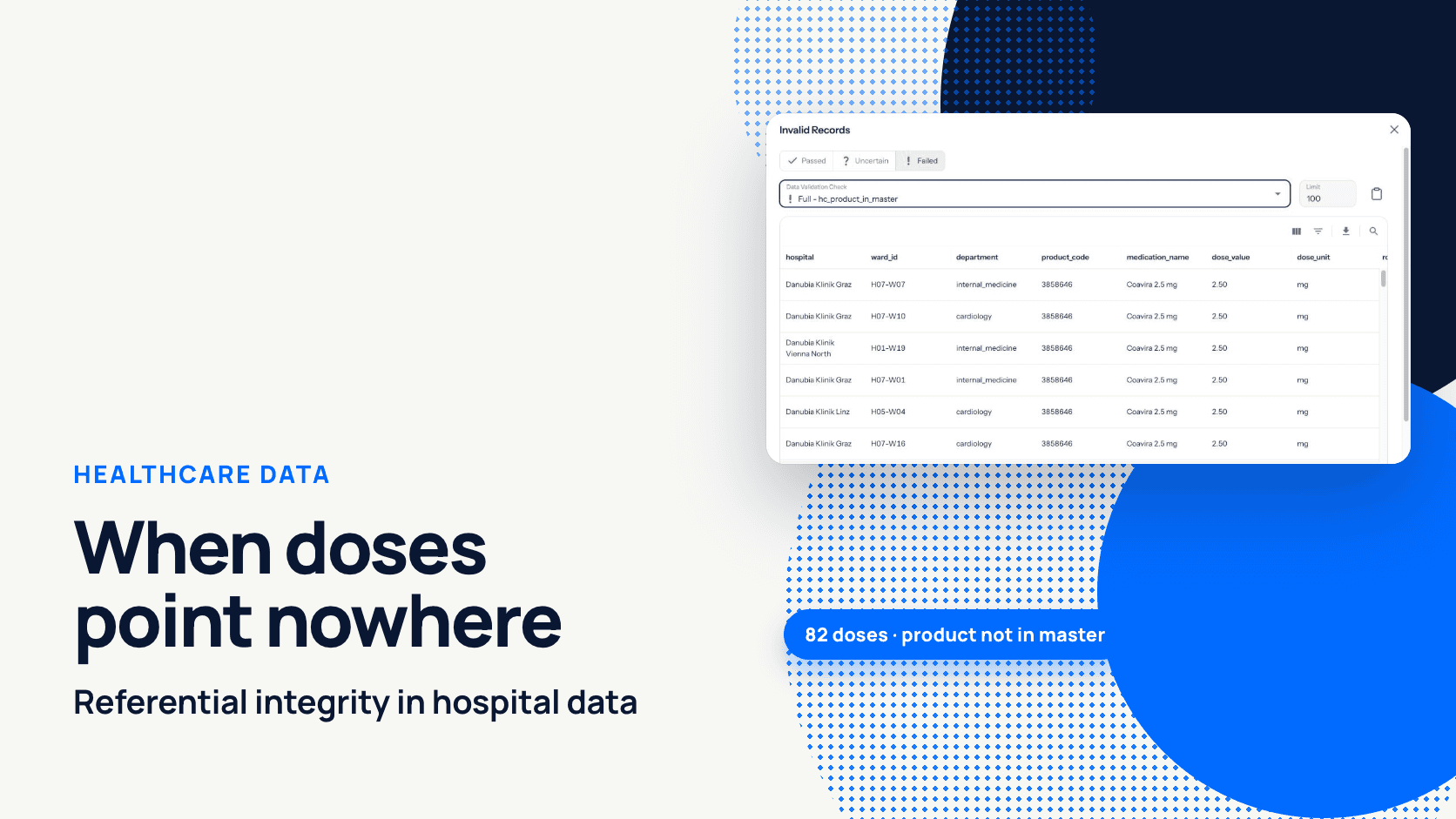
On 2026-04-22 the wards recorded 82 administrations of Coavira 2.5 mg (product code 3858646), not yet in the pharmacy product master. Every report joining doses to products showed 0 doses of it while nurses had given 82. The rule hc_product_in_master failed: 4,244 of 4,326 rows passed. By hand, you would need:
The Invalid Records view shows that result set without anyone writing it:

Invalid Records, filtered to Failed: every orphaned dose with hospital, ward, department, product code and medication name.
Setting up the rule:
Configuration → data source
hospital_medication_administrations→ tab Data Validation → Add Rule. The Add Data Validation Rule dialog opens.Enter a Name (
hc_product_in_master) and a Description.Set Type to Referential Integrity and pick Attributes
product_code.Under must exist in, pick the Data Source
hospital_medicationsand its Attributesproduct_code. For a composite key, pick several columns on both sides in the same order; lists of different length are rejected.Choose Threshold Mode Absolute or Relative and set the Info threshold and Warn threshold (here: Absolute, Info 0, Warn 1). Save. The rule runs with every inspection, scheduled or on demand.
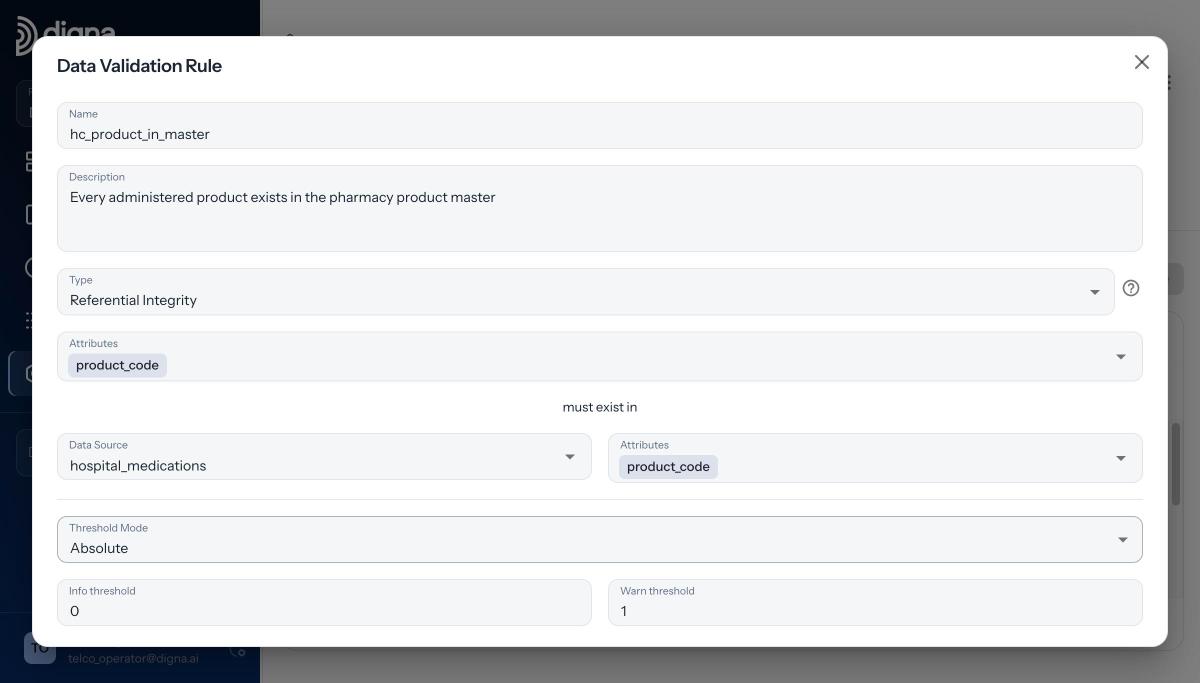
The whole rule: two attribute lists, a target data source and two thresholds.
Referential Integrity skips NULLs, like the IS NOT NULL filter above; if presence is required, add a separate Rule with product_code IS NOT NULL. Above the Info threshold the status is Uncertain, above the Warn threshold Failed, so with Info at 0 any orphan takes the rule off Passed. The failing records are the same query with the pass condition negated, exportable, and results can notify the team that owns the data.
Since Release 2026.06 rules can also live as code via the Python SDK (pip install digna-sdk). For the full walkthrough, see how to set up a referential integrity check in digna or the 2:26 setup video.
Find them once, then keep them out
For investigating orphan records: NOT EXISTS for rows, EXCEPT for missing keys, never NOT IN on a nullable column, and a deliberate decision about NULLs. Keeping them out takes more: enforce foreign keys where the database can, load parents first, handle late-arriving master data explicitly, and run the referential check on every load.
To see that check running against your own tables, inside your own infrastructure, book a demo with the digna team.
Frequently asked questions
How do I find orphan records in SQL?
Use an anti join that returns child rows with no matching parent. The most robust form is NOT EXISTS with a correlated subquery on the key; LEFT JOIN … WHERE parent_key IS NULL gives the same result. Filter NULL foreign keys out first and count them as a separate completeness check.
Why does NOT IN return no rows when the subquery contains a NULL?
Three-valued logic is the reason. x NOT IN (1, 2, NULL) expands to x <> 1 AND x <> 2 AND x <> NULL, and the last comparison is unknown, never true. WHERE keeps only true rows, so the query returns nothing, which looks exactly like a clean result.
Is NOT EXISTS faster than LEFT JOIN IS NULL?
Usually neither is faster: most modern optimizers plan both as an anti join, so the choice comes down to readability. NOT IN is the outlier. On nullable columns it can get a worse plan, and it returns no rows at all when the subquery contains a NULL.
What is the difference between an orphan record and a NULL foreign key?
An orphan record points to a parent key that does not exist, while a NULL foreign key points nowhere. They need different checks: referential integrity for orphans, and an IS NOT NULL rule where the reference is mandatory. digna's Referential Integrity rule skips NULLs for exactly this reason.
How can I check for orphan records automatically after every load?
Turn the anti join into a scheduled check with thresholds and stored results. In digna that is one Referential Integrity rule in Data Validation: pick the columns, pick the data source they must exist in, set Info and Warn thresholds, save. It runs inside your database with every inspection.