Foreign Key Not Enforced: Why Your Data Warehouse Lets Orphans In
|
6
min read

You add a foreign key from fact_sales.customer_id to dim_customer in your warehouse. The DDL runs, the nightly load runs, and the next morning a batch of new sales rows point at customers that do not exist. Nothing failed, because nothing checked. In Snowflake, BigQuery, Amazon Redshift and Databricks, a foreign key is not enforced: the platform stores the declaration as metadata but accepts rows whose key has no match in the parent table.
The same applies to primary keys and unique constraints. That surprises people who grew up on PostgreSQL, Oracle or SQL Server, where a declared foreign key rejects the bad row on insert. In a cloud warehouse the declaration is a promise you make, not a rule the database keeps for you. Some query planners even believe the promise and use it to simplify joins.
This post lists what each platform enforces, with links to the vendor documentation, explains why warehouses make this trade-off, shows how a violated key can turn into a wrong number, and describes what to run instead. For the general idea of parent and child rows and what an orphan record is, start with the pillar post Can Your Data Still Find Its Parents? Understanding Referential Integrity.
Key takeaways
Snowflake (standard tables), BigQuery, Redshift and Databricks accept primary, foreign and unique key declarations but do not enforce them. Snowflake hybrid tables are the exception.
NOT NULL is enforced on Snowflake, Redshift and Databricks; Databricks also enforces CHECK constraints.
Redshift and BigQuery use declared keys when planning queries. If the keys are wrong, some queries can return incorrect results without any error.
Declare keys only when the data has been validated, and validate again after every load with a referential integrity check.
Keep NOT NULL as its own rule and watch references that cross systems, where no constraint can exist at all.
Table of Contents
What does "foreign key not enforced" mean?
Which data warehouses enforce primary and foreign keys?
Why don't data warehouses enforce foreign keys?
How can an unenforced key return wrong query results?
How do you protect referential integrity in a data warehouse?
The anti-join check in SQL
How does a referential integrity check look in digna?
Where to go from here
What does "foreign key not enforced" mean?
A foreign key that is not enforced is a declaration the database records but never tests. You can write FOREIGN KEY (customer_id) REFERENCES dim_customer (customer_id), and the platform will store it, show it in the catalogue and expose it to tools, yet it will still load a row whose customer_id has no parent.
Vendors call these informational constraints. They describe the intended shape of the data: which column identifies a row, which column points to which table. BI tools, data catalogues and modelling tools read them to draw diagrams and suggest joins. Some query optimisers read them too. What they do not do is stop a load, raise an error or flag an orphan.
So "the key is declared" and "the key holds" are two different statements in a warehouse. The first is a piece of DDL. The second is a fact about the data that only a check can establish, and it can change with every load.
Which data warehouses enforce primary and foreign keys?
None of the four major cloud warehouses enforces primary, foreign or unique keys on their standard tables. Snowflake hybrid tables are the one exception in this list. NOT NULL is enforced on Snowflake, Redshift and Databricks, and Databricks also enforces CHECK constraints. The table summarises each vendor's documentation; follow the links for the current wording.
Platform | PK / FK / UNIQUE enforced? | What is enforced | What the planner does with declared keys | Documentation |
|---|---|---|---|---|
Snowflake | No on standard tables ("optional, not enforced"). Yes on hybrid tables. | NOT NULL; PK, FK and UNIQUE on hybrid tables | Keys on standard tables are informational metadata; check the docs before relying on them for optimisation | |
Google BigQuery | No. "BigQuery doesn't enforce primary and foreign key constraints." | Not enforced for PK/FK; "You are responsible for maintaining the constraints at all times." | Uses declared keys to eliminate inner and outer joins and to reorder joins | |
Amazon Redshift | No. Uniqueness, primary key and foreign key constraints are informational only. | NOT NULL | Uses keys as planning hints and assumes they are valid as loaded; invalid keys can make some queries return incorrect results | |
Databricks | No. "Primary key, foreign key, and unique constraints are informational only and aren't enforced." | NOT NULL and CHECK | Keys are informational; check the docs before relying on them for optimisation |
Two details matter in practice. First, NOT NULL is the constraint you can usually trust: on Snowflake, Redshift and Databricks a null in a NOT NULL column is rejected. Second, Snowflake hybrid tables are a different table type with different behaviour; a foreign key on an ordinary Snowflake table gives you none of that enforcement.
Classic OLTP databases such as PostgreSQL, Oracle, SQL Server and MySQL with InnoDB do enforce declared foreign keys. But a warehouse loaded from them usually does not carry those constraints over, and many load jobs disable constraints for speed. The integrity you had in the source system does not travel with the data on its own.
Why don't data warehouses enforce foreign keys?
Enforcing a foreign key means looking up every incoming key in the parent table before accepting the row. Warehouses are built to load very large batches quickly and in parallel, and that per-row lookup works against both. The vendor documentation states the behaviour; the reasons below are the general engineering trade-off, not vendor statements.
Load speed. A bulk load of millions of fact rows would need millions of parent lookups. Skipping them keeps load times predictable.
Distributed, parallel loads. Storage and compute are spread across many nodes and files. Checking a key against a parent table that is itself being loaded in parallel needs coordination, which slows everything down.
Load order. Pipelines often load facts before dimensions, or receive late-arriving dimension rows. Strict enforcement would reject rows that would have been valid an hour later.
Append-heavy pipelines. Most warehouse tables are appended to, not edited row by row. The model assumes the data was prepared upstream, so the database does not re-check it.
The trade-off is reasonable. The catch is that the check does not disappear; it moves. Someone has to run it after the load, and in many teams nobody does.
How can an unenforced key return wrong query results?
An unenforced key becomes dangerous when the query planner trusts it. Amazon Redshift documents that its planner assumes keys are valid as loaded, and that if your application allows invalid foreign or primary keys, some queries could return incorrect results. A key that is declared but violated is worse than no key at all.
BigQuery uses declared primary and foreign keys to eliminate inner and outer joins and to reorder joins, and its documentation puts the burden on you: "You are responsible for maintaining the constraints at all times."
Here is the mechanism in general terms. Take a query that joins fact_sales to dim_customer but only selects columns from fact_sales. If the planner trusts the foreign key, it may decide the join cannot remove any rows and skip it. Run the same query without the declared key and the inner join drops every orphan sale. Now the same report gives two different totals depending on the plan, and neither run raises an error.
Duplicate primary keys cause a related problem: a join everyone assumes returns one row per key returns several, and totals double. In both cases the dashboard looks normal. The number is simply wrong, and you find out from a reconciliation weeks later, if at all.
How do you protect referential integrity in a data warehouse?
You protect referential integrity in a warehouse by treating declared keys as claims and checking them after every load. Declare a key only when the data has been validated, run a referential integrity check as part of each pipeline run, and alert the owning team when it fails. These steps work on any of the four platforms.
List the keys you have declared. Know which foreign and primary keys exist in the catalogue, because those are the ones a planner may trust and a BI tool may join on.
Declare keys only when validated. Before adding a key, prove it holds on the current data. If you cannot keep checking it, think twice about declaring it.
Validate after every load. Run a referential integrity check for each important child-parent pair as part of the pipeline, not as a one-off audit. A load that brings in orphans should be visible the same day.
Keep NOT NULL as a separate rule. A referential check usually ignores null keys, because a null points at nothing. If every row must have a parent, test
customer_id IS NOT NULLon its own, or rely on the enforced NOT NULL constraint where the platform offers it.Watch cross-system references. The product master may live in one database and the transactions in another. No foreign key can span two systems, so these references are only ever protected by a check.
Set a threshold and an owner. Decide whether one orphan is a failure or whether a small share is tolerable, and route the result to the team that owns the data.
The anti-join check in SQL
The core of any referential integrity check is an anti-join: find child rows whose key has no match in the parent table.
The IS NOT NULL filter keeps null keys out of the orphan count, in line with step 4. For composite keys, NOT EXISTS variants, performance on large tables and how to keep orphans out at load time, see orphan records: find them with SQL and keep them out.
Writing the query is the easy part. Running it after every load, for every key, storing the counts, alerting someone and keeping the failing rows available for whoever has to fix them is where hand-written SQL tends to fall behind.
How does a referential integrity check look in digna?
In digna, a referential integrity check is a rule in digna Data Validation: you pick the column on one data source, pick the matching column on another, and set a threshold. There is no SQL to write. digna generates the check and runs it inside your warehouse with every inspection of that data source.
The setup takes a handful of fields in the Add Data Validation Rule dialog (Configuration → data source → Data Validation → Add Rule):
Name and Description, for example
hc_product_in_master: "Every administered product exists in the pharmacy product master".Type: Referential Integrity (the other types are Rule and Uniqueness).
Attributes: the column on this data source, here
product_code.must exist in: the parent Data Source (
hospital_medications) and its Attributes (product_code). For a composite key, pick several columns on both sides in the same order; mismatched column lists are rejected.Threshold Mode Absolute or Relative, with an Info threshold and a Warn threshold. Absolute, Info 0, Warn 1 means a single orphan already raises an Uncertain status and two or more fail the rule; leave Warn at 0 if one orphan must fail.
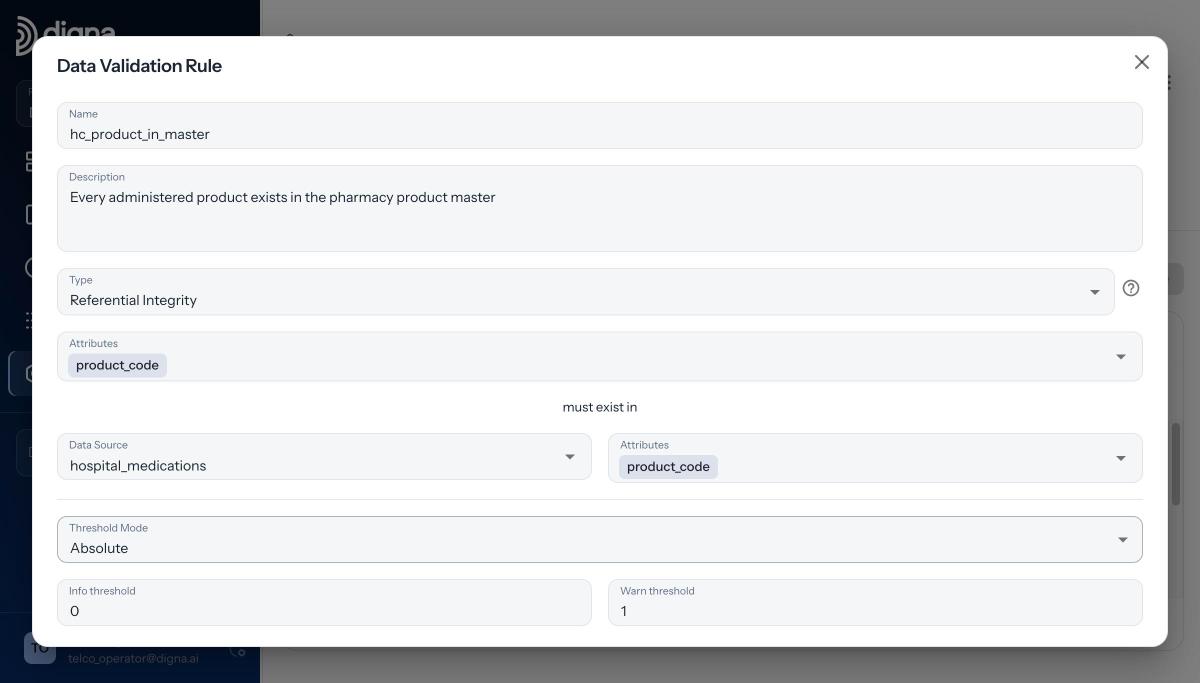
The referential integrity rule in digna: every product_code on the administrations data source must exist in hospital_medications.
The example uses fictional demo data from Danubia Kliniken, a fictional Austrian hospital group.
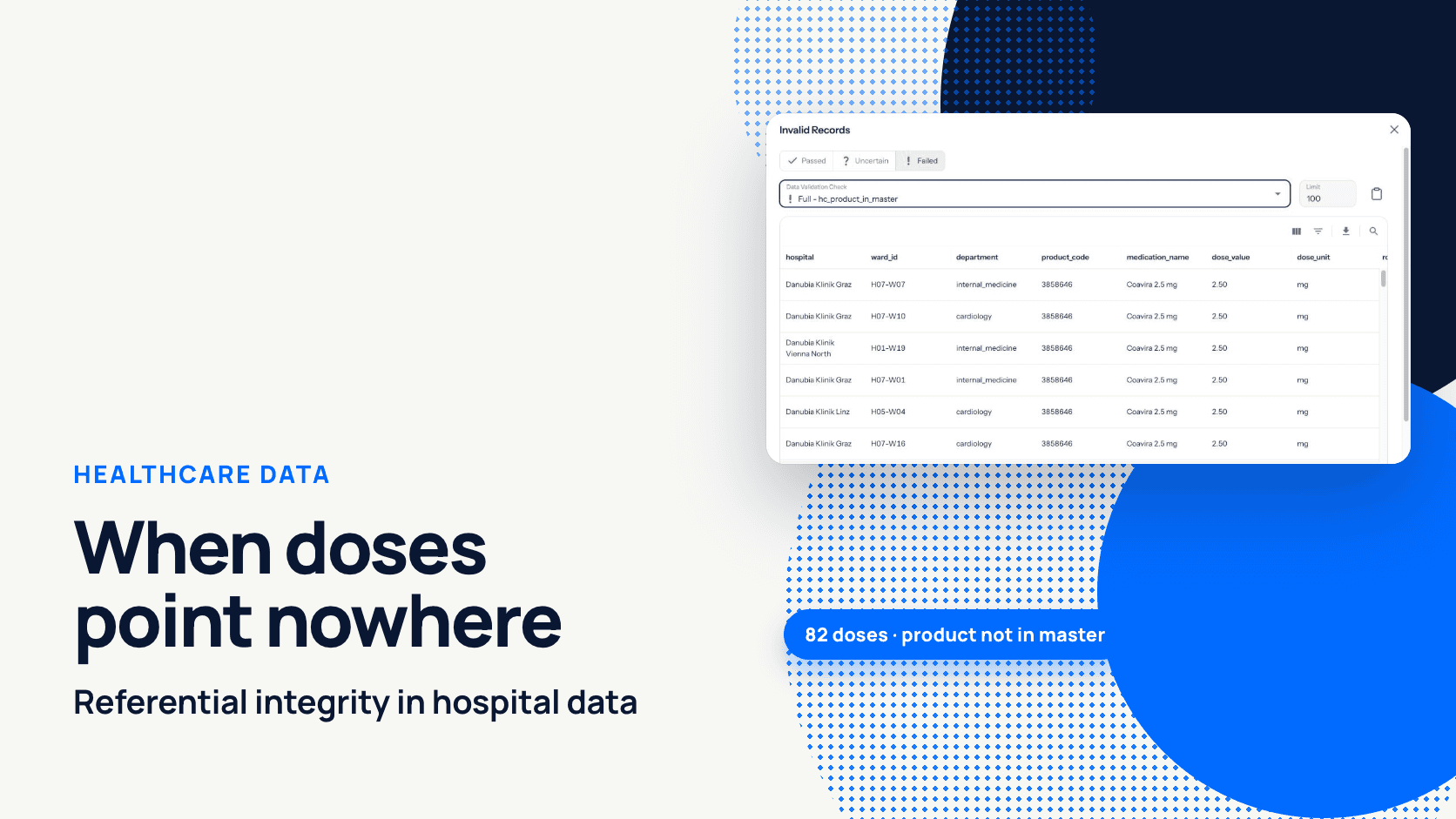
On 2026-04-22, 82 administrations of Coavira 2.5 mg (product code 3858646) were recorded on the wards before the product reached the pharmacy product master. The rule reported 4,244 of 4,326 rows passed and went to Failed. In the Invalid Records view you filter on Failed, pick the check and see each orphan row with its hospital, ward and product code, ready to export for whoever fixes the master data. Without the check, every report joining doses to products would have shown zero doses of that product.
Three properties line up with the steps above. The check runs inside the warehouse itself: digna sends SQL, receives counts, and fetches the failing rows only when you ask for them; no table is copied out, and your data never leaves your infrastructure. Null keys are skipped, so presence is a separate Rule such as product_code IS NOT NULL. And since Release 2026.01 the parent can sit in a different schema or even a different database connection within the same project, which covers the cross-system references no constraint can reach. For the wider picture of bringing sources together in a warehouse, see our guide to data warehouse integration; the full field-by-field walkthrough of the rule is in how to set up a referential integrity check.
Where to go from here
An unenforced foreign key is not a bug in your warehouse. It is a design choice that hands the check back to you. Keep declaring keys where they help tools and planners, but only once the data has been proven to match them, and prove it again after every load. A referential integrity check that runs with each inspection, inside the warehouse, with a threshold and an owner, closes the gap the platform left open.
If you want to see this running against your own warehouse tables, book a demo with the digna team.
Frequently asked questions
Does Snowflake enforce foreign keys?
Not on standard tables. Snowflake documents primary, foreign and unique keys there as optional and not enforced, while NOT NULL is enforced. Hybrid tables are the exception: on them, PK, FK and UNIQUE constraints are enforced. Orphan rows in a standard table therefore load without any error.
Can unenforced foreign keys cause wrong query results?
Yes, when the planner trusts them. Amazon Redshift states that its planner assumes keys are valid as loaded, so invalid keys can make some queries return incorrect results. BigQuery uses declared keys to eliminate and reorder joins and says you are responsible for maintaining the constraints.
What are informational constraints in a data warehouse?
Informational constraints are primary, foreign or unique keys the platform records as metadata but does not check. Databricks and Amazon Redshift describe their key constraints as informational only. Tools and planners may read them, yet rows that violate them still load, so a separate validation check is needed.
Should I still declare foreign keys in Redshift or BigQuery?
Declare them only when the data has been validated and you keep validating it. Both platforms use declared keys in query planning, so a key that is declared but violated can change results. Run a referential integrity check after every load before trusting the declaration.
How do you check referential integrity when the warehouse doesn't enforce it?
Run an anti-join after every load: select child rows whose key has no matching parent, excluding nulls. In digna Data Validation this is a Referential Integrity rule with a threshold, executed inside the warehouse with each inspection, and the failing rows appear in the Invalid Records view.