Data Warehouse Integration a Guide for Modern Data Teams
|
4
min read

A warehouse integration project usually starts with a business complaint, not an architecture diagram.
A finance lead opens the monthly revenue dashboard and sees totals that don't match the CRM. Operations says inventory is late by several hours. The data team checks the pipeline logs and finds every job marked successful. Nothing looks broken, yet nobody trusts the numbers. That's the core problem data warehouse integration is meant to solve. It isn't just about moving data from one system to another. It's about creating a reliable analytical foundation that people can use without second-guessing every chart.
Most first-time enterprise teams focus on connectors, load schedules, and transformation code. Those matter. But the projects that hold up over time are the ones that treat integration as a reliability discipline. You need schema mapping, controlled transformation, lineage, governance, and post-load monitoring that catches subtle failures before they spread into dashboards, forecasts, and machine learning features.
Table of Contents
The True Cost of Disconnected Data
The classic failure pattern looks like this. Sales reports one customer total from the CRM, finance reports another from the ERP, and support has a third view in its ticketing platform. Every team has data. Nobody has agreement.
That mismatch creates more damage than a visible outage. Analysts build workarounds in spreadsheets. Executives stop trusting BI. Engineers spend their mornings proving whether the issue is a source problem, a mapping problem, or a stale load. A single broken metric can erode confidence in the whole warehouse.

Data warehouse integration is what turns that mess into a system. It gives you one governed path from source applications into a shared analytical model. Instead of each team interpreting raw exports differently, the warehouse standardizes definitions, aligns grain, and preserves history in a form that reporting tools and models can use consistently.
This isn't unique to software or finance. Industries with fragmented operational systems run into the same issue. If you want a simple example of how disconnected business systems create reporting friction, this guide to homebuilder integrations shows the operational side of the same pattern. Different apps may serve different teams well, but they create analytical chaos when nobody owns the integration layer.
Broken trust is usually more expensive than a failed job. Teams can recover from a visible outage faster than they can recover from weeks of quietly wrong numbers.
If you're trying to make the business impact visible, a data downtime cost calculator can help frame the operational cost of unreliable data in practical terms. That conversation matters, because warehouse integration often gets funded as plumbing when it should be treated as decision infrastructure.
Core Data Warehouse Integration Architectures
Teams often argue about ETL versus ELT as if one pattern has won. It hasn't. Good architecture comes from matching the pattern to the workload.
The simplest way to explain the trade-offs is a kitchen model. Raw ingredients are source data. Prep is transformation. Plating is the final warehouse model. The question isn't which kitchen is best in theory. It's where you do the prep, how fast the dish needs to leave the line, and how much volume the kitchen can handle.
The market direction explains why these patterns matter. The broader data integration market is projected at USD 15.18 billion in 2026 and USD 30.27 billion by 2030, with growth tied to real-time processing through streaming systems such as Apache Kafka for use cases like fraud detection and live inventory management, according to Integrate.io's review of real-time data integration growth rates.
How the main patterns differ
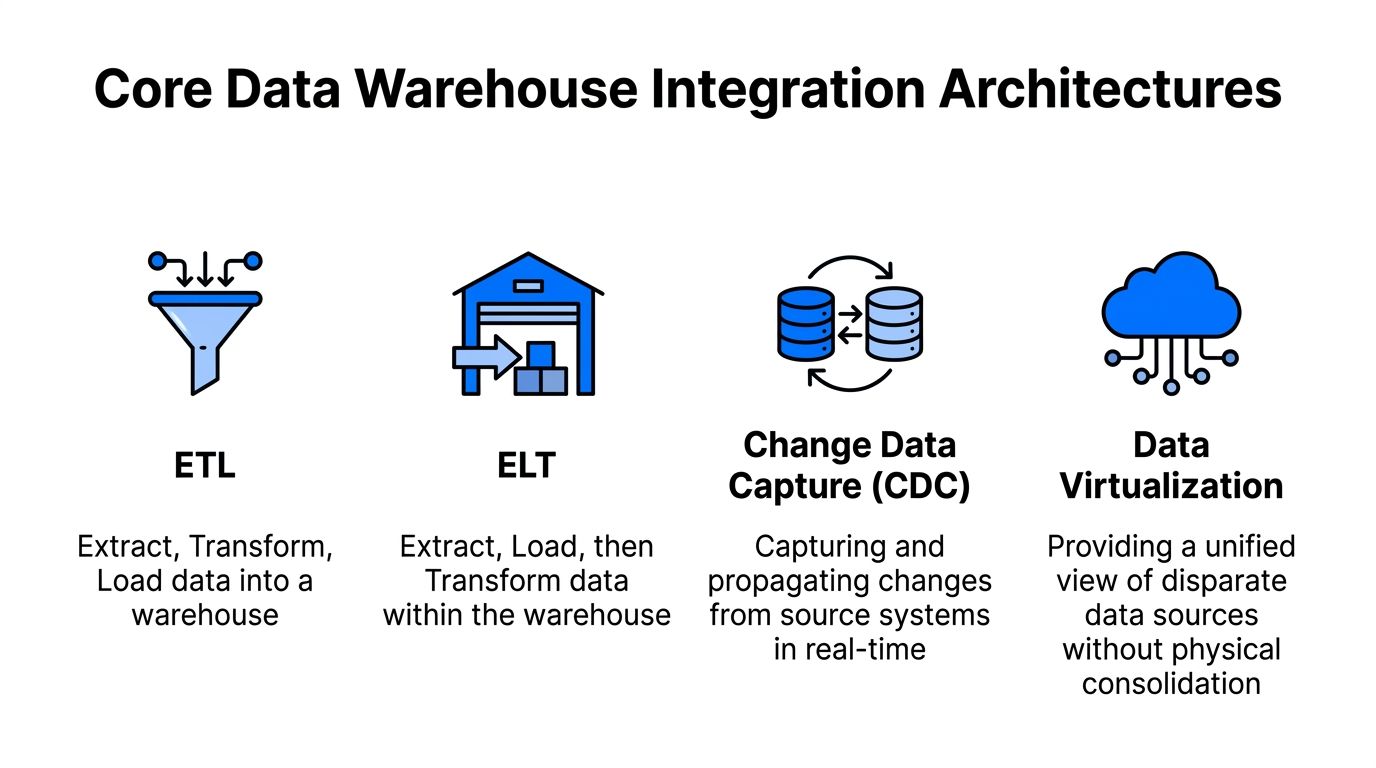
ETL is the prep kitchen. You extract data from source systems, transform it before it reaches the warehouse, then load a cleaned and conformed result. This works well when quality checks must happen before data is exposed to analysts. Nightly reconciliations and regulated reporting often fit here.
ELT loads first and transforms inside the warehouse. This is the line cook approach for modern cloud platforms. You land raw or lightly standardized data fast, then use warehouse compute for heavy transformation. It's usually the better fit when volumes are high and you don't want external transformation systems becoming the bottleneck.
CDC, or Change Data Capture, watches for inserts, updates, and deletes at the source and propagates only what changed. This reduces unnecessary movement and keeps analytical tables fresh without full reloads. It's one of the most practical ways to support near-real-time reporting while protecting source systems from constant full extracts.
Streaming pushes events as they happen. Instead of waiting for the next scheduled batch, the pipeline processes data continuously. This is what you reach for when the warehouse feeds operational analytics, alerting, or ML features that lose value quickly if they arrive late.
Practical rule: If the business can tolerate delay and needs strict pre-load controls, ETL is usually simpler. If the business needs freshness and the warehouse has strong compute, ELT and CDC usually age better.
Comparison of Data Integration Architectures
Pattern | Transformation Point | Latency | Best For |
|---|---|---|---|
ETL | Before loading into the warehouse | Batch, often scheduled | Nightly reconciliations, strict pre-load validation |
ELT | Inside the warehouse after load | Batch to near-real-time | Large volumes, cloud-native warehouses, flexible transformations |
CDC | Minimal transformation during change propagation, then downstream handling | Near-real-time | Keeping warehouse tables fresh from transactional systems |
Streaming | Inline event processing and downstream transforms | Real-time | Fraud detection, live inventory, threat analysis |
What doesn't work is picking a single pattern for every source. ERP extracts, CRM APIs, event logs, and IoT feeds don't behave the same way. Mature platforms mix these approaches. They may use ETL for finance close processes, ELT for SaaS application replication, CDC for operational databases, and streaming for event data.
Also note the common trap in the infographic language. Data virtualization can be useful for unified access, but it isn't the same as warehouse integration. Virtualization helps with access abstraction. A warehouse still needs physical modeling, governed transformation, and durable history if you want dependable analytics.
A Practical Plan for Integrating Data Sources
Most failed integration programs start too far downstream. Teams rush into building pipelines before they've profiled sources, aligned business definitions, or agreed on how to handle conflicts. Then they spend months rewriting logic that should've been settled in week one.
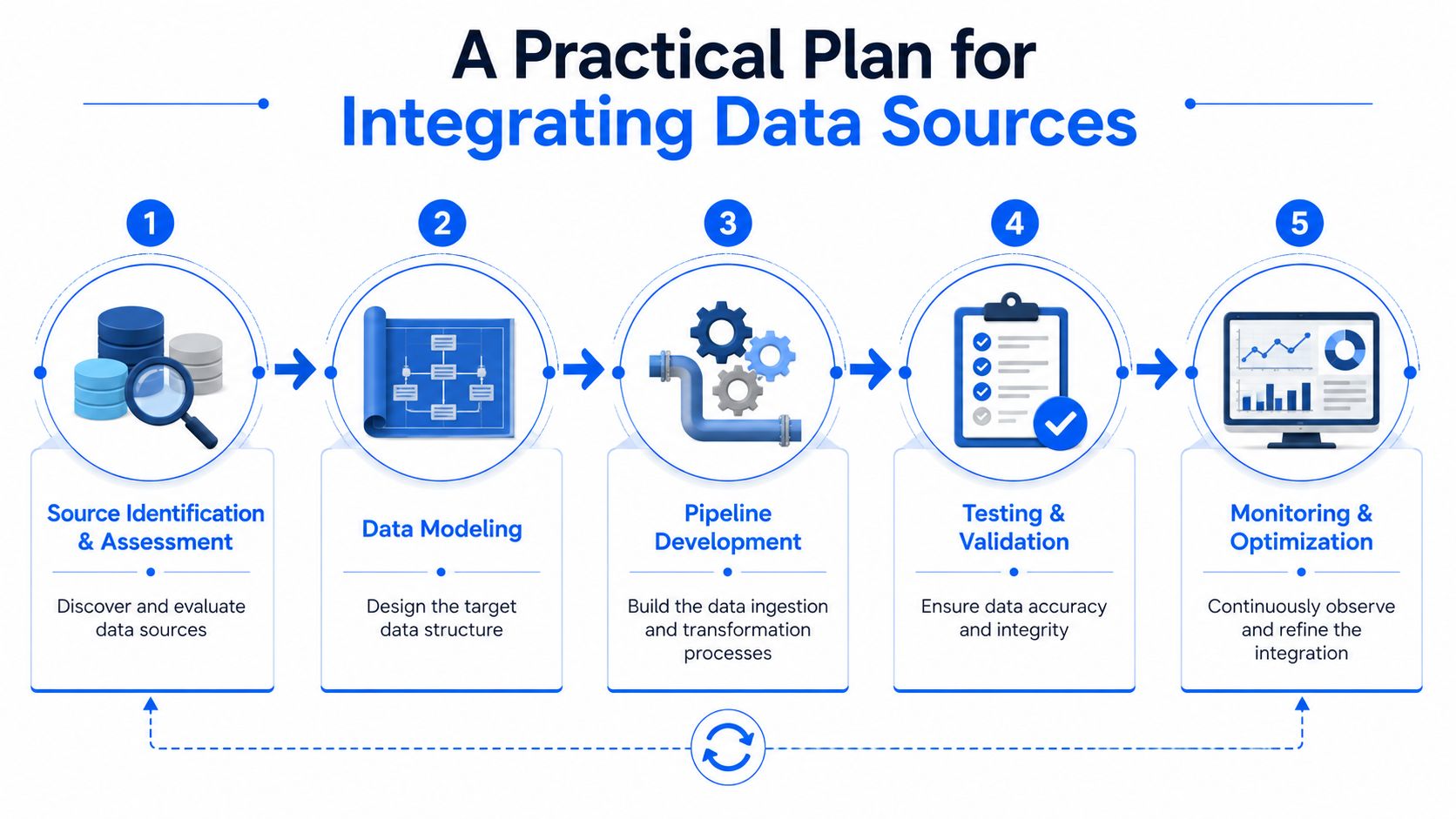
Effective warehouse integration depends on mapping heterogeneous schemas from systems like ERP and CRM into a unified model. The ETL versus ELT choice follows directly from project requirements. Batch ETL fits nightly jobs with quality checks before load, while ELT fits high-volume streaming or API-driven use cases because it uses warehouse compute for transformation, as outlined in Exasol's guide to data warehouse integration.
Start with source reality, not target ambition
Begin by inventorying source systems and profiling the data itself. Don't trust field names. A column called customer_id in one system may hold an account-level identifier, while another source uses it for an individual contact. The first practical deliverable isn't a pipeline. It's a source contract.
Focus on four early questions:
What is the business grain of each dataset. Order, line item, account, session, policy, claim.
Which fields are authoritative in each source. Don't let two systems both “own” the same business fact without an explicit rule.
How are time and status represented. Timestamps, local time zones, soft deletes, and status codes create more defects than initially anticipated.
What history must be preserved. Many source applications overwrite current values. Analytics often needs the prior state.
This is also the point where schema conflict resolution matters. Naming conventions, data types, currency formats, and units of measure have to be normalized before they hit business reporting layers. If CRM stores revenue as decimal and ERP stores monetary values with local-currency assumptions, you need a clear canonical model before anyone writes KPI logic.
Build the pipeline in layers
A durable integration stack usually has at least three layers.
Landing layer
Pull source data with minimal interference. Preserve raw shape, load timestamps, and extraction metadata. This layer helps with replay, auditing, and root-cause analysis.Standardization layer Normalize keys, timestamps, type conversions, status values, and structural inconsistencies. Many cross-system conflicts are resolved in this layer.
Business layer Publish subject-oriented models for analytics. Sales, customers, claims, products, support. In this layer, teams should consume data, not in raw ingestion tables.
A few choices consistently work well:
Use idempotent loads: Pipelines should be safe to rerun without duplicating records or corrupting history.
Separate ingestion from business logic: Don't mix extraction code with metric logic. It makes change management painful.
Capture lineage early: Track source table, extract time, and transformation dependencies from the first production run.
Treat deletes explicitly: Soft deletes, hard deletes, and status-based deactivation each need different handling.
The quickest way to produce broken dashboards is to skip referential integrity checks until after stakeholders start building reports.
Orchestration also deserves more respect than it usually gets. A pipeline can have perfect SQL and still fail operationally if dependencies are fuzzy. Define load order, retry behavior, freshness expectations, and failure escalation before launch. Integration reliability comes as much from control flow as from transformation code.
Fighting Silent Failures with Data Observability
A green pipeline dashboard doesn't mean your warehouse is healthy.
The most expensive issues in warehouse integration often happen after data lands. A source team adds a column, changes a data type, shifts event timing, or alters business process behavior. The pipeline still completes. Tables still populate. Dashboards still render. But key measures start drifting because the meaning, shape, or timeliness of the data has changed without a hard failure.
That's the blind spot most implementation guides leave out. A TDWI survey found that 72% of data teams report broken dashboards due to unmonitored schema changes and latency drift, as highlighted in TDWI's discussion of modern data integration gaps. The key issue isn't just failed ETL. It's silent drift that slips past traditional tests.
Why successful loads still produce bad analytics
Traditional validation usually checks whether the job ran, whether row counts look plausible, and whether required fields are non-null. Those checks matter, but they miss a large class of downstream failures.
Consider a few common examples:
Schema drift: A source changes
status_codefrom integer to string. The warehouse coercion succeeds, but business logic relying on numeric mapping now behaves differently.Latency drift: Data that usually arrives early in the morning starts arriving hours later. Dashboards refresh on schedule and show partial business activity as if it were complete.
Distribution drift: A source process changes upstream, and the ratio of values across categories shifts sharply. Nothing fails technically, but forecasts and anomaly-sensitive metrics become unreliable.
Grain drift: Records that used to represent one event per customer now represent one event per line item. Aggregates inflate without any loader error.
These aren't theoretical issues. They show up constantly in first-generation warehouse programs because teams treat integration as transport instead of a monitored production system.
A warehouse load is only the beginning of integration. The real test is whether data keeps the same meaning, freshness, and structure after production changes start happening around it.
The difference between basic monitoring and observability is context. Monitoring tells you whether the pipeline ran. Observability helps you detect whether the output still behaves as expected.
What to monitor after data lands
Post-load controls should sit close to the warehouse, not only in the orchestration layer. The highest-value checks usually include:
Freshness tracking: Learn expected arrival windows by table and source. Alert on late, missing, or partial loads before business users see stale dashboards.
Schema tracking: Detect added columns, removed columns, data type changes, and unexpected nullability changes automatically.
Anomaly detection on metrics: Watch row counts, sums, ratios, cardinality, and distribution shifts. This is often the first signal that a source process changed.
Record-level validation: Enforce business rules on the warehouse side, especially where regulated reporting or audit requirements apply.
Trend analysis: Compare current behavior to baseline patterns over time so teams can distinguish a true incident from normal seasonality.
Teams often ask whether unit tests in transformation code can handle this. They can handle some of it. They can't handle enough. Static tests are good at validating expected logic. They're weaker at detecting unknown unknowns, especially when the source changed in a way nobody modeled.
A practical observability stack should answer questions like these every day:
Check | What it catches | Why it matters |
|---|---|---|
Freshness | Late or missing arrivals | Prevents partial reporting and stale decisions |
Schema change | Added, removed, or modified columns | Protects transformations and downstream semantic models |
Volume anomaly | Unexpected spikes or drops | Flags source extraction issues or process changes |
Distribution anomaly | Unusual value patterns | Catches silent business-process or mapping drift |
Validation rule breach | Record-level business logic failures | Supports trust, compliance, and audit readiness |
For teams that want a deeper explanation of why this layer matters, this guide to why data observability is crucial for modern data management is a useful companion read.
A short walkthrough helps if your stakeholders still think “job succeeded” is enough:
Enterprise Integration Deployment and Security
Enterprise warehouse integration is rarely limited by SQL. It's limited by security reviews, governance requirements, and the operational complexity of running data movement at scale.
Cloud-native warehouse adoption is one reason this work keeps accelerating. The global DWaaS market is projected to grow from USD 8.13 billion in 2025 to USD 43.16 billion by 2035, driven by enterprises in sectors including finance and healthcare that are adopting cloud-native architectures with real-time integration and AI-powered automation, according to Precedence Research on the data warehouse as a service market.
Architecture choices shape risk
The safest integration design usually minimizes unnecessary data movement. If you can transform and validate inside the warehouse or in tightly controlled environments, you reduce the number of systems that hold copied sensitive data. That matters for regulated sectors, and it matters for internal audit.
A few patterns usually hold up well:
Prefer controlled landing zones: Don't scatter raw extracts across ad hoc storage locations.
Use role-based access: Engineers don't always need direct access to sensitive business fields, and analysts rarely need unrestricted raw data.
Separate service accounts by function: Extraction, transformation, and consumption should have distinct permissions.
Audit pipeline actions: Access, schema changes, failed loads, and retries should leave an operational trail.
Governance has to be built in early
Governance isn't documentation you add after deployment. It starts when you define source ownership, data contracts, retention rules, and lineage expectations. If teams wait until production to clarify who owns customer_status or which system is authoritative for revenue adjustments, they end up governing incidents instead of governing data.
The strongest enterprise programs also align subject areas with policy boundaries. Finance models, healthcare datasets, and customer support data often have different access rules, retention needs, and validation standards. The warehouse may be centralized, but governance rarely is.
Security problems in integration usually start with convenience decisions. Temporary extracts become permanent. Shared credentials stick around. Debug tables outlive the incident they were created for.
Scalability matters too. Real enterprise deployment means the architecture must absorb new sources, changing schemas, and tighter compliance demands without a redesign every quarter. That's why subject-oriented modeling, metadata capture, and disciplined access control aren't overhead. They're what keeps the platform operable as adoption grows.
Your Integration Success Checklist and Validation Plan
A first enterprise integration program doesn't need perfect architecture. It needs a repeatable operating model. The best teams make their checklist explicit, use it on every new source, and treat validation as continuous rather than ceremonial.
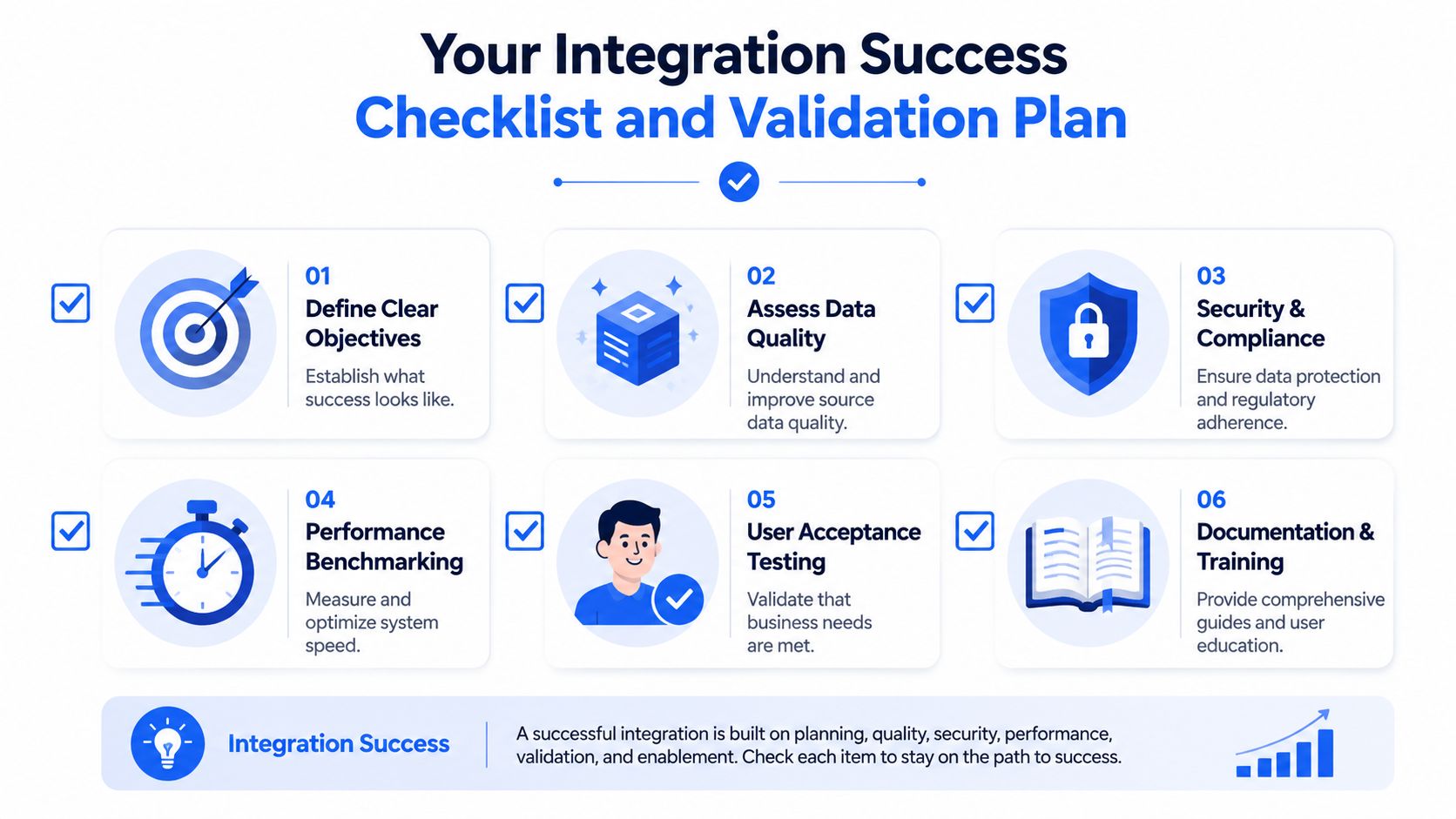
Pre-deployment checklist
Use this before you promote any pipeline into production.
Define the business objective: Name the decisions this integration supports. “Load CRM data” is not an objective. “Provide trusted customer and pipeline reporting” is.
Lock down source ownership: Every critical field needs a business or system owner. If ownership is vague, defects will bounce between teams.
Document target grain: State whether the model represents account, order, claim, event, or another business entity. Many reporting errors start with unstated grain assumptions.
Profile source anomalies early: Null patterns, duplicate keys, missing timestamps, and type inconsistencies should be known before modeling starts.
Choose the integration pattern intentionally: Batch ETL, ELT, CDC, or streaming should reflect freshness, volume, and control needs.
Design for replay: Store enough metadata and landing history to rerun safely after a failed or partial load.
Set freshness expectations: Business users need to know when data is expected and what “complete” means for each domain.
Define access and masking rules: Security controls should ship with the model, not after complaints appear.
Prepare operational ownership: Someone must own incidents, retries, source coordination, and downstream communication.
Modern validation and testing
Old validation practice was sample a few records, compare totals, and hope the pipeline behaves next week. That doesn't hold up once source systems evolve.
A stronger validation plan combines fixed tests with continuous warehouse-side checks:
Pre-load validation
Confirm extract completeness, required fields, and source delivery readiness.Transformation validation
Test joins, key uniqueness, type conversions, and referential integrity inside modeled layers.Business rule validation
Verify domain logic such as valid status transitions, date ordering, and required attribute combinations.Post-load observability
Watch freshness, schema changes, volume shifts, and metric anomalies after the data is already available to consumers.Consumer validation
Check that BI models, dashboards, and ML feature tables still align with expected warehouse outputs.
To address these challenges, many teams need a toolset beyond orchestration logs and SQL assertions. A modern validation approach should continuously track warehouse behavior, compare current loads to learned baselines, detect late arrivals, and surface schema drift before business users discover it in a dashboard. If you're formalizing that process, this guide to data validation during migrations and best practices is a practical reference.
A final review checklist for go-live should answer yes to these questions:
Validation area | Go-live question |
|---|---|
Source readiness | Do we know what each source owns and how often it changes? |
Modeling | Is the warehouse grain explicit and documented? |
Pipeline reliability | Can jobs rerun safely and recover from partial failure? |
Data quality | Are key business rules enforced automatically? |
Freshness | Do we know when each table should arrive and how to flag delays? |
Drift protection | Can we detect schema and distribution changes after load? |
Security | Are access controls and audit paths in place? |
Consumption | Have downstream dashboards and models been validated against the final warehouse output? |
If your team can't answer those questions clearly, the integration probably isn't finished. It's just loading data.
Reliable warehouse integration doesn't stop at ETL or ELT. It depends on catching late data, schema drift, and subtle anomalies after load, when success is often prematurely declared. digna helps data teams monitor freshness, validate records, track schema changes, and detect silent data drift inside their own environment so analytics stays trustworthy in production.
If schema drift is the post-load failure you most want to catch, digna Schema Tracker detects added, removed and retyped columns before they surface in dashboards.
Frequently asked questions
What is data warehouse integration?
Data warehouse integration creates one governed path from source applications such as CRM and ERP into a shared analytical model. Beyond moving data, it standardizes definitions, aligns grain and preserves history, so finance, sales and support stop reporting three different customer totals from three different systems.
What is the difference between ETL, ELT and CDC for a data warehouse?
ETL transforms data before loading and suits nightly reconciliations with strict pre-load checks. ELT loads first and uses warehouse compute for heavy transformation at high volumes. CDC propagates only inserts, updates and deletes from the source, keeping tables fresh in near real time without full reloads.
What layers should a data warehouse integration pipeline have?
A durable stack has at least three layers. The landing layer preserves raw shape, load timestamps and extraction metadata for replay and audits. The standardization layer normalizes keys, timestamps, types and status values. The business layer publishes subject-oriented models such as sales, customers or claims for analytics.
Why do successful warehouse loads still produce wrong dashboards?
Jobs can succeed while schema, latency, distribution or grain silently drift. A TDWI survey cited in the article found 72% of data teams report broken dashboards due to unmonitored schema changes and latency drift, for example when status_code changes from integer to string and warehouse coercion still succeeds.
What should you monitor after data lands in the warehouse?
Post-load checks should sit close to the warehouse and cover freshness against expected arrival windows, schema changes such as added or removed columns, volume and distribution anomalies, record-level validation rules, and trend analysis against baselines. Together they help separate real incidents from normal seasonality.