Searching with Wildcards: A Practical Guide for 2026
|
9
minuto de lectura

Most wildcard advice tells you to memorize symbols and move on. That shortcut breaks in production, because the failure usually starts when the engine stops treating your pattern as a wildcard at the point you need it most. The result is missed matches, noisy recall, or a query that looks harmless but forces a slow scan across the system.
Table of Contents
Why Wildcard Search Is an Operational Decision, Not Just a Syntax Trick
The Four Canonical Wildcard Symbols and What They Match
Any-length sequences
Single characters and character classes
Alternation and regex-like structures
Cross-Platform Wildcard Syntax at a Glance
Real Query Patterns for Data Exploration and Validation
A few patterns that earn their keep
Performance, Indexing, and the Cost of a Leading Wildcard
Two mitigations that actually help
Where Wildcards Stop Working and How to Spot It
Quick checks that expose the failure mode
A Practical Wildcard Checklist Before You Hit Run
Why Wildcard Search Is an Operational Decision, Not Just a Syntax Trick
A support engineer types *error* into a search box, expects every noisy log line to surface, and gets back nothing, or a timeout, or a result set that ignores the wildcard entirely. That kind of failure is more common than many teams admit, because wildcard handling changes with the platform, the index, and the analyzer pipeline. The same pattern can behave one way in SQL, another way in a shell, and a third way in a search engine.
Wildcard search is best treated as an operational choice, not a convenience feature. Microsoft's SQL Server docs show that % can sit at the beginning, middle, or end of a pattern, and that _ matches exactly one character, while bracket ranges like [a-f] are also valid in LIKE patterns as documented by Microsoft. Enterprise tools keep the same idea alive in user-facing search because partial matches are useful when you don't know the exact spelling, but the trade-off is always the same, broader recall usually means more load and more room for silent mismatch.
Practical rule: don't ask whether wildcards are supported. Ask whether the query still behaves like a wildcard after tokenization, quoting, escaping, and index selection.
The rest of the problem is simpler to frame than to fix. You need to know the core symbols, how they differ across platforms, where performance falls apart, and which systems stop expanding the pattern at all. That's the part most wildcard guides skip, and it's the part that matters when your query editor is connected to production. For teams that manage data reliability, this is the same kind of discipline you apply to lineage and freshness checks, which is why a tool like digna's data observability platform belongs in the same conversation, even if the search problem itself lives elsewhere.
The Four Canonical Wildcard Symbols and What They Match
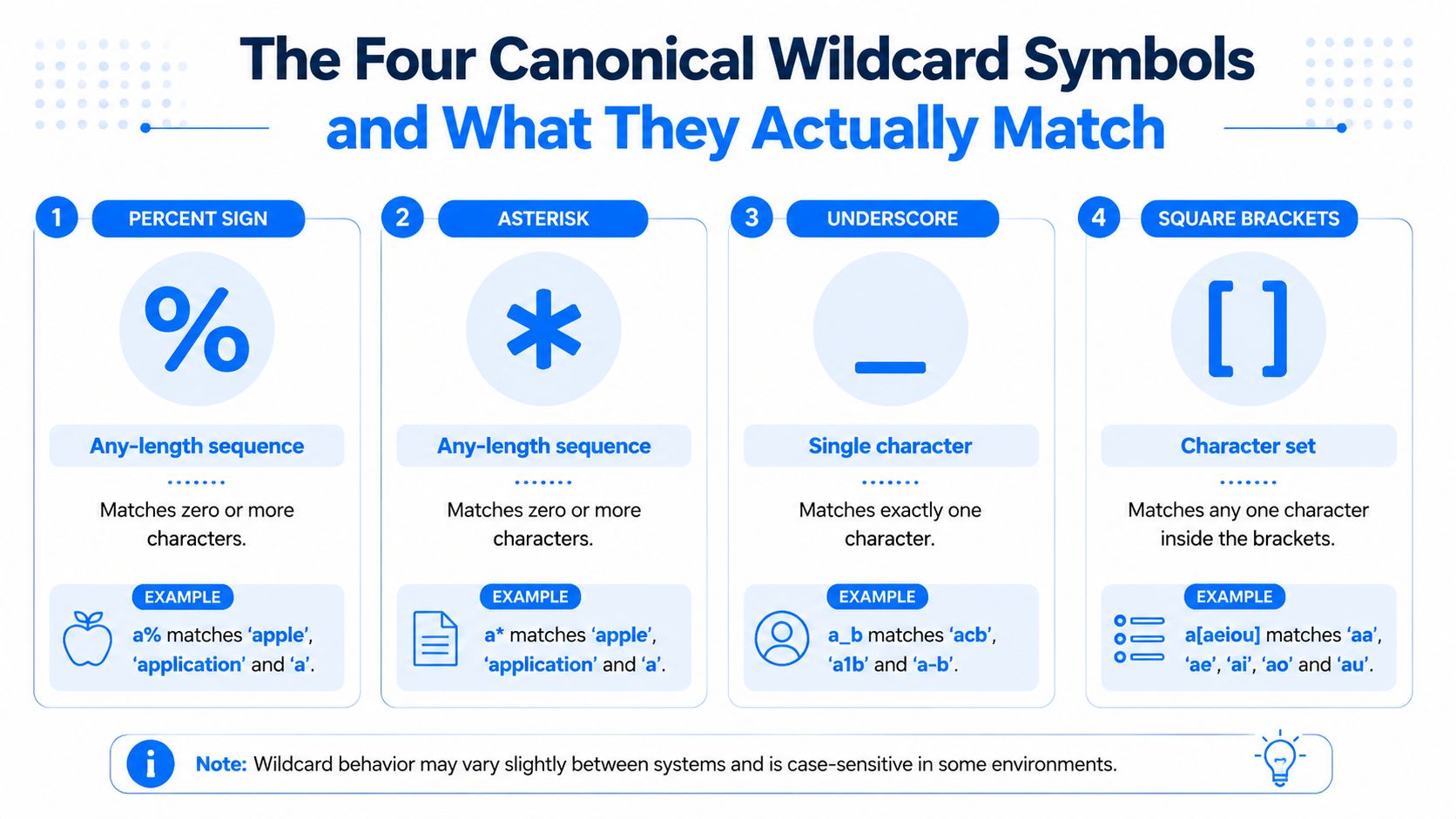
The safest way to think about wildcard syntax is by meaning, not by symbol. Across SQL, shell globs, and search engines, the same intent appears under different characters, and the engine may stop treating that character as a wildcard once tokenization, quoting, or escaping gets involved.
Any-length sequences
In SQL, % matches zero or more characters. A pattern like LIKE 'cust%' will match customer_id, cust, and custodian, because the match only cares that the text starts with cust. In a POSIX shell, the equivalent intent is usually *, so ls /var/log/*.log selects files that end in .log.
Search engines often borrow the same idea with * or % depending on the query language. Redgate's SQL Prompt history search uses * for zero or more characters, and Teradata's history filter uses % in the same role, which is why wildcard syntax feels familiar even when the product surface changes Teradata's wildcard filter docs.
Single characters and character classes
_ in SQL and ? in shells and many search tools match exactly one character. That matters when you know the shape of the value but not the exact character at one position. status_1 and status?1 are both precision tools, not fuzzy ones.
Square brackets let you define a character class. SQL Server supports bracket ranges like [a-f], and Teradata supports bracketed sets such as [xyz] and [0-5] in its history filter Microsoft's SQL Server wildcard docs.
Alternation and regex-like structures
Vertical bars show up more often in regex than in pure wildcard syntax. In a search field, status:[active|pending] is a common pattern for alternation in query-string style systems, while an email pattern may lean into regex-style character sets when wildcard syntax isn't expressive enough. The useful rule is simple, wildcards are for shape, regex is for structure.
Use a wildcard when the unknown part is broad but simple. Use exact match when you know the value. Reach for full regex only when you need alternation, grouping, or validation that a glob can't express cleanly.
For a quick comparison before you type, digna's data profiling overview is a useful mental model because it pushes the same habit, verify the shape before you trust the result.
Cross-Platform Wildcard Syntax at a Glance
The same intent, matching identifiers that start with INV, turns into different syntax depending on the platform. That difference matters because the same query shape can produce very different recall, ranking, and load characteristics once you move between SQL, search engines, and shells.
Platform | Any string | Single char | Char set | Escape literal | Sample, starts with |
|---|---|---|---|---|---|
SQL Server |
|
|
|
|
|
Teradata history filter |
|
|
| Literal |
|
PostgreSQL pattern matching |
|
| regex classes for advanced matching |
|
|
Elasticsearch query string |
|
| regex-style only when using regex queries | Escape reserved query characters |
|
OpenSearch wildcard |
|
| not a class system, use regex or other query types instead | Escape reserved characters carefully |
|
Splunk SPL | search operators, not | n/a | regex functions or search-time parsing | depends on the search command |
|
POSIX shell |
|
|
| quote patterns to stop expansion |
|
The friction points matter more than the symbols. Teradata's filter treats wildcard matches as not case-specific and supports literal percent handling in documented examples such as %[%]%, which is a good reminder that enterprise tools often expand the grammar beyond textbook SQL. SQL Server keeps LIKE as the baseline model, while OpenSearch and Elasticsearch reserve * and ? in query syntax and may block leading wildcard behavior by default. For a broader view on how query shape affects execution cost, digna's SQL optimization guide is a useful companion read.
A wildcard is portable as an idea, not as a character. Each engine remaps that idea at the boundary, and the failure mode is usually a query that looks correct but misses records or hits the index far harder than expected.
Real Query Patterns for Data Exploration and Validation
The queries that pay off here are usually the ones you write once, inspect, then delete after the audit. The best queries here are intentionally boring and easy to remove after validation is done.
A few patterns that earn their keep
For email validation in SQL Server, a bracketed pattern is often enough for quick triage, even when it is not a full RFC validator. A practical example looks like LIKE '%@[A-Za-z0-9.-]%\.com', which is a coarse screen for addresses ending in .com and containing a plausible local and domain shape. It is not a substitute for a dedicated validation rule, but it works well when you are checking a load for obvious corruption.
For shell work, the pattern can stay simpler. A Linux archive check like find . -type f \( -name "*.csv" -o -name "*.json" \) -mtime +7 isolates stale CSV and JSON files cleanly, because the wildcard handles file-name selection and the date filter handles lifecycle control. That split keeps the pattern readable and the result set bounded.
In OpenSearch, a product-code search such as { "wildcard": { "sku": "*aa*" } } finds SKUs with two consecutive vowels in the middle, but only if the field is mapped in a way that supports wildcard lookup. It is a useful audit pattern when you are checking whether upstream systems introduced unexpected code shapes.
Practical rule: use the narrowest wildcard that proves the point. If you already know the prefix or suffix, anchor it. If you do not need internal matching, avoid it.
When I am sanity-checking search behavior for a dashboard or a review, I look for the smallest query that still exposes the defect. That same discipline shows up in work like boost brand visibility in AI, where the useful move is to control query shape before the system fans out too broadly.
Use case | SQL LIKE | Shell glob | Search engine |
|---|---|---|---|
Email audit |
| n/a | regex or fielded search |
File cleanup | n/a |
| indexed file metadata query |
SKU shape check |
|
|
|
Prefix validation |
|
|
|
The best checks here are narrow, temporary, and easy to remove once the data passes review. That is the same mindset behind digna's data cleaning in SQL, because both jobs work better when you confirm the shape before you widen the search.
Performance, Indexing, and the Cost of a Leading Wildcard
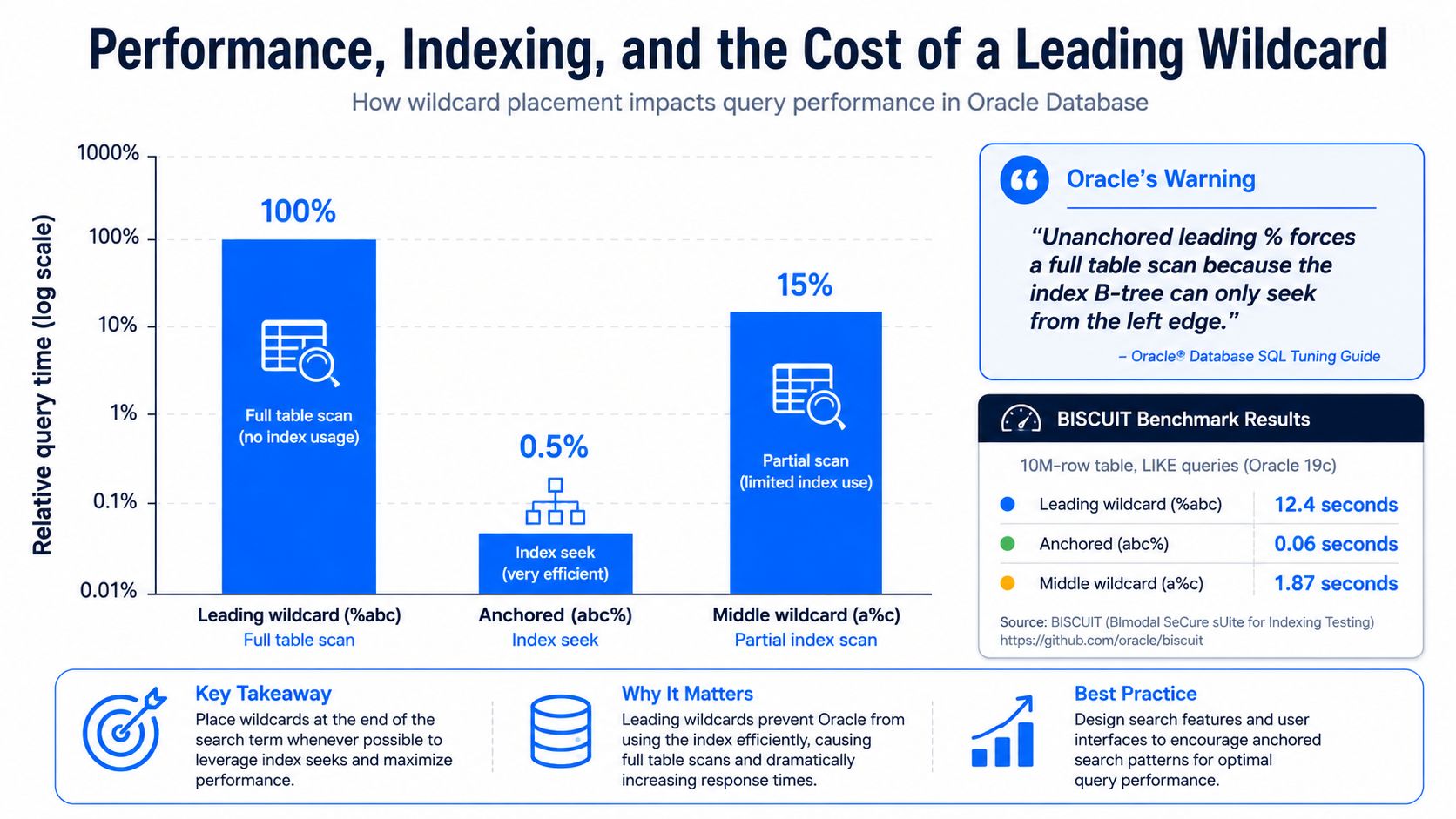
A leading wildcard changes the execution path, and the cost shows up fast. Oracle warns that searches like a*, or queries made up only of wildcards or punctuation, can take a significant amount of time, and it recommends using at least 2 to 3 non-wildcard characters before execution Oracle's wildcard guidance.
The engine can seek from the left edge, so abc% stays index-friendly while %abc usually does not. Once the pattern stops giving the index a stable prefix, the query shifts from a fast lookup to a scan. In the BISCUIT benchmark, suffix and infix wildcard patterns ran in 2.2 to 28.9 ms versus 34.97 to 189.3 ms for Trigram/B-tree in the published benchmark, and the suite reports a 14.4× median speedup over B-tree indexing with 100% correctness across 11,400 measurements BISCUIT benchmark. The trade-off is storage, because the index was about 10× larger than Trigram BISCUIT benchmark.
Search engines follow the same pattern, even if the internals differ. A leading * removes the easy left-anchored path, so the engine has to evaluate more terms and can put pressure on coordinator nodes and expansion safeguards Elasticsearch wildcard docs OpenSearch wildcard docs. That is why “just add a wildcard” becomes an expensive habit on large indices.
Two mitigations that actually help
Trigram or n-gram indexes: use these when partial matches happen often and at scale. They give the engine a structure to search against instead of forcing a full scan.
Reverse-field indexes for suffix searches: if users search by endings, store a reversed copy of the string and anchor the wildcard on the left side of the reversed field. That turns a suffix problem into a prefix problem.
A common SQL pattern for the reverse-field approach is simple:
For partial matching in PostgreSQL, trigram indexing is the workhorse:
The key insight is straightforward. The engine needs help once you move away from the left edge. digna's SQL query optimisation guide keeps that conversation grounded in execution cost instead of pattern syntax.
Where Wildcards Stop Working and How to Spot It
Wildcard syntax can fail without throwing an error, which is worse than an obvious syntax mistake because the query looks valid. SharePoint and some enterprise search tools strip leading wildcards by default, so a search that appears broad may become a narrow prefix search instead CAS product help on wildcards.
Quoted phrases are another trap. Many systems treat wildcards inside double quotes as literal text, so "apple%" may search for the exact string apple% rather than expanding the pattern. PubMed's wildcard behavior also shows a subtler issue. Wildcard use can stop automatic term mapping, which changes recall in ways that are hard to catch until someone compares results by hand.
Quick checks that expose the failure mode
Leading wildcard stripped: run
app%and compare it with%app%on the same corpus. If the result count barely changes, the platform may be rewriting your query.Wildcard ignored in quotes: test
"apple%"againstapple%outside quotes and compare the raw query explanation, if the platform exposes one.Minimum-prefix rule enforced: try a pattern with only one non-wildcard character. Some systems require at least 3 non-wildcard characters or limit one wildcard per term.
Expansion capped or blocked: some search engines add safeguards that limit wildcard expansion when the pattern would fan out too far.
Case behavior differs: one platform may treat wildcard matches as case-insensitive by default, while another exposes that behavior as an option. The same input can return different results across systems.
Most wildcard failures stem from mismatched expectations, not logic errors.
The fastest way to catch them is to test the same pattern in a tiny, known dataset before you promote it into a shared dashboard or a saved search. A small validation set shows whether the engine rewrites the query, drops the wildcard, or returns a result set that looks plausible but is missing the records you expected.
A Practical Wildcard Checklist Before You Hit Run
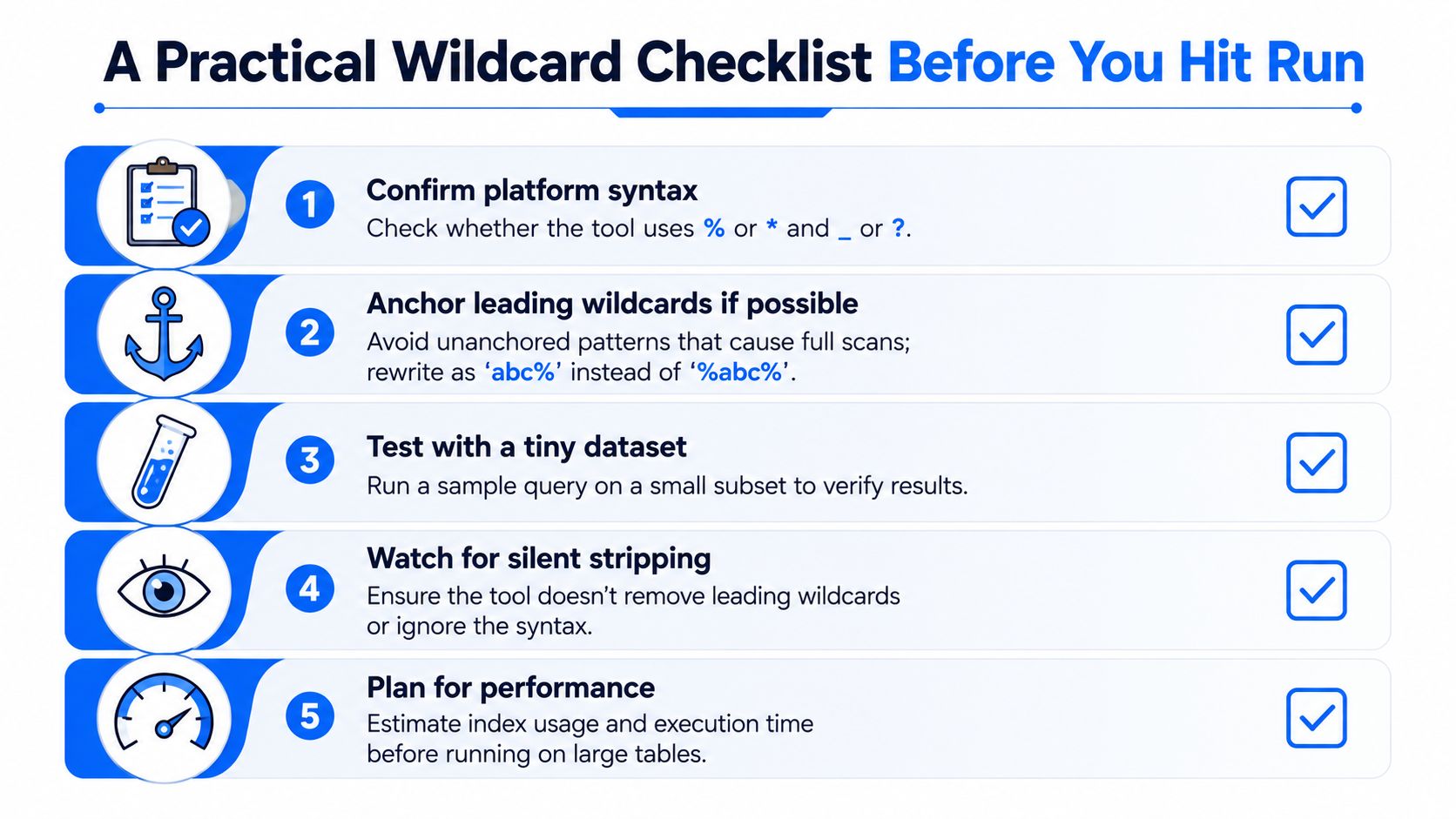
Before you submit a wildcard query, verify the platform rules first. Check whether it uses % or *, whether _ or ? matches a single character, and whether brackets, quotes, or other reserved symbols change the parse.
Then inspect the pattern itself. Escape special characters before they reach the parser, and make sure the query is narrow enough for the engine to handle without a broad scan. If the pattern will run in a shared dashboard, confirm that date filters, row limits, and index eligibility still apply.
Governance matters just as much. Confirm that the query is logged, validated against the target schema, and tested for injection risk if any part of the pattern comes from user input. A wildcard query should be easy to explain to the next engineer without reopening the incident channel.
Run that checklist every time. Most wildcard failures are caught before execution.