Data Validation Error: Causes, Examples, and Fixes
|
9
min read
You've probably seen it: the dashboard refresh finishes, the numbers look plausible, and then someone asks why churn suddenly changed. The analyst checks the visual, the SQL, and the scheduled job. Hours later, the problem turns out to be one malformed value that entered the pipeline early and changed how a downstream system interpreted the record.
A data validation error is more than a rejected spreadsheet cell. It can be a missing field, an invalid date, a code outside the allowed domain, or a relationship that doesn't exist. The practical challenge is finding where the contract failed, deciding whether the row is safe to repair, and preventing the same defect from returning.
Table of Contents
When a Single Bad Row Breaks the Whole Dashboard
What a Data Validation Error Actually Means
The shallow check
The deeper check
The Main Patterns Behind Validation Failures
Missing values
Format errors
Range violations
Coding and domain errors
Consistency breaks
Record-Level Examples You Can Spot in Your Own Data
Spreadsheet exports
API ingestion
Warehouse records
Why Most Validation Errors Start Upstream
Repair the contract, not just the output
A Practical Workflow to Detect and Fix Errors
Capture
Ingestion
Warehouse
Consumption
Key Takeaways for Reliable Data Operations
When a Single Bad Row Breaks the Whole Dashboard
A finance team receives a nightly CSV from a vendor portal. The records look normal until one cancellation field contains a malformed date. The warehouse loader cannot cast it to a date, so it writes NULL rather than stopping the load.
The churn model treats a missing cancellation date as its own condition. That single conversion changes the customer's cohort assignment, and the executive dashboard shows an unexpected increase. The pipeline reports success, the chart renders, and the result is still wrong.
The analyst starts at the dashboard and traces the result through three reports, two SQL views, and an Airflow task. The malformed source row eventually appears in the rejected-value log. The dashboard was only the first visible symptom.
Practical rule: A successful pipeline run proves that processing finished. It does not prove that each record met the rules the business relies on.
Validation therefore has to reach the record level. One invalid value can alter aggregates, machine-learning features, financial reports, or operational workflows without causing an outage. Gartner's widely cited benchmark estimates that poor data quality costs organizations an average of $12.9 million per year (Gartner benchmark), while IBM's 2025 research found that more than a quarter of organizations estimate annual losses above $5 million, with 7% reporting losses above $25 million (IBM research). The DCI whitepaper on the hidden cost of bad data provides further discussion of the operational cost of poor data quality.
The investigation also needs context. A data anomaly can represent genuine customer behavior, while a validation failure means a value violates an expected structure or rule. A spreadsheet may flag a value through a dropdown, an enterprise import may reject it against a governed schema, and a warehouse pipeline may coerce it into a misleading NULL. Repeated failures across these layers usually point to a source mapping, transformation, or contract defect rather than a series of unlucky rows. For background on distinguishing unusual values from rule failures, see digna's guide to data anomalies.
For teams publishing dashboards through Power BI, Tutorial AI's Power BI connector guide can clarify the reporting layer. Connector configuration cannot repair an invalid source value. The dependable fix begins where the record first breaks its contract.
What a Data Validation Error Actually Means
A data validation error occurs when an observed value fails a rule, schema, relationship, or business expectation. The rule might be simple, such as “this field must contain a date,” or relational, such as “this order must reference an existing customer.”
Think of validation as a club entrance contract. A bouncer might first check whether your ID has the right format. A deeper check confirms that the name appears on the guest list, the event is valid for that ticket, and the reservation matches the person presenting it. Data systems work the same way.
The shallow check
A format check asks whether a value can be interpreted correctly:
2025-04-18looks like a valid date representation.jdoe@resembles an email field but fails a complete email pattern.42may be a valid numeric value.Closed Wonmay still fail if the permitted code isclosed_won.
These checks prevent parsing failures, but they don't establish that the record makes sense in context.
The deeper check
Record-level validation examines relationships and business rules:
Does
customer_ididentify a customer in the customer dimension?Is the discount permitted for this customer segment?
Does the order total equal the sum of its line items?
Does the event date occur after the account was created?
Does the status belong to the approved domain for this workflow?
A spreadsheet dropdown, an API response such as HTTP 422, a warehouse constraint violation, and a Great Expectations test suite all implement the same underlying idea at different layers. Each one compares data with an agreed contract.
The World Bank describes validation through techniques such as range checks, internal consistency checks, and outlier detection, and emphasizes documenting validation in metadata. That guidance appears in its lecture on data validation. A validation error therefore isn't merely an annoying message. It's evidence that a record, file, or dataset no longer matches the assumptions made by the next system.
You'll get better results when you ask two questions separately:
What rule failed?
Which layer allowed the invalid value to travel this far?
The first question repairs the record. The second prevents recurrence.
For a broader explanation of validity, dimensions, and measurement, compare this definition with digna's explanation of data validity.
The Main Patterns Behind Validation Failures
Most validation incidents fall into a small set of structural patterns. Classifying the failure first helps you choose the right fix instead of treating every rejected row as an unrelated mystery.
The World Bank identifies missing values, format problems, coding issues, range checks, consistency checks, and outlier detection as important parts of validation practice. Earlier Society of Actuaries research also found that validity errors are more common and widespread than accuracy errors, with missing values, data-format errors, and coding errors among the main validity problems. The guidance is summarized in the Society of Actuaries data quality research.
Pattern | Example Bad Value | Rule Violated |
|---|---|---|
Missing value |
| Required identifier must be present |
Format error |
| Value must use a parseable date format |
Range violation |
| Age must stay within the permitted range |
Coding or domain error |
| Value must match an approved domain |
Consistency break |
| Header total must equal detail total |
Missing values
A missing value becomes an error when the field is required for processing or interpretation. A blank phone extension may be acceptable, while a missing customer identifier can make the record impossible to join. These failures commonly surface in ingestion logs, NOT NULL checks, or reports with unexpectedly incomplete populations.
Format errors
Format errors occur when the system can't parse the value as the declared type. A date stored as free text, a numeric amount containing an unexpected symbol, or an email missing its domain can pass through a loosely controlled export and fail inside an API or warehouse cast.
Range violations
Range checks catch values that are structurally numeric but logically impossible or disallowed. A negative age, a future birthdate, or a percentage above its permitted maximum may be syntactically valid numbers. The World Bank's data validation reference explains how range and internal consistency checks help localize errors before analysis or production use.
Coding and domain errors
A domain is the set of accepted values for a field. Country, status, product type, and risk category fields often fail because different systems use different spelling, capitalization, abbreviations, or legacy codes. These errors may not trigger a parser failure, but they fragment counts and break filters.
Consistency breaks
Consistency rules compare fields within the same record or across related records. A shipping country that conflicts with the assigned region, an invoice whose detail lines don't match its header total, or a transaction linked to an unknown customer belongs here. Business users often notice these errors first because the output contradicts what they know about the process.
Diagnostic habit: Don't start by editing the value. Start by naming the violated pattern. The pattern usually points to the responsible layer.
Record-Level Examples You Can Spot in Your Own Data
The same defect looks different depending on where you encounter it. A spreadsheet may display a suspicious string, an API may return a structured rejection, and a warehouse test may report a failed relationship. The underlying issue can still be identical.
Spreadsheet exports
A CRM export contains this row:
customer_email | phone | stage |
|---|---|---|
|
|
|
The email fails a basic structural check because it lacks a complete domain. The phone number may be usable for one process but inconsistent with another process expecting a normalized format such as (555) 123-4567. The stage values closed-won, Closed Won, and CLOSED_WON may represent the same business state to a person while appearing as three distinct categories to a pivot table.
A dropdown could stop new variations, but it won't normalize historical values already exported. Nor will it explain whether the source CRM, the export template, or a manual edit introduced the difference.
API ingestion
An API receives this payload:
Here, customer_id violates a required-field rule. order_total is a string even though the receiving contract expects a number. created_at isn't a valid date because the month and day combination can't be interpreted as a real calendar date.
An HTTP 422 response is useful when it identifies the exact field and rule that failed. If it only says “unprocessable entity,” inspect the request body, response body, content type, and API specification. The Postman guide to HTTP 422 errors provides practical debugging context for these cases.
Warehouse records
A warehouse fact table contains a row with three separate problems:
order_dateoccurs beforecustomer_signup_date.customer_idpoints to no row indim_customer.discount_percent = 150, outside the allowed range.
The first is a temporal consistency failure. The second is a referential integrity failure. The third is a range violation. None is merely a formatting issue, and correcting the display format won't make the record trustworthy.
Environment | Field Example | Bad Record Value | Defect Class |
|---|---|---|---|
Spreadsheet |
|
| Format |
API payload |
|
| Required field |
API payload |
|
| Type mismatch |
Warehouse fact table |
| Unknown dimension key | Referential |
Warehouse fact table |
| Before signup date | Temporal |
Warehouse fact table |
|
| Range |
These examples are easier to reason about when you separate validity from reasonableness. A value can match a data type and still look implausible in context. digna's guide to data reasonableness explores that distinction.
Why Most Validation Errors Start Upstream
Fixing bad cells one at a time feels productive because the error count drops immediately. It often treats the symptom while leaving the producer, contract, or schema unchanged.
A spreadsheet dropdown only governs what a user can enter through that interface. It doesn't control values generated by a CRM integration, a bulk export, an API client, a database migration, or a transformation job. The strongest validation sits close to the point where data is created and exchanged.
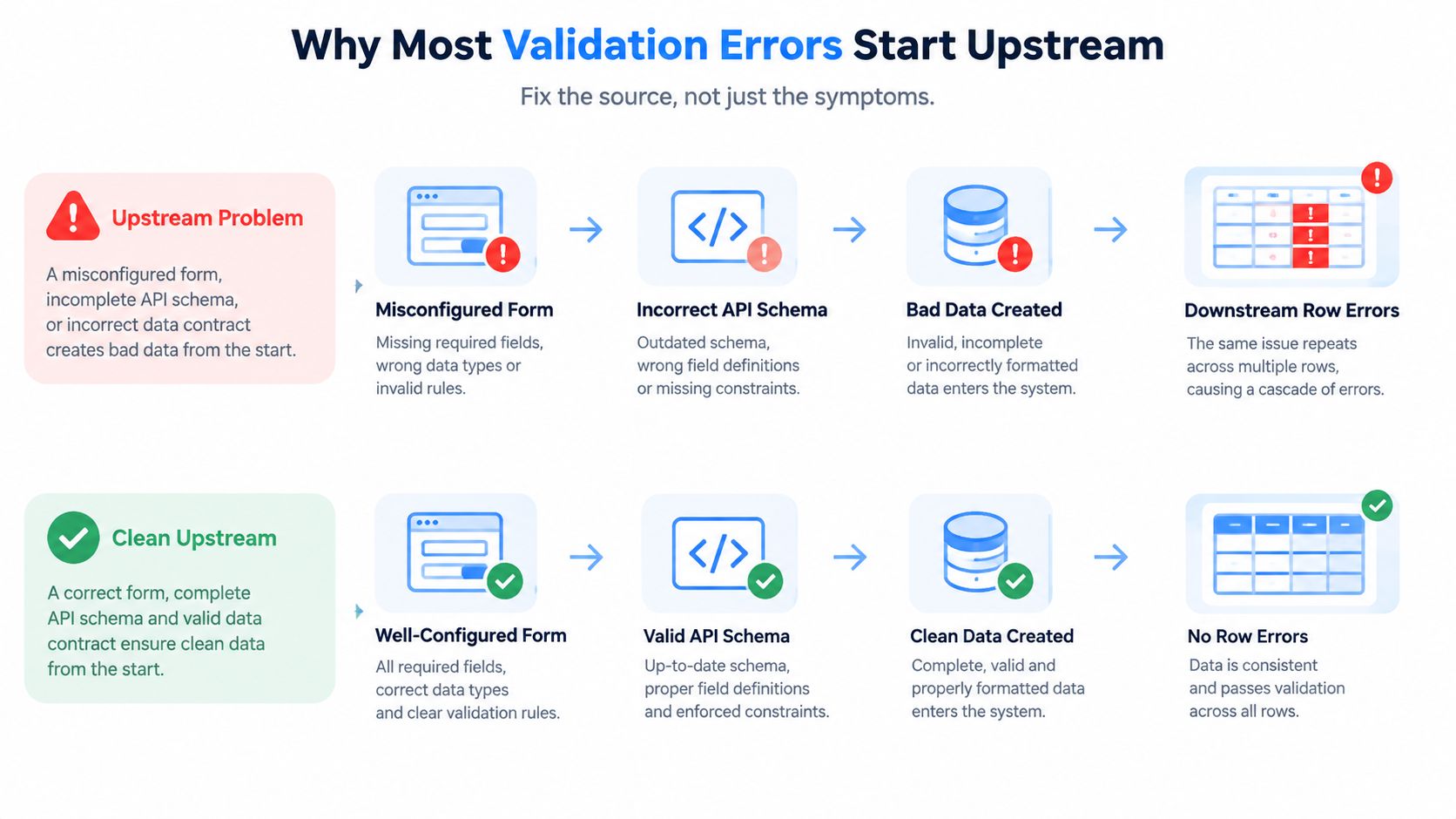
Consider an API field that changes from customer_id to account_id without a versioned contract. The receiving transformation may populate customer_id with NULL across every incoming record. The warehouse then reports missing identifiers, dashboard joins lose rows, and analysts begin manually patching outputs. The repeated failure isn't evidence of careless data entry. It's evidence that two systems disagree about the schema.
The same pattern appears when a CRM export template changes, a database constraint is relaxed, or a migration removes a required-field rule. A source change can create thousands of downstream failures that look like individual bad rows.
Repair the contract, not just the output
Use the failure pattern to choose the intervention:
Changed field name: Version the payload and update the consumer deliberately.
Optional field that must exist: Make the field required in the source contract and reject incomplete requests.
Invalid numeric value: Add a source-level
CHECKconstraint or equivalent validation.Unrecognized status: Maintain a shared domain or enumeration instead of relying on free text.
Bad relationship: Validate referenced identifiers before loading the dependent record.
The digna guide to data ingestion provides useful context for treating ingestion as a controlled movement of data rather than a file-transfer step.
Root-cause test: If the same validation failure appears across many rows after a source change, investigate the contract before cleansing the records.
Rejecting invalid data at ingestion is usually safer than allowing it to land as NULL, an empty string, or a coerced default. If rejection isn't feasible, quarantine the row with its source identifier, rule failure, and ingestion timestamp so downstream consumers don't mistake a damaged value for a real one.
A Practical Workflow to Detect and Fix Errors
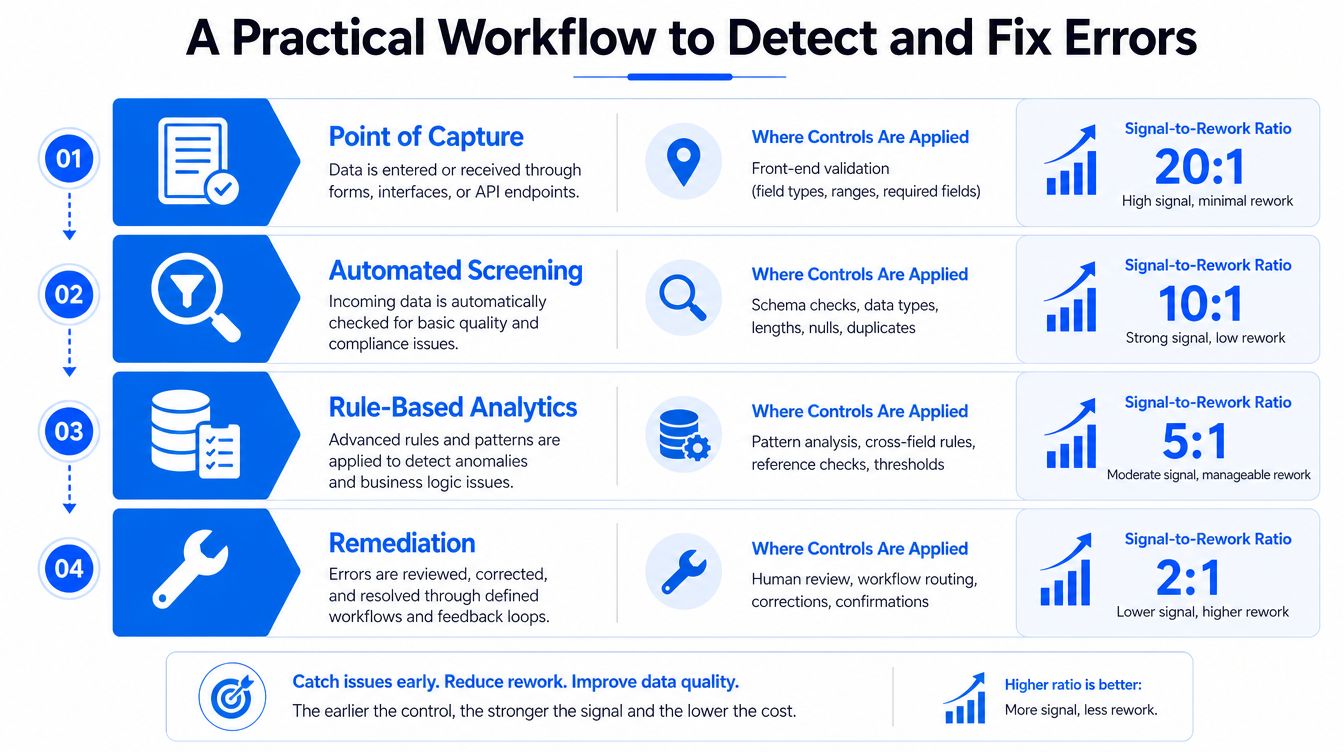
A reliable workflow places controls where they provide the clearest signal and the least rework. Start at capture, then move through ingestion, warehouse checks, and consumption.
Capture
Validate types, required fields, allowed values, and ranges in forms, APIs, and source databases. Input masks can guide users, while schema constraints prevent producers from sending values that downstream systems can't interpret.
A source database should enforce rules that matter regardless of who writes the record. An API should return field-level errors that tell the client what to correct. A form should prevent an invalid value before submission rather than relying on an analyst to find it later.
Ingestion
Treat each incoming file or payload as a contract. Validate every record against the expected schema, quarantine failures, and emit structured error events containing the source file, record identifier, field, observed value, and violated rule.
Don't overwrite the original value during cleaning. Preserve it alongside the normalized value so the team can audit what arrived and what transformation occurred.
Warehouse
Run continuous checks for nulls, uniqueness, referential integrity, freshness, distribution changes, and cross-field logic. A warehouse test should distinguish a single rejected row from a broad schema failure, and it should preserve enough context for the owner to reproduce the issue.
The World Bank guidance on data entry and validation emphasizes controls such as restricting response options and using count-based checks to reduce skipped or invalid items. Those principles apply beyond surveys. Enforce constraints early, then verify the resulting dataset independently.
Consumption
Dashboards and models need their own assertions. Compare expected row counts, detect missing partitions, check join coverage, and flag metrics that suddenly change without a corresponding data-quality explanation.
When formulas are edited in spreadsheets, validation can behave unexpectedly. Microsoft Q&A notes that formula errors such as #REF! or #DIV/0! can cause validation to be ignored, while copy and fill operations may bypass or alter expected behavior. Check Microsoft's discussion of formula-driven validation errors when a dropdown appears correct but transformed cells still fail.
Use this remediation order:
Fix upstream contracts first. Correct the source rule, schema, mapping, or producer behavior.
Patch the warehouse second. Isolate, backfill, or normalize records when the source can't be changed immediately.
Cleanse in analytics only when necessary. Make the transformation visible, documented, and reversible.
For continuous checks that combine record-level rules with broader observability, review digna's data validation and continuous data quality guidance. The platform runs inside a customer's environment, performs metric computation in the customer's databases, and can monitor validation, timeliness, anomalies, and schema changes without moving production data outside that environment.
Key Takeaways for Reliable Data Operations
Reliable data operations depend less on one perfect cleansing exercise and more on a repeatable response to recurring failures. Use this checklist when a validation alert appears:
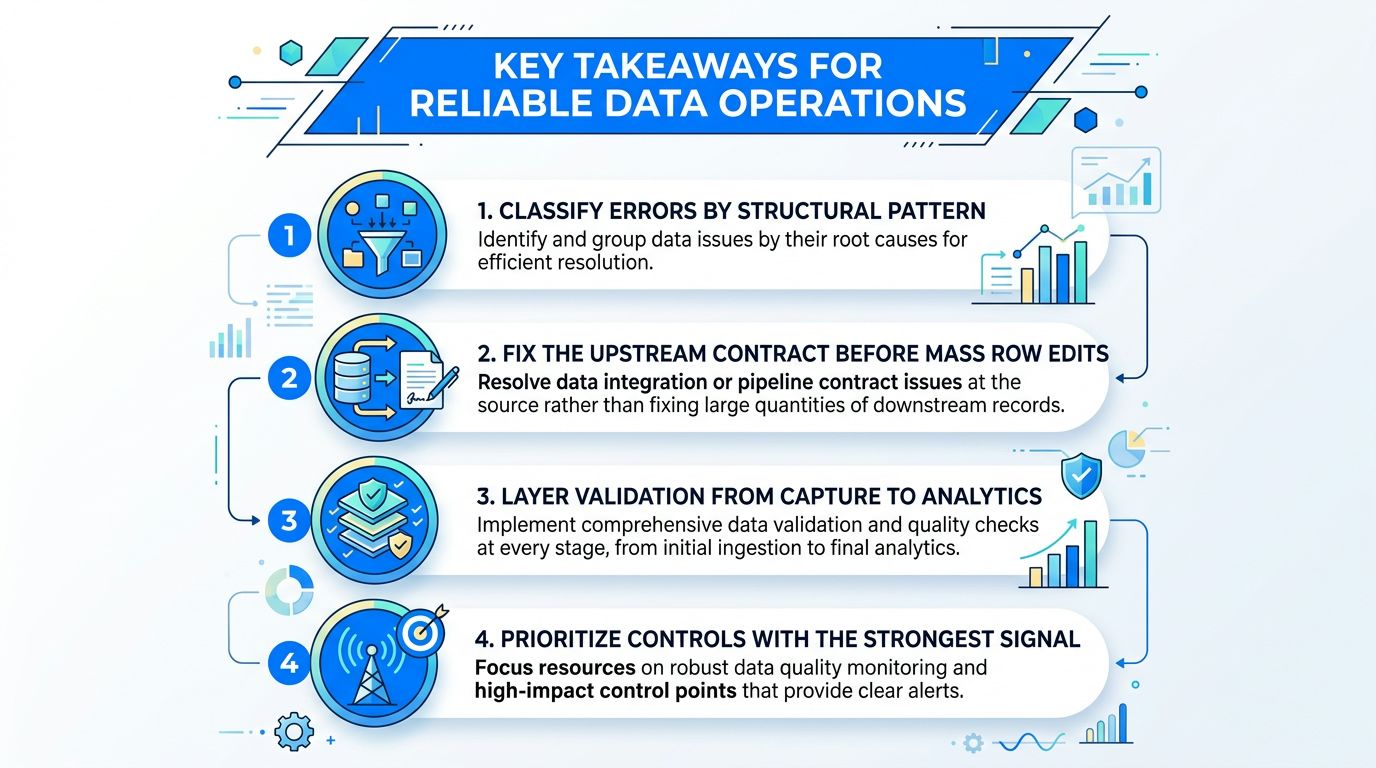
Classify the defect. Decide whether it's missing, malformed, out of range, outside the domain, inconsistent, temporally impossible, or referentially invalid.
Trace the first point of failure. Identify the producer, export, API mapping, migration, or transformation that introduced the mismatch.
Repair the upstream contract. Change the schema, required-field rule, constraint, mapping, or versioned payload before editing large numbers of downstream rows.
Layer controls. Validate at capture, ingestion, warehouse, and consumption so a silent conversion can't travel unnoticed.
Track recurrence. Record the field, rule, source, pipeline, and failure trend. Repeated failures deserve engineering work, not repeated manual cleanup.
Keep evidence. Preserve rejected records, rule outcomes, timestamps, and remediation decisions for investigation and auditability.
The central lesson is simple: recurring validation errors usually point to a broken process, not a careless user. A single row may be the visible failure, but repeated rows reveal a contract, schema, mapping, or monitoring weakness upstream.
Validation should therefore be observable. Teams need to know which rules fail, where they fail, whether failures are isolated or systemic, and what downstream assets depend on the affected data. That visibility turns a confusing dashboard discrepancy into an actionable engineering incident.
digna helps data teams define record-level validation rules, monitor schema changes, track timeliness, and detect unusual behavior across warehouses and pipelines while keeping data inside the customer's environment. Visit digna to see how you can replace recurring row-by-row cleanup with traceable data quality and observability controls.
Frequently asked questions
What is a data validation error?
It occurs when an observed value fails a rule, schema, relationship or business expectation. It is more than a rejected spreadsheet cell: a successful pipeline run proves that processing finished, not that each record met the rules the business relies on.
What is the difference between a format check and record-level validation?
Depth. A format check asks whether a value can be interpreted, so 2025-04-18 parses as a date while jdoe@ fails an email pattern. Record-level validation examines relationships instead: does customer_id identify a real customer, does the order total equal its line items, does the event date follow account creation?
What are the most common validation failure patterns?
A small set recurs: missing values, format problems, coding issues, failed range checks, consistency violations and outliers. The World Bank identifies these same categories and emphasizes documenting validation in metadata so the rule and its rationale survive beyond the person who wrote it.
What does a validation error actually cost?
Gartner's widely cited benchmark puts poor data quality at an average $12.9 million per organization per year. IBM's 2025 research found more than a quarter of organizations estimate annual losses above $5 million, with 7% reporting losses above $25 million.
How should you investigate a validation error?
Ask two questions separately. What rule failed, which repairs the record, and which layer allowed the invalid value to travel this far, which repairs the pipeline. Answering only the first leaves the same defect free to arrive again tomorrow.


