Data Migration from Legacy Systems: The 2026 Playbook
|
7
min read

About 83% of data migration projects either fail completely or exceed their original budgets and schedules. That number changes the conversation. Data migration from legacy systems isn't a back-office cleanup task. It's a high-risk engineering event where weak visibility, manual validation, and undocumented assumptions can turn a planned upgrade into a production incident.
The teams that get through it cleanly don't rely on optimism. They build observability into the migration itself. They baseline source behavior before extraction, track schema changes while mappings evolve, validate records continuously, and treat cutover as an operational exercise rather than a one-night leap of faith.
Table of Contents
Why Most Legacy Data Migrations Fail and How Yours Won't
Legacy migrations fail long before cutover. They fail when teams treat migration as a one-time transfer instead of a controlled program of discovery, validation, and proof.
The pattern is familiar in high-risk programs: the ETL runs, row counts look close enough, and confidence holds until the target system starts rejecting records, finance reports no longer tie out, or a business workflow depends on a field nobody mapped correctly. The engineering work is rarely the core problem. Late visibility is.
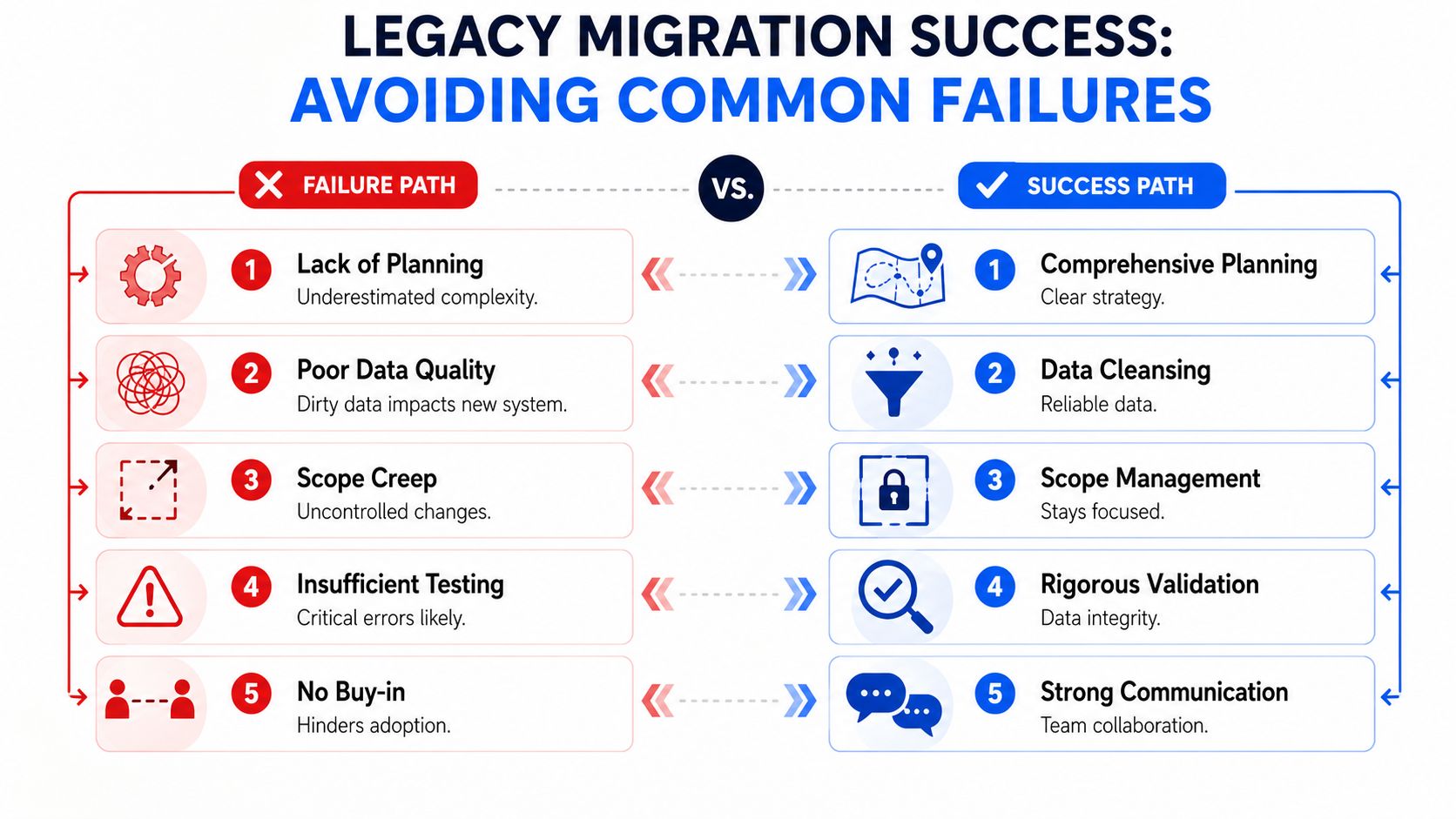
What usually goes wrong
Teams often underestimate how much hidden logic sits outside the documented application path. A report formula, a nightly export, or an exception-handling script can carry business rules that never made it into formal specs. Once the target platform applies stricter types, constraints, or referential rules, those omissions turn into failed loads and broken downstream processes.
Three failure modes show up again and again:
Discovery stops at the schema: Table inventories miss report logic, operational workarounds, and undocumented dependencies.
Validation is treated as a phase at the end: By the time teams check for defects after loading, the cost of rework and rollback is much higher.
Responsibility is diffuse: Infrastructure, app owners, analysts, and business stakeholders each validate part of the move, but nobody owns migration integrity end to end.
Manual checking makes that worse. Sampling a few records in SQL can confirm that some rows survived the trip. It cannot tell you whether transformations preserved business meaning across millions of records, whether source and target drifted during a long migration window, or whether a rule change introduced silent corruption.
Practical rule: if the first serious validation happens after the load, the migration is already behind.
The safer approach is to build observability into the migration itself. digna changes the operating model here. Instead of relying on spreadsheets and ad hoc reconciliations, teams can profile source data early, define automated checks before transformations run, and monitor row counts, null patterns, schema changes, freshness, and rule violations throughout extraction, transformation, and ingestion. That turns migration from a manual, trust-based exercise into an observable system with measurable gates.
That matters most in business-critical moves where the database is only part of the risk. For ERP and accounting transitions, Receipt Router insights for financial transitions are useful because they show how system changes affect reconciliations, document flows, and finance operations after the data lands.
The good news is that migration failures are usually predictable. Hidden defects, mismatched schemas, weak rollback plans, and late testing show up in the same places across projects. Teams that want a practical reference can review these common migration pitfalls and solutions, then use continuous observability to catch those issues before cutover instead of explaining them after production impact.
Charting the Old World Assessment and Discovery
Discovery is where teams either earn a smooth migration or inherit months of avoidable rework. Legacy environments rarely match their documentation. The source of truth is usually split across database schemas, batch jobs, report logic, file drops, and the memory of the one person who has supported the system for years.
Start with data archaeology
The first pass should answer basic but nontrivial questions:
Which datasets are operationally critical?
Which tables are historical archives that can be retired or compressed?
Which files or exports bypass the official application path?
Which fields drive reports, reconciliations, or compliance processes?
A schema dump won't answer those on its own. Engineers need workload context. Look at update patterns, null-heavy columns, duplicate keys, old partitions, and fields that appear inert but feed monthly reconciliations. In practice, “unused” often means “used by one painful process nobody wants to touch.”
The legacy system always contains more business logic than the application team admits and more exceptions than the database team expects.
Build a baseline before moving anything
Good discovery doesn't stop at inventory. It measures behavior. Capture source row counts by table, data freshness patterns, common value distributions, and known edge cases. If a customer status field carries strange values or a date column mixes formats, that should become part of the migration contract early.
Automated observability changes the quality of planning. Instead of documenting assumptions in static sheets, teams can baseline how source data behaves over time. That makes later validation concrete rather than subjective.
A practical assessment backlog usually includes:
Volume profiling: Identify large tables, skewed partitions, and growth hotspots that will affect extraction windows.
Completeness review: Check for sparsity, missing keys, and mandatory fields that were never enforced in the old platform.
Freshness patterns: Learn when data arrives, which feeds lag, and which datasets behave differently at period close.
Dependency tracing: Map reports, interfaces, and jobs that depend on specific tables or file outputs.
Exception capture: Document null conventions, placeholder values, special characters, and unusual date handling.
Define validation targets now, not later
The strongest reason to take discovery seriously is that the migration process mandates multiple validation layers including row-count matching, checksums for integrity, sample-based spot checks, and business rule validation, all of which depend on a thorough initial assessment to define, as described in RecordPoint's migration guidance.
If you haven't identified which business rules matter during discovery, you can't validate them under pressure during cutover.
A useful working artifact is a short decision table:
Discovery finding | Migration implication |
|---|---|
Mixed date formats | Add explicit transformation and parsing tests |
Duplicate business keys | Define survivorship or deduplication rules |
Untracked file exports | Include parallel interface testing |
Late-arriving source feeds | Adjust extraction timing and cutover sequence |
That's the point where assessment becomes engineering. You're no longer collecting facts. You're reducing unknowns that would otherwise surface in production.
Bridging the Gap Data Mapping and Schema Reconciliation
Mapping isn't clerical work. It's translation between two systems that often use the same labels to mean different things and different labels to mean the same thing. Legacy migrations go wrong here because teams confuse field alignment with semantic alignment.

Build a real data dictionary
A usable migration dictionary needs more than source column and target column names. It should capture datatype, nullability, default behavior, transformation logic, accepted values, and owning team. If a source field stores numeric identifiers as text with left-padding, that detail can't stay in someone's notebook.
I've seen teams lose days because a field labeled “status” was treated as a simple enum when the legacy app had overloaded it to encode workflow stage, exception state, and manual override. The map looked finished. The migration logic wasn't.
A disciplined mapping sheet should answer:
What is the field really for?
What values appear in practice, not just in documentation?
What transformation rule applies?
What happens when the source violates the target constraint?
Resolve structural mismatches directly
Some translation problems are routine. Others are subtle.
Source condition | Target challenge | Common response |
|---|---|---|
Text field storing numbers | Strict numeric type | Clean, cast, and quarantine invalid rows |
Free-text categories | Controlled vocabulary | Standardize with explicit mapping rules |
Multiple date conventions | Single date parser | Normalize upstream and test edge values |
Reused columns with changing meaning | Stable analytics model | Split into separate target fields |
The dangerous cases are the ones that pass initial load but corrupt downstream logic. A string-to-integer cast failure is obvious. A silent truncation, timezone shift, or reused code table is worse because it can survive long enough to poison reports and reconciliations.
Field lesson: If a mapping rule needs a footnote, it probably needs a test case and an owner.
Replace spreadsheet drift with tracked change detection
Manual mapping exercises have a built-in weakness. They freeze structure in a document while the actual source and target systems keep moving. During a long migration, columns get added, datatypes get changed, and integration teams update target contracts. If nobody catches those shifts quickly, the migration logic diverges from reality.
That risk is well established. Schema tracking during migration flags structural changes such as added or removed columns and data type modifications, which are often missed in manual mapping exercises and lead to downstream ETL failures, as noted in MindBridge's discussion of anomaly detection techniques and data integrity.
Reconcile business meaning, not just structure
The hardest mapping work usually has nothing to do with SQL types. It sits in business logic:
A “closed” account in the legacy system may include suspended accounts that the new platform treats separately.
Historical records may use codes that were retired years ago but still appear in archived data.
Default values may have been application-generated in the old system and now need to be made explicit.
Migration teams need working sessions with operations, finance, compliance, and reporting owners. Not for broad strategy. For decisions. Which values are valid, which should be remapped, which should be archived, and which should block load.
A mapping document becomes trustworthy only when every ambiguous field has a rule, every rule has a rationale, and every rationale has an owner.
The Migration Engine Extraction Transformation and Ingestion
Once the source is understood and the mappings are stable, architecture starts to matter more than theory. The migration engine has one job: move data predictably under real operational constraints. That means controlled extraction, deterministic transformation, and ingestion patterns that match business tolerance for downtime and risk.
Big bang or phased cutover
The most important design decision is usually the cutover pattern. Both options work. Both fail when chosen for the wrong reasons.
A big bang migration compresses the switch into a single event. It's attractive when interface complexity is low, change windows are fixed, and the business wants a clean break. The trade-off is concentration of risk. If one dependency behaves differently in production, you have little room to absorb the surprise.
A phased or trickle migration reduces blast radius by moving domains, entities, or data ranges incrementally. It gives teams more room to compare outputs across systems and handle exceptions in manageable batches. The price is operational complexity. Dual-run logic, reconciliation overhead, and temporary process workarounds can exhaust teams if the plan drags.
A simple decision view helps:
Pattern | Works better when | Watch out for |
|---|---|---|
Big bang | Tight dependency graph, short outage is acceptable | Concentrated rollback pressure |
Phased | Domain boundaries are clear, business can tolerate coexistence | Extended reconciliation burden |
Extraction should protect the source
Legacy platforms are often fragile. Extraction logic that looks harmless in test can saturate I/O, lock tables, or disrupt overnight jobs in production. Pull design matters. Use bounded windows, predictable ordering, and restartable jobs. If you need change capture, make sure you understand what counts as a real change in that system rather than assuming a timestamp is trustworthy.
Transformation logic should also be explicit and testable. Avoid hiding rules inside one massive pipeline script. Break them into named stages so engineers can isolate failures and replay specific segments without repeating the entire run.
Build for retries, quarantine, and auditability
Migration pipelines need operational mechanics that standard ETL teams sometimes leave implicit:
Retry design: Retries should be safe and idempotent. If a batch reruns, the target shouldn't duplicate or partially overwrite records.
Error quarantine: Bad records need a holding path with enough metadata for triage. Don't bury them in generic logs.
Structured logging: Every extract, transform, and load event should produce evidence that engineers can trace by dataset and batch.
Ordering rules: Parent-child loads, reference data dependencies, and late-arriving corrections need documented sequencing.
For document-heavy environments, the same discipline applies beyond tables. Teams modernizing file archives, scanned records, or operational documents can learn from transforming business with document management, especially where metadata consistency and retrieval patterns matter as much as raw transfer.
Choose ETL or ELT based on control points
The ETL versus ELT choice isn't ideological. It's about where you want transformation control and failure visibility to sit.
Use ETL when source cleanup is substantial, the target has strict loading constraints, or sensitive transformation logic needs to be resolved before data lands. Use ELT when the target warehouse is strong enough to absorb raw loads and you want richer replay and audit options inside the destination platform.
The wrong choice usually reveals itself fast. If your team keeps exporting data for manual inspection because pipeline behavior isn't observable enough, the engine design is missing operational feedback loops. That's not a tooling issue alone. It's an architectural one.
From Hope to Proof Automating Validation and Monitoring
Manual validation creates false confidence. A team checks a few row counts, spot-verifies a handful of records, compares one report, and declares the batch clean. That method can catch obvious breakage. It can't prove migration integrity across complex datasets with changing patterns and strict business rules.

Validation has to become continuous
The practical shift is simple. Stop treating validation as a checkpoint after movement and start treating it as a control system during movement.
That means checking multiple layers in parallel:
Record integrity: Are required fields present, transformed correctly, and valid against business rules?
Dataset completeness: Do source and target counts reconcile at the right grain?
Structural stability: Did anything change in the schema or contract during execution?
Operational health: Are batches arriving when expected, or is the pipeline drifting into delay?
This approach aligns with established migration discipline. Dedicated staging, iterative validation, row-count matching, integrity checks, business-rule verification, and real-time monitoring all belong in the operating model rather than in a one-time test cycle.
Anomaly detection catches what static thresholds miss
One reason migration monitoring often disappoints is that teams hard-code simplistic checks. They alert if row volume falls below a fixed threshold or if a job exceeds a rough runtime estimate. Those checks are better than nothing, but they miss contextual anomalies.
AI-powered anomaly detection relies on unsupervised learning algorithms to automatically learn normal data behavior, including seasonality and trends, without manual rule maintenance, adapting thresholds dynamically as environments change, according to digna's explanation of AI anomaly detection techniques.
That matters in migration because “normal” is rarely flat. End-of-month spikes, delayed upstream jobs, and business-cycle patterns can make static alerting noisy or blind. Unsupervised models can learn those patterns and flag deviations such as unexpected traffic volumes, timing shifts, or value distributions that no one encoded by hand.
Manual spot checks answer “did this sample look okay?” Automated observability answers “did the system behave within expected bounds across the entire run?”
Record-level rules still matter
Anomaly detection is powerful, but it doesn't replace explicit validation. You still need deterministic checks for business-critical fields. Customer identifiers must conform to target rules. Ledger mappings must land in valid accounts. Effective dates must parse correctly and align with target constraints.
A strong pattern combines learned monitoring with rule enforcement. One platform in that category is digna, which supports anomaly detection, schema tracking, timeliness monitoring, and record-level validation while executing analysis inside customer-controlled environments. If you're designing validation controls for a live migration, this guide to data validation during migrations best practices is a practical reference.
Visibility changes stakeholder behavior
The engineering value is obvious, but the operational value matters just as much. When migration telemetry is visible in one dashboard, conversations improve. Instead of “we think batch three is done,” the team can see records processed, error rates, schema changes, and pipeline latency in one place.
The video below shows the kind of product experience teams now expect from observability tooling during data operations.
That visibility also sharpens escalation. Business owners don't need raw logs. They need proof that critical data domains have passed defined controls and that exceptions are isolated, understood, and either remediated or blocked from release.
Monitoring timeliness is part of integrity
A migration can be accurate and still fail operationally if data arrives late enough to break downstream reporting, reconciliations, or service processes. Timeliness should be monitored as its own dimension, not treated as a side effect of successful loading.
A mature monitoring setup watches expected arrival patterns, processing delay, and completion consistency by feed or domain. That's especially important during phased migrations, where temporary dual pipelines create more opportunities for timing drift.
Confidence comes from evidence. In high-stakes data migration from legacy systems, that evidence must be continuous, explainable, and visible before the cutover meeting starts.
The Final Push Cutover Rollback and Post-Migration Success
Cutover is where planning becomes operations. Teams often focus so much on extraction and transformation that the final switch gets treated as a scheduling exercise. It isn't. It's a controlled change event with technical, business, and governance consequences happening at once.
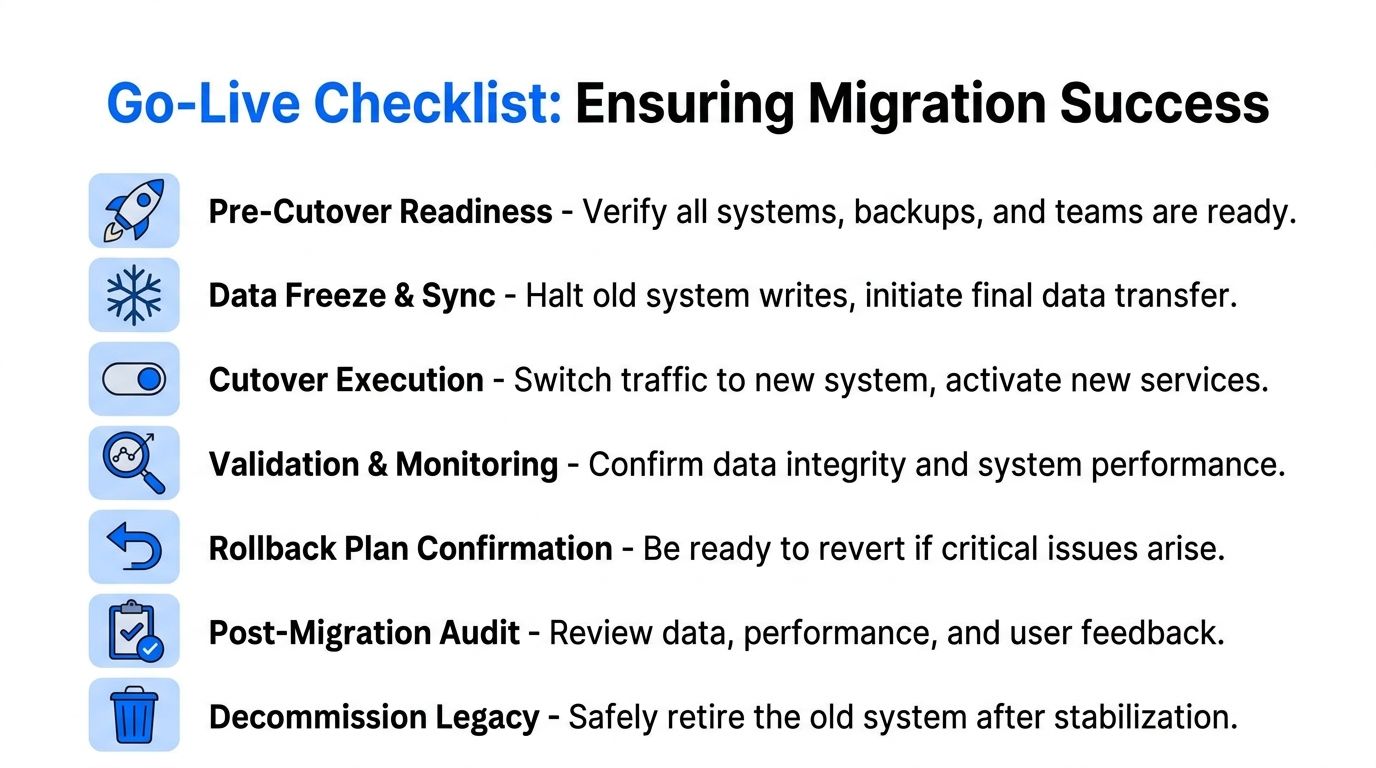
Prepare the cutover like an incident response plan
The best cutover plans are specific enough that another engineer could run them under stress. They define freeze timing, ownership, communication channels, sign-off criteria, and the exact point where traffic shifts to the new platform.
A strong runbook includes:
Business freeze rules: Which writes stop, when they stop, and who approves exceptions.
Final sync sequence: The order of last extracts, catch-up loads, and downstream refreshes.
Validation gates: The checks required before users are pointed at the target system.
Decision authority: Who can approve go-live, who can pause, and who can trigger rollback.
Cutover discipline: If the rollback trigger is vague, the team will wait too long to use it.
Rollback is not optional
Rollback plans fail when they exist only as architecture diagrams. Teams need working criteria and a tested procedure. The underlying rule is firm: maintain full backups of source systems until validation is complete, test restore procedures beforehand, and define rollback triggers that can execute inside the maximum acceptable downtime window. RecordPoint's guidance makes this point clearly in the migration methodology cited earlier.
The hardest part is usually governance, not scripting. Teams hesitate because rollback feels like failure. It isn't. A controlled reversal is often evidence that the migration process is healthy enough to protect the business when assumptions break.
Post-migration success is operational, not ceremonial
A project doesn't end when users log into the new system. It ends when the new environment consistently produces trusted outputs, scheduled data arrives on time, and the old system can be decommissioned without anxiety.
A practical post-go-live checklist looks like this:
Post-cutover area | What to confirm |
|---|---|
Data trust | Critical reports and reconciliations match expected business outcomes |
Pipeline health | Feeds arrive on schedule and complete reliably |
User impact | High-value workflows run without workaround spreadsheets |
Legacy retirement | Old integrations and exports can be shut down safely |
The final trap is leaving observability behind once the project closes. That's how new platforms become tomorrow's legacy problem. The same controls used during migration should stay in place afterward to detect schema drift, late-arriving data, broken rules, and quality decay as the target environment evolves.
If you're planning data migration from legacy systems and want continuous visibility into anomalies, schema changes, record-level validation, and timeliness without moving data out of your environment, take a look at digna - own website. It's built for teams that need observable, auditable data operations in private cloud or on-prem setups.
See how digna does this in practice: data quality monitoring for your platform.
Frequently asked questions
Why do most legacy data migrations fail?
Roughly 83% either fail outright or overrun budget and schedule. The recurring cause is not the transfer itself but the unexamined assumptions underneath it: undocumented business rules, fields reused for purposes nobody recorded, and reconciliation targets defined only after the data has already moved.
What should you do before moving any data?
Do the archaeology first. Profile the legacy system to learn what the data actually contains rather than what the documentation claims, then capture a baseline of record counts, distributions and key totals. Without that baseline you cannot prove the migration preserved anything.
How do you validate a data migration?
Define validation targets before you start, not after. Reconcile counts and control totals per entity, compare distributions rather than spot-checking rows, and verify referential integrity in the target. Agreement on what constitutes a successful migration has to precede the cutover.
What is schema reconciliation in a migration?
It is resolving the structural and semantic mismatches between old and new: fields that split or merge, types that change, codes that map imperfectly. The hard part is semantic, because two systems can store the same column name and mean different things by it.
How do you prevent drift during a long migration?
Legacy systems keep changing while you build the target. Tracked change detection on the source beats a mapping spreadsheet that ages silently, because it tells you when a column, type or distribution moved after your mapping was signed off.


