Mastering Archiving of Data: Your 2026 Guide
|
7
min read

Your archive probably already contains data nobody has opened in months, maybe years. It still sits in expensive primary storage, slows operational systems, and keeps showing up in governance reviews as “retained,” even though no one can say with confidence whether it's still readable, complete, or understandable.
That's the practical problem with archiving of data. Many groups can move data out of production. Fewer can prove that the archive will still be usable when legal asks for it, an auditor challenges it, or an ML team needs old training data back with its original meaning intact.
A good archive isn't a dumping ground. It's a managed lifecycle, a compliance control, and a long-term reliability problem.
Table of Contents
What Is Data Archiving and Why It Is Not a Backup
Think of the archive as records storage
An active database is like a working office. Teams use the files every day, add new documents, revise old ones, and expect fast access. An archive is the secure off-site records facility. You move material there because daily work no longer depends on it, but legal, financial, analytical, or historical value still does.
That distinction matters because data archiving is a lifecycle decision, not just a storage action. You identify inactive data, preserve it in a controlled form, and keep it retrievable under defined rules. The archive becomes the place where historical records live on purpose.
Backups solve a different problem. A backup is a recovery copy of active systems. You use it when production data is deleted, corrupted, or unavailable. It supports operational recovery, not long-term records management.
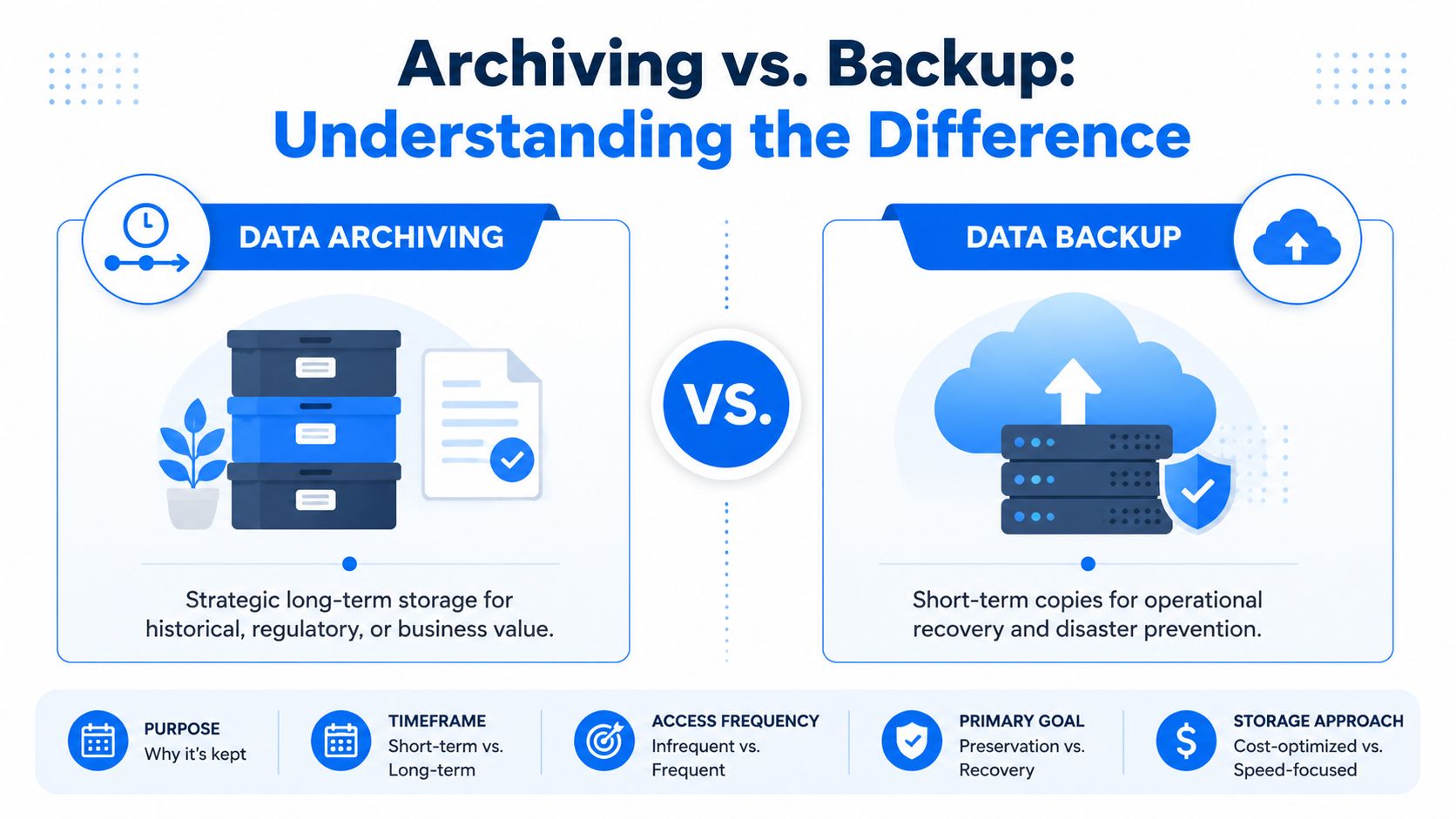
Core difference: Archives preserve historical data as the retained record. Backups preserve recoverable copies of current systems.
If you treat backups as archives, you inherit the wrong retention model, the wrong indexing model, and usually the wrong access path. Restoring an old backup to answer a compliance question is slow, disruptive, and hard to defend. If you treat archives as backups, recovery will disappoint you because archives usually aren't designed for rapid full-system restoration.
Where teams get this wrong
The most common mistake is calling anything “cold storage” an archive. It isn't. Data becomes archived only when it has policy, ownership, retention logic, retrieval expectations, and a documented reason for being kept.
A second mistake is leaving historical data inside the transactional system because “storage is cheap.” Primary storage isn't the whole cost. Large operational tables affect maintenance windows, query behavior, index growth, schema changes, and migration effort. Old data also muddies data quality work because engineers spend time separating live defects from stale history.
A working rule helps:
Archive when business activity is over: The data still has legal, analytical, or historical value.
Back up when recovery matters: The data is part of a live system you may need to restore.
Delete when retention expires: The data no longer has a defensible reason to exist.
Teams that get this right make better design choices later. They choose storage tiers based on access patterns, not habit. They build metadata for discovery. And they stop confusing disaster recovery tooling with records management.
Choosing Your Archival Storage Tier
Storage tiering decides whether archiving of data saves money or just relocates cost. The right tier depends on three things: how often data will be retrieved, how quickly someone needs it back, and what it costs to hold it there until that day arrives.
Data Archiving Tiers Compared
Tier | Typical Use Case | Retrieval Time | Storage Cost |
|---|---|---|---|
Hot archive | Historical data used regularly for analytics, investigations, or service lookups | Fast | Highest among archive tiers |
Nearline archive | Data kept for occasional business access or periodic audits | Moderate | Mid-range |
Cold or deep archive | Regulatory retention, legacy records, closed cases, and datasets rarely retrieved | Slowest | Lowest |
This looks simple, but the trade-off is rarely just “speed versus price.” Retrieval patterns drive architecture decisions upstream. If finance needs prior-period records every month, deep archive is usually the wrong answer even if capacity pricing looks attractive. If legal retrieves a narrow subset once in several years, cold storage is often the most rational choice.
How to map data to the right tier
Start with actual access behavior, not what people say they might need someday. Future retrieval frequency is often overestimated. That pushes too much data into expensive tiers.
A practical mapping approach looks like this:
Use hot archive for operationally adjacent history: Examples include customer support lookups, recurring BI comparisons, or recent closed transactions.
Use nearline for intermittent retrieval: Good for departmental reporting, investigations, and scheduled audit support.
Use cold or deep archive for retention-first data: Ideal for records preserved mainly because policy requires them.
Retrieval economics matter as much as storage economics. Cheap capacity becomes expensive when the wrong team has to wait on the wrong tier.
This is also where platform design intersects with analytics architecture. If your team is still deciding what belongs in a warehouse, mart, or long-term archive, this comparison of data lake vs data mart is useful because it clarifies which datasets should remain analytically active and which should move into archival tiers.
Two practices help avoid bad tiering decisions:
Separate legal retention from analytical usefulness. A dataset can be legally required but analytically dead.
Review retrieval paths before migration. If restoring data requires manual tickets, undocumented scripts, or one engineer who knows the object path convention, your real retrieval time is worse than the storage vendor's published behavior.
Good tiering isn't about placing the cheapest copy somewhere remote. It's about matching value, access, and operational friction. When teams do that, archives stay affordable without becoming invisible.
Designing a Resilient Archiving Architecture
The architecture should enforce policy even when people forget. That means automation, immutability where needed, and a design that fits both compliance and operating reality.
Start with lifecycle automation
The strongest pattern is a policy-driven archive pipeline. Inactive data moves out of primary platforms into dedicated object storage tiers such as cold or deep archive. Immutability is enforced at the storage layer with WORM or object lock. That's not optional for many regulated use cases.
A clear formulation comes from Scality's guidance on policy-driven data archiving best practices: data archiving requires a policy-driven, automated lifecycle where inactive data is moved to dedicated object storage tiers with WORM or object lock immutability enforced at the storage layer to satisfy regulatory mandates like SEC Rule 17a-4. This architecture reduces primary storage costs by 40–60% while ensuring tamper-proof audit trails and compliance with data residency policies across multiple regions.
That sentence captures the core design goal. You're not merely moving bits. You're moving them under enforceable retention and immutability rules.
Build hybrid on purpose
Most mature environments end up hybrid, even if they begin with a simple cloud archive.
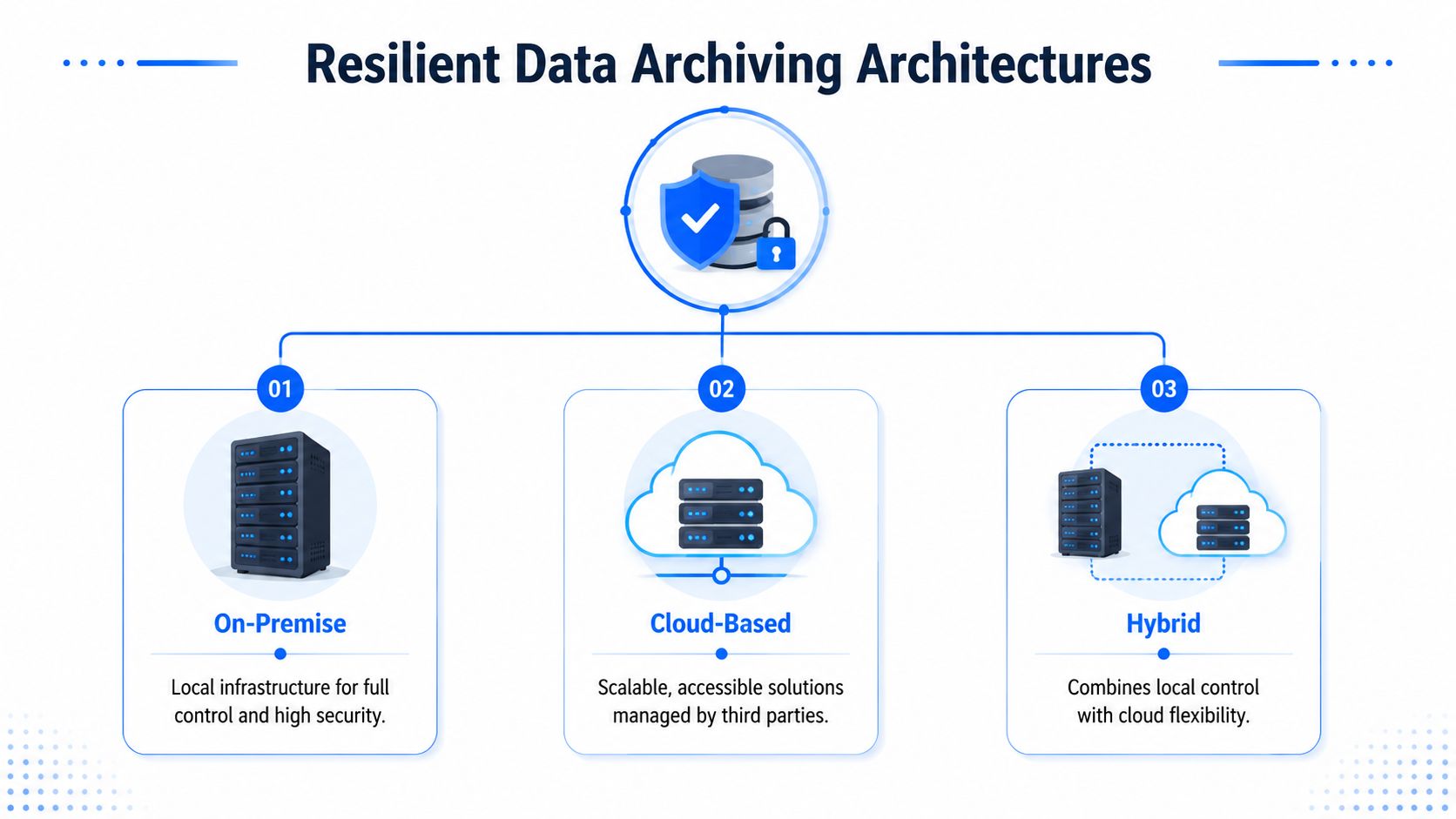
On-premise archive fits organizations that need strict locality, direct hardware control, or internal-only environments. Tape libraries still appear in some sectors. More often, teams use dedicated on-prem object storage for archive workloads.
Cloud archive works well when scale elasticity, managed durability features, and regional placement matter more than infrastructure control. Services like AWS Glacier or Azure Archive Storage are common targets.
In-database archiving belongs in the conversation too. Some platforms support moving old partitions, tables, or records into cheaper internal structures or archive schemas. This can work for application-specific retention, but it often falls short when teams need immutable records, independent lifecycle rules, or broader discovery capabilities.
Three design rules usually hold:
Keep operational and archival responsibilities separate: Don't let production databases become permanent museums.
Push immutability down to storage controls: Application logic alone is too easy to bypass.
Design for residency up front: Regional retention and jurisdiction constraints are expensive to fix later.
A resilient archive is boring in the best way. Policies fire automatically, retention can't be edited casually, and retrieval doesn't depend on tribal knowledge.
When teams mix on-prem control, cloud economics, and application-specific archiving carefully, they get the benefits of each without forcing one pattern onto every dataset.
Building Your Compliance and Retention Framework
A retention framework isn't a spreadsheet of dates. It's the set of rules that tells your systems what to keep, why to keep it, who owns it, and when it can be released or destroyed.
Retention is a legal and operational policy
Start with records categories, not storage platforms. Finance data, HR records, customer communications, application logs, clinical records, and ML training datasets usually have different retention logic. If you begin with the bucket where data happens to live, you'll build inconsistent rules across the same business record.
For teams formalizing policy language, practical examples of designing UK retention policies are useful because they show how legal obligations, deletion timing, and ownership should be written down in a defensible way.
A workable framework should define:
Retention trigger: When the clock starts. Creation date, contract end, account closure, case closure, and employee termination all create different outcomes.
Legal hold handling: Normal expiry must stop when litigation, investigation, or audit requires preservation.
Disposition workflow: Destruction should be authorized, logged, and repeatable. It shouldn't rely on ad hoc manual cleanup.
Residency constraints: If archived records must stay within specific jurisdictions, policy has to say so explicitly. This overview of data residency requirements is a good reference when aligning archive location with governance controls.
Metadata is what makes the archive defensible
Stored files without rich metadata are hard to search, hard to explain, and hard to defend. The archive needs its own operational context.
Atlan's overview of data archival best practices is one of the clearest summaries: every archived dataset must retain its complete metadata profile, including classification label, governing regulation, retention period, expiry date, original owner, archival date, storage tier, retrieval instructions, and full data lineage, to enable fast, defensible e-discovery and root-cause analysis. The same source notes that metadata tagging and automated tiering can deliver 30% lower retrieval latency and 25% reduced TCO.
That's why indexing strategy matters. Engineers often focus on where archived data sits, but compliance teams care just as much about whether they can find a precise subset without restoring an entire historical application.
Use metadata to answer these questions quickly:
What is this dataset?
Why was it retained?
Which regulation or policy governs it?
Who owned it at archive time?
How do we retrieve it and in what format?
What upstream system and schema produced it?
If your archive can't answer those questions, it may hold records, but it doesn't yet support defensible discovery.
The Hidden Risks of Long-Term Archives
The industry still talks about archives as if moving data off primary storage solves the problem. It doesn't. Long-term archives fail unnoticed.
Stored is not the same as viable
An object can exist in storage and still be useless. Bits can decay. Files can become unreadable by current tooling. Formats can outlive the software that once made them understandable. Compression libraries, proprietary exports, and legacy database dumps are frequent trouble spots.
Access Corp's discussion of long-term data retention risks puts a hard number on the issue: 30% of long-term archives fail due to unverified integrity or unreadable formats by year 7. That's the uncomfortable truth behind “store it and forget it.”
When engineers hear “bit rot,” they often think only about storage media corruption. The broader risk is archive viability. A dataset can pass a storage-level presence check and still fail the business test: can a team retrieve, open, interpret, and trust it?
Archive governance overlaps with disposal and hardware retirement practices. If your organization also handles legacy media, these Reworx Recycling data security insights are worth reading because they highlight the security implications around old systems and retired storage assets that often still hold sensitive records.
What active validation looks like
Checksums at ingest are useful, but they aren't enough on their own. You need recurring validation over time and a process for remediation when a check fails.
A pragmatic archive validation routine includes:
Periodic integrity verification: Recalculate and compare hashes on stored objects.
Format readability tests: Open sample records with current tools, not just storage APIs.
Restoration drills: Prove retrieval instructions still work under current permissions and environments.
Catalog freshness checks: Confirm archive references still point to valid objects and locations.
An archive without validation is a digital tomb. It exists, but you won't know whether it's usable until the worst possible moment.
This is especially relevant when stale historical datasets feed downstream analytics or model retraining. Teams dealing with stale data in production workflows already know that age alone can distort trust. Archives add another layer of risk because deterioration may stay hidden until retrieval.
Preserving Context to Ensure Future Usability
Integrity protects the bits. Context protects the meaning. Lose the second one, and the archive becomes a black box.

Why static tags are not enough
A file named customer_snapshot_legacy_final_v2 might still be perfectly intact years from now. That doesn't mean anyone will understand how it was generated, which schema version it followed, or which business rules filtered the rows.
Cloudian's write-up on data archiving strategy in 2026 highlights the future-context problem directly: a 2025 study found that 45% of archived research datasets are unusable because the original metadata is insufficient for re-interpretation. That's not a storage failure. It's a documentation failure.
What a self-describing archive includes
A usable archive needs embedded context that travels with the data or is inseparably linked to it. Static classification tags help, but they don't explain business meaning.
Keep at least these context artifacts with archived datasets:
Schema evolution history: Which columns changed, disappeared, or shifted data type over time.
Validation logic: The rules that defined acceptable records at archive time.
Lineage notes: Upstream source systems, transformations, and key joins.
Business definitions: Human-readable explanations of important fields and derived values.
A modern data catalog helps here because it gives teams a controlled place to store definitions, ownership, and lineage. But for long retention, the best practice is stronger than external reference alone. Archives should be self-describing enough that future analysts, auditors, or ML engineers don't need the original team sitting beside them to interpret the dataset correctly.
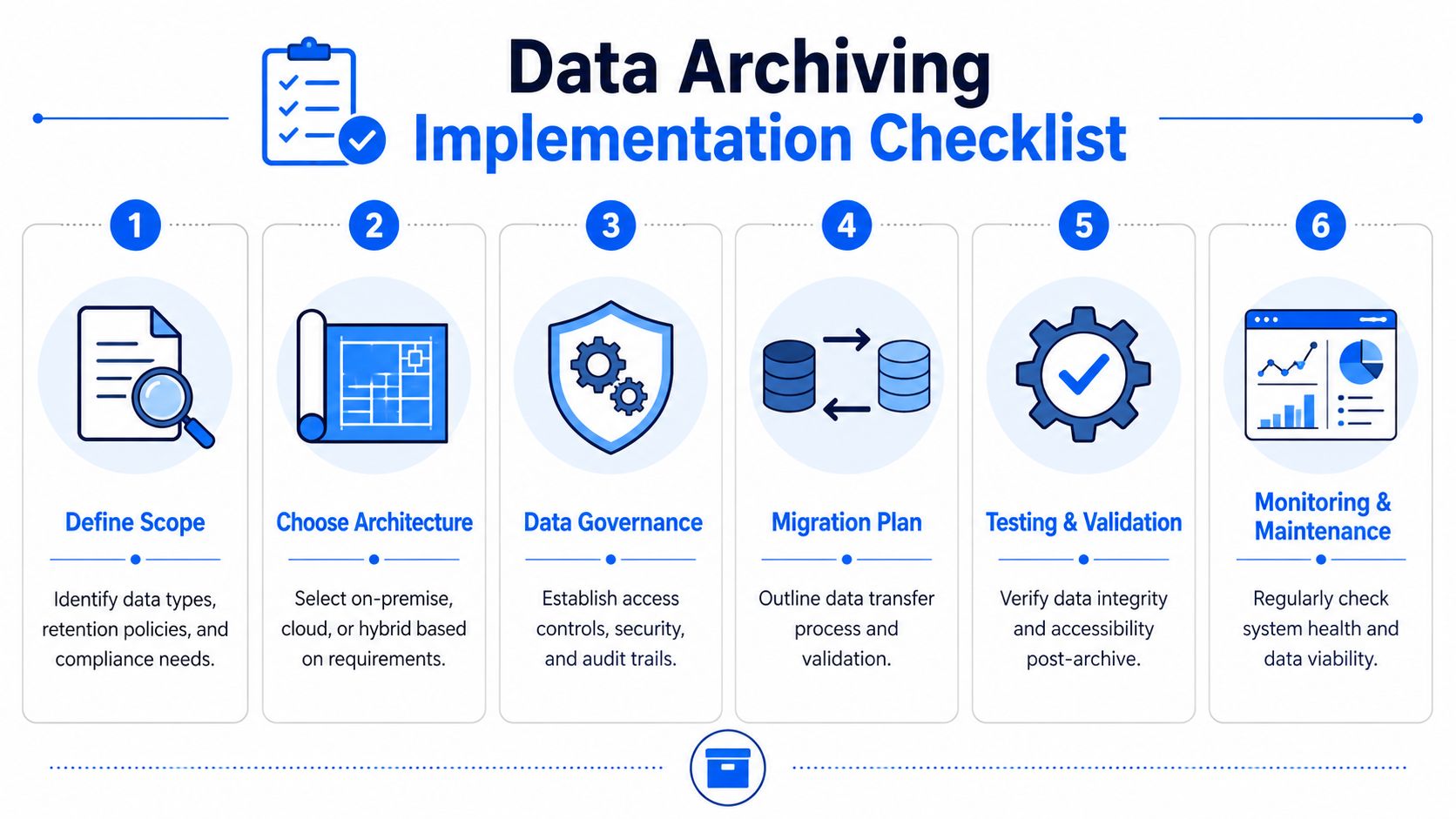
A Practical Checklist for Implementation
Most archive projects succeed or fail on execution discipline. The pattern that works is phased: decide what qualifies, automate the movement, and keep validating long after the migration is done.
Planning
Begin with inventory and classification. Identify candidate datasets by inactivity, business owner, regulatory obligation, and downstream dependency. Don't archive blind. Some “old” data still supports active reconciliations, fraud reviews, or model backtesting.
Then define archive classes. Group data by retention behavior, not by whichever team currently stores it. That gives you consistent rules across applications.
Use this planning checklist:
Define archive candidates: Focus on inactive data with ongoing legal, analytical, or historical value.
Assign ownership: Every archive class needs a business owner and a technical owner.
Set retention triggers and holds: Capture when retention starts, what interrupts deletion, and who approves release.
Choose retrieval expectations: Decide whether the consumer needs minutes, hours, or longer.
Execution
Architecture comes next. Pick on-premise, cloud, or hybrid based on residency, immutability, scale, and operational fit. Then automate movement into the target tier with metadata capture at the same time. Manual archive jobs usually drift out of policy fast.
At execution stage, insist on testable controls:
Preserve metadata during migration. If metadata arrives later, it often never arrives correctly.
Write retrieval instructions into the archive record. Future teams shouldn't reverse-engineer recovery steps.
Validate post-move accessibility. Don't mark a dataset archived until you've proven it can be found and opened.
Apply storage-layer immutability where required. That control shouldn't depend on application goodwill.
If the migration script is the only place where archive logic exists, you don't have a framework. You have a fragile batch job.
Ongoing monitoring
The archive now needs observability. Not the same observability you apply to streaming pipelines, but a related discipline: integrity, accessibility, context completeness, and retrieval reliability.
AI-assisted monitoring offers a solution. According to digna's overview of AI anomaly detection techniques, AI-powered anomaly detection systems using adaptive thresholding reduce false positives by 45% compared to static rule-based systems, while maintaining 92% true anomaly capture rates in high-volume data pipelines by learning normal behavior patterns including seasonality and trends. The practical lesson for archiving is simple: fixed thresholds miss too much or alert too often when archive behavior changes over time.
Run the archive as an operational system with its own checks:
Monitor integrity signals: Detect changes in checksum results, object counts, and validation outcomes.
Track retrieval anomalies: Watch for rising restore failures, unexpected delays, or broken paths.
Detect schema drift in source systems: If active schemas change, archived context models may need updating before the next archive cycle.
Review access patterns: If teams keep retrieving the same dataset, it may belong in a warmer tier.
Good archiving of data is never a one-time migration. It's a managed service your team provides to the business.
If your team needs stronger visibility into schema changes, timeliness issues, anomaly detection, and in-environment data monitoring, digna is worth a look. It's built for teams that want observability and data quality controls without moving production data out of customer-controlled environments.