S3 as File System
|
7
minuto de lectura

Mounting S3 as a file system is usually the wrong default. Teams reach for it because the path looks familiar, legacy tools keep running, and the promise of “just mount the bucket” sounds cheaper than rewriting pipelines. That shortcut hides a semantic mismatch, and in enterprise analytics that mismatch shows up as latency spikes, odd consistency behavior, messy governance, and surprise operational cost.
The safer rule is simple. Use S3 for what it is, object storage, unless you have a narrow workload that needs file semantics. If you treat the mount as a convenience layer instead of an architecture decision, you'll end up debugging the abstraction instead of delivering data.
Table of Contents
Why Mounting S3 as a File System Is Usually the Wrong Default
Object Storage and POSIX File Systems Compared
Map the file operation to the S3 behavior
Consistency Behavior You Cannot Ignore
The operations that still trip people up
Mount Options from s3fs and FUSE to S3 Files
Compare the stack, not the marketing
Analytics Workloads on an S3 File System Layer
Tune for the workload you actually have
Enterprise Governance and Observability for S3 File Access
Audit the object layer, not just the mount
When S3 as a File System Actually Makes Sense
Use it when the tradeoff is deliberate
Why Mounting S3 as a File System Is Usually the Wrong Default
The common mistake is assuming that if a bucket can look like a directory, it should behave like one. That assumption breaks teams because the mount hides the fact that S3 is still an object store underneath, with different performance, consistency, and metadata behavior than a local disk or NFS share. The object store will happily store your bytes, but it won't inherit the guarantees your application may be counting on.
In production, that gap is where the pain starts. Engineers use mounts to keep old scripts alive, then discover that rename-heavy jobs, shared writes, and metadata walks behave like a translation layer, not a native file system. The result is often more moving parts, more hidden retries, and more places for cost to leak through request fan-out and cache churn.
Practical rule: if the workload only “needs a folder,” that doesn't mean it needs a file system.
AWS itself has evolved S3 in a way that proves the point. From its launch on March 14, 2006 with about 1 petabyte of capacity across roughly 400 storage nodes in 15 racks and 15 Gbps of total bandwidth, S3 grew into a platform storing more than 500 trillion objects and serving more than 200 million requests per second globally by March 2026, across 123 Availability Zones in 39 AWS Regions (AWS S3 history and scale). That scale makes S3 excellent for object workloads, but it doesn't magically make it a POSIX disk. If your architecture depends on local file behavior, you need to prove why the mount belongs there.
For teams designing a platform from scratch, the first question is not “can we mount it?” It's “what failure mode are we buying?” If you want a clean system design review around that question, the right starting point is this data system architecture guide.
Object Storage and POSIX File Systems Compared
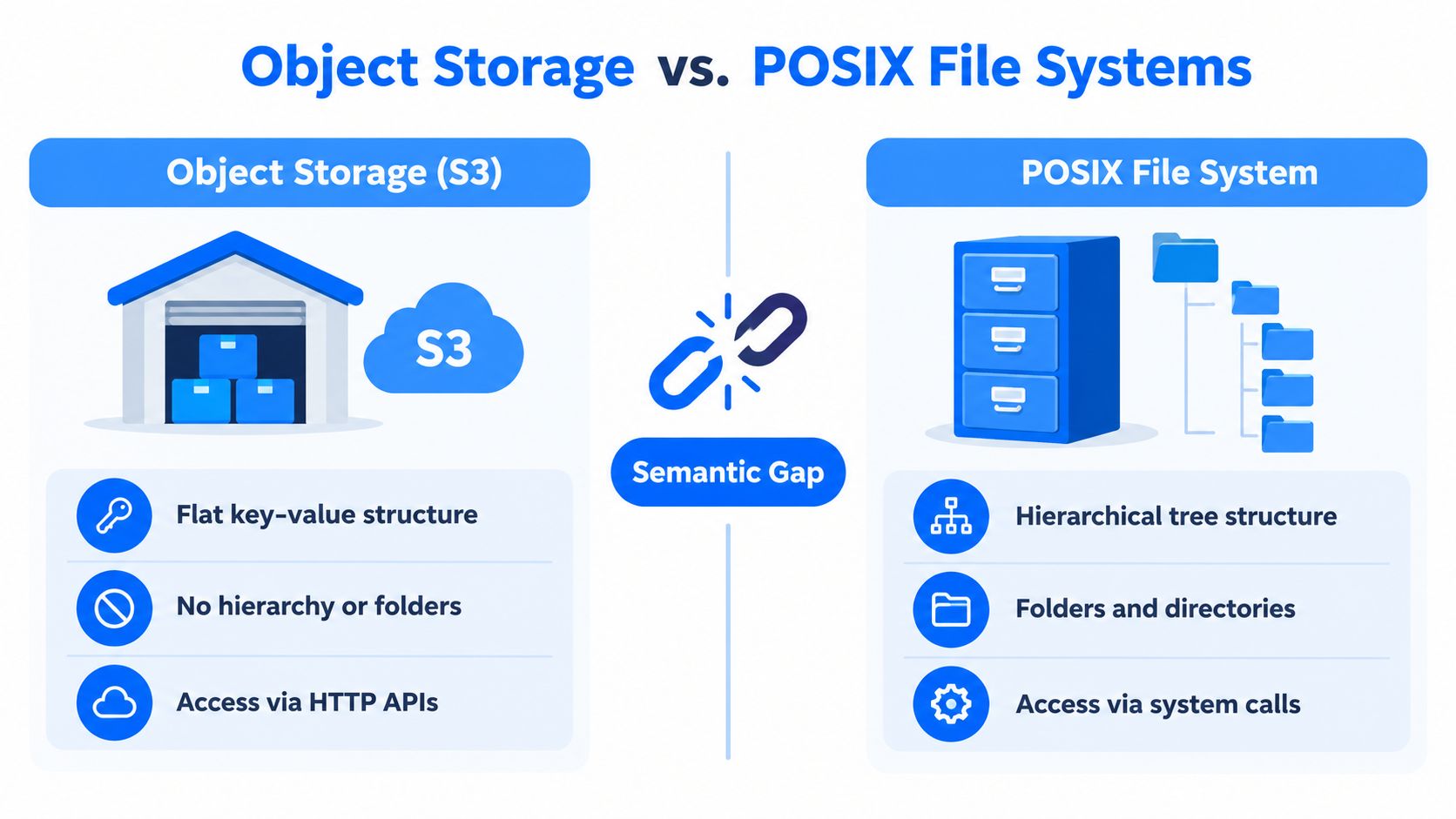
Think in warehouse terms. A bucket is a warehouse, an object is a sealed crate, and the key is the label on the crate. You can move crates, replace crates, and list labels, but you can't open a crate and edit one page inside it the way you would edit a document on a laptop. That's the semantic gap every mount layer has to hide.
Map the file operation to the S3 behavior
Start with open. On POSIX, opening a file is a normal system call into a hierarchical file system. On S3, “opening” is really a client decision to fetch an object or prepare a write path through a translation layer. The system can make it feel familiar, but the mechanism is still object-based.
Now map partial write and overwrite. On a file system, you can often modify bytes in place. On S3, the object gets replaced. That's why file-oriented workflows that assume incremental edits can become expensive or awkward when translated to object operations (object-store behavior and overwrite differences). The storage model does not behave like a mutable block of shared memory.
Finally, consider rename and atomic rename. In POSIX, rename semantics are part of the file system contract. In S3, rename is an emulation pattern, usually copy plus delete or a metadata rewrite in the mount layer. That's where surprises show up, because a directory move can turn into a burst of object operations instead of a single atomic action.
A mount can translate names. It can't invent semantics.
The one-minute explanation for a stakeholder is blunt. S3 is a flat object namespace with file-like presentation layered on top. POSIX is a hierarchical file system with native directory and mutation semantics. The more your workload leans on atomic edits, locking, and rename behavior, the more the translation layer has to fake what the storage backend never promised.
Consistency Behavior You Cannot Ignore
S3 consistency is the point where many file-system assumptions start to crack. Amazon S3 now provides strong read-after-write consistency for GET, PUT, and LIST across all AWS Regions, and AWS says what you write is what you will read (S3 consistency model). That removes an important class of surprises, but it doesn't turn S3 into a POSIX file system.
The operations that still trip people up
A reader can still get into trouble when the application assumes file-system coordination that doesn't exist. Overwrite workflows, directory-style rename patterns, and metadata-heavy access paths still depend on the mount layer to add synchronization or caching behavior that S3 itself doesn't provide. When teams ignore that, they eventually see stale reads, race conditions, or split-brain patterns in multi-client workflows, especially when multiple writers touch the same namespace.
The risk is not theoretical. A job may write data, a second job may list the same prefix, and both jobs may believe they own the same logical path. If the pipeline is expecting atomic directory replacement or file locking, the abstraction has to supply coordination on top of object semantics, and that coordination becomes another failure surface.
Operation | POSIX Behavior | S3 Behavior | Risk for File-System Users |
|---|---|---|---|
Create and read | Native file create, then immediate read | Strongly consistent for new objects | Lower risk, but mount behavior still matters |
Overwrite | In-place file update semantics | Object replacement semantics | Readers may not get file-like update behavior |
Rename directory | Atomic-looking namespace move | Emulated through object operations or metadata layer | Orphaned keys, partial moves, hidden retries |
List directory | Native directory metadata | Prefix-based listing of object keys | Large listings can become slow and operationally noisy |
AWS S3 Files adds another signal that the abstraction has limits. The documentation exposes explicit quotas such as 25,000 connections per file system and 10,000 access points per file system, which is a reminder that the mount is not the same thing as a local disk (S3 Files limits and behavior). Design for those limits, don't wish them away.
For pipeline teams, the safest habit is to route every consistency-sensitive workflow through a clear owner and an explicit validation step. If you need a practical checklist for that kind of drift detection, use data consistency checks as a model for how to think about the problem.
Mount Options from s3fs and FUSE to S3 Files
Not every S3 mount is built the same. Some options exist to keep legacy tools alive, some exist to reduce operational friction, and some are better described as access layers than true file systems. The right choice depends on whether you need read access, write-through behavior, shared mutation, or a cleaner way to feed analytics engines that already speak object storage.
Compare the stack, not the marketing
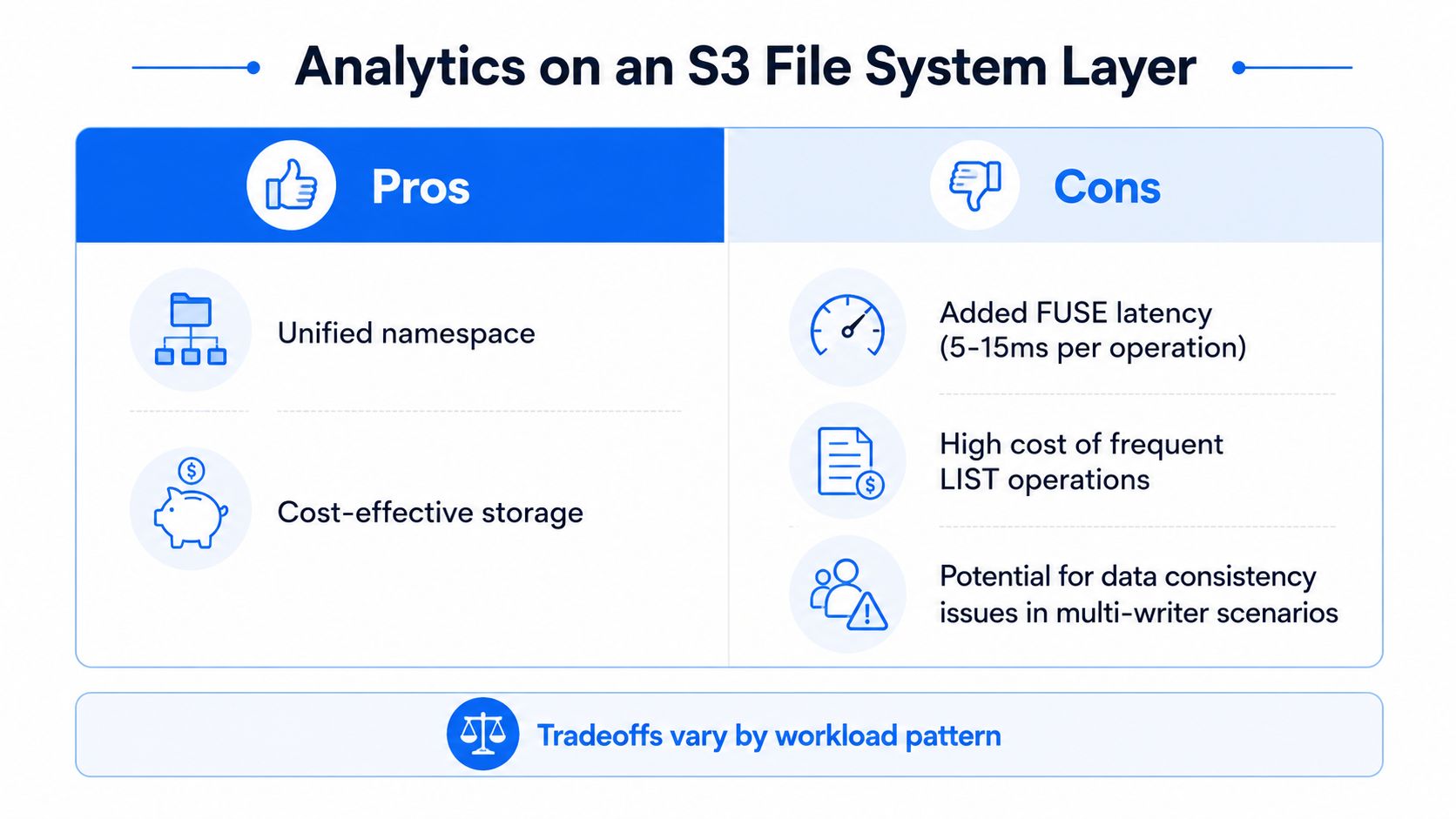
s3fs and similar FUSE-based mounts are usually the first stop for teams that need a quick compatibility bridge. They're convenient, but they add an extra process layer, extra latency, and more room for bottlenecks when a single node becomes the choke point. They can be fine for light interactive use or migration scaffolding, but they're a poor default for busy enterprise pipelines.
Goofys and Mountpoint for S3 sit in the same broad family of compatibility layers. They can improve specific access patterns, but they still don't erase the semantic mismatch between object storage and file semantics. Use them when the primary goal is “make this tool work now,” not “build the platform around this indefinitely.”
AWS's newer S3 Files is different in intent. AWS positions it as a shared file system for EC2, Lambda, EKS, and ECS, with NFS 4.1 and 4.2 access and bidirectional synchronization between the mounted file system and the bucket (S3 Files behavior and regions). That makes it more native than a simple FUSE shim, but it still isn't a POSIX disk. The design tradeoff is better for shared access than for database-style random writes.
Native object-store APIs are the cleanest answer when your engine already supports them. Spark, Trino, and DuckDB get better parallelism and cleaner scaling when they talk to S3 directly instead of walking through a mount that tries to imitate directories. If the tool already knows how to do parallel listing, vectorized reads, or predicate pushdown, don't force it through a file veneer.
Option | Stack | Write Support | Throughput Ceiling | Best Fit |
|---|---|---|---|---|
s3fs | FUSE-based client | Limited, compatibility-oriented | Often bottlenecked by the client node | Legacy tools and short-lived migration work |
Other FUSE mounts | Compatibility layer | Varies by implementation | Depends on translation overhead | Read-heavy access with low concurrency |
S3 Files | AWS-managed file-system interface over S3 | Bidirectional sync | Better for shared access, still not POSIX-native | Shared compute and file-oriented collaboration |
Native object APIs | Direct S3 SDK or engine integration | Full object semantics | Scales with object-store parallelism | Spark, Trino, DuckDB, and modern analytics |
The recommendation is plain. Use read-only mounts when you must preserve old tooling. Use write-through mounts only with explicit retries, ownership rules, and rollback paths. Prefer native object APIs whenever the tool supports them, because that's the path that scales cleanly for analytics. If you want a broader pipeline design lens, the ETL data pipeline guide is the kind of framing your platform team should use before approving a mount.
Analytics Workloads on an S3 File System Layer
Analytics workloads expose the weak spots fast because they touch both bytes and metadata. Spark and Hive jobs can tolerate staged reads if the access pattern is mostly sequential, but once the workload starts scanning directories, renaming partitions, or churning small files, the mount layer gets expensive in both time and control-plane chatter. Trino and DuckDB usually do better when they can talk to S3 directly, because they avoid a file abstraction that was never built for high-churn metadata.
Tune for the workload you actually have
If the job is batch-oriented, staging data through S3 can still make sense when the read pattern is predictable and the output is written once. In that case, focus on reducing unnecessary directory walks and let the engine read larger chunks instead of pretending every row deserves an independent file touch. Tools that support read-ahead, parallel GET ranges, or predicate pushdown will usually outperform a generic mount because they stay closer to object semantics.
The other pressure point is small files. A file-system layer makes small-file proliferation look harmless until listing and metadata operations dominate the job. Rename-heavy table writes also become a problem, because the mount has to emulate a behavior that object storage doesn't natively provide. That is where table formats like Iceberg and Hudi earn their keep, because they encode their own consistency and metadata layers rather than relying on directory tricks.
Practical rule: if your data layout relies on rename as a commit mechanism, you're solving a table-format problem with storage plumbing.
The cost question matters too. Frequent LIST operations on large buckets are an anti-pattern for mount-based analytics, because every file-oriented convenience can turn into extra requests and extra latency. That's why a direct S3 path is usually the better choice for large enterprise datasets, especially when the platform team already has monitoring around query patterns, file counts, and object churn.
For teams that need instrumentation around these tradeoffs, the operational view matters as much as the query engine. The right monitoring pattern belongs in data lake monitoring, not in a one-off mount script.
Enterprise Governance and Observability for S3 File Access
Once S3 is exposed as a file system, governance has to follow the data, not the illusion of folders. IAM boundaries still matter at the bucket or prefix level, KMS encryption still matters at rest, and VPC endpoint policies still matter if you want to stop accidental public egress. The file path may look familiar to users, but the control plane underneath is still object storage, so your policy model has to match object semantics.
Audit the object layer, not just the mount
Filesystem audit logs are not enough here. The mount can hide object-level operations from the people who only look at POSIX-style traces, which means the security team needs S3 access logs, CloudTrail data events, and storage telemetry in the same monitoring pipeline. Without that, you can miss drift, stale mounts, leaked credentials on bastion hosts, and GET patterns that look normal to the file client but suspicious to an incident responder.
Data classification also gets harder. A file path in a mounted namespace does not map one-to-one to an ACL or object policy, so teams need explicit rules for who can see what, and where those rules are enforced. If the same bucket is touched by multiple tools, you also want ownership conventions that prevent ambiguous write paths and accidental namespace collisions.
AWS S3 Files adds one particularly useful operational rule. If the same item is changed both in the file system and directly in the bucket, AWS treats the bucket as the source of truth and moves the conflicting file to a lost-and-found directory, and AWS recommends choosing either the file system or S3 as the primary writer (S3 Files best practices). That's a governance policy as much as a technical detail, because it forces teams to pick a source of truth before they create a mess.
For enterprise data platforms, the job is continuous monitoring of the layer itself. If a mount drifts, a credential leaks, or a workload starts hammering GETs in a way that doesn't fit the expected pattern, the platform team should see it before the business does. That's exactly the kind of visibility a platform such as data observability is meant to deliver.
When S3 as a File System Actually Makes Sense
Use S3 as a file system only when the workload earns the abstraction. Ephemeral staging for a single batch job is fine. Legacy POSIX-bound tools that can't be rewritten inside the project timeline are fine. Read-mostly analytics on Parquet or table formats that already manage their own metadata are also fine, especially when the goal is to avoid duplicate copies and unnecessary data movement.
Use it when the tradeoff is deliberate
What doesn't belong on an S3-backed mount is a random-write database, a high-churn shared workspace, or a microservice architecture that uses the mount as if it were a low-latency shared disk. Those systems want stronger file semantics than object storage can provide through a translation layer, and they tend to fail in the exact places where concurrency and mutation matter most.
The clean decision pattern is to score the candidate workload against six questions.
Write frequency. If writes are frequent and small, walk away.
Listing patterns. If the app traverses directories constantly, walk away.
Latency tolerance. If a few extra round trips break the workflow, walk away.
Cost ceiling. If request growth matters more than storage cost, walk away.
Security posture. If policy enforcement depends on path semantics alone, walk away.
Rollback path. If you can't fall back to direct S3 APIs or another store, don't start.
The honest recommendation is simple. Use the mount when compatibility is the goal and the workload is narrow. Avoid it when shared mutation, complex concurrency, or database-like behavior is the requirement. S3 is an excellent data platform primitive, but a file-system wrapper doesn't turn it into a general-purpose NAS.

If your team is deciding whether to expose S3 as a mount, digna can help you keep the data layer honest with observability that tracks timeliness, schema change, anomalies, and platform behavior inside your own environment. Visit digna to see how its data observability platform can help you monitor the downstream effects of architecture choices like this, before a mount turns into a production incident.


