Apache Iceberg Open Table Format: The Practitioner's Guide
|
0
min. czyt.

You've adopted Apache Iceberg, registered a few tables, and pointed Spark at object storage. The first production incident usually arrives before the architecture feels finished: a downstream query reads an unexpected schema, a partition change behaves differently in Trino, or nobody knows which snapshots can be removed safely. The Parquet files are rarely the difficult part. Ownership, catalog coordination, metadata maintenance, and evidence that a table is trustworthy create the actual workload.
Apache Iceberg's value comes from separating table state from physical file layout. That separation supports reliable analytics across engines, but it also means teams need operating practices that extend beyond the format specification. This guide treats the Apache Iceberg open table format as a platform discipline, with clear boundaries between storage, catalogs, engines, maintenance, and observability.
Table of Contents
Why Iceberg Is an Operational Discipline, Not Just a File Format
Operating Iceberg Tables With Schema Quality and Timeliness in Mind
Migrating From Hive, Delta, or Hudi Without Burning Down the Lake
Why Iceberg Is an Operational Discipline, Not Just a File Format
A team can adopt Iceberg quickly and still lack answers to the questions that matter in production. Who owns snapshot expiration? Which team approves a schema change? How do you detect a producer adding a field with an incompatible meaning? What happens when Spark and Trino interpret a partition transform differently because their catalog or connector configuration has drifted?
Iceberg began at Netflix in 2017 to address scalability and consistency limits in Apache Hive tables. Netflix donated it to the Apache Software Foundation in November 2018, and it became a top-level Apache project in May 2020, according to the project's release history. Those milestones explain the format's engineering focus, but they don't remove the operational responsibilities that appear after adoption.
The physical data layer is comparatively straightforward. Engines write files, commonly Parquet, to object storage. The difficult work starts around those files:
Catalog governance: Decide who can create, alter, drop, or promote tables, and how identifiers resolve across environments.
Metadata hygiene: Control snapshot retention, remove orphan files, and monitor manifest growth.
Engine coordination: Test how Spark, Flink, Trino, and other readers handle the same schema, partition specs, deletes, and isolation rules.
Evidence: Connect data quality, freshness, lineage, and deployment history to a specific table state.
Practical rule: Treat every Iceberg table as a managed product with an owner, an operating policy, and an observable lifecycle.
That is where data observability fits. Observability doesn't replace the catalog or query engine. It provides the evidence needed to answer whether a table is healthy now, whether a change caused a regression, and whether an on-call engineer can trust the current snapshot.
Performance and correctness are decided at this operational layer. Iceberg gives teams strong primitives, but a platform that doesn't schedule maintenance, coordinate access, and monitor behavior will still produce unreliable data.
The Core Building Blocks of an Iceberg Table
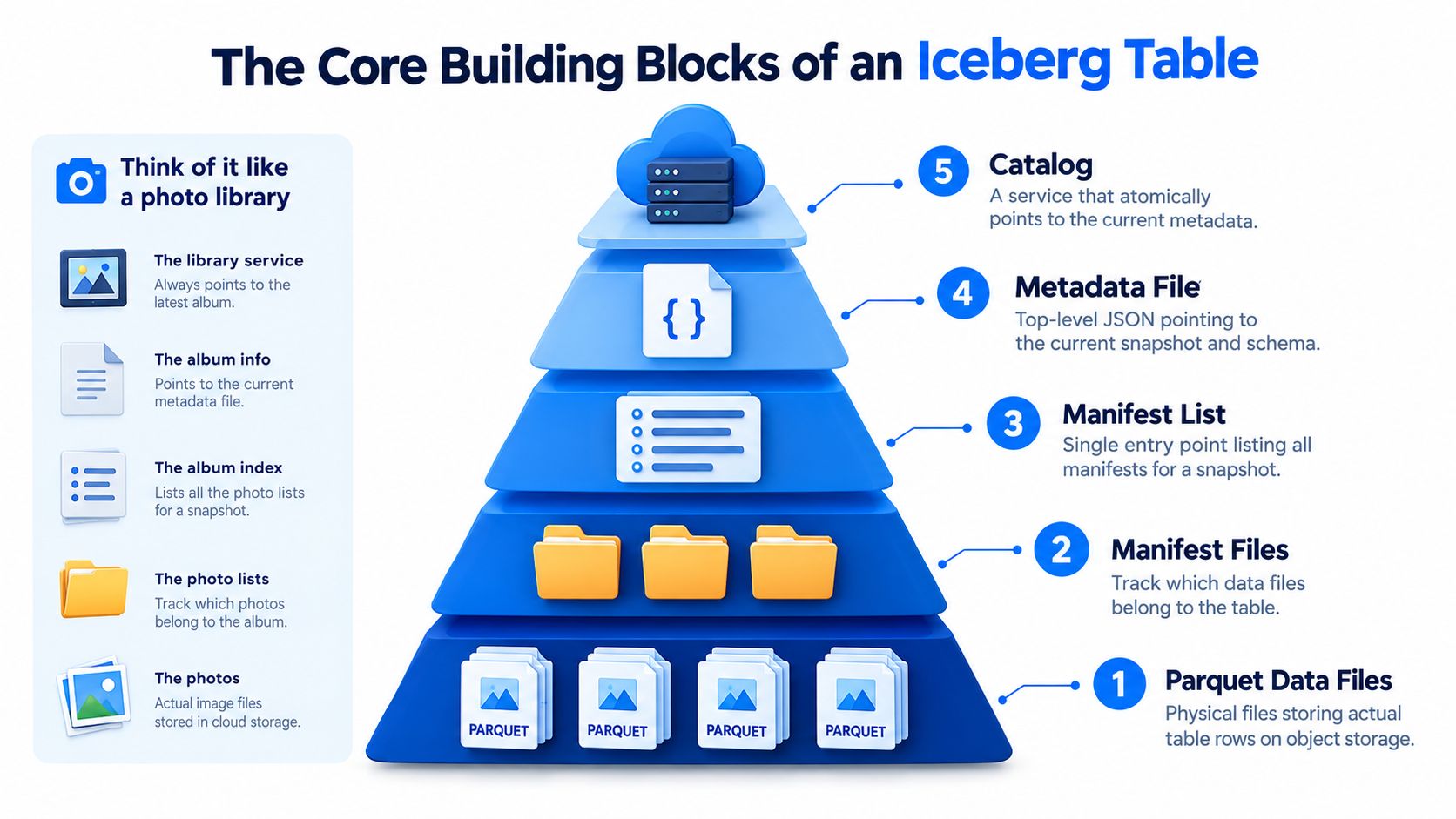
A useful mental model starts with a photo library. The photographs are the rows, folders describe groups of photographs, an album index tells you where to look, and a library catalog tells you which collection is current.
At the bottom, Parquet data files store the actual rows on object storage. Parquet is a columnar file format, and Iceberg manages references to those files rather than forcing readers to discover them by scanning directory names. For a focused explanation of the file layer, see what Parquet is and how it works.
Manifest files act like curated folders containing pointers to data files, along with information that helps engines decide which files are relevant. A manifest list is the index for a particular snapshot. It identifies the manifests that make up that table state, so a planner can start with one structured entry point instead of searching the entire object store.
The metadata and catalog layers
The table metadata file is the library's catalog record. Iceberg stores table state in JSON metadata, including schemas, partition specifications, snapshot history, and parent-child lineage. Snapshots are embedded in the table metadata rather than serialized as an unrelated state system, which lets readers reconstruct a table at a specific point in time from the snapshot log and lineage information, as described in the Iceberg table specification.
The catalog holds the atomic pointer to the current metadata file. A writer creates new data and metadata, then updates that pointer through the catalog's commit mechanism. Readers resolve the table identifier through the catalog, obtain the current metadata location, and plan against the manifests referenced by the selected snapshot.
The reusable model is simple:
Data files store rows.
Manifest files track data-file entries.
Manifest lists identify the manifests for a snapshot.
Metadata records schemas, partition specs, snapshots, and lineage.
The catalog points atomically to the current metadata.
This indirection is the foundation for atomic commits and engine-agnostic reads. It also explains why deleting files manually or changing object-store paths outside Iceberg's procedures can break table integrity.
Snapshots, Manifests, Hidden Partitioning, and Time Travel
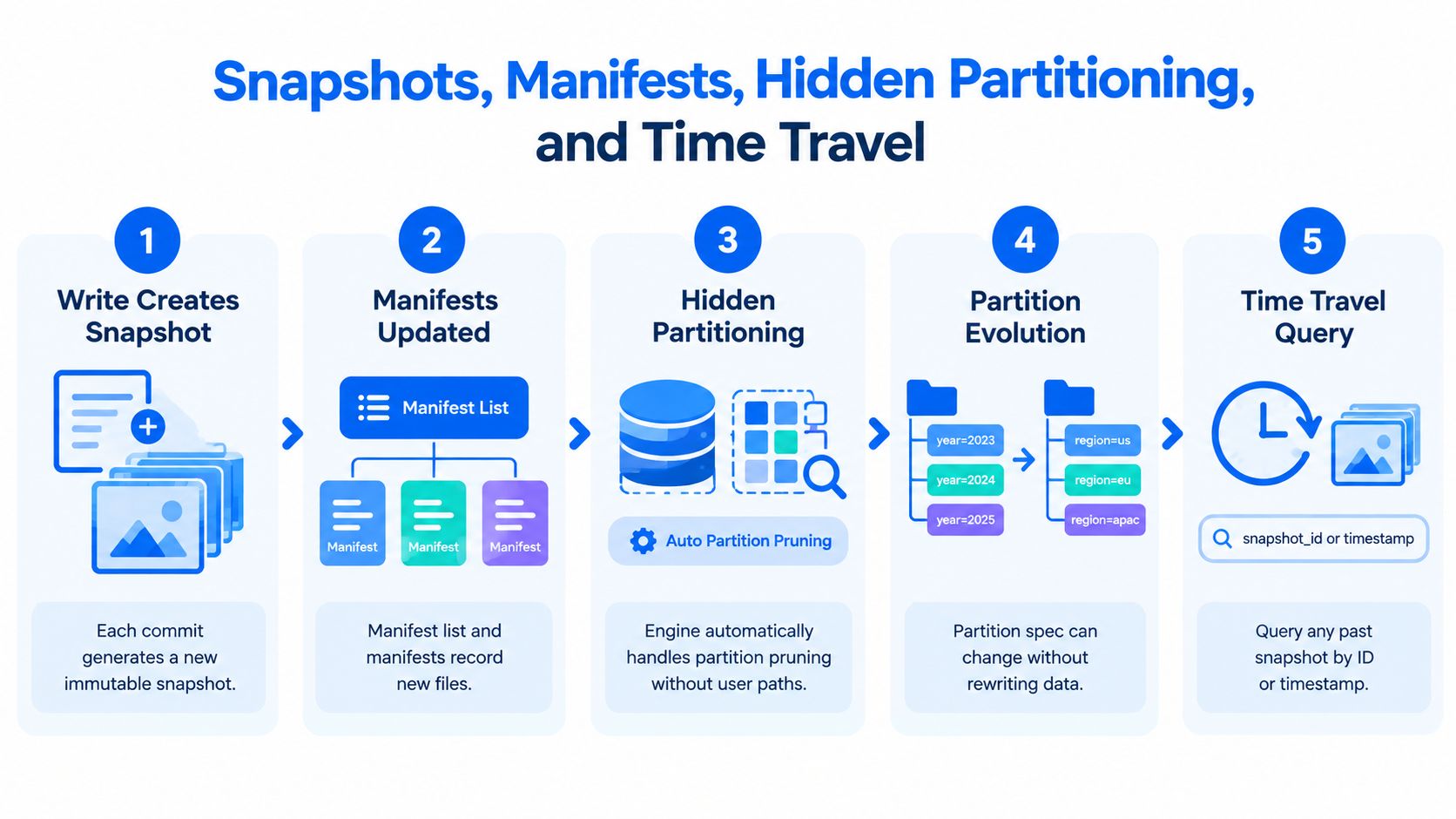
An Iceberg write changes table state by committing a new snapshot. The snapshot records a new point in the table's history and references the manifest list that describes the files visible at that point. Because Iceberg keeps snapshot history and parent-child lineage in metadata, a reader can reconstruct not only the latest state but also earlier committed states.
The sequence matters:
A writer creates or stages new data files.
The commit creates a new snapshot.
The manifest list identifies the manifests for that snapshot.
Readers use manifest metadata and file statistics to prune work.
A historical query can select an earlier snapshot instead of the current one.
Hidden partitioning removes path logic from queries
Iceberg records partition transforms in metadata. A transform such as date extraction, bucketing, or truncation can guide pruning without requiring users to write filters against physical partition columns or object-store paths. The engine interprets the table's partition information during planning, which keeps SQL focused on business columns.
That doesn't mean partitioning becomes automatic performance tuning. The engine still needs usable statistics, sensible file layout, and a partition specification that matches the query workload. Hidden partitioning removes a class of user-facing path errors, but it doesn't rescue an unsuitable design.
Evolution without rewriting history
Partition evolution is metadata-only. A team can change a partition spec, keep old data in its original physical layout, and write new data under the new spec, as documented in Iceberg partition evolution. The table tracks each partition version separately.
That flexibility is powerful when access patterns change. It also creates a planning obligation, because query engines must interpret multiple partition specs in one table. The benefit is avoiding a large rewrite job, while the cost is more complex metadata and planning.
Time travel then becomes a practical diagnostic tool. Query an older snapshot, compare its results with the current state, investigate the change, and return to the latest snapshot. Iceberg's committed-snapshot model provides snapshot isolation, so readers see a consistent committed state while writers create new snapshots atomically. For historical-data workflows, the same pattern is useful beyond Iceberg, as illustrated in this guide to historical data analysis.
Apache Iceberg vs Delta Lake vs Apache Hudi
Choosing a table format on feature count is a poor production method. The useful comparison concerns metadata behavior, engine coverage, and historical-read semantics, followed by the workload and governance constraints your platform can support.
Dimension | Apache Iceberg | Delta Lake | Apache Hudi |
|---|---|---|---|
Metadata model | Snapshot-based metadata with manifest lists and manifests that describe table files and support planning | A | A commit timeline designed around record-level changes and streaming-oriented table operations |
Strongest engine pattern | Broad multi-engine usage across Spark, Flink, Trino, Presto, Impala, Dremio, and Snowflake | Strongest inside Spark-centered environments | Strongest for streaming upserts and incremental processing |
Time travel model | Reads target committed snapshots, with retention controlled by table operations | Reads depend on retained transaction-log history and checkpoints | Reads depend on the configured commit timeline and retention window |
Main production trade-off | Coordination across catalogs and engines requires deliberate governance | Portability can become difficult outside its strongest ecosystem | Merge-on-read and copy-on-write choices add operational complexity |
Iceberg's metadata model separates table state from the data files. Engines can use manifest lists and file-level statistics to reduce planning work without requiring every reader to interpret a directory convention. Delta's log chain is effective for recording changes, but broad historical inspection can become a log-management concern. Hudi's timeline is a natural fit for streaming updates, particularly where incremental consumption and upsert behavior dominate the workload.
Engine coverage changes how the same table behaves in practice. Spark and Flink can write Iceberg tables and participate in commit protocols, producing new snapshots atomically. Trino and Presto are commonly used as read-focused planners that obtain manifest metadata, apply filter pushdown, and use partition transforms during planning. Impala accesses Iceberg through its catalog abstraction and can benefit from metadata pruning. Dremio and Snowflake add further consumption paths, but each connector and catalog combination still needs compatibility testing.
The catalog is the coordination point
REST, Hive, Glue, Nessie, and Polaris catalogs resolve table identifiers to the current metadata pointer. That pointer is the control-plane decision that tells an engine which table state to read or update. Storage compatibility alone doesn't guarantee consistent governance.
Concurrent writers need conflict handling. A writer may discover that the catalog pointer changed after it began its commit, forcing a retry or conflict response. Different engines surface those failures differently, so platform teams should test retries, error handling, and operational ownership rather than assuming every connector behaves alike.
A practical selection checklist looks like this:
Choose Iceberg when multiple engines, open catalogs, and portable table governance matter more than tight platform integration.
Choose Delta Lake when Spark and its surrounding platform provide the dominant write, governance, and serving path.
Choose Hudi when streaming upserts, incremental reads, and record-level ingestion are the central requirements.
Test the catalog first when the same tables must be governed across engines.
Validate historical reads with real retention and rollback procedures, not only a successful demo query.
Data quality operations also need to match the chosen execution environment. For teams using Databricks, Databricks data quality management is one relevant operational path to evaluate alongside catalog and engine behavior.
A Practical Example Creating and Querying an Iceberg Table
A small PySpark workflow makes the metadata model concrete. The exact catalog implementation varies, so the example uses a named Iceberg catalog and a warehouse location that you would replace with your environment's settings.
The table definition stores the partition transform in metadata. Users can filter on event_time; they don't need to reference a generated partition column or object-store directory.
The append creates a new committed snapshot. To inspect history, query the table's metadata tables, select the desired snapshot identifier, and use that identifier for a historical read.
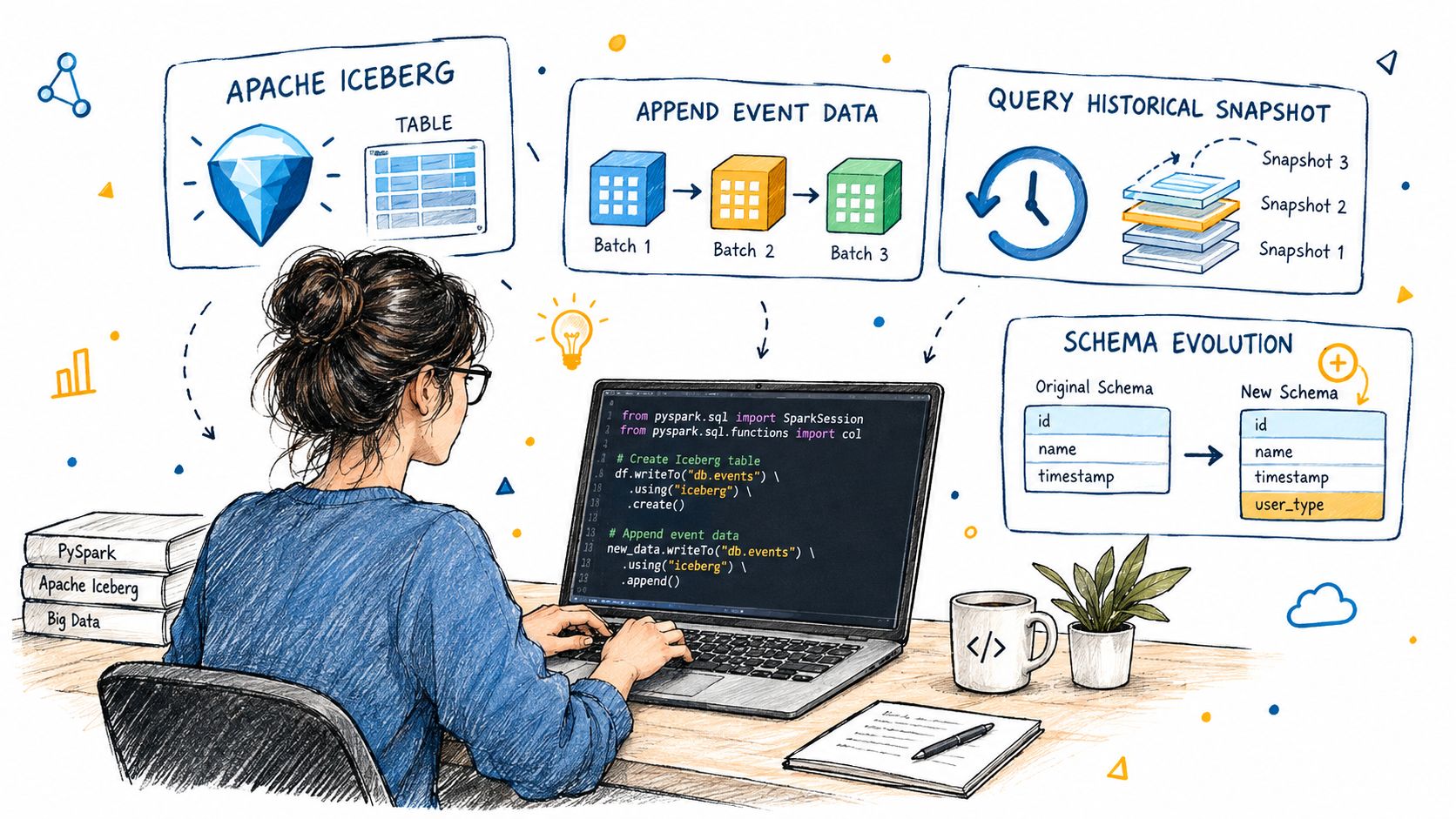
Schema evolution is metadata-only for supported changes. Add a column, then append records that populate it:
Readers targeting the older snapshot still use the older schema projection. Behind the scenes, the catalog points to updated table metadata, the metadata references a new snapshot, the manifest list identifies the relevant manifests, and the manifests point to data files. That filesystem layout should be visible and explainable to the team operating the table.
Partitioning, Sorting, and File Sizing Best Practices
Iceberg doesn't automatically make a slow query fast. Query performance usually depends on the relationship between file size, sort order, partition transforms, and the actual filter mix. The format gives you mechanisms to evolve the layout, but engineers still need to test and maintain that layout.
Start with file sizing. A common starting range is 128 to 512 MB, but the right target depends on read patterns, file format settings, compression, and engine behavior. Small files increase planning overhead and make scans inefficient. Very large files can reduce parallelism or make selective reads less economical.
Sorting is the second lever. Sort event time when time-window scans dominate. Use a high-cardinality filter column when it produces meaningful clustering, and consider Z-order-style organization only where the engine and maintenance tooling support it consistently. A sort key that looks attractive in a design document can be wrong for the actual query mix.
Hidden partitioning is a refinement tool, not a substitute for workload analysis. Partition evolution lets you adjust the specification without eagerly rewriting historical files, but each additional spec increases the number of layouts planners must interpret.
Lever | Default starting point | When to adjust | Common mistake |
|---|---|---|---|
File size | Begin around 128 to 512 MB and validate with representative scans | Adjust for selective reads, concurrency, and engine parallelism | Allowing many tiny files to accumulate |
Sort order | Start with common time filters or stable selective columns | Change when query history shows different predicates dominate | Choosing a key from intuition instead of observed queries |
Partition transform | Use a coarse business-relevant transform | Evolve when access patterns materially change | Creating too many partitions |
Maintenance | Schedule compaction and metadata cleanup | Increase frequency as ingestion and table count grow | Treating cleanup as an emergency task |
Avoid over-partitioning that creates sub-64 MB files. Prefer daily or monthly granularity over hourly granularity when the resulting data volume is low. These are operating heuristics, not guarantees, so validate them against representative workloads before standardizing them.
Compaction isn't optional at scale. Spark rewrite procedures, Flink-based maintenance, or external tools can combine files and improve layout, but they must be coordinated with snapshot retention and orphan-file cleanup. Partition evolution reduces rewrite pressure, yet it doesn't remove the need to monitor metadata growth.
Operating Iceberg Tables With Schema Quality and Timeliness in Mind
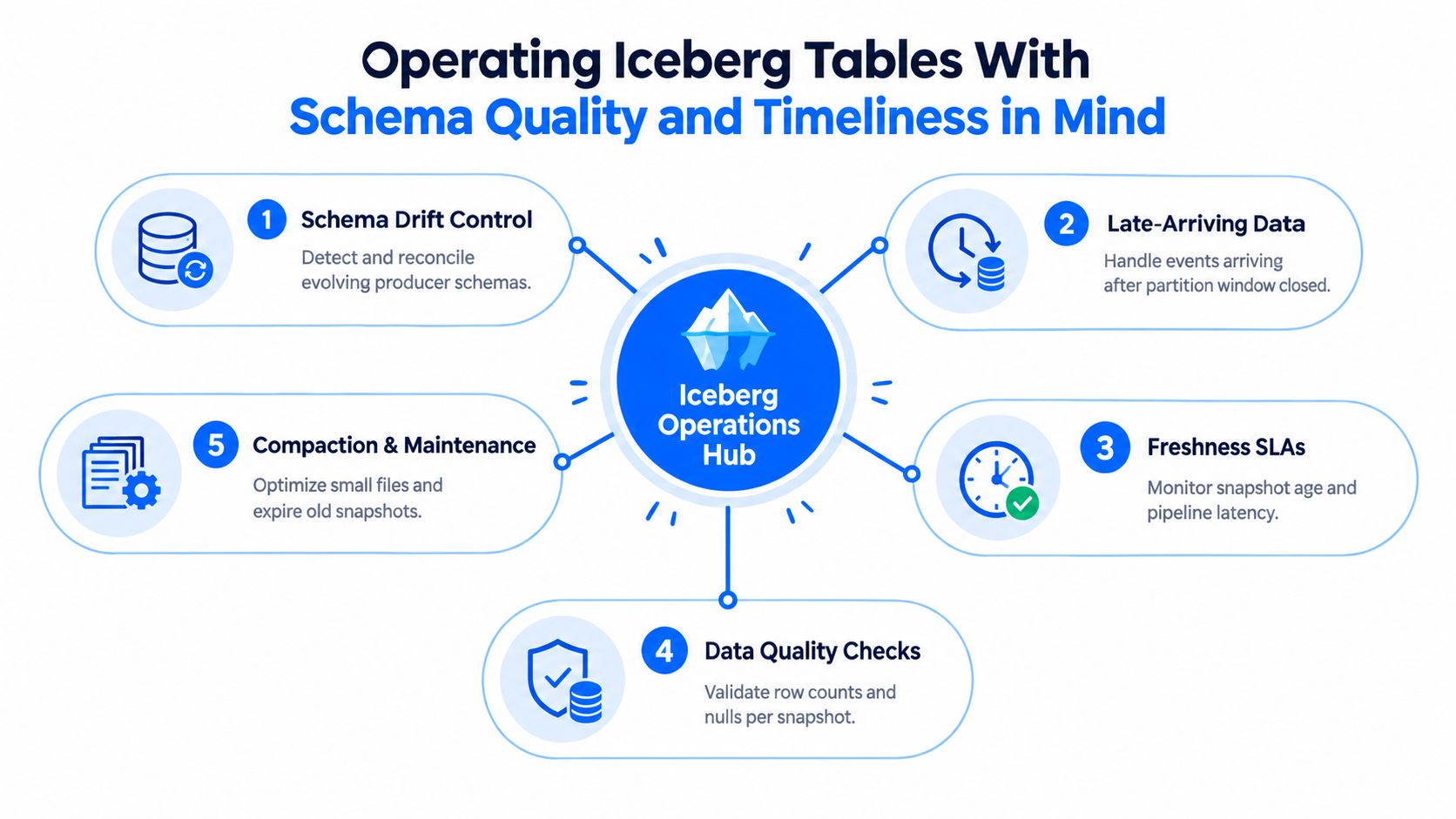
Once teams operate many Iceberg tables, most incidents begin as detection failures. A producer changes a field without notifying consumers, late-arriving events land after the expected partition window, a pipeline creates snapshots without delivering useful data, or maintenance leaves a table technically readable but operationally expensive.
Treat each risk as a signal that needs an owner and a response:
Schema drift: Detect added, removed, renamed, or type-changed fields before downstream jobs interpret them incorrectly.
Late data: Compare event time with arrival time so a closed time partition doesn't hide delivery problems.
Freshness: Track the age of the latest useful snapshot, not merely whether a writer ran.
Quality: Bind validation results to a specific snapshot so an incident can be reproduced.
Metadata health: Watch snapshot counts, manifest growth, orphan files, and file-size distributions.
Make the current snapshot explainable
A trustworthy operational view connects table state with pipeline behavior. A row-count check without snapshot identity can't tell an engineer which version failed. A freshness alert based only on wall-clock time can misclassify a table that received an empty or malformed batch. A schema alert without downstream ownership creates noise rather than action.
digna can sit alongside the catalog and compute layer for this purpose. Its Schema Tracker monitors structural changes, Data Validation applies record-level business checks, Timeliness tracks expected arrivals and delays, and observability views help teams inspect trends and platform behavior. Its in-database execution model keeps metric computation within the customer's environment rather than moving production data to an external service.
The operating question at two in the morning is not whether Iceberg committed successfully. It's whether the table is trustworthy right now, which snapshot is affected, and what changed since the last healthy state. That answer requires quality, timeliness, schema, and metadata signals in one incident context.
Migrating From Hive, Delta, or Hudi Without Burning Down the Lake
Migration paths differ sharply by source format. External Hive tables are often the most approachable because the existing files may already be usable, but identifier mismatches, SerDe assumptions, and catalog registration can still break downstream readers. A metadata conversion or a CTAS path may work for one table and fail for another when physical layout assumptions differ.
Delta requires closer inspection. Conversion or rewrite utilities need to account for deletion vectors, change data feed settings, and identity columns that don't map cleanly to the target model. A successful table registration doesn't prove that historical behavior, deletes, or incremental consumers will behave the same way.
Hudi is usually the hardest migration when the source depends on merge-on-read behavior, copy-on-write behavior, or timeline semantics. Iceberg snapshots don't provide a direct one-to-one replacement for every Hudi timeline operation, so teams may need a full rewrite and a carefully defined cutover boundary.
A safer cutover sequence
Catalog selection comes first. Decide whether the target estate will use REST, Glue, Nessie, or Hive Metastore, then test permissions, identifiers, credential handling, and rollback behavior. BI tools often cache fully qualified names, so changing catalog or namespace paths can break reports even when the data itself is correct.
Partition migration deserves its own test. Hidden partitioning changes how users express filters and how engines interpret transforms, while old and new layouts may coexist during a transition. Dual-writing can preserve rollback options, but it also creates reconciliation work that must be monitored.
Use this sequence:
Inventory: Record schemas, partitions, consumers, writes, retention rules, and historical-read requirements.
Pilot: Convert non-critical tables and test every important engine.
Dual-read: Compare results, counts, schemas, freshness, and access behavior.
Cut over: Move consumers deliberately, preserve a rollback path, and keep the old route available until validation is complete.
For broader planning, use data warehouse to data lake migration best practices as a checklist, then adapt it to the catalog and engine constraints in your estate.
digna provides in-environment data quality and observability for Iceberg-adjacent operations, including schema tracking, record validation, timeliness monitoring, anomaly detection, and platform metrics. Visit digna to evaluate how those signals can help your team operate large table estates with clearer evidence and faster incident response.


