Parquet File Formats: Structure, Tuning, and Best Practices
|
12
min read

Your BI dashboard is slow again. The overnight job landed another pile of CSV files in object storage, someone added a few columns without warning, and the one query the business cares about now chews through far more data than the result set justifies.
That's usually the moment parquet file formats stop feeling like a file extension choice and start feeling like an architectural decision. If your team runs Spark, DuckDB, Trino, BigQuery, dbt models, or lakehouse pipelines, Parquet sits right in the middle of your reliability and cost story. The tricky part is that most explanations stop at “Parquet is columnar,” which is true but incomplete.
What matters in practice is how Parquet lays data out on disk, which encodings help, which schema changes are safe, and what's still changing in the format itself. In 2026, Parquet isn't frozen. New logical types and encodings are still arriving, and support lands unevenly across engines. That's where production teams get caught.
Table of Contents
Why Parquet File Formats Exist for Modern Analytics
CSV is simple to produce and painful to analyze at scale. If a dashboard query needs only price, region, and event_date, a CSV reader still has to parse every field of every row just to reach those columns. The format doesn't know where one column's values live as a contiguous block, and it doesn't carry enough metadata to skip irrelevant chunks cleanly.
Parquet fixes that by storing data by column instead of by row. It also stores metadata that helps readers avoid unnecessary work. Modern explanations of the format note that these design choices commonly make Parquet files 5 to 10 times smaller than CSV and 10 to 100 times faster to query in analytics workloads, with one benchmark example showing a Parquet-Zstd file at 164 MB versus 1.09 GB for CSV on an 11.2 million-row dataset, and some count queries about 160 times faster when metadata alone can answer them (MotherDuck's Parquet format explainer).
Why columnar layout changes everything
When values from the same column sit together, engines can do three useful things:
Read fewer bytes: A query that needs three columns doesn't have to drag the other columns over the network and through the parser.
Compress better: Similar values tend to cluster within a column, so encodings like dictionary, run-length, and delta become effective.
Skip whole chunks: Parquet stores min, max, and null-count metadata in the footer, so readers can prune row groups before decoding them.
That's why Parquet became the default format for analytics storage rather than transaction processing. It's optimized for scans, aggregations, filtering, and projection.
Practical rule: If people mostly query subsets of columns and scan large datasets, row-oriented text formats are fighting the workload.
What engineers still have to decide
Parquet doesn't remove design choices. It moves them.
A production team still has to answer questions about row-group sizing, codec defaults, page layout, version support, and schema evolution. Those are not edge cases. They directly affect scan cost, interoperability, and whether downstream readers survive a pipeline change.
If you're designing lakehouse storage or revisiting warehouse extract formats, this is the point where data system architecture decisions stop being abstract. File format behavior shapes query latency, storage efficiency, and operational failure modes.
The Origin Story and Why It Still Matters
A lot of production pain around Parquet starts with a false assumption: that it is just a neutral file extension every engine handles the same way. It is not. Parquet came out of a specific analytics problem, and those original design choices still explain both its strengths and its failure modes.
Parquet began in 2013 as a joint effort between Twitter and Cloudera. The 1.0 release was announced on July 30, 2013, after the project had already seen 90+ merged pull requests, which shows how fast the format was taking shape in its early months (Twitter engineering announcement of Parquet 1.0).

At that point, Hadoop-era teams were dealing with wide datasets, long scan times, and storage bills that grew faster than budgets. Parquet was built for that environment. Store values by column, compress similar values together, and give query engines enough metadata to skip work. That sounds ordinary now because every lakehouse team expects it. In 2013, it solved a very expensive bottleneck.
The project later became a top-level Apache Software Foundation project on April 27, 2015. That matters because file formats live or die on reader support. Once multiple engines, warehouses, and table formats started betting on Parquet, compatibility became as important as raw compression ratio.
The early bets still show up in 2026
Two design decisions from the beginning still shape real pipelines.
First, Parquet optimized for analytical scans, not point lookups. A Parquet file works like a warehouse organized by product type instead of customer order. If you need every value from one column across 500 million rows, that layout is efficient. If you need one specific row out of the middle, it is clumsy. Teams still get into trouble when they use Parquet for event replays, operational APIs, or workloads that need fast single-record access.
Second, Parquet made files self-describing. The schema and row-group metadata live in the footer, so readers can discover structure without depending on a separate schema service. That portability is a big reason Parquet spread across Spark, Hive, Trino, DuckDB, Snowflake external tables, and lakehouse stacks.
It also creates a sharp edge. If the footer is damaged, the file may be unreadable even when the data pages are still sitting intact in object storage. The format makes this explicit. Files end with the magic number PAR1, and the metadata length is stored as a 4-byte little-endian integer in the footer, which tells readers where schema and row-group metadata begin (Apache Parquet file format documentation).
That detail sounds low level, but it matters in operations. A truncated upload, a failed multipart write, or a buggy rewrite job can turn one bad footer into one unreadable file. In a partitioned dataset, that often surfaces as a missing day, a broken backfill, or a query that fails only for one customer slice. For teams working through lakehouse data quality and reliability practices, this is one of the reasons file validation belongs in the pipeline, not in the postmortem.
The origin story also helps explain what Parquet still does not solve by default. The original win was obvious on repeated values, low-cardinality dimensions, and scan-heavy analytics. In 2026, harder cases are getting more attention: high-cardinality string columns like URLs or user IDs, floating-point measures that do not compress cleanly, and schema changes that technically validate but still break downstream readers. Those are not signs that Parquet failed. They are reminders that the format was designed as a foundation, not a guarantee that every dataset gets good size, speed, and compatibility from default settings alone.
Inside a Parquet File From Row Groups to Pages
A production query is slow for one partition but fast for the other 364 days in the table. The usual reason is not "Parquet is slow." It is that the file was laid out in a way that forced the engine to read far more bytes than the query needed.
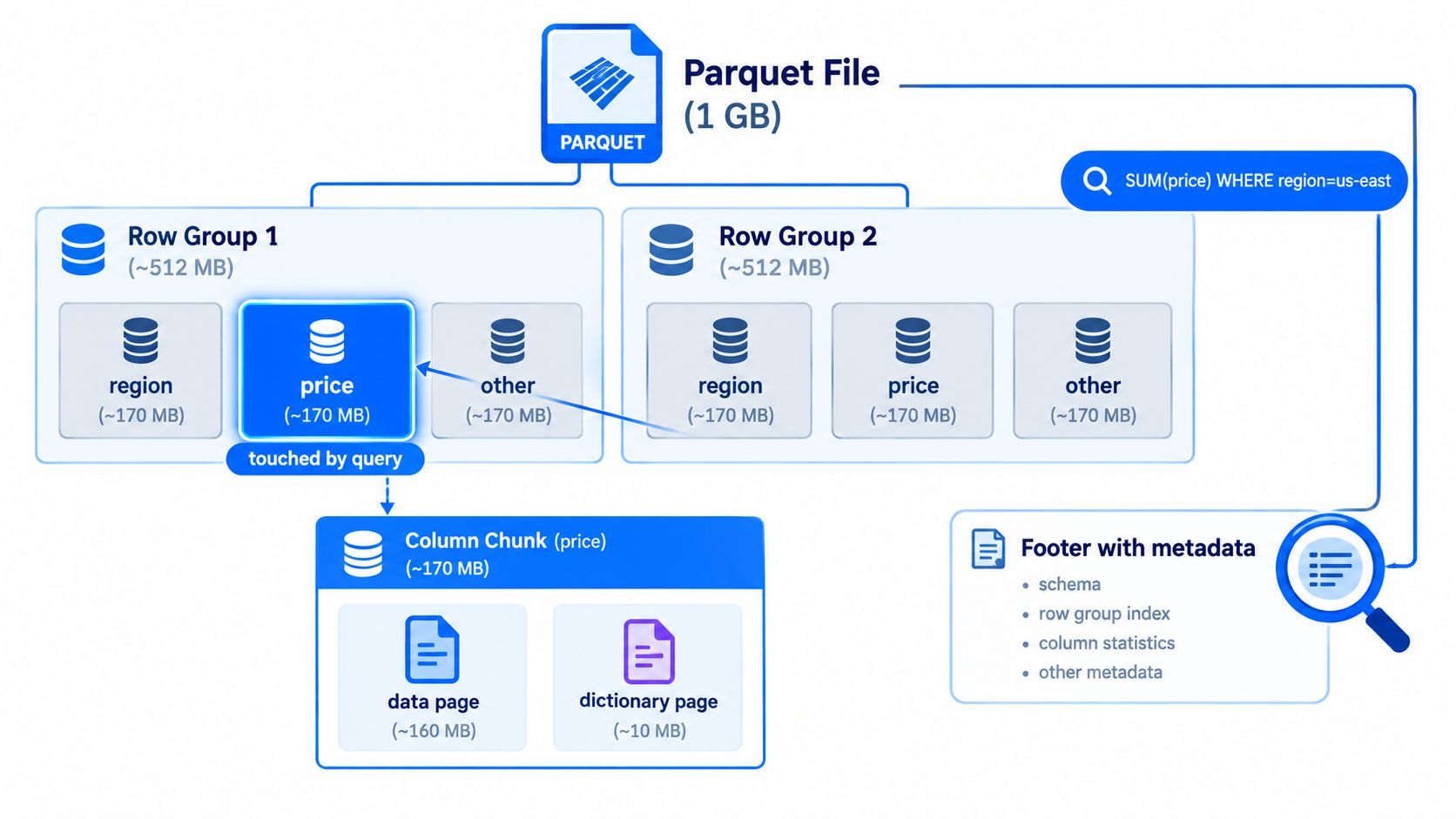
Parquet works best once you picture its storage layout as nested containers. A file holds row groups. Each row group holds one column chunk per column. Each column chunk is broken into pages. That hierarchy is what lets engines read price without touching comment_text, or skip chunks of data that cannot match a filter. The Parquet page index docs describe the structure and the optional finer-grained metadata used for page skipping (Parquet page index documentation).
Start at the row-group level
If you come from a row-store mindset, a row group helps to reframe the model. It is a horizontal slice of the table, but stored by column inside that slice.
Say one file contains columns like region, price, and event_date. One row group will contain three column chunks: one for region, one for price, and one for event_date. The values are not stored row by row. They are stored as three separate runs of data inside that row group. That is why a query that only needs price can avoid reading the bytes for the other two columns.
For scan-heavy analytics, row groups are the first useful unit of parallelism and skipping. They are also where many operational trade-offs begin. A row group that is too small creates excess metadata and too many tiny reads. A row group that is too large can make selective queries read more data than needed, and it can make retries and rewrites more expensive in object storage.
Then zoom in to pages
Pages are the smaller blocks inside each column chunk. Encoding and compression happen at this level.
That detail sounds mechanical, but it affects real workloads. A column with long, high-cardinality strings such as URLs, device IDs, or session tokens often looks fine at the file level and still compresses poorly page by page. The same pattern shows up with floating-point measures that do not repeat much and do not respond well to default encodings. In 2026, those two cases are still where teams discover that "stored in Parquet" does not automatically mean "small and fast."
A useful mental model is a warehouse. The file is the building. Row groups are aisles. Column chunks are the shelves for one product type within an aisle. Pages are the boxes on each shelf. A query should open as few boxes as possible.
What a reader actually does
A reader starts with the footer metadata, then decides which row groups and columns are worth opening. If a query asks for SUM(price) where region = 'us-east', the engine can often inspect row-group statistics for region and skip row groups whose values cannot match. If it only needs price, it can also avoid reading the other column chunks in those row groups.
That is the happy path.
The catch is that skipping depends on data distribution and writer behavior. If rows are shuffled randomly and every row group contains every region, min and max statistics help less. If a string column is unordered and highly unique, page boundaries may still contain enough variation that page-level skipping adds little. The format provides the machinery, but the layout of your data determines whether that machinery saves work.
Why page-level metadata matters more now
Page-level metadata is one of the more interesting developments for production systems because it can reduce wasted reads inside a row group, not just across row groups. That matters as files get larger and selective filters get more common.
It is also uneven in practice. Some engines write the metadata, some read it, and some ignore it. The operational mistake is assuming support because the spec includes the feature. Teams upgrading their stack in 2026 should verify behavior with their actual engines and cloud storage paths, especially for mixed estates that use Spark for writes and DuckDB, Trino, or warehouse readers for queries.
Configuration guidance versus field reality
The Parquet configuration guidance recommends large row groups and small pages, with examples such as 512 MB to 1 GB row groups and 8 KB page sizes, plus HDFS-aligned layout assumptions (Parquet configuration guidance).
Those numbers are useful as format guidance, not universal settings.
On object storage, the practical choice often depends on reader concurrency, partition sizes, retry costs, and the shape of your predicates. A batch fact table scanned end to end may benefit from larger row groups. A dataset hit by selective customer or time filters may do better with a different balance. The common mistake is copying defaults from one engine or one storage system into another and expecting the same behavior.
Keep this hierarchy in your head:
File: the object stored in S3, GCS, ADLS, or HDFS
Row group: a horizontal slice of rows, and the main unit for coarse skipping
Column chunk: one column's data inside one row group
Page: the block that gets encoded, compressed, and sometimes skipped with finer-grained metadata
If you understand those four layers, Parquet stops feeling opaque. It becomes a set of storage decisions you can inspect, measure, and tune.
Parquet Version 1 vs Version 2 in Practice
The Parquet specification has evolved through multiple releases, and the useful question is which capabilities your readers and writers support.
Parquet v2 introduced more than a new badge. It expanded how the format handles nested data, null representation, and metadata for finer-grained skipping. The file structure still feels familiar, but support for the newer capabilities lands unevenly across engines, which is why “write v2” can be either a good default or an interoperability trap depending on your estate.
The capability matrix that matters
Capability | Parquet v1 | Parquet v2 | Reliable in 2026? |
|---|---|---|---|
Core columnar layout | Yes | Yes | Yes |
Footer min/max/null statistics at row-group level | Yes | Yes | Yes |
Nested data support with repetition and definition levels | Supported in the format family | Continued and widely used | Usually yes, but verify reader behavior on complex schemas |
Page-level statistics via page index | No | Yes | Only if your engine explicitly supports and uses them |
Improved null handling in newer page formats | Limited | Better support | Often yes, but engine-specific |
Newer optional features such as Bloom filters | No | Available in the ecosystem | No, audit reader support first |
What's safe to depend on
If you're writing files for mixed environments that include Spark, DuckDB, Trino, and BigQuery, the safest assumptions are still the basics: column projection, row-group statistics, standard encodings, and mainstream compression codecs.
What isn't universally safe is anything that depends on newer optional metadata or fresh spec features. That caution matters even more because Parquet is still evolving. In 2026, the project released Parquet 2.14.0 and highlighted work on the FILE logical type, adaptive lossless floating-point encoding (ALP), and improved timestamp ordering. The project also notes that rollout is staggered, with ALP marked “in preview” while implementations catch up (Apache Parquet format blog).
Compatibility rule: Write for the oldest reader you can't control.
That's the practical lens. For new pipelines, v2 is usually the better writer target. But before you rely on newer page metadata, advanced timestamp semantics, or preview encodings, audit every engine that will read the files. If your team uses Databricks or mixed lakehouse readers, Databricks data quality controls become part of the file-format conversation because compatibility issues often surface as downstream quality incidents rather than obvious read failures.
Encodings and Compression Codecs That Actually Move the Needle
A Parquet file gets small in two separate steps, and production tuning gets easier once you keep those steps apart.
First, Parquet encodes a column into a form that matches the data's shape. Then it runs a compression codec over the resulting bytes. If you skip that distinction, it is easy to blame Snappy or ZSTD for a file size problem that really started with a poor encoding choice. Research comparing Parquet encoding and compression behavior across analytical workloads found that the pairing matters more than the codec alone (research summary on Parquet compression and encodings).
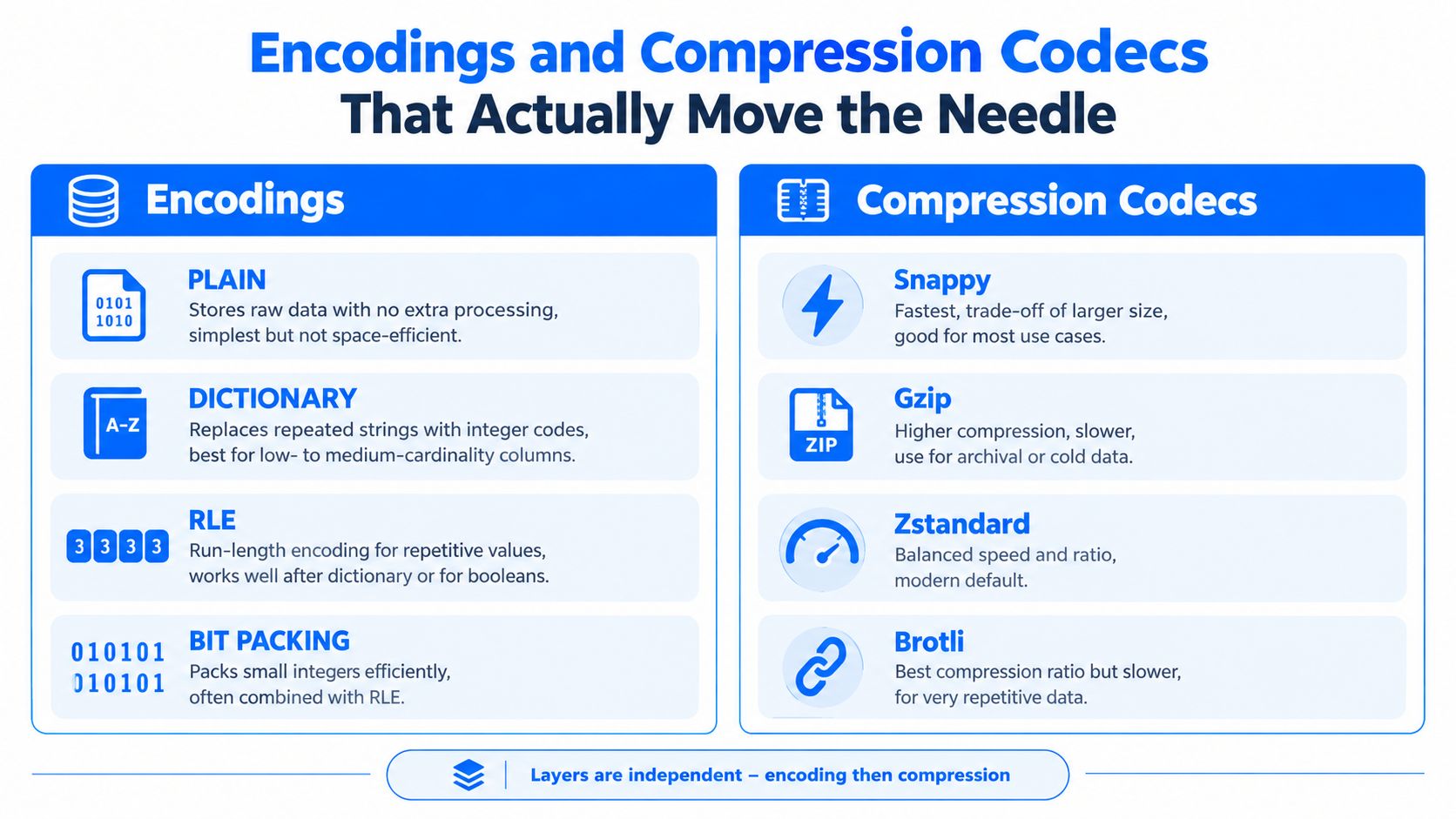
Encoding works like sorting tools into labeled bins before packing a truck. Compression is the straps and shrink wrap applied after the truck is loaded. Good packing starts with the bins.
Encodings first, codecs second
The common encodings solve different problems:
PLAIN: Store values directly. Good fallback, weak for size.
DICTIONARY: Replace repeated values with small integer codes. Strong for low- and medium-cardinality strings, enums, and many ID-like columns.
RLE and bit-packing: Compact repeated or low-width integers. Useful for booleans, dictionary indexes, and repetition-heavy data.
DELTA encodings: Store changes between nearby values instead of each full value. Best fit for sorted integers, counters, and some time-oriented columns.
A concrete example helps. Suppose a status column contains only pending, paid, and failed across 100 million rows. Dictionary encoding turns those strings into tiny codes such as 0, 1, and 2. RLE and bit-packing can then store long runs or low-bit-width values efficiently. After that, ZSTD or Snappy has a much easier byte stream to compress. If the same file stores raw strings with PLAIN encoding, the codec has to do far more work and usually gets worse results.
The same research summary reports that Parquet often shrinks mixed analytical data dramatically, and that ZSTD usually beats Snappy on compression ratio while Snappy still beats leaving data uncompressed. It also notes that dictionary encoding paired with bit-packing and RLE is especially effective on lower-cardinality integer-like columns. That pattern matches what data engineers see in warehouse fact tables and event logs.
Sensible pairings by data shape
Use the column's shape to drive the choice.
Categorical fields, country codes, status values, product types: Dictionary plus ZSTD is a strong default.
Boolean flags, null-heavy indicator columns, partition-like markers inside the file: RLE-friendly paths usually work well because repetition dominates.
Sorted timestamps, sequence numbers, monotonically increasing counters: Delta encodings can cut the payload before any codec runs.
Interactive query paths where CPU time matters: Snappy stays popular because decode cost is predictable.
Archival datasets where storage cost matters more than write speed: ZSTD, GZIP, or sometimes Brotli can be worth the extra CPU.
The common mistake is applying one global codec policy and assuming the job is done. A table with UUIDs, user agents, prices, booleans, and event times contains five different compression problems.
Where defaults still fall short in 2026
This is the part many Parquet explainers skip.
Parquet's standard defaults are still uneven on two column types that show up constantly in real systems: high-cardinality strings and floating-point values. Dictionary encoding loses its edge when almost every string is distinct, as with URLs, request IDs, user agents, and long text attributes. Floats have a different problem. General-purpose codecs can shrink them, but the byte patterns are often noisy enough that the gains are weaker than teams expect.
That gap is a big reason the 2026 conversation around Parquet has shifted toward newer work such as FSST for strings and ALP for floating-point data. The point is not that current Parquet is broken. The point is that default encodings still leave money on the table for telemetry, logs, metrics, model outputs, prices, and percentages. A useful summary of that direction appears in the FSST and ALP discussion for Parquet encodings.
Reader support still decides what you can safely use. Preview or newly added encodings can improve file size in benchmarks, but a production pipeline cares about a harsher question: can Spark, Trino, DuckDB, your ingestion job, and your recovery tooling all read the files the same way next month?
What actually moves the needle in production
Three choices usually matter more than codec debates on social media.
Match encoding to cardinality. Dictionary encoding is excellent until the dictionary gets large enough that it stops paying for itself.
Sort or cluster data before writing when you can. Better local value patterns give delta, RLE, statistics, and compression more to work with.
Benchmark whole read paths, not just file size. A 20 percent smaller file is not a win if CPU cost pushes dashboard latency up or stretches batch SLAs.
One more trade-off deserves honesty. The smallest file is not always the cheapest file to operate. Teams often save more money with a slightly larger file that every engine can decode quickly and reliably than with an aggressive encoding choice that introduces compatibility risk or hard-to-debug reader failures.
Schema Evolution Without Breaking Downstream Readers
Schema evolution is where good parquet file formats practices either save your team or betray it. The file format is flexible enough to support change, but that doesn't mean every change is safe.
The safest mindset is simple: adding is usually easier than mutating.
Changes that are usually safe
These changes are broadly manageable when your readers behave well:
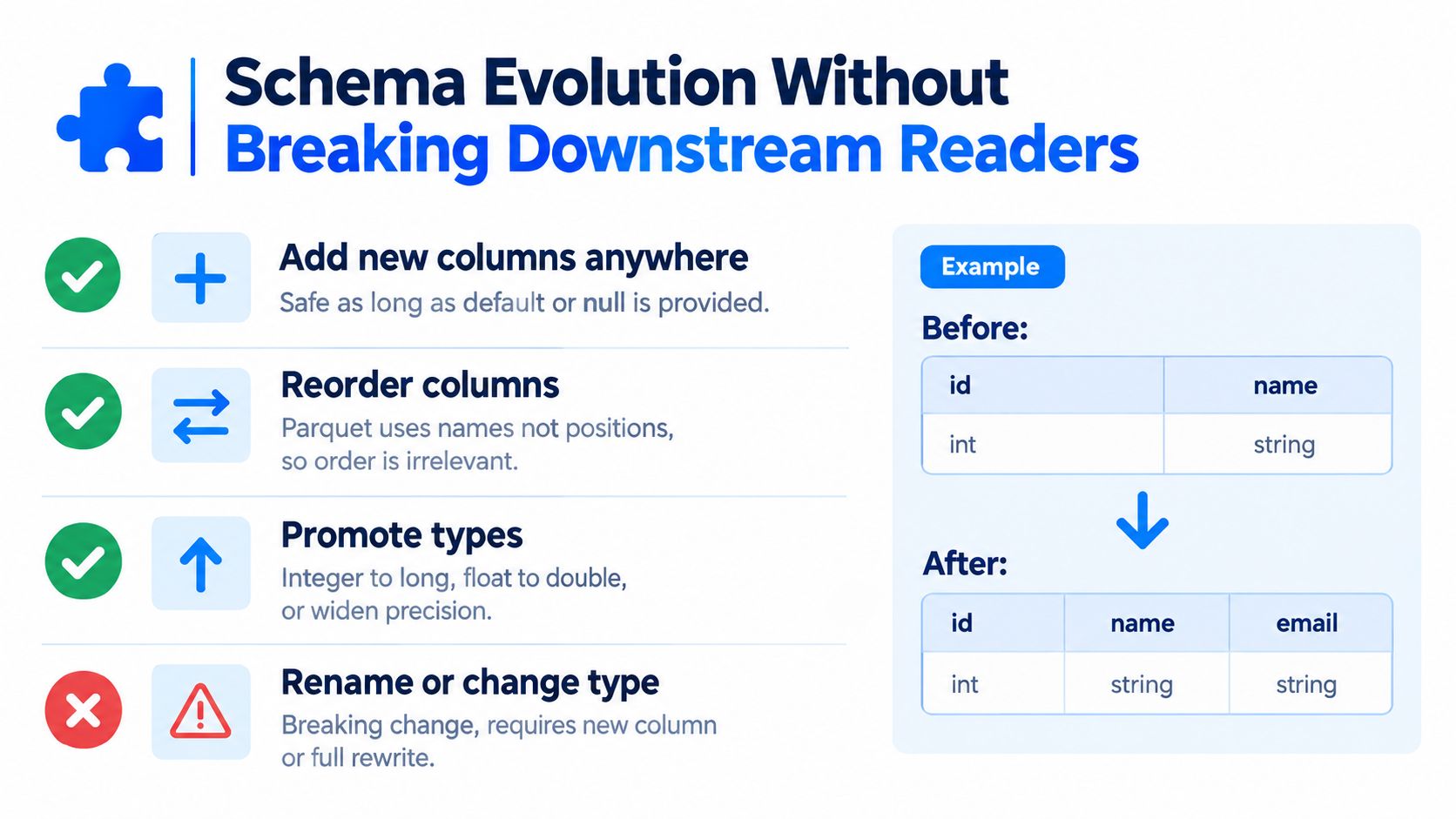
Add a new column: Old files don't have it, so readers usually surface nulls or defaults.
Reorder columns: Readers generally use schema metadata, not visual position in the file.
Widen a type: Moving from a narrower to a broader compatible type is often acceptable if the engine supports it.
Those patterns align with how Parquet stores schema in metadata rather than forcing position-based interpretation. They still deserve testing, but they aren't the changes that usually cause silent damage.
Changes that cause quiet failures
Renames are the classic trap. A rename often looks like “drop one column, add another” to downstream readers. No exception gets raised. You just get nulls where data used to appear.
Type changes can be worse. Changing logical meaning under the same field name can produce values that parse but no longer mean the same thing. That's how teams end up debugging “valid” rows that no longer reconcile.
Renames aren't metadata cosmetics in Parquet pipelines. They're migration events.
Habits that prevent pipeline rot
A few operational habits go a long way:
Freeze schema contracts outside the writer code. A registry, repository contract, or catalog-backed process is better than “whatever the job emits tonight.”
Treat renames as a two-step migration. Add the new field, backfill, update readers, then retire the old one.
Validate widening and logical-type compatibility before release. Use the same reader libraries your downstream engines rely on.
Monitor structural drift continuously. Tools like Schema Tracker are useful because they detect added or removed columns and data type modifications before those changes roll into production incidents.
If your team handles regulated data or a lot of shared downstream consumption, schema discipline matters more than codec tuning. Compression mistakes hurt cost. Schema mistakes hurt trust.
How Parquet Compares With ORC and Avro
Parquet, ORC, and Avro solve different parts of the data lifecycle. Teams get into trouble when they ask one format to do everything.
Avro is row-oriented and fits ingest boundaries well. Parquet and ORC are columnar and fit analytical reads much better. Once you frame the choice around workload instead of brand loyalty, the trade-offs become clearer.
Parquet vs ORC vs Avro at a Glance
Criterion | Parquet | ORC | Avro |
|---|---|---|---|
Storage model | Column-oriented | Column-oriented | Row-oriented |
Best fit | Cross-engine analytics and lakehouse exchange | Warehouse-heavy environments, often Hive-centric | Streaming, message buffers, row-wise interchange |
Column pruning | Strong | Strong | Weak compared with columnar formats |
Predicate pushdown | Strong when statistics are present and well-written | Strong | Limited because it lacks Parquet-style columnar statistics |
Schema handling | Self-describing file metadata | Self-describing file metadata | Strong schema-centric workflows |
Nested data | Supported | Supported | Supported |
Broad tool interoperability | Very strong across modern analytics engines | Strong, but often strongest in ORC-friendly stacks | Strong for ingestion and serialization workflows |
A practical decision rule
Choose Avro when you care about row-wise writes, event interchange, and schema-governed ingestion. It's a good boundary format.
Choose ORC when your stack is tightly aligned to engines and workflows that prefer it, especially in environments with established warehouse conventions.
Choose Parquet when broad interoperability matters most. That includes mixed engines, open table formats, ad hoc analytics, and lakehouse datasets that many tools need to read without negotiation.
The reason Parquet keeps winning that middle ground is less about one killer feature and more about ecosystem gravity. It travels well across readers, and for most analytical teams, that matters as much as raw file efficiency.
Best Practices for Reliable Parquet Pipelines
A Parquet pipeline usually fails in ordinary ways. A writer upgrade changes default encoding for one column. A streaming job emits thousands of 5 MB files overnight. A nullable field appears as INT32 in one producer and INT64 in another. Nothing looks dramatic at write time, but the next morning Trino scans more data than expected, Spark drops predicate pushdown on one partition, and a downstream model starts reading nulls where it expected values.
That is the production reality to optimize for. Reliability comes less from one perfect file setting and more from making file layout, schema rules, and reader compatibility explicit.
The operating checklist
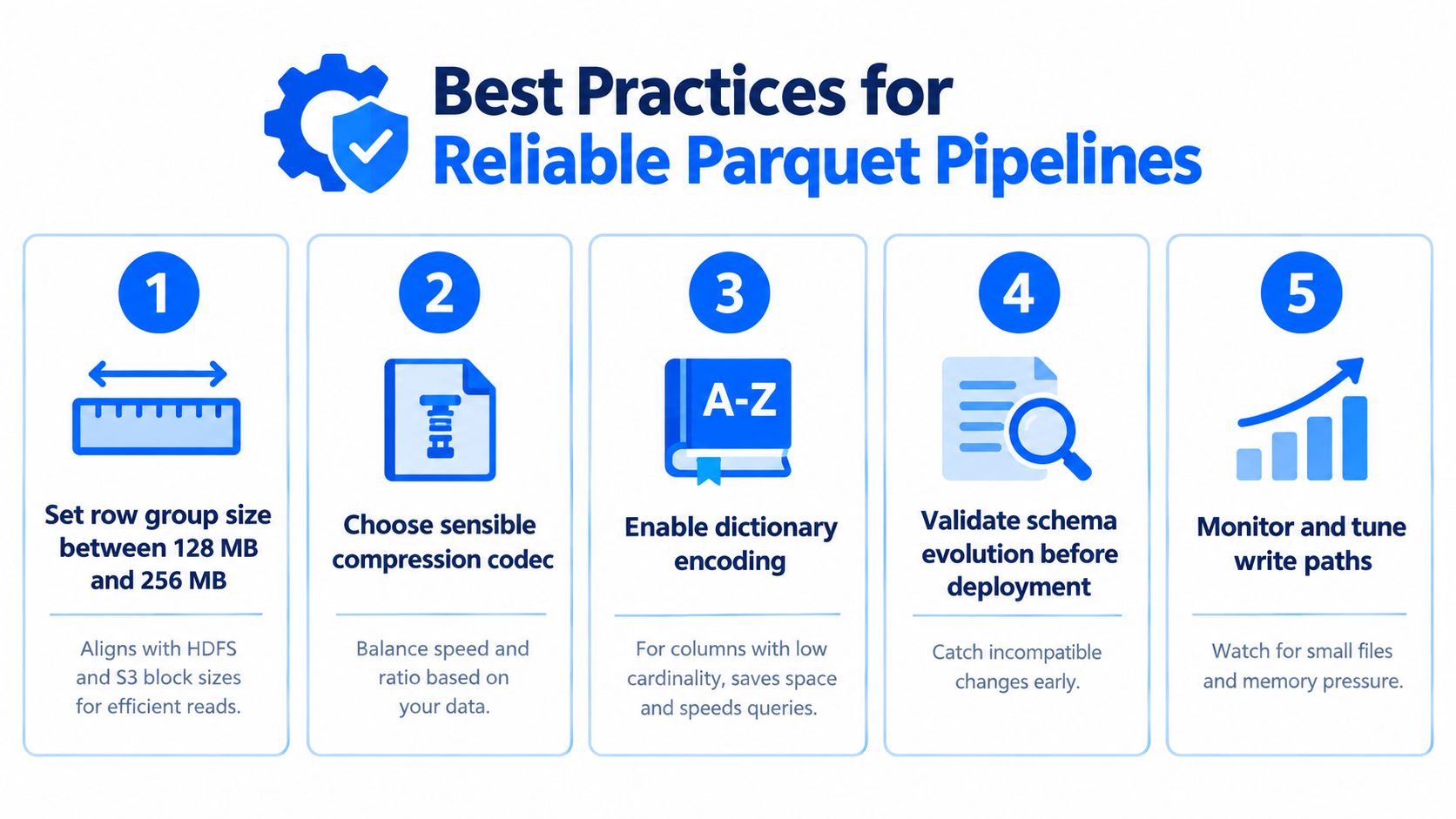
Choose row-group sizes on purpose. Many teams start around 128 MB and adjust based on scan patterns, memory pressure, and object-store behavior. Larger row groups can improve scan efficiency, but they also widen the blast radius when statistics are poor. Smaller row groups give readers more chances to skip data, but too many of them add metadata overhead. Treat row-group sizing like warehouse shelving. If every box is tiny, you waste time handling boxes. If every box is huge, you keep opening containers full of data you did not need.
Stop tiny-file growth early. This is one of the most common Parquet pipeline mistakes. Small files waste planning time, increase metadata work, and reduce read efficiency in Spark, Trino, DuckDB, and cloud warehouses alike. If a Kafka sink flushes every few seconds, add compaction as a first-class job, not an afterthought.
Match encodings to the actual column shape. Defaults are often acceptable for integers and common dimensions. They are much less satisfying for high-cardinality strings, long IDs, and many floating-point columns. This gap matters more in 2026 because teams are storing more embeddings, feature outputs, and machine-generated identifiers in Parquet, and the default writer path still leaves money on the table for those shapes. Dictionary encoding helps when repetition is real. It helps much less when nearly every value is unique.
Write data that gives statistics a chance to work. Predicate pushdown depends on more than "stats enabled." If a day partition contains mixed customers, mixed regions, and mixed event types in every row group, min and max values become weak filters. Sorting or clustering before write often does more for skip efficiency than changing compression codecs.
Treat schema evolution like an API change. Adding a nullable column is usually low risk. Renaming a field, changing numeric width, altering timestamp semantics, or flipping required to optional can break readers in subtle ways. Validate schema changes before deployment, and test them against the engines that matter in production, not just the writer library. A practical way to formalize those checks is to fold them into your data pipeline best practices for validation, monitoring, and change control.
Test Parquet across engines, not just within one stack. A file that looks valid in Spark can still expose edge cases in Trino, pandas, Arrow, or a warehouse reader. Logical types, page indexes, null handling, and timestamp interpretation still vary enough that cross-reader tests catch real production bugs.
The production questions that matter more in 2026
File tuning still matters, but two issues now deserve more attention.
First, default encodings are still uneven for modern workloads. Parquet remains excellent for many analytical tables, yet high-cardinality strings and float-heavy datasets often compress and scan less efficiently than engineers expect. If your lake stores model features, telemetry IDs, or semi-structured dimensions exploded into columns, benchmark writer settings on your own data instead of trusting defaults.
Second, compatibility lag is real. A feature entering the spec is only the starting line. It becomes operationally safe after your readers, validators, and catalog tooling all interpret it the same way. That is why reliable Parquet work includes version testing, schema diff checks, and observability. Digna is one option teams use for this operational layer, monitoring schema changes, timeliness, anomalies, and validation signals inside the customer environment.
Parquet reliability problems rarely stay inside storage. They show up later as slower scans, silent type drift, broken dashboards, and models trained on the wrong shape of data.
Row-group sizing and codec choices drift as writers change, so pair these practices with data platform observability that reports when file layout stops matching the guidance.
Frequently asked questions
What row-group and page sizes does Parquet recommend?
The Parquet configuration guidance recommends large row groups and small pages, with examples such as 512 MB to 1 GB row groups and 8 KB pages, assuming HDFS-aligned layout. Many teams on object storage start nearer 128 MB instead and adjust for scan patterns, memory pressure and store behaviour.
What is the difference between Parquet version 1 and version 2?
The specification has moved through several releases, but the practical question is which capabilities your readers and writers actually implement rather than which version number you target. For mixed environments spanning Spark, DuckDB, Trino and BigQuery, safe ground remains column projection, row-group statistics, standard encodings and mainstream codecs.
Which schema changes break downstream Parquet readers?
Renames are the classic trap. A rename looks like a dropped column plus a new one to downstream readers, so no exception is raised — you simply get nulls where data used to be. Adding nullable columns is broadly safe; type changes and restructured nesting are where quiet failures begin.
How does page-level metadata improve query performance?
It cuts wasted reads inside a row group, not just across row groups. A reader starts from the footer, decides which row groups and columns are worth opening, then uses page-level statistics to avoid decoding pages that cannot match the filter. That matters more as files grow and filters get selective.
Should I use Parquet, ORC or Avro?
Pick by lifecycle stage rather than by benchmark. Avro suits row-wise writes, event interchange and schema-governed ingestion, making it a good boundary format. Parquet and ORC both target analytical scans, with Parquet generally ahead on ecosystem breadth. Trouble starts when one format is asked to cover every stage.


