What Is a Parquet File and Why Data Teams Use It
|
9
min di lettura
Parquet is an open-source columnar file format that stores like-typed values together and uses footer metadata so query engines can read only the columns they need and skip irrelevant data. It started as a joint effort by Twitter and Cloudera, was first released in July 2013, and became a top-level Apache Software Foundation project on April 27, 2015.
If you're here, you probably have one of three problems. Your warehouse queries got slower after a dataset grew. Your lake is full of CSV exports that feel easy to create but painful to scan. Or your team already uses Parquet, but performance still swings wildly between "fast enough" and "why is this dashboard timing out?"
That confusion is normal. Most explainers answer what is a Parquet file with one line: "a compressed columnar format." That's true, but it's incomplete. In practice, Parquet is as much about metadata, schema discipline, and file layout decisions as it is about compression.
A clean Parquet dataset can feel effortless. A messy one can produce expensive scans, brittle downstream jobs, and weird behavior when schemas drift across files. That's why data engineers tend to love Parquet and complain about it at the same time.
Table of Contents
Introduction to Parquet for Modern Analytics
A familiar scene: an analytics engineer opens a model that used to finish quickly, adds two more months of data, and suddenly every query drags. The raw data is sitting in object storage. Some files are CSV, some are JSON exports, some are Parquet. The BI team wants faster dashboards. The platform team wants lower scan costs. Nobody wants to rewrite every pipeline.
That's where Parquet usually enters the conversation.
Apache Parquet was created as an open-source, column-oriented file format for efficient storage and retrieval, with design ideas influenced by Google's Dremel research. It emerged from a joint effort by Twitter and Cloudera, first released in July 2013, and became a top-level Apache Software Foundation project on April 27, 2015 according to the Apache Parquet project history.
For modern analytics, the appeal is simple. Parquet organizes data in a way that fits how analysts query large tables. Most analytics workloads don't read every field from every record. They read a subset of columns, apply filters, then aggregate.
Why teams move from raw files to Parquet
A row-based export like CSV is easy to inspect, but it forces engines to wade through data that often isn't needed. Parquet is built for a different job.
Column-focused reads: It works well when queries touch a few columns across many rows.
Storage efficiency: Like-typed values are stored together, which helps compression work better.
Engine-friendly metadata: Readers can use file metadata to avoid scanning irrelevant portions of a dataset.
The catch is that Parquet isn't a universal default for everything. It's great for analytical scans. It's not designed like an OLTP storage engine for frequent single-row lookups and updates.
Parquet helps most when your access pattern is broad and analytical, not transactional and row-by-row.
This distinction matters even more in lakehouse environments, where file format choices interact with partitioning, schema evolution, and query planning. If you're operating that kind of stack, it helps to connect file format decisions with broader lakehouse data quality maintenance practices.
The question behind the question
When people ask what a Parquet file is, they often mean something more practical:
Will it make my queries faster?
Will it reduce storage?
Will it break when schemas evolve?
Should I use it for every dataset?
Those are the useful questions. By the end, you should be able to answer them with more precision than "Parquet is compressed and columnar."
How Columnar Storage Works in Plain Language
Think about a spreadsheet with columns like customer_id, country, signup_date, and revenue. A row-oriented format stores each record together. A column-oriented format stores all customer_id values together, all country values together, and so on.
That sounds abstract until you map it to a query.
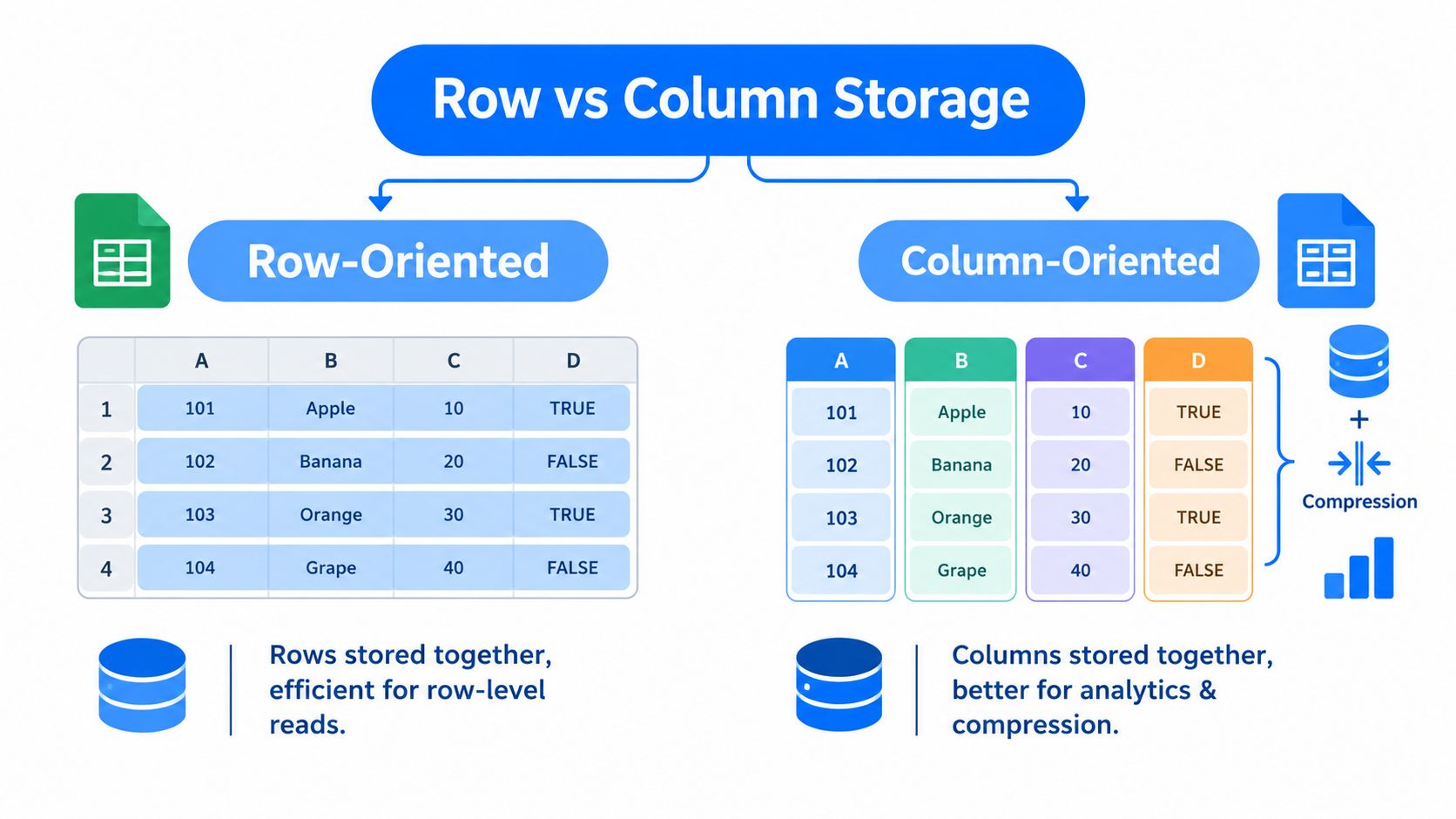
Row storage versus column storage
Suppose you run:
select country, sum(revenue) from sales where signup_date >= ... group by country
A row-oriented file makes the engine read each full record, including columns your query doesn't use. A column-oriented file lets the engine focus on country, revenue, and signup_date.
That's the first big idea: column pruning. The reader skips untouched columns entirely.
The second big idea is compression. When similar values sit together, compression tends to work better. A column full of dates behaves differently from a column full of text, and a column with repeated categories behaves differently from a free-form notes field.
Why like-typed values help
Parquet supports built-in column encodings and compression codecs, and the format documents codecs such as Snappy, Gzip, LZO, and Zstandard. Because like-typed values are stored together, that layout improves storage efficiency and gives teams a trade-off between CPU cost and file size for analytical workloads, as described in the Parquet encoding documentation.
Here's the practical version:
Repeated values compress well: country codes, status fields, booleans.
Numeric sequences can be encoded efficiently: IDs and timestamps often benefit from specialized encodings.
Wide tables benefit from projection: if your dashboard needs 5 out of 80 columns, the engine doesn't have to pay for all 80.
Practical rule: If your users usually scan many rows but only a fraction of the columns, columnar storage is working with your workload instead of against it.
Where people get mixed up
Many readers hear "columnar" and assume Parquet is automatically faster for every use case. It isn't.
Parquet is optimized for analytical scans, especially when you need a few columns across lots of records. It's less natural for row-by-row access patterns, high-frequency updates, or workloads that constantly fetch individual records by key.
A helpful mental model is this:
CSV: easy to produce, hard to scan efficiently at scale
Row-based binary formats: better for whole-record reads
Parquet: best when the query shape is selective by column, large by row count
If you remember only one thing from this section, keep this one: Parquet speeds up analytics because it changes what the engine has to read, not just because it shrinks files.
Inside a Parquet File From Header to Footer
Once you understand the columnar idea, the next step is the file anatomy. Parquet becomes more than "CSV but compressed."
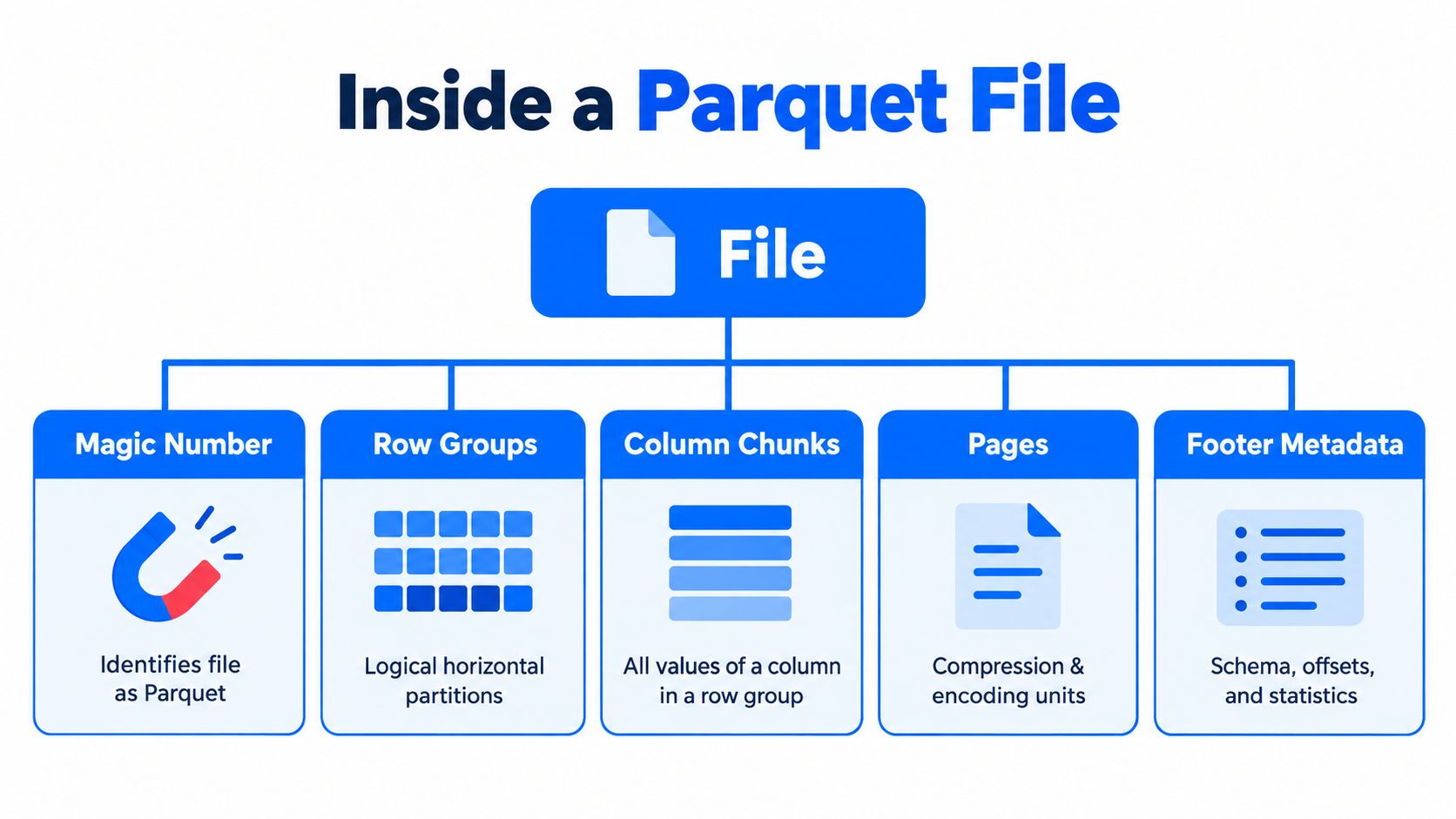
A Parquet file starts with a 4-byte magic number, PAR1, and includes footer metadata that records the schema, column chunk locations, encodings, and statistics. That design lets engines read only needed columns and skip irrelevant row groups during scans, according to the Parquet file format documentation.
The file has layers
It helps to picture a Parquet file as a container with nested parts.
Header
Starts with the
PAR1magic number.Signals that the file follows the Parquet format.
Row groups
Horizontal partitions inside the file.
Each row group contains data for a slice of rows.
Column chunks
Within each row group, each column is stored separately.
A query reading three columns only needs the chunks for those columns.
Pages
Smaller units inside column chunks.
Encodings and compression are applied at this level.
Footer
Stores the schema and structural map of the file.
Includes metadata about where chunks live and how they're encoded.
Why the footer matters so much
The footer is the part many introductions underplay. It's where Parquet becomes intelligent.
Parquet's real power lives in metadata. The file doesn't just store values. It stores enough structure to help engines avoid unnecessary work.
That metadata can tell a reader where a column chunk starts, how values were encoded, and what statistics are available for pruning. In other words, the engine doesn't open the file blindly and read until it finds what it needs. It starts with a map.
For teams dealing with many files in a lake, this is why metadata management practices matter so much. Fast analytics depends on organized file structure, consistent schemas, and readable metadata, not just on choosing Parquet once and moving on.
What row groups do in practice
Row groups are a useful compromise. They make a file large enough for efficient scans but still divisible for parallel work.
Suppose your query filters on a date column. If metadata indicates a row group falls entirely outside the filter range, the engine can skip that row group. If the query only selects a subset of columns, it can also ignore the unneeded column chunks inside matching row groups.
That combination is where Parquet often wins:
Skip columns you don't need
Skip row groups that can't match
Decode pages only where needed
Why file anatomy affects operations
When Parquet behaves badly, the problem often isn't "Parquet is slow." It's usually one of these:
too many tiny files
poorly chosen row-group sizes
inconsistent schemas across part-files
weak or missing statistics
expensive metadata discovery in large tables
That's why experienced engineers treat Parquet as both a storage format and an operational system. The file internals are elegant. The dataset-level behavior is where the hard parts begin.
Compression Encodings and Performance Trade Offs
Parquet gets a lot of its efficiency from something simple: once values of the same type sit together, the format can encode and compress them more intelligently than a plain text file can.
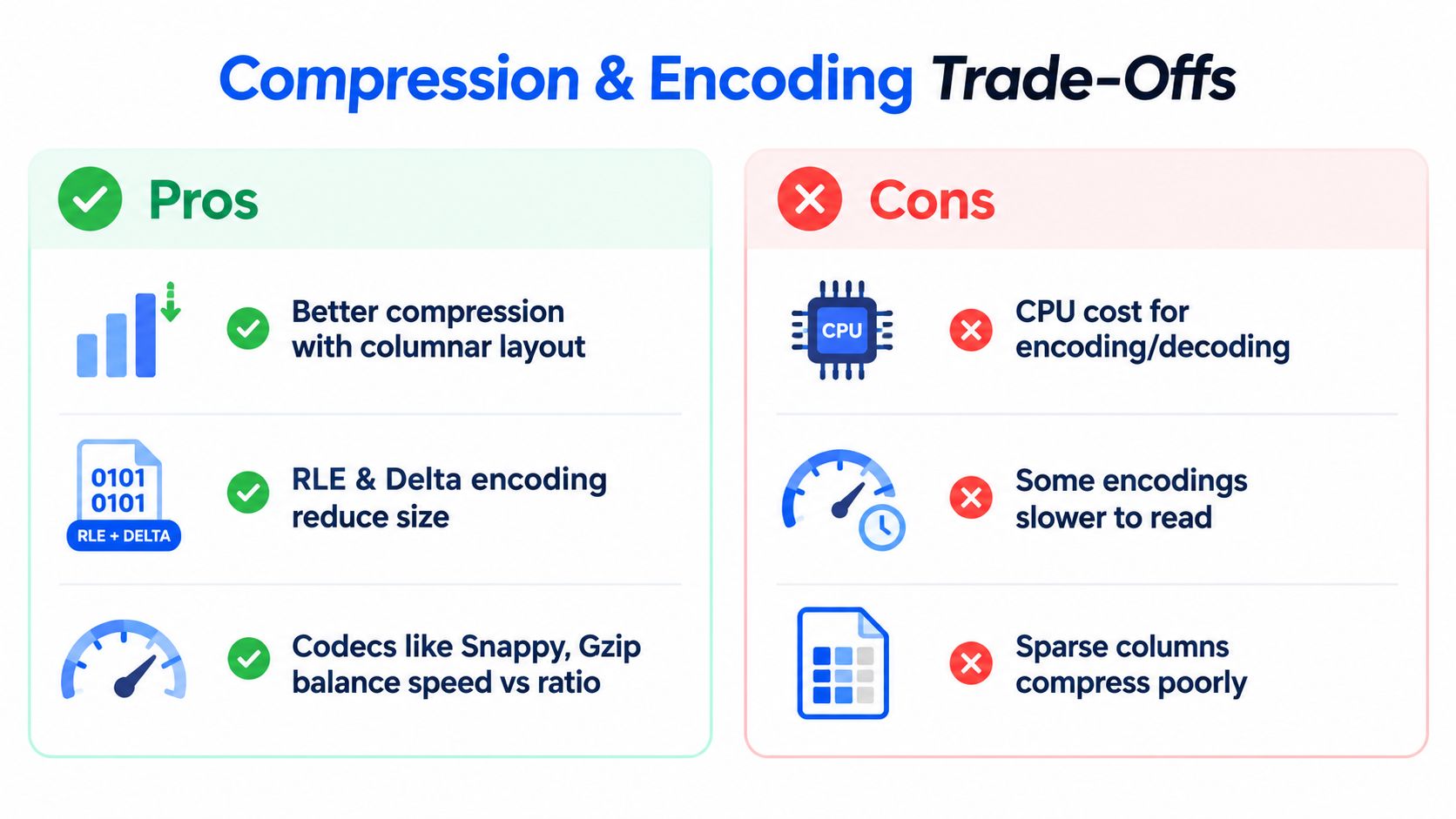
The key detail is where this happens. Parquet supports multiple encoding and compression mechanisms at the page level. The format includes encodings such as PLAIN, RLE, DELTA_BINARY_PACKED, RLE_DICTIONARY, and BYTE_STREAM_SPLIT, plus compression codecs such as SNAPPY, GZIP, BROTLI, ZSTD, and LZ4_RAW, as summarized in the Parquet format reference.
Encoding first, compression second
An easy way to think about it:
Encoding changes how values are represented.
Compression shrinks the encoded bytes.
Those are related, but they aren't the same decision.
A low-cardinality string column might benefit from dictionary-style handling. A numeric series might suit delta-oriented encoding. After that, a codec like Snappy or ZSTD can compress the pages further.
Parquet Encodings and Codecs at a Glance
Mechanism | Examples | Best For | Trade Off |
|---|---|---|---|
Encoding | PLAIN | Simple data, broad compatibility | Less compact for repetitive values |
Encoding | RLE | Repeated or low-cardinality values | Less useful when values vary heavily |
Encoding | DELTA_BINARY_PACKED | Ordered or gradually changing numeric data | Can add decode work |
Encoding | RLE_DICTIONARY | Repeated categorical values | Dictionary overhead may not help every column |
Encoding | BYTE_STREAM_SPLIT | Certain numeric layouts | Reader support and workload fit matter |
Codec | SNAPPY | Fast analytical reads | Usually larger files than heavier codecs |
Codec | GZIP | Better file size reduction | More CPU for compression and decompression |
Codec | BROTLI | Aggressive compression use cases | Can increase compute cost |
Codec | ZSTD | Balanced size and speed in many workloads | Results depend on engine support and settings |
Codec | LZ4_RAW | Fast decompression scenarios | Compression ratio may be less aggressive |
Smaller isn't always faster
Teams often over-optimize the wrong thing. The smallest file on disk doesn't automatically produce the fastest query.
If a codec squeezes bytes aggressively but costs more CPU to decode, total runtime can go up. On the other hand, if storage or network transfer is the bigger constraint, denser compression may be worth it.
For analytics, the winning choice is usually the one that reduces total work across storage, I/O, and CPU. Not the one that produces the tiniest file.
That's why testing matters. Engines like Spark, Trino, DuckDB, and warehouse runtimes all interact differently with file sizes, page structure, and decompression overhead. The same judgment call shows up in query tuning generally, not just in file formats, which is why broader SQL optimization habits still matter after you adopt Parquet.
How this compares to other formats
Compression is also a good place to separate Parquet from nearby formats:
CSV has little structural help for efficient typed compression.
Avro is row-oriented, which changes what compresses well and what reads efficiently.
ORC is also columnar and analytics-oriented.
Delta adds table behavior on top of Parquet rather than replacing Parquet's storage layout.
So yes, Parquet is often smaller and faster than CSV for analytics. But its real advantage comes from the combination of layout, metadata, encodings, and selective reading.
Parquet Compared With CSV Avro ORC and Delta
Format comparisons get messy when people ask, "Which one is best?" That's usually the wrong question. The useful one is: which format matches the access pattern and operational model of this dataset?
Start with workload, not loyalty
CSV is still common because it's universal. You can open it in almost anything. But universality comes with weak typing, weak metadata, and expensive scans.
Avro is better when you care about row-oriented interchange, event-style pipelines, or whole-record reads. ORC competes more directly with Parquet in analytical environments, especially in stacks that grew up around Hive-style optimization. Delta is different again. It usually means a transaction and table-management layer built on top of Parquet files.
Choosing Between Parquet CSV Avro ORC and Delta
Format | Layout | Ideal Workload | Limitation to Watch |
|---|---|---|---|
Parquet | Columnar | Analytical scans over large tabular data | Can become operationally painful with schema drift and poor file layout |
CSV | Row-like plain text | Simple interchange, quick exports, manual inspection | Weak typing, no rich metadata, inefficient large scans |
Avro | Row-oriented binary | Event pipelines, serialization, whole-record processing | Less efficient than columnar formats for selective analytics |
ORC | Columnar | Analytics in ecosystems that favor ORC tooling | Fit depends on engine support and team standards |
Delta | Table layer over Parquet | Lakehouse workloads needing table semantics and data management | Adds operational concepts beyond file format alone |
The subtle question people skip
A lot of teams ask what is a Parquet file, adopt it, and stop there. The better follow-up is: should this workload still use Parquet as the default?
That question matters more now because the format is still evolving. The Parquet project's 2026 documentation shows active changes, including Variant support in preview and a proposed File logical type for unstructured payloads, which signals expansion beyond classic analytic tables. But those capabilities aren't yet broadly mature across the ecosystem, so workload fit matters more than one-size-fits-all defaults, as noted in the Parquet format versions documentation.
That has a practical implication in 2025 and 2026. Teams increasingly choose formats by access pattern:
analytical scans over stable tabular data
row-wise event transport
table-managed lakehouse operations
semi-structured or random-access heavy workloads
For platform teams using Databricks-style lakehouse stacks, file format selection also interacts with governance and reliability choices such as data quality management for Databricks environments.
A simple decision rule
Use Parquet when your dominant pattern is analytical reads across large datasets and your tooling supports it well. Be more cautious when the workload leans toward frequent row updates, heavily evolving semi-structured payloads, or access patterns that care more about random retrieval than broad scans.
Parquet is often a strong default. It just isn't the only sane default anymore.
How to Inspect and Create Parquet Files in Practice
Theory helps, but most engineers eventually want to answer three concrete questions:
What schema is inside this file?
How many row groups does it have?
What compression or encoding choices were used?
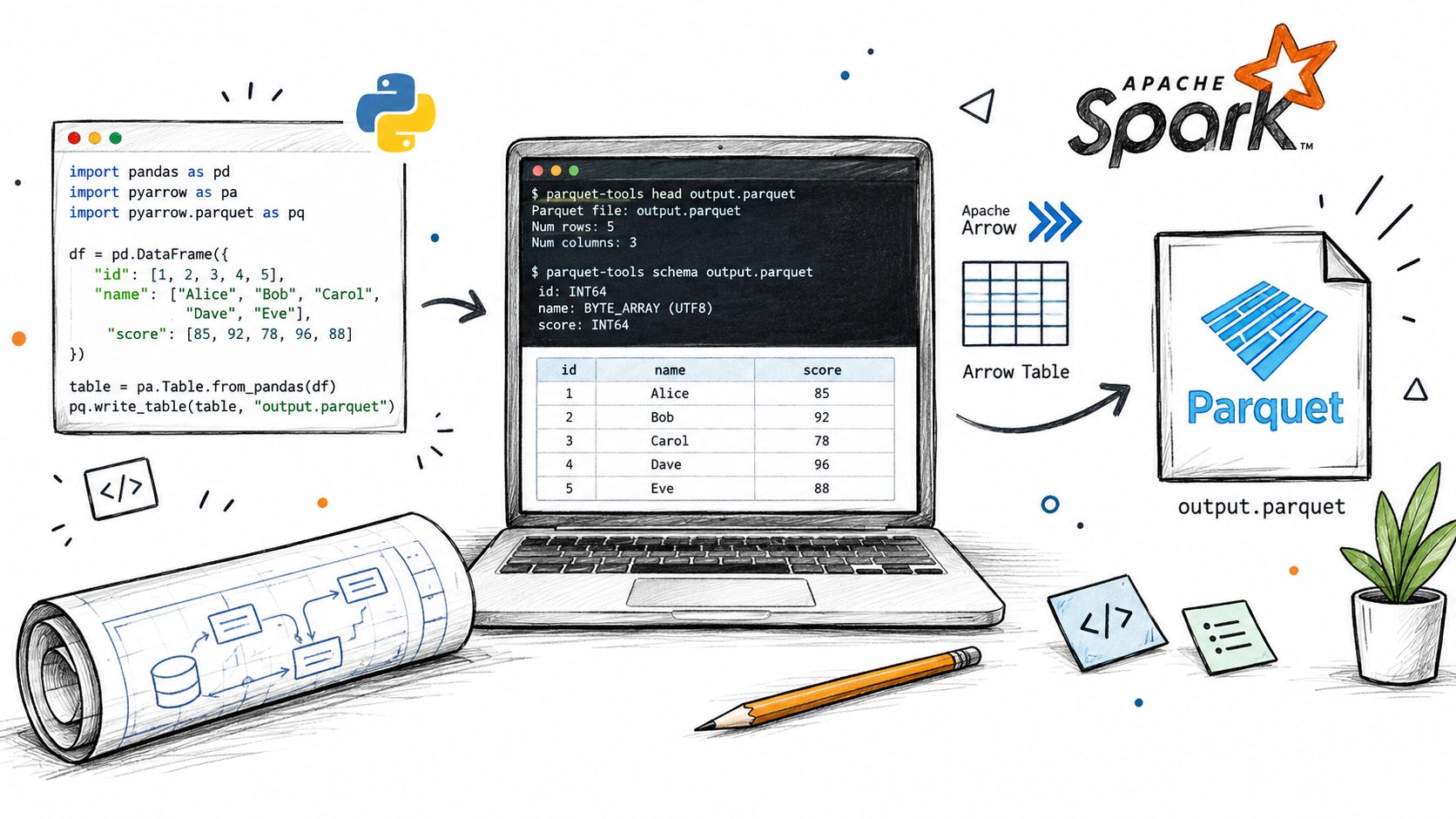
Inspecting a file
A lightweight habit is to inspect Parquet before debugging downstream query behavior.
With parquet-tools, engineers commonly look at schema and metadata:
With PyArrow in Python:
With Spark:
What are you looking for?
Schema shape: are column names and types what you expect?
Row-group count: too many can indicate over-fragmentation.
Compression details: useful when storage and runtime don't line up.
Nullability and field changes: often the first clue in downstream breakage.
Writing Parquet from Python and Spark
Creating Parquet is usually straightforward. The operational details matter more than the syntax.
With pandas and PyArrow:
With Spark:
Those lines are the easy part. The more important questions are:
Are you writing sensible file sizes?
Are partitions aligned with actual filters?
Are all writers producing the same schema?
Are append jobs introducing drift?
Tools are only half the job
A dataset can contain valid Parquet files and still behave badly as a table. That's why teams often combine file inspection with monitoring around schema changes, freshness, and data behavior. Tools in that category include engine-native metadata inspection, catalog tooling, and platforms such as digna, which monitors data behavior, validates records, tracks timeliness, and detects schema changes inside the customer's own environment.
If your query plan looks reasonable but performance still swings, inspect the files and the dataset metadata before blaming the engine.
In practice, the best debugging loop is short: inspect the file, inspect the table layout, inspect the query plan, then inspect schema evolution across partitions or append batches.
Best Practices for Partitioning Schema Evolution and Speed
Most "Parquet performance" issues don't come from Parquet itself. They come from the way teams write, append, partition, and evolve datasets over time.
Treat layout as part of the data model
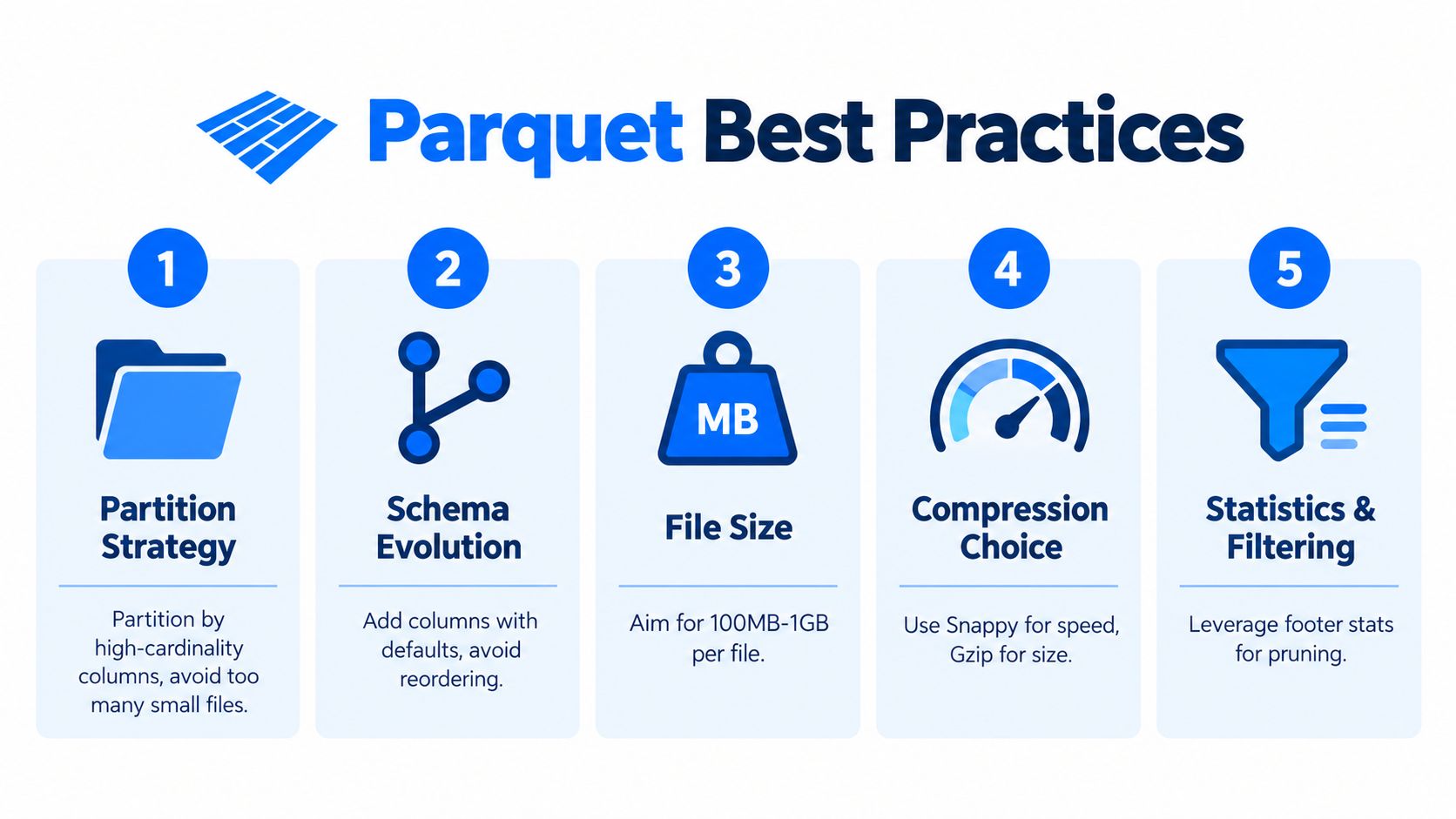
The Parquet specification recommends large row groups of 512 MB to 1 GB, which helps balance scan efficiency and parallel processing for large analytical datasets, according to the Parquet configuration guidance.
That recommendation surprises people because many real datasets end up fragmented into much smaller pieces. Small files and tiny row groups create overhead for planning, metadata handling, and task scheduling.
A few practical habits help:
Partition with restraint: Partition by fields people filter on. Too many partitions create file sprawl and metadata pain.
Aim for healthy file sizes: Large enough for efficient scans, not so fragmented that planning dominates.
Keep writers consistent: Mixed write settings across jobs often produce uneven performance.
Schema evolution is where costs hide
A frequently missed angle in discussions about what is a Parquet file is that the hard part often isn't the file format. It's reading mixed-schema datasets efficiently.
Apache Spark notes that Parquet supports schema evolution, but schema merging across part-files is relatively expensive and is off by default unless explicitly enabled. That means many real-world Parquet problems are metadata-management problems in data lakes, especially for continuously appended datasets where silent schema drift can trigger expensive full-table scans during reads, as described in the Parquet project documentation.
The file format may be fine. The dataset may still be hard to read efficiently if each batch writes a slightly different shape.
That's why schema governance matters. Teams need a clear model for allowed changes, detection of drift, and visibility into downstream impact. A practical starting point is having a shared understanding of schema types and change patterns before pipelines start evolving independently.
What good operations look like
The healthiest Parquet datasets tend to share a few traits:
Append discipline: new data lands in a predictable structure.
Schema review: added columns are deliberate, not accidental.
Metadata awareness: engineers inspect row groups, partitions, and scan behavior.
Timeliness checks: delayed or partial loads don't corrupt downstream assumptions.
If you remember one thing from this article, make it this: Parquet is powerful because it lets engines avoid unnecessary work. But if your files are too small, your partitions too noisy, or your schemas too inconsistent, the engine loses that advantage fast.
If Parquet performance in your lake keeps turning into a schema drift or metadata visibility problem, digna can help you monitor structural changes, timeliness, record-level quality, and broader data behavior without moving data out of your own environment. That makes it easier to catch the operational issues around Parquet datasets before they turn into broken dashboards or expensive scans. Learn more at digna.
A valid file is not a reliable dataset — data observability watches the schema, freshness and volume signals that Parquet metadata alone will not act on.
Frequently asked questions
What is a Parquet file?
An open-source columnar file format that stores like-typed values together and uses footer metadata so query engines read only the columns they need and skip irrelevant data. It began as a joint Twitter and Cloudera effort, was first released in July 2013, and later became a top-level Apache project.
How does columnar storage differ from row storage?
Row storage keeps every field of a record together; columnar storage groups each field's values across records. Because like-typed values sit side by side, they encode and compress far better, and a query touching three columns never has to read the rest.
Why does the footer matter so much?
It holds the schema and the map of where row groups and column chunks live, so a reader consults it before deciding what to open. That makes planning cheap for analytical scans — and makes a damaged footer disproportionately costly, since the data pages can be intact and still unreachable.
Is a smaller Parquet file always faster?
No. Smaller isn't always faster: an aggressive codec cuts bytes on disk but adds CPU on every read, which can push dashboard latency up rather than down. Choose the encoding for the column's value pattern first, then the codec for the storage-versus-CPU trade-off.
When should you choose Parquet over CSV, Avro, ORC or Delta?
Start with the workload rather than format loyalty. Parquet suits repeated analytical scans over a subset of columns; Avro suits row-wise writes and event interchange; CSV stays useful for inspection and simple handoffs; Delta adds transactional guarantees Parquet alone does not provide.