Real Time Data Monitoring: Guide to Essentials & Best
|
6
min read

You're probably seeing the same pattern many data teams hit once the platform grows up. Pipelines finish on time. Orchestration is green. Dashboards refresh. Then someone from finance, operations, or ML asks why a key number shifted, why a segment disappeared, or why a model started making bad decisions. The infrastructure says “healthy,” but the data product is already wrong.
That gap is where real time data monitoring matters. Not as a flashy dashboard feature, and not as another stream of noisy alerts, but as a way to catch issues while data is still moving through the system. In regulated environments, there's a second requirement that most guides barely touch. You need that visibility without shipping sensitive data to a vendor-controlled environment.
Teams in healthcare, finance, telecom, and the public sector don't get to choose between speed and privacy. They have to deliver both.
Table of Contents
When Your Data Pipeline Looks Healthy But Is Silently Failing
A common failure mode looks boring at first.
Your ingestion jobs ran. Kafka lag stayed within normal bounds. Airflow, Dagster, or your managed scheduler marked tasks as successful. The warehouse has fresh partitions. Yet the sales dashboard drops a region, or a fraud model starts scoring too aggressively, or an executive report shows yesterday's value with today's timestamp. Nobody sees the problem until a business user does.
That's the weakness of post-facto checks. Traditional data quality workflows often validate at rest, after load, after transformation, or after a report breaks. They're useful, but they don't tell you what's happening in flight. By the time someone opens a ticket, trust is already damaged.
Why data pipelines fail in production and how to detect issues early is a good example of this production reality. Most failures aren't dramatic crashes. They're subtle changes that move through a healthy-looking pipeline without triggering operational alarms.
Green infrastructure can still carry bad data
The hard lesson is that pipeline health and data health are different things. A task can complete successfully while processing incomplete payloads, shifted timestamps, duplicated events, or structurally valid but semantically wrong records.
This matters more now because 63% of enterprise use cases require data processing within minutes to be operationally useful, according to 2025 IDC data cited by Fortune Business Insights. If the useful window is measured in minutes, waiting for an end-of-day reconciliation isn't operationally serious.
Real-time monitoring starts paying off before a dashboard goes red. It pays off when the wrong data never reaches the dashboard in the first place.
What teams usually miss
The first issues to escape are rarely total outages. They're usually things like:
Late-arriving data that still lands inside the same partition and looks current.
Unexpected distribution shifts that stay within broad historical ranges but break downstream assumptions.
Field-level null spikes hidden inside otherwise valid tables.
Silent schema changes that don't break ingestion but do break consumers.
If you only monitor job success, storage growth, and dashboard uptime, you'll miss the problem that matters. Real time data monitoring closes that gap by checking freshness, timeliness, drift, and structure while the pipeline is still active enough for engineers to intervene.
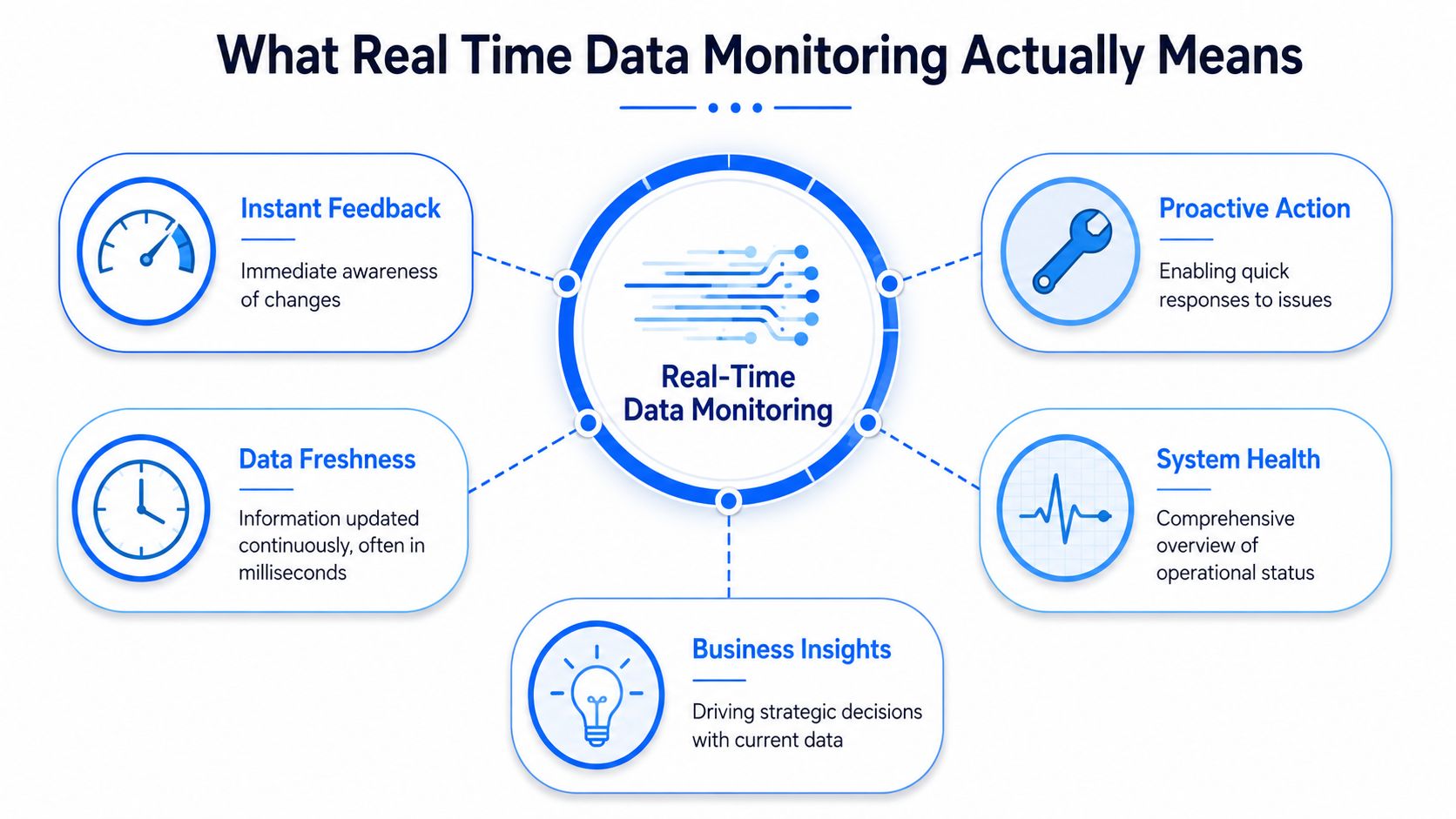
What Real Time Data Monitoring Actually Means
Teams often use “real-time” loosely. That creates bad architecture decisions.
A better analogy is a car dashboard versus a mechanic's report. The dashboard tells you right now if the engine is overheating or fuel is low. The mechanic's report tells you what was wrong after inspection. Both matter, but only one helps you respond while you're still driving.
True real time versus near real time
Not every monitoring use case needs the same latency target. That's where teams often overbuild.
Real-time data processing delivers output with latency in seconds or milliseconds. True real time means sub-second responses for cases like fraud detection. Near real time covers seconds to minutes, which is usually enough for analytics dashboards and operational monitoring, as outlined in Splunk's overview of real-time data processing.
In practice:
Use true real time when the system must react immediately. Think payments, security events, or machine protection.
Use near real time when people are making operational decisions from a live dashboard.
Don't force stream processing everywhere if the business can tolerate minute-level lag.
A lot of waste comes from treating every table as if it powers fraud detection.
The basic monitoring loop
Real time data monitoring usually has four layers working together:
Ingestion
Events arrive from apps, APIs, sensors, CDC streams, or warehouse updates.Processing
A stream layer filters noise, computes aggregates, joins reference data, and evaluates anomalies as data arrives.State and storage
You need somewhere to keep metrics, recent windows, and historical context for comparison.Action
The system updates a dashboard, opens an incident, sends a notification, or blocks a bad downstream action.
The important point isn't the tool brand. It's the feedback loop. A monitoring system is only real-time if it can detect, evaluate, and surface a problem while there's still time to act.
A quick walkthrough helps anchor the architecture:
What people often confuse with monitoring
A BI dashboard isn't the same as monitoring. A dashboard presents metrics. Monitoring decides whether those metrics indicate a problem and whether someone should act.
Practical rule: If your team learns about a data issue from a stakeholder, you have reporting. You don't yet have monitoring.
That distinction matters because it changes how you design the system. Reporting optimizes for visibility. Monitoring optimizes for timely intervention.
Key Monitoring Architectures and Their Trade-Offs
Architecture choices for real time data monitoring are mostly trade-offs. Latency, cost, control, privacy, and operational complexity pull in different directions. There isn't a universal best pattern.
Stream processing versus micro-batching
The first decision is usually whether to process continuously or in short intervals.
Stream processing is the right fit when the monitoring signal loses value quickly. You process events as they arrive using tools such as Apache Flink, Spark Structured Streaming, Kafka Streams, or Apache Beam. You get lower latency, but you also take on more state management, ordering logic, and runtime complexity.
Micro-batching is often enough for warehouse-centric teams. You process every minute or every few minutes, often with simpler orchestration and lower cost. The downside is obvious. You only see problems on the batch boundary.
Here's the practical view.
Approach | Best For | Latency | Security & Privacy |
|---|---|---|---|
Stream processing | Operational alerts, machine telemetry, fast-moving product events | Seconds to milliseconds | Depends on where processing runs and whether raw data leaves the environment |
Micro-batching | Warehouse monitoring, dashboard freshness checks, recurring data products | Seconds to minutes | Often easier to keep inside existing controlled infrastructure |
External SaaS monitoring | Fast setup, broad integrations, lower internal operational overhead | Varies by product design | Can conflict with strict data residency or third-party access requirements |
In-database execution | Regulated data, warehouse-native monitoring, tight governance | Often near real time, depending on compute and scheduling | Strong fit when data must remain in the customer environment |
External SaaS versus in-database execution
For regulated industries, this is usually the real decision.
External monitoring platforms can be fast to adopt. They may provide polished UIs, many connectors, and easier onboarding for teams that need coverage quickly. But they often require shipping metadata, samples, or even broader data payloads into a vendor-controlled plane. That's where security reviews stall.
An in-database or in-environment model flips the pattern. The analysis runs where the data already lives, inside your warehouse, lakehouse, private cloud, or on-prem stack. That reduces data movement and simplifies the privacy story, but it can increase implementation discipline because you need to think harder about compute placement, permissions, and operational ownership.
Data observability versus data quality is the right framing here because the trade-off isn't just visibility. It's whether observability can coexist with governance instead of bypassing it.
What works in practice
For most enterprise teams, the architecture that survives procurement and security review has these traits:
Monitoring logic runs close to the data so engineers aren't duplicating sensitive datasets.
Metrics are computed on governed stores instead of exporting broad raw streams externally.
Only alerts, summaries, and investigation metadata move outward when necessary.
Schema tracking and anomaly detection share context so teams don't need separate tools for every failure mode.
Fast setup is attractive. But if the design requires exceptions to your privacy model, it won't survive production in a regulated environment.
The best architecture is the one your engineers can operate, your security team can approve, and your business can trust when something subtle breaks at 2 a.m.
The Core Metrics You Must Track
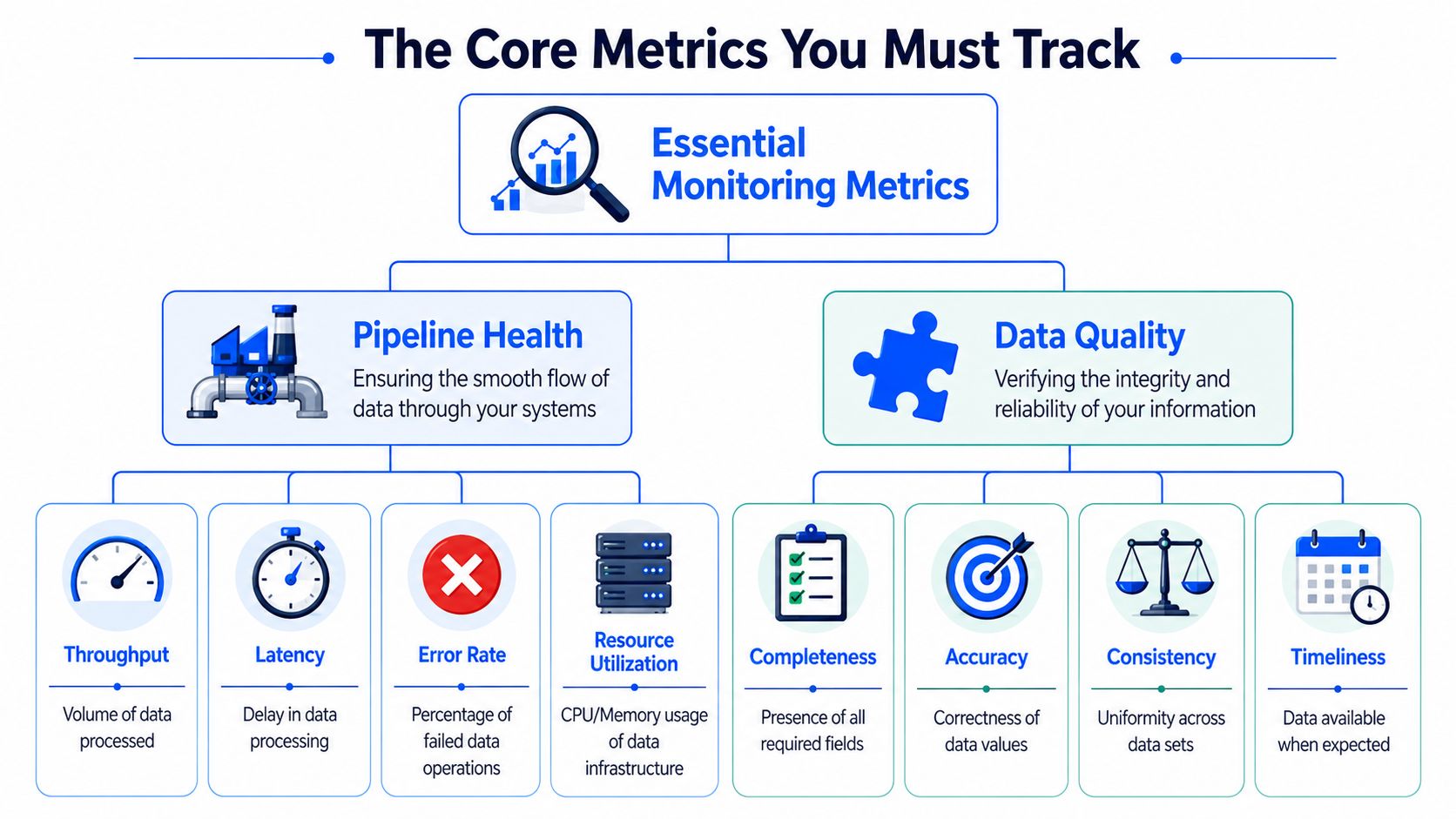
Teams often collect too many infrastructure metrics and too few data signals. Real time data monitoring gets useful when you separate pipeline health from data health and treat both as first-class.
Pipeline health signals
These tell you whether the system is moving data when and how it should.
Freshness matters because “latest available” is often what downstream users care about. A table can be populated and still be stale.
Timeliness measures whether data arrived when the business expected it, not just whether it exists. Timeliness monitoring in practice is useful because expected arrival patterns are often more informative than a simple “last updated” timestamp.
Latency tells you how long the trip from source event to usable output takes.
Throughput helps you spot drops, spikes, or bottlenecks in event flow.
Error behavior should include failed writes, retries, dead-letter volume, and consumer lag where relevant.
These metrics answer a basic question. Can the platform deliver the data product on time?
Data health signals
These tell you whether the contents remain trustworthy once delivered.
Volume anomalies are the easy part. A sudden drop in row count is readily detectable. The harder part is catching changes that still look structurally acceptable but break meaning.
That's why schema drift deserves its own place. A critical blind spot in real-time monitoring is schema drift. 58% of data teams manually update rules to adapt to new pipelines, AI-driven baselines can reduce alert fatigue by 65%, and only 15% of these advanced systems also detect structural changes like added columns or type modifications in real time, according to Streamkap's discussion of real-time analytics use cases.
The short list I'd insist on
If a team is starting from scratch, I'd require monitoring for:
Arrival behavior for critical tables and streams.
Distribution drift on important numeric and categorical fields.
Null and completeness changes on required columns.
Schema changes including added, removed, or type-modified fields.
Join health for key reference relationships.
Consumer-facing freshness at the published table or API layer.
For application teams, the same logic applies outside the warehouse. If you need a concrete example of instrumenting update behavior, this guide on how to monitor Capacitor app updates in real time is useful because it shows how operational signals become actionable only when you track delivery state, failures, and timing together.
If you only watch row counts, you'll catch outages. You won't catch corruption.
That's the dividing line. Basic monitoring detects absence. Good monitoring detects wrongness.
Designing Smarter Alerts and Data SLAs
No monitoring system fails because it lacks alerts. It fails because people stop trusting them.
Static thresholds are the usual cause. A fixed rule like “alert if volume drops below X” sounds sensible, but it ignores seasonality, product launches, regional cycles, and natural behavior changes. Engineers end up tuning thresholds by hand, then muting the alerts they don't believe.
Why dynamic baselines work better
A smarter approach is baseline learning. The system learns what normal looks like for a metric at a given time, in a given operating pattern, and alerts when behavior deviates meaningfully. That reduces noise and makes the remaining alerts worth reading.
This isn't theory. In real-time production monitoring, event-driven architectures capture machine state changes in milliseconds, which enables instant dashboard updates and mobile notifications when thresholds are breached, as described in Symestic's explanation of real-time production monitoring. The operational lesson carries over to data platforms. Speed matters, but useful alerting matters more.
What a useful alert should contain
A good alert should answer four questions immediately:
What changed
Where it changed
How severe it is
What downstream products are exposed
If your alert says only “anomaly detected,” the engineer still has to do first-response triage manually. That's wasted time.
Turn alerts into SLAs
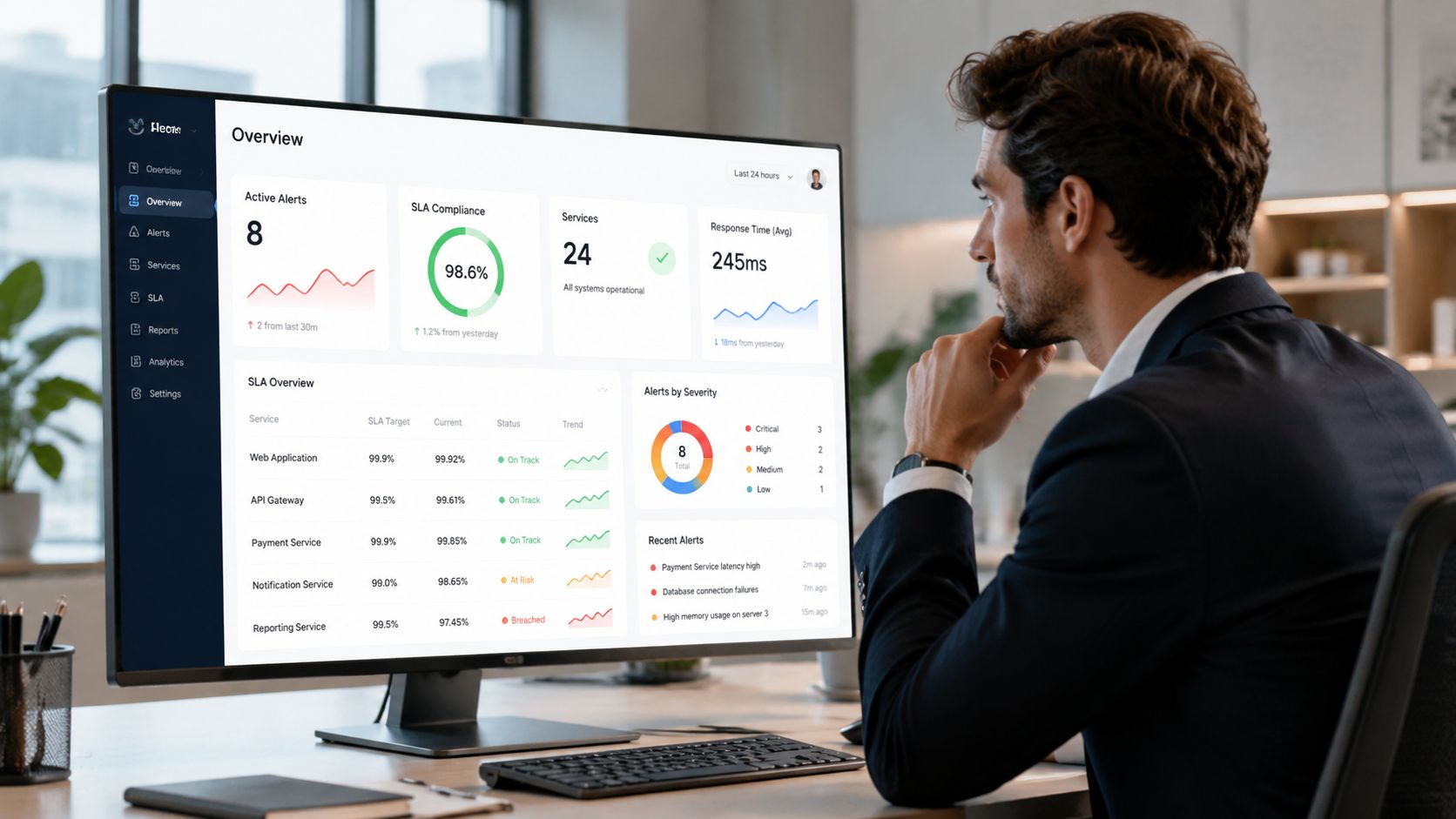
The next step is to convert monitoring signals into data SLAs that stakeholders can understand.
Use SLAs around things people can evaluate:
Freshness SLA for published tables or dashboards
Timeliness SLA for expected arrivals
Schema stability SLA for contract-sensitive datasets
Quality SLA for required fields or validation outcomes
Don't make every SLA technical. Business teams don't care about consumer lag unless it changes the timeliness of the data product they use.
A data SLA should describe the experience consumers can rely on, not the internal metric engineers happen to collect.
That shift is important. Monitoring is internal. SLAs are promises. If the signals and promises don't line up, both engineering and the business lose confidence.
How to Choose and Operationalize a Solution
Tool selection goes wrong when teams evaluate only connector count, dashboard polish, or how quickly they can get a demo running. Those things matter, but they aren't the hard part. The hard part is whether the solution fits your architecture, governance model, and operating habits.
Start with the non-negotiables
In finance and healthcare, privacy usually decides the shortlist before features do. Over 70% of enterprises in finance and healthcare reject third-party data access for real-time observability. 62% of new data quality tools offer in-database execution, but only 12% combine this with AI-powered baseline learning, according to the cited analysis on private-environment observability.
That tells you something important. “Runs in your environment” and “supports modern anomaly detection” still don't commonly appear together. If you need both, you have to validate that early.
Evaluate the operating model, not just the product
Ask practical questions:
Where does computation run
Inside your warehouse, your VPC, on-prem, or in the vendor's cloud?What leaves your environment
Raw rows, metadata, samples, metrics, or only alerts?How does it detect anomalies
Static rules only, learned baselines, or both?Can it track structure as well as values
Many tools handle drift poorly when the schema changes.Who owns day-two operations
Data engineering, platform, governance, or a shared model?
If your team also monitors customer-facing systems beyond the data platform, adjacent operational tooling matters too. For example, when you need to diagnose email deliverability issues, the useful products are the ones that expose root-cause signals clearly rather than just reporting sends and opens. The same standard applies here.
One deployment pattern that fits regulated teams
For regulated environments, the most defensible pattern is usually:
Compute metrics where the data resides.
Learn baselines without exporting production data.
Expose dashboards and incidents through a controlled UI.
Limit vendor access to software support, not dataset access.
One option in that category is digna, which runs analyses inside customer databases and private environments, while covering anomaly detection, timeliness monitoring, validation, and schema tracking in one platform. That approach is relevant when security teams won't approve broad external data access but engineering still needs modern monitoring capabilities.
Operationalizing the solution is less glamorous than selecting it. Start with a few critical pipelines, define ownership, wire alerts into the channels engineers already use, and force every alert to map to an action. If there's no action, there shouldn't be an alert.
Frequently Asked Questions
Is real time data monitoring the same as BI reporting
No. BI reporting shows metrics to users. Monitoring evaluates whether data or pipeline behavior indicates a problem and should trigger action.
Do we need sub-second monitoring everywhere
No. Some use cases need sub-second response. Many don't. Near real-time monitoring is enough for a large share of warehouse and analytics workflows.
What's the first thing to monitor
Start with the data products that cause the most operational pain when they're late, stale, or wrong. Usually that means executive dashboards, finance reporting tables, customer-facing APIs, or model input datasets.
What's the most overlooked failure mode
Schema drift is high on the list, especially when ingestion still succeeds and downstream consumers fail undetected.
Is this only relevant for industrial or IoT systems
No. The pattern shows up anywhere data has to be acted on quickly, from product analytics to healthcare. The scale is already large. By 2027, the projected number of global patients using remote patient monitoring solutions is 115.5 million, according to HealthArc's RPM statistics roundup. That kind of deployment depends on timely, trustworthy monitoring.
How should a team begin
Pick one critical pipeline. Track freshness, timeliness, a few quality signals, and schema changes. Route alerts to the team that can respond. Tune for actionability, not alert volume.
If your team needs real time data monitoring that works inside private cloud or on-prem environments, digna is worth evaluating. It's built for teams that need anomaly detection, timeliness monitoring, validation, and schema tracking without giving a vendor access to production data.