Parquet File Guide: Architecture, Performance, and Use
|
10
min di lettura

You're probably dealing with one of two situations right now. Either you're choosing a storage format for a new dataset and every option sounds vaguely “optimized,” or you already have Parquet in production and your problem isn't reading it, it's understanding why one dataset is fast, another is sluggish, and a third suddenly won't open.
That's where most Parquet content falls short. It explains the happy path. It says Parquet is columnar, compressed, and good for analytics, which is true, but not enough when you're tuning row groups, debugging corrupted uploads, or trying to decide whether new logical types will break interoperability across engines.
Parquet matters because it sits at the center of modern data platforms. It's the file format many teams use as the physical layer under data lakes, lakehouses, feature stores, archival zones, and cross-tool exchange. If you understand the file mechanics, you make better decisions about layout, query behavior, governance, and failure handling.
Table of Contents
What a Parquet File Is and Why It Matters
A Parquet file is an open columnar file format built for analytical workloads. It began as a joint open-source effort between Twitter and Cloudera, first released as Parquet 1.0 in July 2013, and became an Apache Software Foundation top-level project on April 27, 2015. Its design drew on Dremel-style record shredding and assembly, which made it a natural fit for large-scale analytics in cloud data lakes, as noted in the Apache Parquet background.
That origin matters because analytics workloads don't behave like transactional systems. Analysts don't usually fetch one complete record at a time. They scan many rows, touch a few columns, filter hard, aggregate harder, and repeat that pattern all day. A row-oriented format like CSV forces the engine to read through a lot of irrelevant data just to answer a simple question.
Why columnar storage changes the cost profile
Say your table has customer_id, event_date, country, device_type, revenue, campaign, browser, and a dozen more fields. If your query only needs event_date and revenue, a row-based format still drags every field through I/O and parsing. Parquet doesn't.
That's the practical win. Columnar storage lets query engines read only the columns they need, which cuts wasted I/O and memory for selective analytical work. This is one reason Parquet became the default exchange layer across tools that don't share a single runtime.
Why teams rely on it in mixed-tool environments
A Parquet file carries its own schema and metadata inside the file structure, so it travels well between Spark, Hive, Pandas, DuckDB, Trino, and warehouse-adjacent engines. You don't always need an external catalog just to interpret the contents.
Practical rule: If your team expects the same dataset to move between processing engines, a self-describing format saves a lot of brittle glue code.
Parquet has effectively become the common storage language of the lakehouse stack. If you're thinking about platform design more broadly, this is part of why the data platform foundation matters so much. The file format isn't a side detail. It shapes how every downstream engine reads, skips, validates, and trusts your data.
Inside the Parquet File Architecture
The cleanest way to understand a Parquet file is to stop thinking about it as a blob and start thinking about it as a small library.
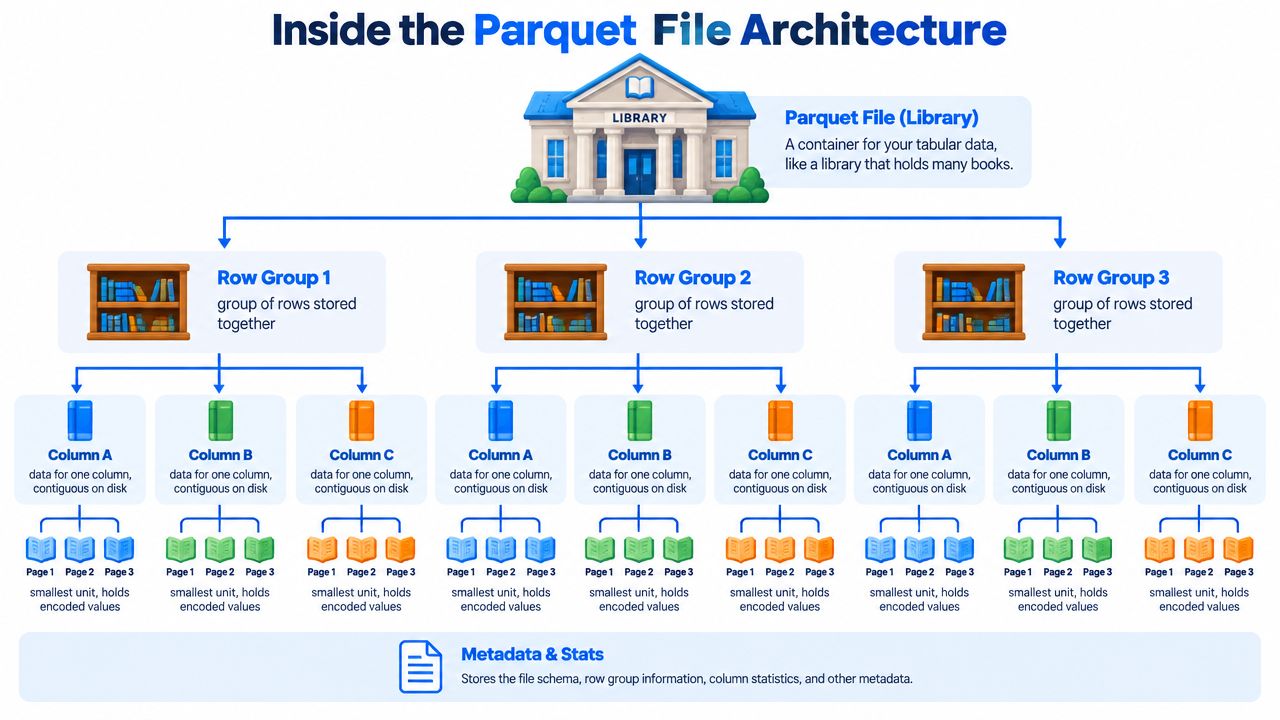
The file is the building. Inside it, row groups are sections of the library. Within each row group, each column chunk is a shelf for one column. And each column chunk contains pages, which are the smaller units read sequentially from disk.
The Apache concepts documentation lays this out directly: a file contains one or more row groups, each row group contains exactly one column chunk per column, and each column chunk contains one or more pages. It also notes that column chunks are contiguous in the file, which is one of the reasons columnar reads work efficiently in practice, as documented in the Parquet concepts reference.
The hierarchy that readers actually use
That hierarchy isn't academic. Query engines use it constantly.
File level gives the reader a single object to open and inspect.
Row group level acts as a practical unit of parallel scanning.
Column chunk level lets the engine pull only the columns requested by the query.
Page level is where encoded values are stored and decoded in sequence.
If you've worked on data system architecture, this should feel familiar. Efficient systems are usually hierarchical because hierarchy gives readers stopping points. Parquet gives those stopping points at several layers.
What sits at the edges of the file
A healthy Parquet file starts and ends with the magic bytes PAR1. That's one of the first integrity checks many tools use. If the tail marker is missing, the file may be truncated, incomplete, or not Parquet at all.
The footer near the end of the file is where much of the intelligence lives. It stores the schema, row-group metadata, and key-value metadata. That's why Parquet is self-describing. Readers don't need to guess the shape of the dataset.
A Parquet file is easy to read when the data pages are fine. It's easy to diagnose when the footer is fine. It's painful when transport broke the file before either layer could help.
How Parquet handles nested data
Parquet was designed around Dremel-style shredding and assembly, which is how it represents nested structures such as structs, lists, and maps without repeating field names in every row. The trick is that the writer breaks nested records into columnar pieces and keeps enough positional information to rebuild them later.
That positional information is commonly expressed through definition levels and repetition levels. In plain terms, those levels help the reader distinguish between “this field is null,” “this list is empty,” and “this nested child belongs to the same parent as the previous value.” If you've ever seen nested data read back with surprising nulls or shape mismatches, this is usually the machinery behind the outcome.
Under the hood, pages may use different encodings depending on the data and writer behavior. You'll run into plain encoding, dictionary encoding, run-length encoding, bit-packing, delta-style encodings, and byte-stream split in real systems. The key point isn't memorizing every encoding. It's understanding that Parquet stores values in compact, encoded page units rather than as raw, row-by-row text.
How Predicate Pushdown and Page Indexes Speed Up Queries
A Parquet query gets fast when the reader can prove that large parts of the file are irrelevant before it opens the data pages. That is the win. Compression helps with bytes on disk and bytes over the network. Predicate pushdown helps with something more valuable in production: fewer reads, fewer decompressions, and less work in the execution engine.
The starting point is the footer metadata described in the Parquet file-format documentation. Along with schema and layout details, Parquet may store per-column statistics for each row group, including minimum values, maximum values, and null counts. Query engines use those statistics to test your filter against each row group before scanning the actual column data.
A common case makes this concrete. Say your query filters on:
WHERE event_date BETWEEN '2026-01-01' AND '2026-01-31'
If one row group has event_date bounds entirely in March, the engine can rule it out from metadata alone. If another row group covers January dates, that group still needs more inspection. The result is simple:
Row groups whose min and max cannot satisfy the predicate are skipped.
Row groups whose range overlaps the predicate remain candidates.
Candidate groups still require page reads or value checks to confirm matches.
That sounds straightforward, but two production details matter.
First, row-group statistics are only as useful as the data layout. If values are clustered by event_date, min and max ranges are narrow, so pruning is sharp. If the file was written from heavily shuffled data, each row group may span a wide date range, and the metadata becomes much less selective. Predicate pushdown still runs. It just has less to work with.
Second, row groups are a coarse unit. They work like boxes in a warehouse. If the label says every item in the box is from March, you skip the whole box. If the label says the box contains January through March, you still have to open it even if only a few January records inside might match.
That is where page indexes matter. Parquet supports optional page-level metadata through ColumnIndex and OffsetIndex, defined in the Parquet page-index specification. ColumnIndex stores page-level bounds and null information for a column. OffsetIndex maps pages to physical offsets and row ranges. Together, they give a reader a finer-grained map inside the row group.
The practical effect is easy to miss if you only read happy-path tutorials. Without page indexes, an engine may know a row group is worth checking but still read many pages inside it. With page indexes, the engine may skip the non-matching pages and jump closer to the pages that could satisfy the filter. For selective queries on large row groups, that can cut a lot of unnecessary I/O.
The distinction is worth keeping straight:
Row-group statistics decide whether to read a row group at all.
Page indexes decide which pages inside that row group are worth touching.
This is also why Parquet tuning can feel inconsistent across tools. Writer support for page indexes varies. Reader support varies too. One engine may use page indexes aggressively. Another may ignore them and fall back to row-group pruning only. In 2026, that gap still shows up in mixed stacks, especially where Spark, Trino, warehouse engines, and Python readers all touch the same files.
Bloom filters belong in the same family of skip-work features, but they solve a narrower problem. They can help with membership tests on high-cardinality columns such as user_id, assuming the writer produced them and the reader knows how to use them. When teams say, "Parquet pushdown stopped working," the root cause is often not the format itself. It is one of these mechanics: poor clustering, weak statistics, unsupported page indexes, or reader behavior that falls back to a full scan.
That diagnostic mindset matters more now because newer logical types, including Variant, geospatial data, and the FILE logical type, are expanding what teams put into Parquet. As files carry more complex data, the question is no longer just "Can I read this file?" It is "Which parts of this file can my engine safely skip, and what metadata is it using to make that decision?"
Parquet vs CSV vs Avro vs ORC
Choosing Parquet gets easier when you stop asking which format is “best” and start asking what access pattern you need to support.
CSV is universal and easy to inspect. It's also weak on schema, typing, and selective reads. Avro is row-oriented and usually a better fit when writing and reading complete records matters more than scanning a few columns. ORC is columnar like Parquet and remains strong in Hive-heavy environments. Parquet sits in the middle as the most common cross-engine analytics format.
The trade-offs in one view
Format | Layout | Schema | Compression | Scan Cost | Write Cost | Best For |
|---|---|---|---|---|---|---|
Parquet | Columnar, organized into row groups and column chunks | Embedded in the file | Strong, helped by columnar layout and encoding | Low for selective analytics queries | Higher than plain text and often more work than simple row formats | Analytics, data lakes, interchange across engines |
CSV | Row-oriented plain text | None built into the format | External compression possible, but the file itself is text | High because readers must parse full rows and infer types | Very low | Simple export and human-readable exchange |
Avro | Row-oriented binary | Strong schema support | Compact binary encoding | Better for row-wise access than column pruning | Good for write-heavy flows | Streaming, event data, row-level reads |
ORC | Columnar | Embedded schema and metadata | Strong | Low for analytics scans | Similar design trade-offs to Parquet | Hive-centric analytics and table ecosystems |
How to think about the decision
Use CSV when portability and human inspection matter more than analytical efficiency. It's still the lingua franca for basic exchange, but teams pay for that convenience later through parsing, weak typing, and wasted reads.
Use Avro when you care about row fidelity, schema evolution in event pipelines, and write-heavy patterns. Kafka-connected systems often land here for good reasons.
Use ORC when your stack is tied to Hive-style processing and ORC-specific table behaviors. It solves many of the same problems as Parquet, but the center of gravity is different.
Use Parquet when most workloads are filtered scans, projections, and aggregation across large datasets. It's the format that tends to survive tool changes because so many readers understand it.
Working With Parquet in Spark, Hive, and Pandas
The interesting part of using Parquet isn't read_parquet() itself. It's that different writers leave different fingerprints behind, and those fingerprints affect later reads.
Spark, Hive, and Pandas can all work with the same Parquet dataset, but they won't always write it the same way. That shows up in row-group layout, sort behavior, statistics quality, partition directory structure, and how efficiently another engine can prune data later.
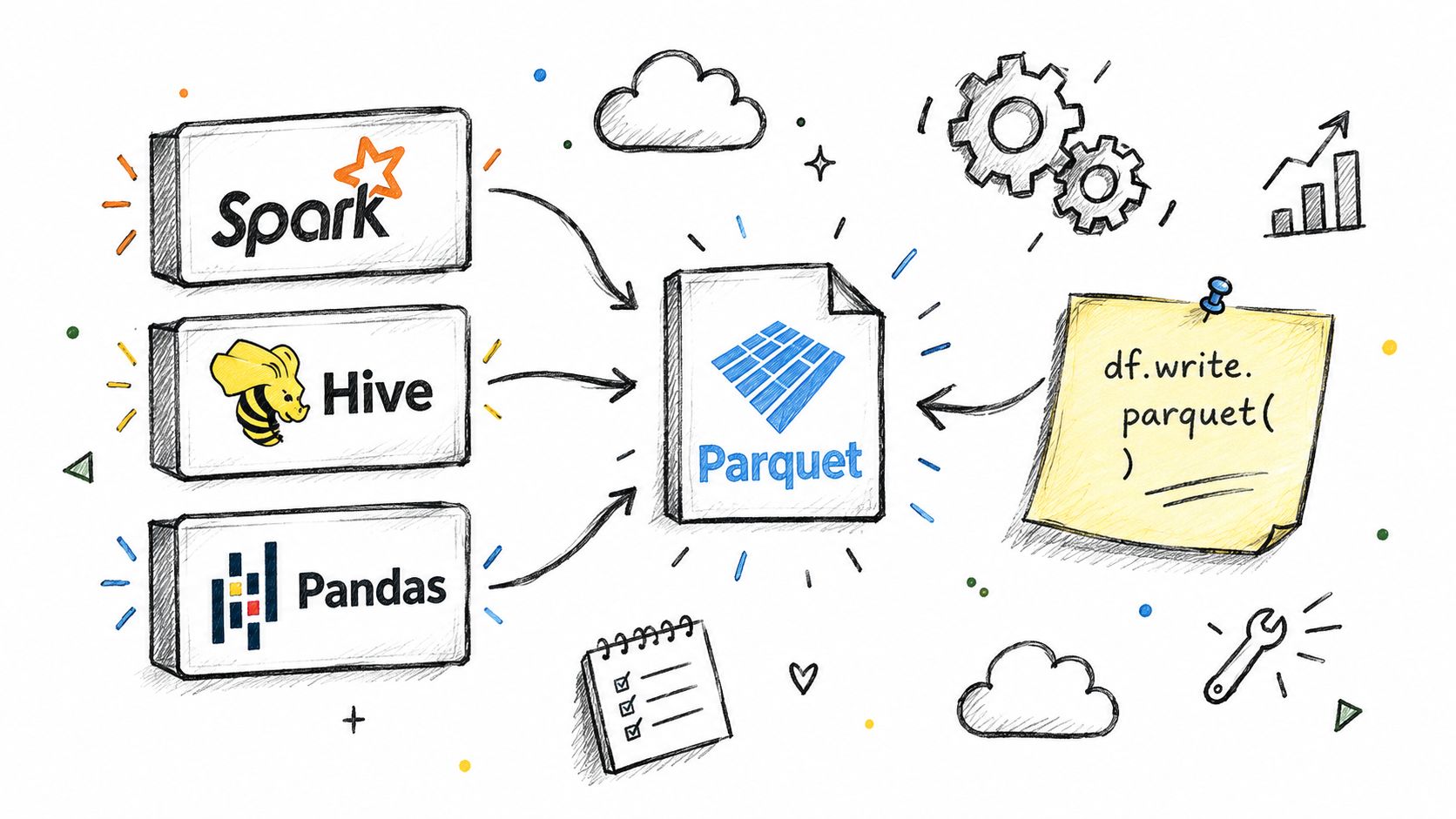
Spark and partitioned datasets
In Spark, the common pattern is straightforward: read a DataFrame, transform it, and write Parquet back to object storage. Teams often combine this with partitionBy(...), which creates Hive-style directory trees such as event_date=2026-01-01/. Those directories become virtual partition columns at read time.
That's useful, but it also creates a trap. Teams sometimes over-partition and end up with too many small files. Once that happens, footer metadata becomes fragmented across many objects and query planning gets noisier.
If you're already monitoring Databricks or Spark reliability, Databricks data quality monitoring becomes relevant because file layout mistakes usually surface first as inconsistent runtime behavior, not neat format errors.
Hive and its mature Parquet path
Hive has supported Parquet for years, and in many environments it reads Parquet natively through the usual table abstractions. The important operational point is that a Hive table may feel “logical,” but the performance still comes from the physical Parquet layout underneath. If the files are poorly partitioned or carry weak statistics, Hive can't rescue that with metadata alone.
Pandas and PyArrow surprises
Pandas usually reaches Parquet through PyArrow or fastparquet. With PyArrow, selecting columns during reads can preserve the main benefit of columnar access. That's a good habit when analysts only need a slice of the dataset.
The subtle problem is on write. A notebook-generated Parquet file often works fine for local analysis but performs poorly later when another engine tries to push down filters or parallelize scans. That doesn't mean Pandas is wrong. It means notebook defaults aren't the same thing as production storage design.
If a dataset starts life in a notebook and ends life in a shared pipeline, rewrite it with production settings before calling it done.
A final point many teams miss: a dataset written by Spark and read by DuckDB can behave differently from one written by PyArrow and read by Spark. Same format, different writer decisions.
Compression, Encoding, Partitioning, and Schema Evolution
A Parquet dataset can look healthy from the outside and still behave badly in production. The files open. Queries return rows. Then one table scans far more data than expected, another produces hundreds of tiny files, and a third breaks after a writer upgrade. These four controls usually explain why: compression, encoding, partitioning, and schema evolution.
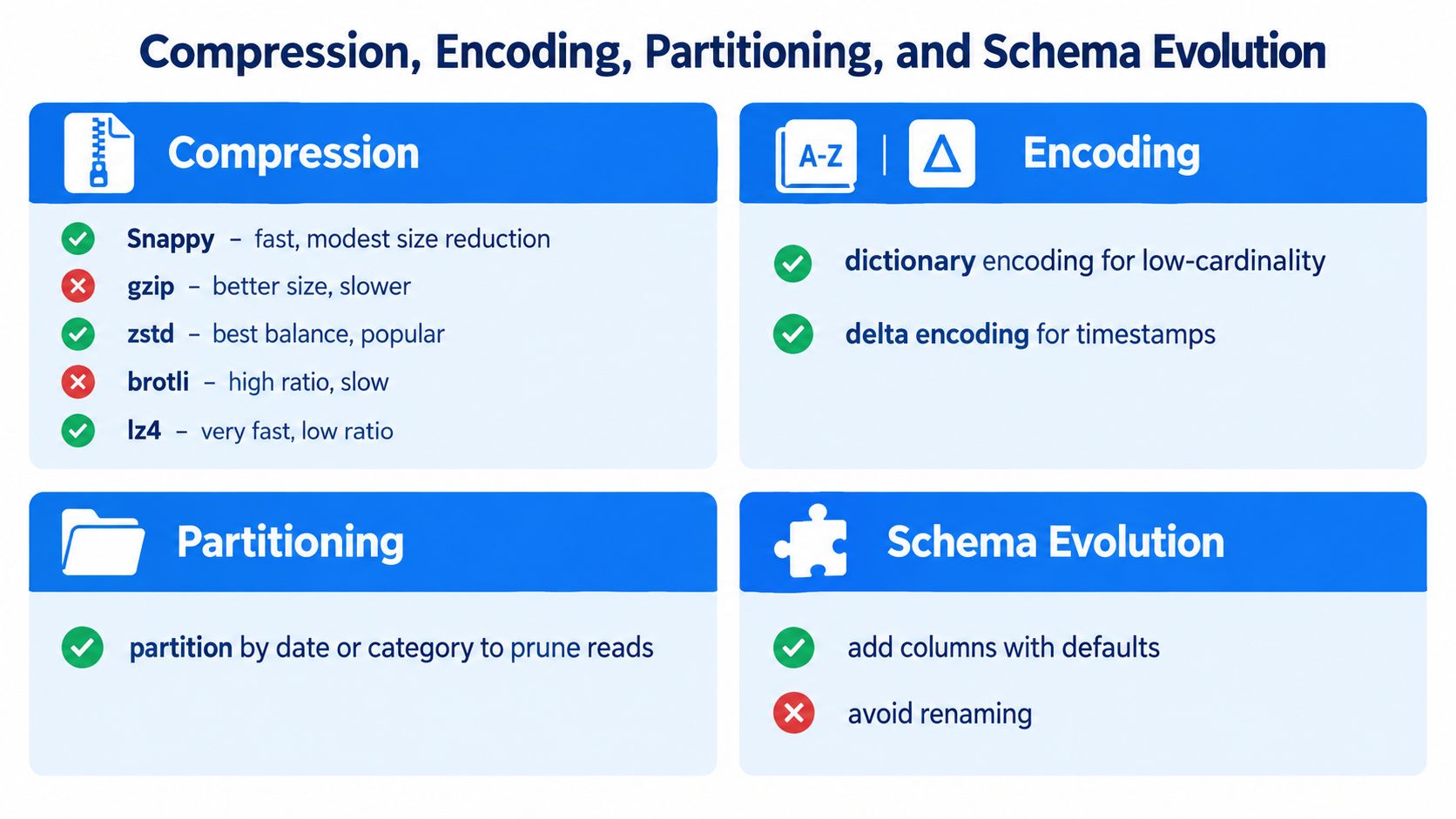
Compression and encoding solve different problems
Compression decides how bytes are squeezed for storage. Encoding decides how values are laid out before compression sees them.
That distinction matters because a weak encoding choice can leave the compressor doing unnecessary work. A strong encoding choice can make ordinary compression look much better.
For compression, the trade-off is usually CPU versus size:
Snappy is a common default when fast reads and writes matter more than the smallest file size.
gzip often compresses more tightly, but the CPU cost is higher.
zstd is a good fit for many mixed workloads because it often balances ratio and speed well.
brotli can make sense when storage reduction matters more than write throughput.
lz4 favors speed.
Encoding is more sensitive to column shape. Dictionary encoding works well when a column repeats the same small set of values, such as country codes or status fields. Delta encodings fit ordered integers, timestamps, and other values that change gradually. Byte-stream split can help some floating-point columns. If compression is packing a suitcase, encoding is how you fold the clothes first.
Row-group sizing sets the performance envelope
Row groups are one of the least glamorous Parquet settings and one of the most expensive to get wrong. They control how much data is bundled together for scan, skip, and parallel work.
The Parquet configuration guidance recommends large row groups because larger groups often improve scan efficiency and compression. In real systems, teams frequently choose smaller targets to balance memory limits, task sizing, and pruning behavior. A larger row group gives each scan task more useful work. A smaller row group gives the engine more chances to skip irrelevant data.
So the question is not whether larger row groups are always better. The useful question is: do your workloads benefit more from higher scan throughput or from finer-grained skipping?
If analysts filter heavily on a narrow date range, oversized row groups can force readers to pull in more data than necessary. If the workload is mostly broad table scans, larger groups often pay off.
Partitioning should mirror how data is actually read
Partitioning works best when it follows a coarse, stable filter such as event date, region, or another field that appears in many queries. It works poorly when teams partition on high-cardinality columns because they look selective on paper.
A good rule is simple. Partition for file discovery, not for every possible predicate.
Over-partitioning creates a directory tree that is expensive to list, expensive to plan, and prone to tiny-file sprawl. Under-partitioning pushes too much filtering work down into the files themselves. The right layout is usually boring. That is a good sign.
Sorting within partitions is often as important as partitioning itself. If rows with similar values are clustered together, Parquet statistics and page indexes have a better chance of helping the reader skip data cleanly.
Schema evolution is where compatibility debt shows up
Adding a nullable column is usually easy. Renaming a field across engines, changing logical types, or rewriting nested structures is where trouble starts.
Parquet is permissive enough that changes can appear to work for weeks before they fail in a downstream reader. One engine may interpret a logical type one way, another may widen it, and a third may materialize nulls. That is why schema evolution should be treated as a compatibility process, not a file-format checkbox.
The complexity is increasing because the Parquet ecosystem is still changing. The Apache Parquet project blog tracks ongoing work around features such as Variant for semi-structured data, geospatial types, and the FILE logical type, along with broader format and versioning discussions that matter for cross-engine compatibility. Those features are useful, but they also raise a practical question for production teams: which readers in your stack can parse them correctly today?
That is where disciplined schema tracking helps. A tool such as schema drift tracking for Parquet pipelines can catch structural changes before they surface as silent reader disagreements.
The safe mindset is conservative. Use newer Parquet features when they solve a real problem, but gate them behind reader compatibility checks, test files written by the actual engines in your stack, and treat writer upgrades as behavior changes, not routine patching.
Diagnosing Parquet File Failures in Production
When a Parquet file won't read, engineers often blame the format first. That's usually the wrong instinct. Recent community guidance shows that the hardest real-world failures are often about file integrity and transport, not Parquet's core design, and the same symptom can come from storage, writer, or reader issues rather than the file structure alone, as outlined in the Parquet failure diagnosis FAQ.
A better approach is to sort failures into archetypes.
Four failure classes that save time
Retrieval failures
The reader never got the right bytes. Think stale object listings, wrong manifest entries, partial downloads, or an HTML error page saved with a.parquetextension.Footer failures
The object exists, but the footer is missing, corrupted, or unreadable. Truncated uploads and partial multipart writes often show up here.Schema-binding failures
The file opens, but the reader maps types differently than the writer intended. You get silent nulls, broken nested fields, or logical-type mismatches.Decode and materialization failures
Metadata looks fine until the engine starts decoding pages or materializing values into memory. Compression compatibility, page corruption, and reader-specific limits often land here.
A practical triage order
Use a simple sequence before you start changing code:
Verify retrieval first. Confirm the object is complete and is a Parquet file, not mislabeled content.
Check the file edge markers and footer. If the tail is broken, nothing above it matters.
Inspect schema and logical types. Compare writer output and reader expectations.
Only then debug decode behavior. Don't jump to codec theories before you know the file is whole.
Broken Parquet pipelines often start outside Parquet. Storage, transport, naming, and object lifecycle policies cause a surprising share of the pain.
File monitoring and pipeline observability help more than format knowledge alone. If teams already use data lake monitoring, they can often spot missing partitions, stale arrivals, or abrupt schema shifts before a reader throws a low-level error.
The main mindset shift is simple. Don't ask, “Why is Parquet broken?” Ask, “At which stage did the bytes, metadata, schema binding, or decode path stop being trustworthy?”
Operational Checklist for Parquet Files in Pipelines
Healthy Parquet doesn't happen because the format is good. It happens because teams apply the same rules every time they write, validate, and publish files.

The checklist worth pasting into a runbook
Pin writer versions. Keep library versions stable across jobs that write the same dataset. Mixed writers often produce mixed behavior.
Verify footer statistics. Make sure row-group metadata is present and plausible enough for readers to prune effectively.
Choose row-group targets intentionally. Many teams land near 128 MB in practice, while the project guidance recommends 512 MB to 1 GB for large row groups depending on workload and engine behavior, based on the earlier-linked Parquet guidance.
Audit partition layout. Directory structure should reflect how people query the data.
Test schema evolution before merge. Added columns are one thing. Logical-type drift is another.
Check compression and encoding choices. Don't inherit notebook defaults and assume they fit production.
Validate transport integrity. A correct writer doesn't protect you from broken uploads or object-store surprises.
Observability and governance make this sustainable
This checklist becomes more useful when it's tied to automated checks. Great Expectations can validate expected schema and content rules. Apache Griffin can support data quality workflows. Datafold can help compare changes across environments. digna is another option in this category. It runs inside the customer's own environment and monitors data behavior, timeliness, validations, and schema changes across pipelines, which fits the kinds of silent Parquet regressions that basic file checks miss.
Governance belongs here too. Column metadata can help carry PII tags. Table formats and catalog layers can enforce retention and access policies. Object-store permissions still matter because the cleanest Parquet file in the world is useless if the wrong job can overwrite it.
Operational habit: Treat every Parquet dataset as both a file format problem and a contract problem. Performance comes from the format. Reliability comes from the contract.
A Parquet file is simple to use when someone else made the right choices for you. In production, your team is that someone.
If Parquet is carrying critical analytics or AI workloads in your environment, digna can help you monitor the parts that usually fail: schema drift, missing or late data, record-level quality issues, and unusual behavior across pipelines. That's especially useful when a Parquet problem isn't a format problem at all, but a delivery, metadata, or contract problem upstream. Take a look at digna if you want that visibility inside your own environment.
For the dataset-level version of this checklist, applied continuously rather than file by file, see how data quality management works in practice.
Frequently asked questions
When was Parquet created?
Parquet began as a joint open-source effort between Twitter and Cloudera, with Parquet 1.0 released in July 2013, and became an Apache Software Foundation top-level project on 27 April 2015. Its design drew on Dremel-style record shredding, which is how it represents nested structures without repeating field names in every row.
How does Parquet store nested data such as structs, lists and maps?
Through Dremel-style shredding and assembly. The writer breaks nested records into columnar pieces and keeps enough positional information to rebuild them at read time, so field names are not repeated per row. That is why deeply nested schemas stay compact instead of ballooning the way nested JSON does.
Why does a Parquet file fail to read?
Integrity and transport problems cause more real failures than the format itself. A healthy file starts and ends with the magic bytes PAR1, so a missing tail marker points to truncation, a partial download, or an HTML error page saved with a .parquet extension. Check retrieval before you start changing code.
What row-group size should I use?
Row groups control how much data is bundled together for scan, skip and parallel work, and they are among the most expensive settings to get wrong. Larger groups improve scan efficiency but widen the blast radius when statistics are poor; smaller ones give readers more chances to skip. Tune against real scan patterns.
How do you keep Parquet datasets reliable in production?
Apply the same rules on every write. Pin writer versions so jobs writing one dataset do not produce mixed behaviour, partition on stable coarse filters, and validate with the reader engines rather than only the writer. Tools such as Great Expectations, Apache Griffin, Datafold and digna automate those checks.