Planning Data Migration the Right Way
|
8
min read

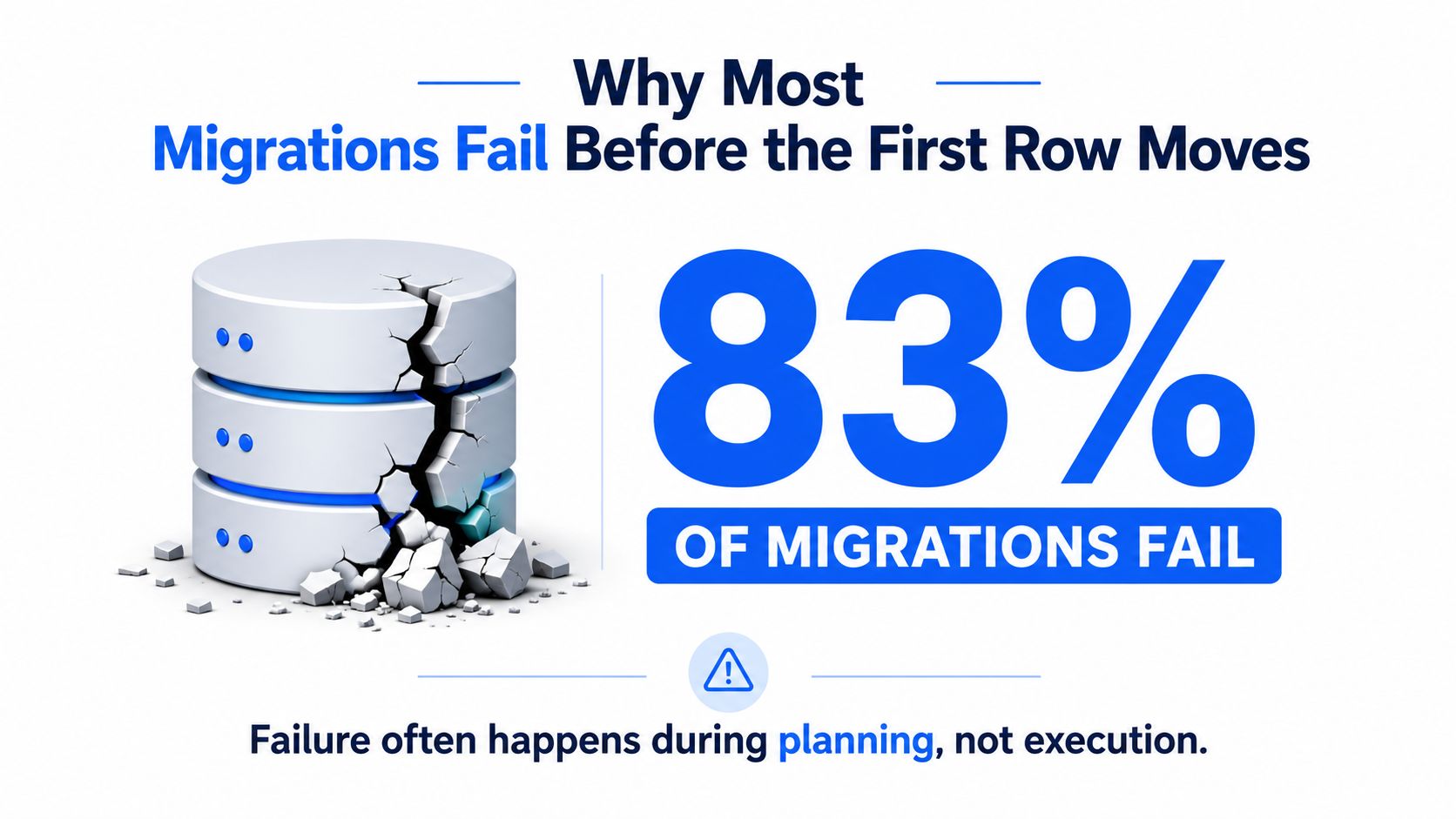
83% of data migration projects fail, and that number should change how you think about planning data migration. The problem usually isn't the transfer itself. It's the work teams skip before the first row moves, including inventory, profiling, mapping, test runs, and rollback design, which is why so many projects collapse after the cutover looks “done” on paper (industry analysis).
A good migration plan is a risk instrument. It tells you where the data is messy, where the schema will break, which business users need parallel access, and how much time you need for validation before anyone signs off. That's why the same analysis that cites the 83% failure rate also recommends spending 20 to 25% of the total timeline on assessment and planning, plus 30 to 40% on testing, which means a 12-week migration would typically reserve roughly 2.5 to 3 weeks for planning and 3.5 to 5 weeks for validation (industry analysis).
That timeline discipline matters because planning is not a calendar exercise. It's where teams decide whether they're moving a cleanly understood workload or gambling on assumptions. A useful external benchmark for implementation pacing is a realistic timeline for logistics software, which shows how staged delivery beats compressed launch thinking when dependencies are real (Coreties implementation timeline). For a broader view of common failure modes, this also pairs well with the practical pitfalls discussed in digna's migration issues guide.
Table of Contents
Why Most Migrations Fail Before the First Row Moves
The blunt truth is that 83% of data migration projects fail, and most of those failures begin long before execution day (industry analysis). The extract job runs. The load job runs. Then the team finds out the source inventory was incomplete, transformations were never checked against production-like data, or the cutover was planned like a software release instead of a controlled data event.
Planning is where the critical leverage sits
The same analysis that provides the failure figure also points to the time split that works better in practice. A strong plan spends 20 to 25% of the timeline on assessment and planning, and 30 to 40% on testing. On a 12-week program, that leaves about 2.5 to 3 weeks for planning and 3.5 to 5 weeks for validation. That is not overhead. That is the work.
If a team compresses planning into a few days, it usually means the inventory is shallow, the business rules are buried in tribal knowledge, and the fallback plan exists only in someone's head. By the time the first load fails, the project is already in rework mode. That is why the migration plan should be read as a control document, not a slide deck.
Practical rule: if the schedule does not leave room for at least one dry run at production volume, the schedule is too aggressive.
The difference shows up in projects that treat cutover as a rehearsed event. AWS's migration guidance lays out the sequence clearly, describe the source, define the destination, test first, and decommission only after the new system has been stable for a while (AWS data migration guidance). That sequence is the opposite of “move fast and hope.”

The most reliable migrations I have seen were never the fastest. They were the ones where the team gave planning enough room to expose the ugly parts early, while there was still time to change scope, sequence, or tooling. That is also where the hidden costs show up, the contingency budget for rollback support, extra validation runs, and a longer post-cutover audit window. If you do not reserve time to compare counts, reconcile exceptions, and watch the first production queries, the plan stops being a plan the moment users start relying on the new system.
For teams that want a practical schedule target, a realistic timeline for logistics software is useful as a reference point because it forces the same discipline, staged testing, cutover rehearsal, and room for stabilization instead of assuming the first load will tell the whole story.
Planning also needs a place to record the failure modes that usually get hand-waved away. A clear migration plan should name the validation owner, the rollback trigger, the reconciliation method, and the observability signals that will decide whether the system is healthy after cutover. That is where projects either keep control or drift into guesswork. If you want to reduce avoidable surprises, digna's write-up on common data migration pitfalls and fixes is worth folding into the planning review before anyone starts moving data.
Scoping, Discovery, and Source-System Inventory
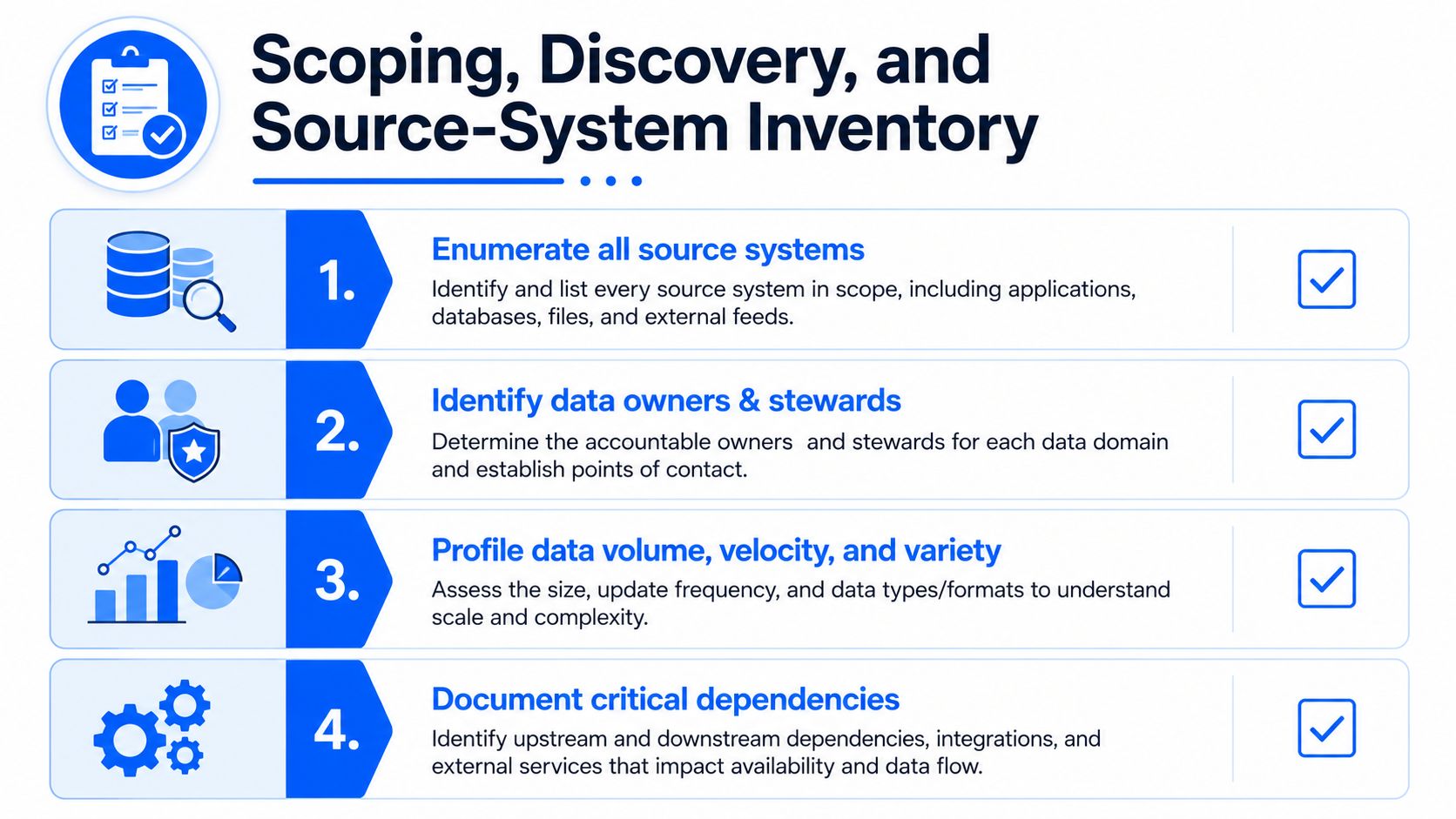
Discovery is where good migration programs stop guessing. Before anyone argues about tools or cutover style, the team needs a complete source-system inventory that names every system, owner, refresh cadence, sensitivity class, and downstream consumer. A workload nobody owns can still be business-critical, and that's exactly how migrations get blindsided.
Build the inventory like an operations asset
Start by listing every source, not just the obvious production databases. Include reporting replicas, departmental extracts, file drops, and side systems that feed finance, operations, or compliance workflows. For each one, capture the owner, the steward, the schedule, the retention expectation, and who depends on it downstream.
Then profile the data. Good profiling looks at record counts, null rates, value distributions, anomalies, and orphan rows (filefeed best practices). That is where surprises surface, like a column that is much more cardinal than expected, a slowly changing dimension nobody documented, or a table everyone assumed was dead but still drives a monthly report.
Once the inventory is visible, create a field-to-field mapping document. That means explicit source-to-target field links, type conversions, transformation rules, and handling for nulls and defaults. The point is not just to move data. It's to make every assumption inspectable before engineering starts wiring pipelines.
A migration discovery pass is complete only when someone can explain, field by field, what changes, what stays, and what breaks if the source shifts.
Close discovery with a dependency check
A practical completion checklist for discovery should include four things. First, every source has an owner. Second, every important table has a profile. Third, every downstream consumer is named. Fourth, every non-obvious rule is written down, not stored in chat history.
When those four boxes are filled, the architecture conversation becomes real. Without them, the architecture is just speculation with diagrams.
Choosing a Cutover Strategy That Matches the Risk
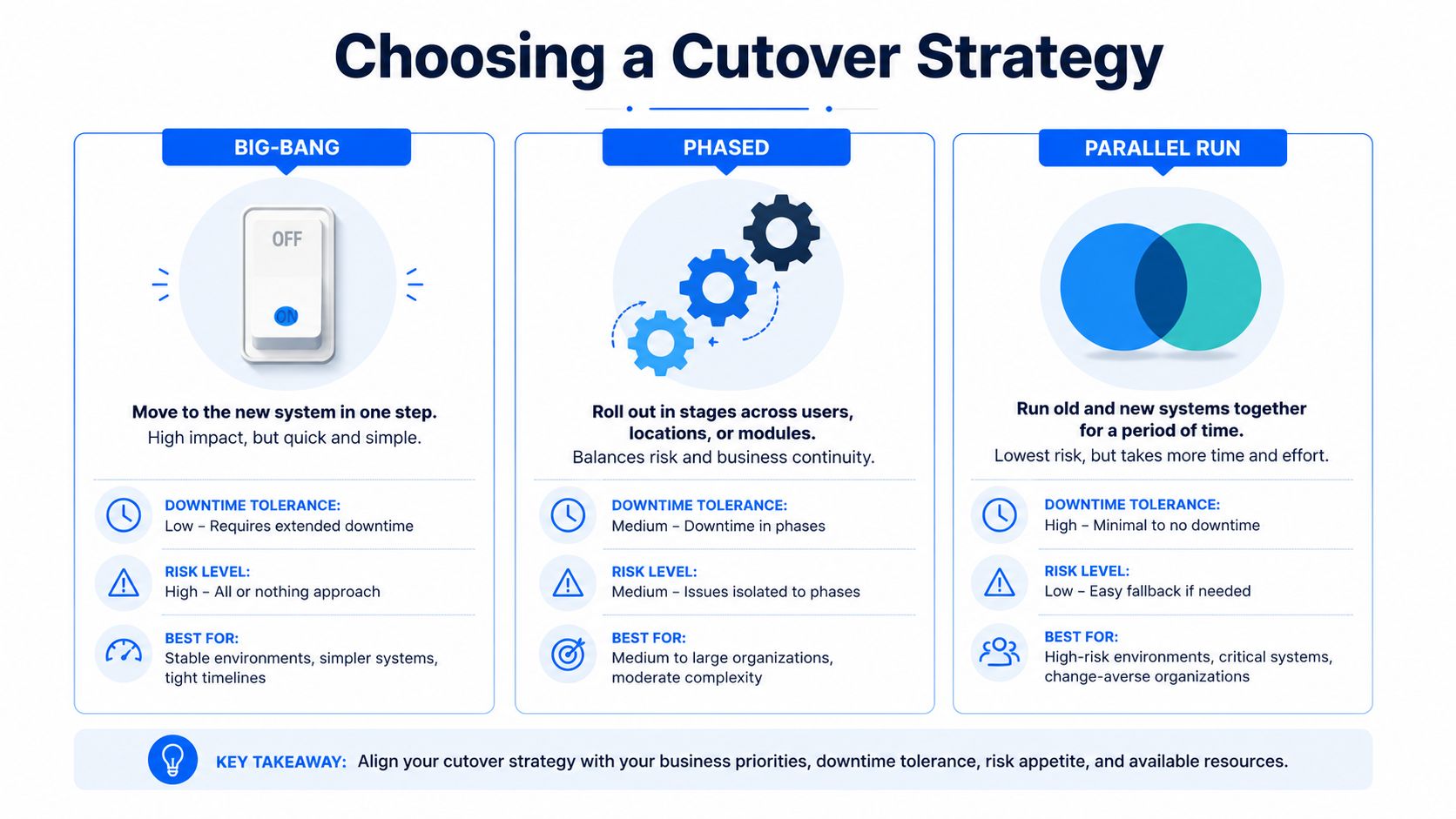
The right cutover strategy depends on what the business can tolerate when something goes wrong. Big-bang, phased, and parallel run are all valid patterns, but they solve different problems. Downtime tolerance, data volume, regulatory criticality, and rollback complexity should drive the choice, not personal preference.
Big-bang works only when the blast radius is small
Big-bang cutover is the simplest to describe and the hardest to recover from. It fits lower-volume systems with clear dependencies and a rollback path that's been tested, not assumed. If the workload is operationally important but not heavily audited, and the source and target are close enough that a short freeze is acceptable, big-bang can be the cleanest route.
Phased cutover fits the opposite case. If the system has complex dependencies, lots of consumers, or business functions that can be moved in stages, phased is safer because each wave becomes a validation point. Parallel run is strongest when trust matters more than speed, because the old and new systems stay live long enough for the team to compare outputs and catch drift.
Use the budget buffer as a reality check
A practical migration template recommends a 10 to 25% contingency budget on top of the base estimate (RudderStack migration guidance). That buffer is not padding for optimism. It reflects the amount of rework that tends to appear once the team starts comparing live data, fixing transformation edge cases, and handling access issues under real load.
A useful way to think about it is this. If the business cannot tolerate bad totals, stale reports, or a prolonged reconciliation window, then the cutover should lean phased or parallel. If rollback is expensive, big-bang is usually the wrong instinct. In finance and healthcare, audited numbers and compliance expectations raise the cost of getting the first pass wrong, so the safer pattern is usually the one with more visibility and less drama.
The hard part is that many public guides stop at checklists and never quantify the buffer by migration type or criticality (network installers plan discussion). That gap matters. Without a buffer rule, teams pretend every migration is a straight-line delivery effort, and migrations are rarely straight-line work.
Schema, Transformation, and Compatibility Planning
Once the cutover style is chosen, the technical planning begins. The team needs a target schema with versioned DDL, a transformation catalog, and a compatibility matrix before any extract job runs. Without those artifacts, schema mismatch turns into a production surprise.
Make the target explicit
The target schema should be written down as a controlled object, not left implicit in the destination platform. Versioned DDL gives engineering a stable reference point, which matters when source systems evolve during the project. If the target is still changing while loads are being tested, nobody can tell whether a failure is caused by the data or the model.
The transformation catalog should name every business rule that touches a column. That includes type conversions, precision changes, timezone adjustments, default values, and null handling. If a rule matters to the business, it needs an owner. If nobody owns it, it's not a rule, it's a guess.
Build a compatibility matrix before the first load
A compatibility matrix is where source and target differences become visible in one place. It should flag mismatches in type, encoding, precision, and timezone so the team can decide whether to convert, truncate, preserve, or reject. Silent failure often starts here, especially when strings get shortened without notice or timestamps move between zones and no one notices until a downstream report is off.
This is also the point where observability planning should line up with the schema plan. digna's Schema Tracker is built to flag structural changes such as added or removed columns and data type modifications, so the artifacts engineers produce here should match the changes the monitoring layer is expected to catch. That alignment prevents a gap between what the migration team thinks it built and what the platform can watch.
Rule of thumb: if a schema change can break a dashboard, it should be written into the transformation catalog, not left to discovery in validation.
For engineering handoff, the minimum document set should be simple: target DDL, field mapping spec, transformation catalog, and compatibility matrix. When those four are clear, the extraction code has a contract to follow.
Validation, Dry Runs, and Observability During Migration
Validation should be treated as a signal stream, not as a one-time gate. One full-volume test is not enough when the target system, the source data, and the transformations all interact under production pressure. A better baseline is to run at least three complete test migrations with production-volume extracts, then use the third run to confirm that the process holds up under realistic conditions.
Dry runs need to prove more than loadability
The first dry run usually exposes missing permissions, schema misalignments, and broken assumptions about volume. The second run often reveals transformation edge cases and cleanup defects. The third run is the one that matters, because it shows whether the process is repeatable instead of lucky.
A practical template also recommends a 50% buffer on the total time estimate to cover unexpected delays. That sounds conservative until a production-volume dry run takes longer than expected because a dependent table is bigger than the team assumed, or a validation query has to be rewritten to avoid locking the source. A data migration plan template from Concentrus makes the same point by forcing teams to budget for the work that appears only after the first rehearsal.
The good planning move is to design validation around the business data that people trust. That means row counts, control totals, null rates, distribution shifts, schema changes, and timeliness against expected arrival. It also means comparing those signals during the run, not after the source has been decommissioned.
Monitoring should catch drift while the team can still act
Tools like digna fit naturally here. Its anomaly detection, timeliness monitoring, record-level validation, and schema tracking are built to keep checks running through the cutover window, not just at the endpoints. In a migration, that matters because one wrong assumption can hide in a calculation while the load itself still looks successful.
The migration validation guide from digna follows the same discipline, establish source baselines, profile fields, map relationships, and track schema consistency during the move. That approach works because it focuses on whether the data still means the same thing after it lands.
A common failure pattern is easy to miss. A source column that carries a numeric total gets promoted to a different type in the target, and the load completes without errors. The row counts match, but downstream totals do not. The signal chain catches it because the record-level checks, aggregate comparisons, and schema tracking do not all say the same thing, which is exactly the mismatch a good observability stack should surface before the business sees the bad report.
Cutover Runbook, Rollback, and Reconciliation
A cutover runbook should read like an operations plan, not a task list. Every phase needs an owner, a trigger, and a stop condition. That's how a migration stays controlled when the clock starts and people get nervous.
Define the phases before anyone freezes the source
The usual sequence is straightforward. Pre-cutover freeze, dual-write or read-only window, switchover, post-cutover verification, and source decommissioning. AWS also recommends waiting through a live-and-stable period before retiring the old system, and industry checklists commonly use a 2 to 4 week post-cutover audit window before decommissioning the source (AWS data migration guidance).
Rollback triggers should be measurable. Error rate spikes, reconciliation mismatches, and financial variance are all valid examples, but they need agreed thresholds before launch, not negotiation during incident response. If the legacy rollback capability is supposed to remain active, it has to be kept live long enough to matter.
Reconciliation is where confidence becomes defensible
Reconciliation should compare row counts, control totals, and sampled field values between source and target. It should use comparison tools or scripts, not manual spreadsheet archaeology. Post-cutover verification should continue through the audit window, because some failures show up only after business workflows begin using the new system at normal pace (Rivery checklist).
The runbook should assign who watches each signal. DBA on access and load behavior. App team on application errors. Data engineer on reconciliation scripts. Business owner on sign-off for the key workflows. That division keeps the incident from becoming everybody's problem and nobody's responsibility.
Rollback is not a sign of failure. It's the proof that the team planned for reality instead of theater.
When the runbook is clear, the migration feels less like a leap and more like a sequence of conditions that must all hold true before the source gets retired.
Security, Compliance, and a Planning Checklist You Can Actually Use
Security and compliance should be embedded in the same artifacts that drive the migration, not bolted on at the end. Encryption in transit and at rest, key management, access controls on staging extracts, and audit logging for every transformation are part of the plan, because a migration that moves data safely but leaves no audit trail still fails governance.
Keep validation alive after go-live
The post-cutover workload is where a lot of plans break. Domain experts often need to stay engaged for months, especially when the business relies on report-by-report comparisons, dual writes, or continuous checks on calculated fields and relationships. Independent practitioner guidance even argues for long overlap windows and sustained expert involvement, because silent drift is easier to miss than a hard failure (Particle41 migration framework).
That is why the checklist should treat post-cutover as a phase, not a footnote. Keep monitoring data arrival, business-rule outputs, and relationship integrity while users start relying on the new system. If something looks stable on day one but drifts in week three, the plan wasn't finished yet.
Use one checklist, organized by phase
Scoping: inventory every source, owner, dependency, and consumer, then profile counts, nulls, distributions, and anomalies.
Architecture: define the target schema, transformation catalog, compatibility matrix, and rollback path.
Validation: run multiple full-volume test migrations, compare totals and samples, and keep schema checks active.
Cutover: freeze, switch, reconcile, and monitor through the audit window.
Post-cutover: keep domain experts involved, watch for silent drift, and retire the source only after stability is proven.
That's the difference between a project that ships cleanly and one that leaks trust. Planning data migration well is not about making the plan look complete. It's about proving that the business can trust the new system when the old one is finally gone.
If you're planning a migration and want checks that keep running after cutover, visit digna. It's built to detect anomalies, validate records, monitor timeliness, and flag schema changes while your data stays in your own environment. That gives migration teams a practical way to watch for drift before users start filing tickets.