Lift and Shift Migration: Your Guide to a Fast Cloud Move
|
0
minuto de lectura

Your CTO wants proof that the cloud program is moving. Finance wants hardware spend off the books. Product wants faster environments for new work. Meanwhile, your data team is staring at a stack of aging jobs, undocumented dependencies, and dashboards that already break on a normal Tuesday.
That's where lift and shift usually enters the conversation. It looks practical because it is practical. You move existing workloads to cloud infrastructure with as little change as possible, get out of the data center faster, and defer deeper modernization until later.
The catch is that “later” often arrives as broken schedules, strange query behavior, inflated compute bills, and a growing pile of hidden data debt. The migration may finish on time while data quality degrades. If you don't plan for observability and validation from the start, the first sign of trouble usually comes from a business user asking why yesterday's numbers don't match.
Table of Contents
The Pressure for a Fast Cloud Migration
Most first cloud migrations don't begin with architecture purity. They begin with a deadline.
Leadership has usually made a reasonable business call. They want infrastructure capacity without another hardware cycle. They want teams to stop waiting on procurement. They want visible progress this quarter, not a two-year modernization effort that burns engineering capacity before anyone sees a result.
In that environment, lift and shift feels like the adult answer. Keep the application largely intact. Move the servers, storage, scheduled jobs, and supporting components into a cloud environment. Get production over safely. Reduce disruption. Buy time for a more thoughtful redesign later.
That logic holds up, especially when the alternative is doing nothing while the current platform gets harder to support.
The migration mandate rarely arrives cleanly
A typical enterprise estate isn't one application. It's a chain. A source database feeds batch jobs. Those jobs land files in a staging area. ETL processes transform the data. BI dashboards and downstream models depend on all of it arriving in the right order.
When a team is told to move fast, they often scope the migration around infrastructure. Virtual machines, storage, network paths, and access control get attention first. What gets less attention is the operational behavior of the data itself once it lands in the new environment.
Practical rule: If your migration plan treats data quality checks as a post-go-live task, you're not planning a migration. You're planning a delayed incident.
Speed is the benefit and the trap
Lift and shift is attractive because it respects business urgency. It can also hide risk because it preserves technical assumptions that no longer hold once the workload runs elsewhere.
A nightly process that completed comfortably on-prem may now contend with different storage behavior, network latency, IAM changes, or scheduler timing. The application may still run, but the outputs can drift. That's why experienced teams treat lift and shift as a tactical move with strategic guardrails, not as a simple relocation exercise.
What Is a Lift and Shift Migration
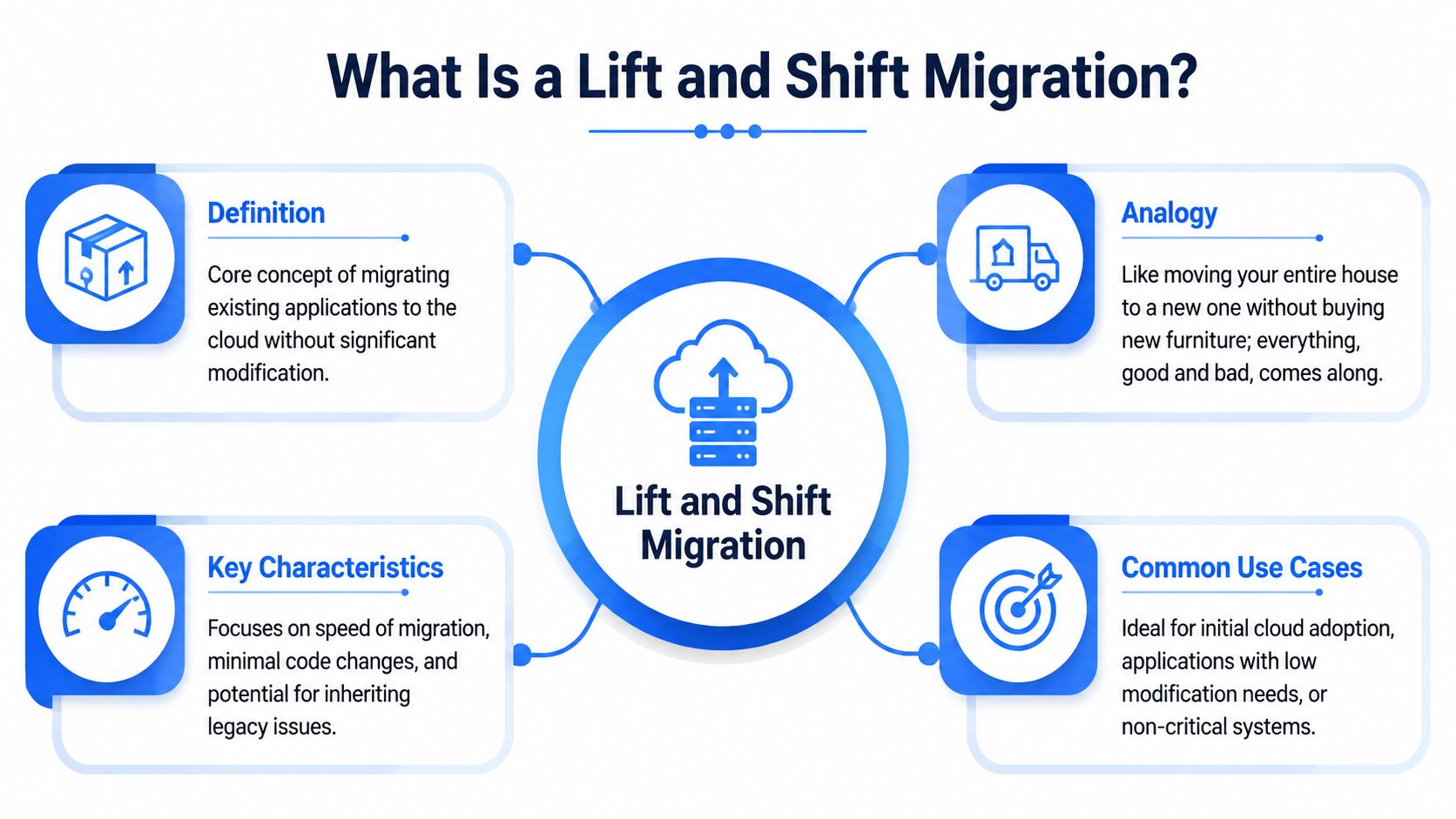
Lift and shift, also called rehosting, is the direct move of an existing application from on-premises infrastructure to the cloud with minimal architectural change. Cortex describes it as the most direct cloud migration strategy, and says it's the fastest and least expensive way to start shifting IT spending from CapEx to OpEx. The same piece notes that this approach is particularly practical for 75% of tech leaders who are building new features and products in the cloud, citing Pluralsight's State of the Cloud report in its overview of lift and shift migration strategy.
The simplest way to understand rehosting
Imagine moving houses without buying new furniture. You pack everything up and place it in the new location largely as-is. The dining table comes with you. So does the broken lamp in the basement and the chair nobody likes but nobody threw away.
That's what happens with rehosting. The application logic, server patterns, batch structure, and operational assumptions all come across. You aren't redesigning the workload to fit the cloud. You're relocating it.
For many teams, that's exactly the point. They need a low-friction path that gets the application off aging infrastructure and into a managed cloud environment without opening a large redevelopment program.
Why teams choose it first
The appeal comes down to three things:
Speed to execution: Teams can move faster because they aren't rewriting application code or redesigning every data flow.
Lower upfront disruption: Existing processes, runbooks, and support knowledge remain useful after the move.
Budget mechanics: The move helps organizations start shifting infrastructure spending toward operating expense rather than continuing to invest in owned hardware.
If you're mapping options at the program level, it helps to place rehosting inside a broader cloud migration strategy rather than treating it as the strategy itself. A fast move can be the right first stage, but only if you've already decided which systems should stay largely intact and which ones deserve deeper redesign.
Lift and shift works best when the business goal is relocation first, optimization later, and everyone is honest about that trade.
A common mistake is expecting cloud-native gains from a non-cloud-native workload. Rehosting gets you out of the building. It doesn't automatically give you elasticity, efficient scaling, or cleaner data operations. If those outcomes matter on day one, you're probably choosing the wrong migration pattern.
Choosing Your Migration Path Rehost vs Replatform vs Refactor
Not every workload deserves the same treatment. Some should move quickly with minimal edits. Others need targeted cleanup. A smaller set should be redesigned because keeping the old structure will keep producing the same old problems.
Three paths with very different outcomes
Rehost is the fastest path. You move the application largely unchanged. This is usually the best choice when time matters, the application is stable enough, and the team can tolerate inherited inefficiencies for a while.
Replatform sits in the middle. You keep the core application but make selective changes so it behaves better in the target environment. That might mean moving a self-managed database to a managed service, changing storage patterns, or adjusting deployment methods without rewriting the business logic.
Refactor goes much further. You change the application architecture to better fit the cloud. That can mean decomposing services, redesigning pipelines, introducing event-driven patterns, or rebuilding brittle batch logic. You get more long-term benefit, but you also take on more engineering effort and more delivery risk upfront.
For data-heavy systems, this choice matters more than commonly realized. A reporting platform with hardcoded schedules and tightly coupled transforms may survive rehosting, but it won't become easier to reason about. A pipeline with fragile schema handling may need replatforming or refactoring if data freshness and trust are critical to the business.
Cloud Migration Strategies Compared
Strategy | Approach | Speed | Cost (Initial / Long-term) | Cloud-Native Benefit | Risk |
|---|---|---|---|---|---|
Rehosting | Move workloads with minimal change | Fastest | Lower initially / can become inefficient over time | Limited | Lower migration complexity, higher chance of carrying legacy constraints |
Replatforming | Make selective platform changes without full redesign | Moderate | Moderate initially / often more manageable over time | Moderate | Balanced risk if dependencies are understood |
Refactoring | Redesign the application for cloud-native operation | Slowest | Highest initially / strongest long-term optimization potential | High | Highest delivery and design risk upfront |
How to decide without turning it into a philosophy debate
Use decision criteria, not slogans.
Ask these questions:
How stable is the workload today: If it's operationally boring and business-critical, rehosting may be sensible.
Where is the pain: If the biggest problem is database administration or environment management, replatforming may solve enough.
What breaks if we preserve the current design: If the current data flow is already opaque, tightly coupled, and hard to validate, refactoring may save you from years of expensive workarounds.
Who will support it after migration: An elegant target state is useless if the operating team can't run it confidently.
When the conversation turns to analytics platforms, staging layers, or warehouse modernization, this article on data warehouse to data lake migration best practices for seamless transition is useful because it frames architectural moves around operational realities instead of vendor marketing.
The best migration path isn't the most modern one. It's the one your team can deliver, support, and improve without losing control of the data.
A good rule is simple. Rehost systems that need speed. Replatform systems that need relief. Refactor systems that create recurring operational drag or block business change. If you apply that discipline workload by workload, the migration program becomes much easier to defend to engineering, finance, and operations at the same time.
The Hidden Risks of a Lift and Shift Strategy
The same decision that makes lift and shift attractive on day one can become expensive on day ninety.

What moves with the workload
When you rehost a legacy system, you don't just move compute and storage. You move assumptions.
You move oversized servers that were originally provisioned for peak demand. You move batch windows built around old infrastructure limits. You move brittle job chains, hand-maintained scripts, undocumented dependencies, and all the odd exceptions that accumulated over time.
That's why cloud bills surprise teams after a “successful” migration. Atlas Systems notes in its discussion of cloud migration challenges that up to 40% of cloud spend in lift-and-shift migrations is wasted due to over-provisioned resources and missed opportunities for cloud-native auto-scaling. The same analysis points out that generic cost-forecasting tools don't adequately solve the problem without deep workload dependency mapping.
Where hidden data debt shows up
Data debt after rehosting rarely announces itself as a major outage first. It starts as small inconsistencies:
Late-arriving tables: The pipeline still runs, but downstream models miss their reporting window.
Schema surprises: A process writes the same logical data with slightly different structure after the move.
Validation drift: Row-level checks that used to pass now fail because encodings, null handling, or timestamp behavior changed.
Observability blind spots: Existing monitoring tracks server health but not whether the data landed correctly.
These issues are expensive because they force engineers to debug at the wrong layer. Teams spend hours checking infrastructure, only to discover the issue sits in sequence timing, file semantics, or an overlooked dependency between jobs.
A green infrastructure dashboard can sit beside a broken finance report. Those are not contradictory signals. They measure different things.
Why generic cloud cost advice falls short
General advice like “monitor usage” or “remove idle resources” isn't enough for rehosted data systems. The expensive waste usually lives in systems that look active. They run every day. They consume storage. They spin up compute. They just do it with the same inefficiency they had before, now billed by the cloud.
This short explainer is worth watching because it illustrates why teams confuse migration completion with modernization:
For data platforms, the bigger problem isn't only cost. It's that poorly understood workloads become harder to trust once they cross environments. If your team doesn't know which upstream process affects which dashboard, post-migration tuning becomes guesswork. That's where hidden data debt accumulates. Not because the cloud is flawed, but because the migration preserved complexity without preserving enough visibility.
An Enterprise Checklist for a Successful Migration
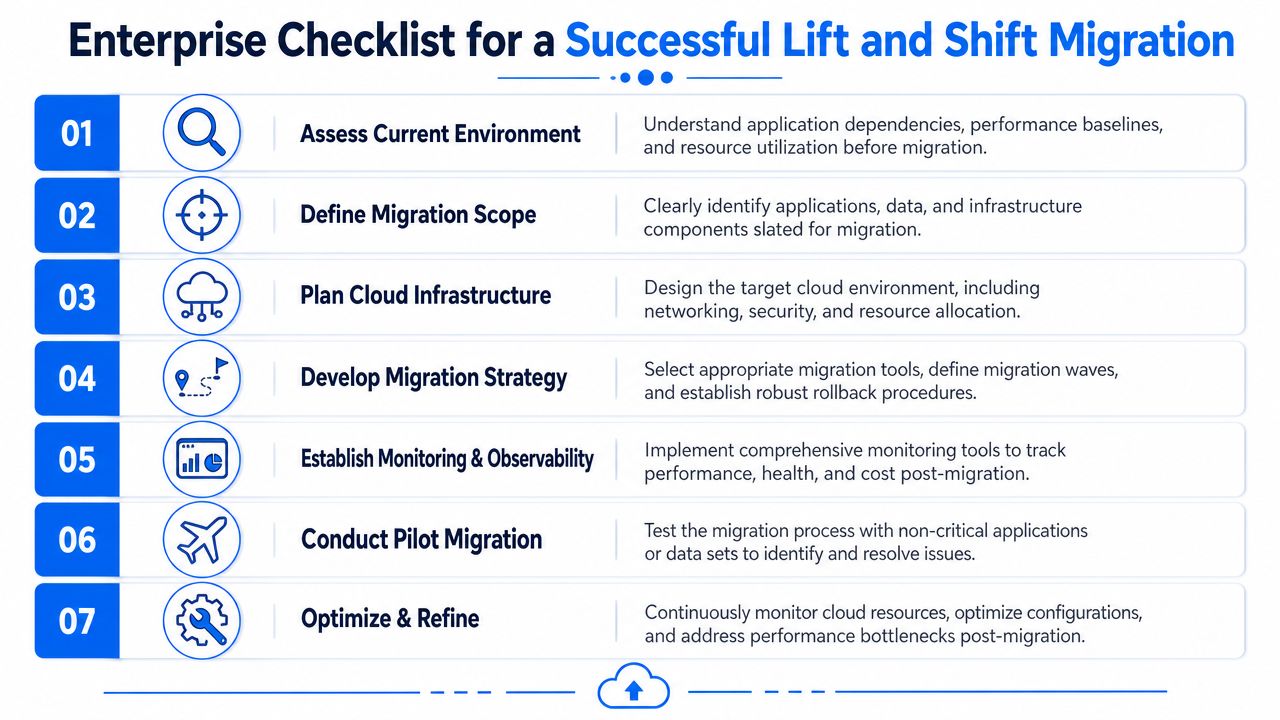
Good lift and shift programs are disciplined. The teams that struggle are usually the ones that treat migration as a server move and discover too late that application behavior, data dependencies, and operational controls didn't move cleanly with it.
Start with the estate you actually have
Build an inventory before anyone touches a migration tool.
That inventory should cover applications, databases, storage locations, schedulers, service accounts, dashboards, external interfaces, and batch dependencies. If a system sends data to another team through an informal process, capture that too. Unofficial dependencies are the ones most likely to hurt you during cutover.
Use this stage to separate critical systems from merely inconvenient ones. A pilot should involve something real enough to reveal issues, but not so central that one mistake freezes the business. If you want another practical planning reference, this guide to cloud migration for CEFs is a useful companion for structuring priorities and rollout thinking.
Build control points before the move
A migration needs pre-cutover baselines. Without them, every post-move debate turns subjective.
Create checkpoints in three categories:
Performance baselines: Capture job durations, query latency patterns, data arrival windows, and known operational bottlenecks.
Data quality rules: Define what “correct” means at the record, table, and pipeline level. Row counts alone won't protect you.
Observability coverage: Decide how you'll detect missing loads, delayed feeds, schema drift, and downstream breakage after cutover.
Many teams benefit from a dedicated plan for data validation during migrations best practices. Validation should exist before migration day, not as a cleanup activity after executives have already declared the move complete.
Field note: If you can't say which tables must land by which times and what validates their contents, your rollback criteria are incomplete.
Run the migration in waves and verify each one
Avoid the temptation to move everything in one dramatic event.
A safer pattern looks like this:
Choose a migration wave with a coherent set of dependencies.
Execute the move with documented rollback criteria.
Validate outputs against pre-migration expectations, including data freshness and structural consistency.
Watch the first business cycle closely. End-of-day, weekly, and month-end behaviors often reveal problems normal smoke tests miss.
Tune after stabilization rather than declaring success immediately after cutover.
The checklist sounds basic. In practice, it's what separates a controlled cloud move from a noisy chain of incidents. The migration itself may be fast. Confidence comes from the verification discipline wrapped around it.
Preserving Data Quality and Observability with digna
The hardest part of lift and shift begins after the infrastructure team says the migration is done.
Why observability matters after the cutover
A rehosted application can be technically available and still produce unreliable data. Schedules can drift. Upstream jobs can arrive later than usual. A schema can change just enough to break downstream analytics without causing a loud platform alert.
That's why post-migration control needs to operate at the data layer, not only the infrastructure layer. Teams need to know whether data arrived on time, whether its shape changed, and whether the values now behave differently from their historical norms.
If you're also planning a broader physical relocation or hybrid transition, this guide for successful data center moves is a helpful reminder that operational checklists matter just as much as architecture diagrams.
What to monitor first
The highest-value checks after cutover are usually the least glamorous.
Start with timeliness. If yesterday's data lands later than expected, business users feel that before engineers do. Then track anomalies in key datasets, especially where analytics, forecasting, or executive reporting depend on stable distributions. After that, watch schema change aggressively. A renamed column or altered type can subtly break a chain of downstream logic.
Digna is built for exactly this sort of post-migration assurance. Its platform runs analyses inside the customer's own database environment, which matters when security, data residency, or private-cloud deployment rules limit what you can ship to an external service. The article on navigating the complexities of data migration with AI-driven quality tools gives the broader context for using automated quality controls during and after large data moves.
Why in-database execution fits migration programs
For migration teams, operational friction matters. Pulling sensitive production data into yet another external tool can complicate approvals and slow adoption.
Digna's approach keeps analysis close to the data. That makes it practical to monitor:
Timeliness: Are tables and feeds arriving when the business expects them?
Data anomalies: Did the move change row patterns, distributions, or values in a way nobody intended?
Schema tracking: Did a structural change appear during the migration or the first post-cutover runs?
Record-level validation: Are business rules still being enforced after the workload changed environments?
Migration success isn't just “the app is up.” It's “the data is trustworthy enough that nobody has to guess whether the numbers are real.”
That's the part many lift and shift projects miss. They budget for relocation but not for confidence. Data observability closes that gap by turning silent failure modes into visible, actionable signals.
If you're planning a lift and shift migration and don't want hidden data debt to follow you into the cloud, digna helps teams monitor timeliness, detect anomalies, validate records, and catch schema changes inside their own environments. It's a practical fit for organizations that need migration speed without giving up control of data quality and observability.