Mastering What Is a Schema in Database: Your 2026 Guide
|
8
min di lettura

You're probably not looking up what a schema is because you're curious about database theory. You're looking because something downstream feels fragile. A dashboard broke after a routine release. A pipeline started failing on a table that “didn't change.” A model kept scoring, but the outputs no longer made sense.
That's the practical reason to care about schemas. Often, the data values get the attention, while the structure around those values changes unobserved in the background. That's where a lot of expensive failures start.
If you want the textbook answer first, here it is: a database schema is the structural blueprint that defines how data is organized, including tables, columns, data types, constraints, and relationships such as foreign keys, as described by Oracle's definition of database schema structure. But that definition is only the starting point. In real systems, the schema is also a contract. When that contract changes without control, pipelines, dashboards, and ML systems often absorb the damage first.
Table of Contents
The Silent Failure Behind a Broken Dashboard
A common failure starts with a perfectly ordinary morning. A BI developer opens a revenue dashboard and sees blanks where yesterday there were trends. A data engineer checks the orchestration layer and finds a downstream transformation has failed. The source system is up. Compute is fine. Nothing looks overloaded.
The root cause turns out to be smaller than anyone expected. An upstream team renamed a column, dropped a field, or changed a type from integer-like values to strings. No one announced it. No migration reached the analytics team. The pipeline wasn't overloaded or badly tuned. It was expecting one structure and received another.
That's why introductory explanations of schemas often feel incomplete. They describe a schema as structure, which is true, but they stop short of the operational consequence. Recent industry analysis indicates that 60 to 70 percent of data pipeline failures stem from unexpected schema changes rather than data volume issues, a point highlighted in Cockroach Labs' discussion of schema risk.
Why these failures are hard to diagnose
Schema-related incidents are messy because they don't always fail loudly. Sometimes the job crashes on parse. Sometimes a transformation skips a field unnoticed. Sometimes the dashboard still loads, but a metric is now wrong because a join no longer matches or a cast started returning nulls.
Most teams monitor row counts and freshness before they monitor structure. That's backwards when the structure is what every downstream assumption depends on.
A broken dashboard is usually just the visible symptom. The underlying issue sits one level lower, in the contract that defines what the data is supposed to look like.
The real lesson
If you only monitor values, you'll miss a large class of failures. Schemas deserve the same operational attention as code, jobs, and infrastructure. For modern data teams, “what is a schema in database” isn't an academic question. It's a reliability question.
The Blueprint of Your Database
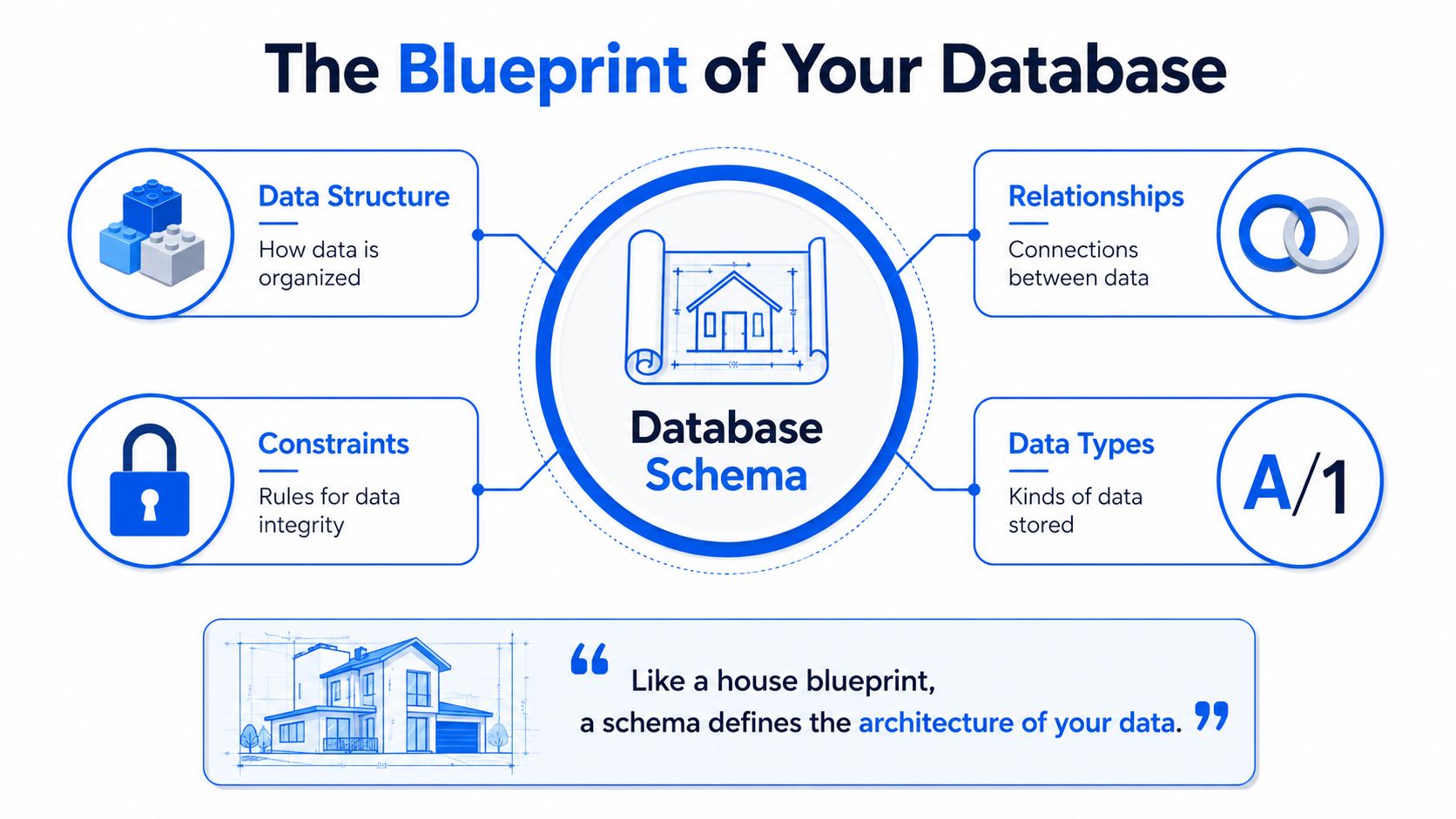
The simplest way to understand a schema is to think of it as a building blueprint. The blueprint doesn't contain the furniture or people inside the house. It defines the rooms, the doors, the load-bearing walls, and the rules the construction must follow.
In a relational database, the formal version is stricter. In relational database management systems, a schema is formally defined as a set of integrity constraints, logical formulas that prevent data insertion violating structural rules, acting as a non-data-containing blueprint of tables, fields, data types, and relationships, as explained by IBM's overview of database schema.
What the blueprint actually includes
A practical schema usually defines several core elements:
Tables represent the main entities you store, such as
customers,orders, orpayments.Columns define the attributes on each table, like
customer_id,email, orcreated_at.Data types specify what kind of value each column can hold, such as integer, text, or timestamp.
Constraints enforce rules like
PRIMARY KEY,NOT NULL, or uniqueness.Relationships connect tables through keys, usually with foreign key references.
If you map that back to the blueprint analogy, tables are rooms, columns are fixtures, data types are material specifications, and constraints are code requirements that stop bad construction.
Why constraints matter in production
The phrase “set of integrity constraints” sounds abstract until you've lived through bad data. Constraints stop some classes of failure before they enter the database. A primary key prevents duplicate identities. A foreign key stops orphaned records. A type constraint keeps a timestamp column from accepting free-form text.
That matters because prevention is cheaper than cleanup. When the database enforces structural rules at write time, downstream jobs don't have to guess whether core assumptions still hold.
Schema element | What it does | Typical failure if unmanaged |
|---|---|---|
Table definition | Organizes entity data | Missing or duplicated domain concepts |
Column definition | Describes each attribute | Broken transforms when names shift |
Data type | Controls allowed value format | Cast errors, null inflation, bad aggregations |
Constraint | Enforces integrity | Duplicates, invalid references, inconsistent records |
Relationship | Connects entities across tables | Incorrect joins and misleading reports |
Practical rule: If a field is important enough to join on, filter on, or feed into a model, its schema definition should be treated as part of your production contract.
What works and what doesn't
What works is explicit structure. Clear table ownership. Reviewed DDL changes. Constraints that match business reality.
What doesn't work is treating the schema as documentation you create once and forget. The blueprint only protects you if teams keep it aligned with the building they're changing.
Conceptual Logical and Physical Schemas
A database schema is usually taught as a definition of how data is organized. In practice, that definition exists at multiple levels, and each level affects a different kind of decision. If a team mixes them together, schema changes become harder to review, ownership gets blurry, and production risk goes up.
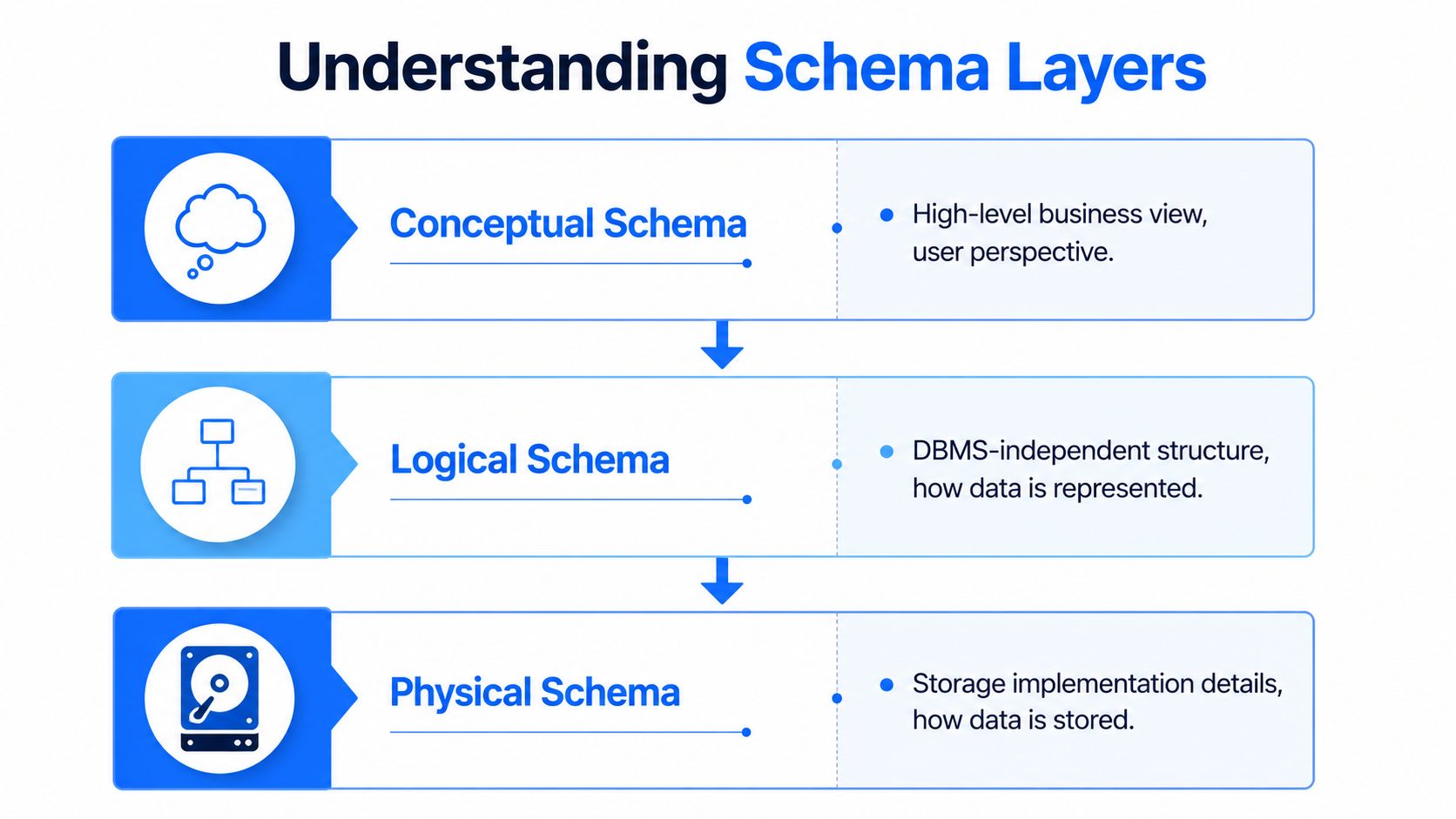
The standard three-layer view comes from the ANSI/SPARC architecture: conceptual, logical, and physical. IBM's overview of the three-schema architecture is one example of that model in practice.
One e-commerce example across three layers
Use a commerce system as a concrete example.
At the conceptual level, the business defines the core objects: customers, products, orders, and payments. This layer captures meaning and rules of the business domain. It answers questions like what an order is, who a customer is, and whether a refund belongs to payments or orders.
At the logical level, that business view becomes a data model. Engineers define entities, attributes, keys, and relationships such as customers to orders, orders to order_items, and payments to orders. The focus is structure and consistency, not storage details.
At the physical level, the design becomes executable in a specific database engine. Data types, indexes, clustering, partitioning, file layout, and engine-specific options all show up here. Here, performance, storage cost, and operational behavior start to diverge between systems that look similar on a whiteboard.
Why the distinctions matter in production
Each layer fails differently.
A conceptual mistake gives you the wrong business object. A logical mistake produces broken joins, duplicate entities, or models that analysts work around with custom SQL. A physical mistake slows queries, inflates storage, and turns routine schema changes into risky migrations.
That separation also helps during incident response. If a dashboard breaks because customer_tier moved from one table to another, the issue is logical. If the dashboard still runs but query time jumps after a partition change, the issue is physical. If two teams disagree on whether trial users count as customers, the issue is conceptual. Getting the layer right shortens the fix.
The namespace side of schema
Relational systems also use the word schema in a second sense: an object namespace such as finance, sales, or analytics. In platforms like SQL Server and PostgreSQL, that namespace groups tables, views, and other objects under a named boundary with its own access rules.
That matters operationally. Namespace design affects permission management, deployment isolation, and object ownership. A team might store restricted healthcare tables in one schema and publish curated reporting views in another. Done well, that reduces accidental exposure and makes ownership easier to enforce.
The catch is that engineers often use the same word for both concepts. Sometimes “schema change” means a column type changed. Sometimes it means an object moved from staging to analytics. Those are different events with different blast radiuses. Treating them as the same is how reviews miss downstream impact, and how schema drift turns into broken pipelines later.
Schema-on-Write vs Schema-on-Read
Not every system applies structure at the same stage. That's where a lot of “what is a schema in database” discussions become more modern. The answer changes depending on when you enforce the contract.
Schema-on-Write
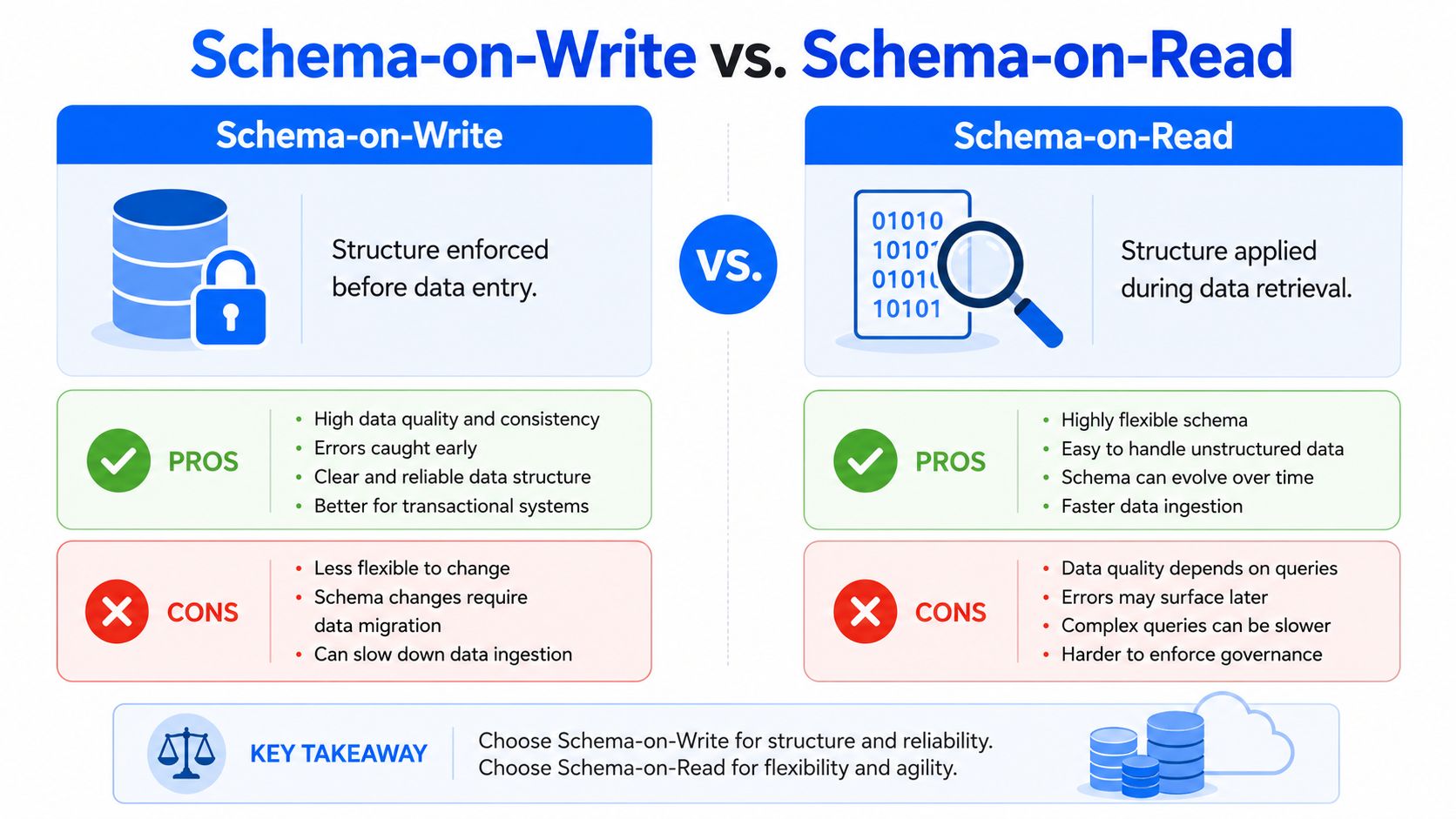
Traditional relational systems usually follow schema-on-write. Data must match the expected structure before the database accepts it. If the table expects a timestamp and receives malformed text, the write should fail or be rejected through controlled transformation.
That rigidity is useful in transactional systems. Payments, orders, account balances, and identity records benefit from strict structure because consumers need consistency more than flexibility.
Pros
High integrity at ingestion: invalid records get blocked early.
Cleaner downstream usage: analysts and applications work with predictable structures.
Clear contracts: producers and consumers know what shape is expected.
Cons
Slower adaptation: changing the model usually requires migration planning.
More coordination: upstream and downstream teams have to align before release.
Less forgiving for raw ingestion: semi-structured inputs need preprocessing.
Schema-on-Read
Data lakes and raw landing zones often use schema-on-read. Teams ingest first and apply structure later when querying or transforming the data. That works well when inputs are diverse, semi-structured, or evolving quickly.
The flexibility is real. So is the operational risk. If every consumer infers structure differently, the same raw dataset can produce multiple interpretations.
Approach | Best fit | Main strength | Main risk |
|---|---|---|---|
Schema-on-Write | Transactional systems, curated warehouses | Consistency before storage | Rigidity during change |
Schema-on-Read | Raw lakes, exploratory analytics, varied ingestion | Flexibility during intake | Inconsistent downstream interpretation |
What works in practice
The mistake isn't choosing one or the other. The mistake is assuming schema management disappears with schema-on-read. It doesn't. You still need contracts, cataloging, validation, and change monitoring. Otherwise, the lake turns into a place where consumers repeatedly rediscover the same structural surprises.
A practical pattern is to accept flexibility at ingestion, then enforce stronger structure as data moves into curated layers. That gives teams room to ingest fast without letting downstream analytics and models run on guesswork.
When Blueprints Change Schema Evolution and Drift
No production schema stays frozen. Products add features. APIs change. Source applications version their payloads. Regulations force new fields. Teams split one table into three, or consolidate ten into one. Change itself isn't the problem.
The problem is whether the change is deliberate and visible.
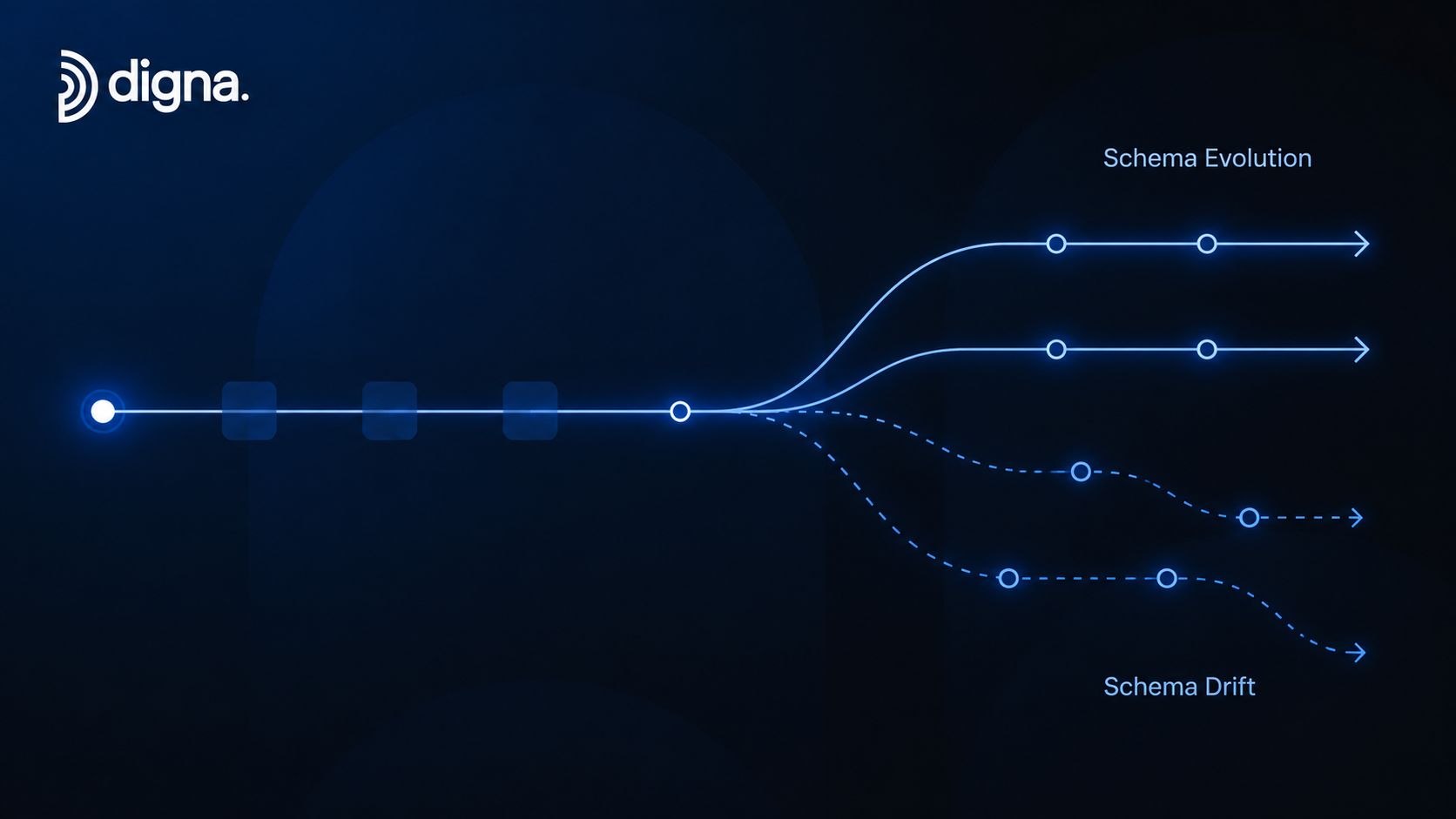
Schema evolution versus schema drift
Schema evolution is planned change. A team introduces a new nullable column, publishes the migration, updates the contract, and coordinates consumers. There may still be work to do, but at least the change is intentional.
Schema drift is what happens when columns are added, removed, or modified without proper migration controls. According to this explanation of schema drift and downstream breakage, those changes can unexpectedly break downstream applications.
If you want a deeper breakdown of the failure mode, this guide on how structural changes break data pipelines is useful because it frames drift as an operational reliability issue, not just a modeling issue.
Five common causes in real systems
These are the causes I see most often:
Feature work in source applications
Product teams add fields to support new workflows, but analytics consumers never hear about the release.Type changes during service refactors
A service starts emitting IDs as strings instead of numeric values, or a date field changes format.Third-party API revisions
Vendors add nested attributes, deprecate fields, or rename payload keys.Unreviewed manual database changes
Someone runs DDL directly in production or a shared environment without a migration path.Environment drift between stages
Dev, staging, and production stop matching, so pipeline behavior changes after deployment.
What healthy evolution looks like
Good evolution has a paper trail. The DDL is versioned. Consumers know what changed. Compatibility windows exist for high-impact tables. Validation checks run after deployment.
Planned schema change is normal engineering. Untracked schema change is incident fuel.
That distinction matters because both events may look identical at the table level. The difference is governance, visibility, and whether anyone downstream had a chance to prepare.
The High Cost of Silent Schema Changes
A schema change becomes expensive the moment downstream systems assume the old structure still holds. The textbook definition of a schema is simple. It defines tables, columns, types, and relationships. In production, it also defines whether your dashboard is trustworthy, whether your feature pipeline still matches training assumptions, and whether engineers spend the afternoon shipping work or debugging fallout.

Scenario one, the pipeline fails fast
This is the visible failure mode. A source column is removed or renamed. A transformation references the old field. The job fails, alerts fire, and the on-call engineer has a concrete error to trace.
That kind of breakage is expensive, but at least it is bounded. The team compares versions, patches the transformation, reruns the job, and explains the delay to downstream users. You lose engineering time and freshness, but you usually do not lose trust for long because the failure is obvious.
Scenario two, the dashboard keeps running but lies
This is the incident teams underestimate.
A type change, key mismatch, or changed null behavior can leave the pipeline green while the metric becomes wrong. The join still executes, but fewer rows match. The cast still runs, but invalid values become null. Revenue lands in the wrong category, or a KPI drops for reasons that have nothing to do with the business.
Once that happens, the problem leaves the data platform and enters decision-making. Analysts start tracing model logic, warehouse tables, and source feeds. Managers question the number before anyone questions the schema. The cost is no longer just compute or engineering hours. It is slower decisions, repeated validation work, and reduced confidence in every report built on that dataset.
Silent schema issues are dangerous because the output still looks usable.
That is why schema management belongs in reliability work, not just documentation.
Scenario three, the ML system degrades without an obvious error
ML pipelines are less forgiving than many reporting workflows. A model can keep scoring while the feature set drifts away from what training expected.
A numeric field arrives as text. A categorical value gets a new encoding. A sparse column starts being populated differently after an application release. None of those changes has to throw an exception to create damage. They can shift feature distributions, break assumptions embedded in preprocessing, and create training inference skew that takes days to diagnose.
In practice, schema drift becomes an AI operations problem. Teams need checks on feature structure before the model output is treated as trustworthy. A schema change tracking workflow for production data assets helps catch those changes before they reach downstream scoring or retraining jobs.
Costs you feel even without a declared incident
Even when nobody opens an incident, the bill still arrives:
Engineering interruption: data engineers and analytics engineers stop planned work to trace structural mismatches across systems.
Trust erosion: business users start asking for manual validation before they act on dashboard numbers.
Release friction: every upstream change feels risky because downstream impact is hard to predict.
Storage and query waste: weak schema discipline often leads to duplicated fields, inconsistent types, wider tables than necessary, and more expensive processing patterns.
What works versus what fails
Teams get better outcomes when they treat schema changes as production changes with consumer impact. Review the DDL. Compare the current structure to a baseline. Check whether shared models, dashboards, and feature pipelines still match the contract they were built against.
What fails is informal coordination. A message in chat, a release note nobody reads, or the assumption that a green pipeline means the data is still correct. Operationally, schema is part of the contract surface of the platform. If you do not monitor that surface, silent breakage becomes a recurring cost center.
Best Practices for Schema Management and Monitoring
Manual schema management usually breaks at team boundaries. A pull request gets merged in the application repo, but the analytics team doesn't watch that repo. Someone updates a third-party connector, but the model owner never sees the release note. Documentation exists, but it trails reality.
A better approach is to treat schema as an observable production asset.
Build a change process people will actually use
A heavyweight governance model sounds good on paper and often gets bypassed in practice. Keep the process lean enough that product engineers will follow it.
Use a few simple rules:
Version DDL changes: keep table definitions and migrations in source control.
Assign table ownership: every important dataset should have a team that approves structural changes.
Classify consumer impact: note whether a change is additive, breaking, or behavior-changing.
Require rollout notes for shared tables: especially for warehouse facts, dimensions, and ML feature sources.
Monitor structure, not just freshness
Freshness monitoring tells you whether data arrived. It doesn't tell you whether the shape is still usable. Row counts tell you volume. They don't tell you whether a key column was renamed.
That's why schema monitoring needs to compare current structure against a known baseline and flag DDL changes such as added columns, removed columns, and type modifications. One option is digna Schema Tracker, which monitors table schemas, columns, and data types to detect structural changes. The broader pattern matters more than the vendor choice. Use a platform, internal tooling, or warehouse-native checks, but make sure structure is part of your operational monitoring.
Put schema alerts into incident response
A schema alert that lands in a forgotten inbox won't help much. The signal has to reach the people who own pipelines, dashboards, and model inputs.
A practical operating pattern looks like this:
Route alerts to the same channels as pipeline incidents: on-call systems, chat notifications, or incident tooling.
Attach before-and-after definitions: engineers need the exact structural diff, not a vague warning.
Link affected assets where possible: dashboards, jobs, feature tables, and downstream consumers.
Run post-change validation: verify critical joins, row-level rules, and key metrics after structural updates.
Key takeaway: If your team can detect a failed job in minutes but can't detect a changed column until a stakeholder complains, your monitoring stack is incomplete.
Keep the schema useful
Good schemas aren't only correct. They're maintainable. Normalize where it improves integrity and reduces duplication. Use naming conventions that survive team turnover. Avoid burying business-critical semantics inside loosely typed fields when a proper model would make the contract explicit.
Don't treat schema management as a one-time design exercise. In live systems, it's ongoing operational work.
If schema changes are one of the fastest ways to break pipelines, dashboards, and model inputs, they need first-class monitoring. digna helps teams track structural changes alongside data quality, timeliness, validation, and anomaly detection so schema issues surface before they turn into downstream incidents.
Detecting a schema change is only half the job; to confirm that critical joins and row-level rules still hold after a structural update, see digna Data Validation.
Frequently asked questions
What is a schema in a database?
A schema is the structural blueprint of a database, defining tables, columns, data types, constraints and relationships such as foreign keys, without containing the data itself. In relational systems it is formally a set of integrity constraints, and in production it also acts as a contract that pipelines, dashboards and models depend on.
What is the difference between conceptual, logical and physical schemas?
These three ANSI/SPARC layers fail differently. The conceptual layer defines business objects like customers and orders, the logical layer turns them into entities, keys and relationships, and the physical layer adds data types, indexes and partitioning for a specific engine. A moved customer_tier column is logical; a slow partition is physical.
What is schema-on-write versus schema-on-read?
With schema-on-write, data must match the expected structure before the database accepts it, which suits payments, orders and curated warehouses. Schema-on-read ingests first and applies structure at query time, common in data lakes. A practical pattern accepts flexibility at ingestion and enforces stronger structure as data moves into curated layers.
What is the difference between schema evolution and schema drift?
Schema evolution is planned: a team adds a nullable column, publishes the migration, updates the contract and coordinates consumers. Schema drift is columns being added, removed or modified without migration controls. Both can look identical at table level; the difference is governance, visibility and whether downstream teams had a chance to prepare.
Why do schema changes break data pipelines?
Downstream jobs assume the old structure still holds, so a renamed column, dropped field or integer-to-string type change can crash a job or, worse, keep it green while joins match fewer rows. Cockroach Labs, cited in the article, links 60 to 70 percent of pipeline failures to unexpected schema changes.