Database Schema Description: A Complete Guide for Data Teams
|
0
minute de lecture

You're staring at a dashboard that looked fine yesterday, then one renamed column turns a routine load into a mess of nulls, failed casts, and awkward Slack messages before the morning standup. That's usually the moment people realize the database schema isn't a background detail, it's the thing holding the reporting chain together. A database schema description gives every team the same contract to read, and when it's treated as a living artifact instead of a static diagram, it becomes the difference between a controlled release and a quiet production incident.
Table of Contents
Why a Schema Description Matters Before the First Query
A bad schema change rarely looks dramatic at first. Someone renames a column in a source table, the ETL job still runs, and a leadership dashboard opens with blanks where yesterday's numbers were. That's not a reporting issue in isolation, it's a broken contract between the database and the people reading it.
A useful database schema description is the shared reference that keeps that contract visible. Data engineers need it to know what can change safely. Analytics engineers need it so transformations don't assume a column means something it no longer means. BI developers and business analysts need it because the table name alone never tells the full story.
Practical rule: if a consumer depends on a column, that column's meaning, type, and constraints belong in the schema description, not in someone's memory.
The reason this matters is simple. Schema design shapes integrity, indexing, and query behavior IBM's schema overview, and schema changes can ripple through downstream reports, applications, and pipelines that depend on a table's columns or constraints IBM's schema overview. That's why this topic sits at the center of governance and observability, not just database modeling.
There are three big ideas to keep in mind. First, the schema has to be described clearly. Second, that description has to survive in a format teams can use. Third, changes have to be tracked continuously, because modern schemas don't stay frozen. Organizations add columns, adjust types, and enforce new rules as business needs evolve, which is exactly why the description has to stay close to the live system IBM's schema overview. If you get that right, debugging gets faster, audits get easier, and trust in the data stops depending on heroics.
What a Database Schema Description Actually Is
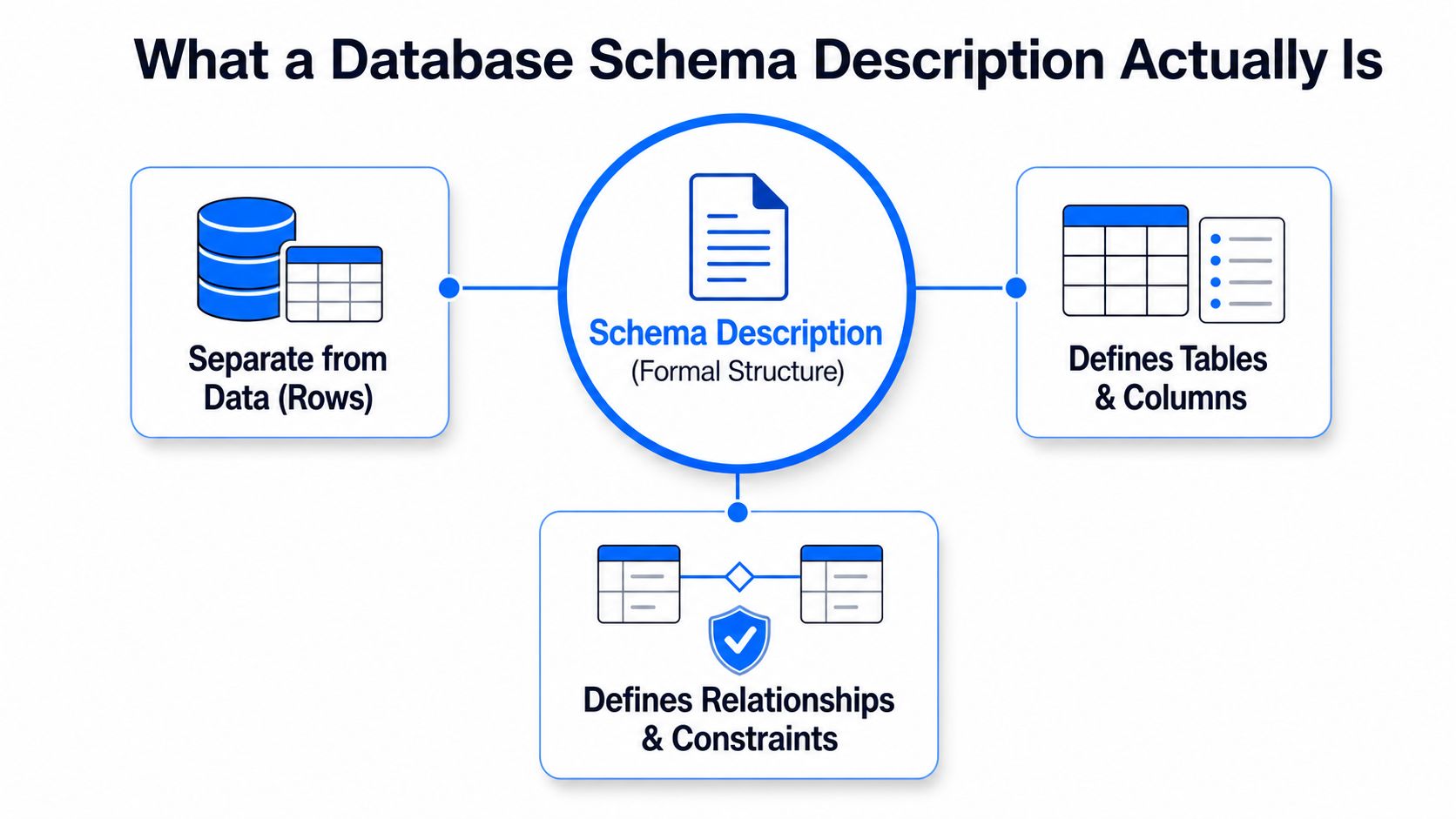
Think of the schema as the blueprint and the rows as the people living in the building. The blueprint tells you how many rooms exist, where the doors are, and what rules the structure follows. The residents change every day, but the building plan is a separate object.
That distinction is central to relational database theory, where the structure is separated from the instance or state UPJS lecture notes. A database schema is the formal description of a database's structure, including tables, fields, data types, constraints, and relationships Purdue CS database terminology. It's the description of the system, not the data itself.
digna's schema-vs-data-model guide is useful if you're trying to separate the idea of structure from the broader modeling choices around it.
What belongs in the description
A real schema description needs more than table names. It should show what the database stores, how entities connect, and what values are allowed. A field typed as integer, date, or text is part of the schema's meaning, because that choice constrains the values the database accepts Purdue CS database terminology. The same is true for uniqueness, not-null rules, and referential relationships.
That's why schema changes are operational, not cosmetic. Changing a column type or dropping a constraint changes the database's expected structure, and applications can fail immediately when they rely on the old contract Purdue CS database terminology. In practice, that means a schema description should be read like an engineering artifact. It tells you what the system is allowed to do, what it must reject, and where the joins are safe.
Modern guidance still reflects the relational lineage. Normalization, primary keys, foreign keys, and constraints remain the standard tools for preserving consistency and making retrieval predictable GeeksforGeeks schema summary. A schema description that leaves those pieces out isn't really describing the database. It's describing a guess.
The Core Building Blocks of Any Schema Description

A good schema document starts with the nouns of the model. Tables or entities represent the things you care about, customers, orders, products, claims, accounts. Those names matter because they frame the business meaning before anyone reads a single query.
Tables and columns
Columns are the properties of each table. They tell you what facts are stored about that entity, such as customer_id, created_at, or status. In strong schema writing, the table name and column names carry enough meaning that a new teammate can infer the shape of the data without guessing.
Data types and constraints
Data types are the contract layer. An integer, date, or text field doesn't just describe storage, it says what counts as valid input Purdue CS database terminology. Constraints do the same work at a stricter level. PRIMARY KEY, FOREIGN KEY, UNIQUE, NOT NULL, and CHECK rules keep the data consistent and enforceable.
A schema description that ignores constraints is only half-written.
That's also why schema changes hurt so quickly. A type change can break a cast. Dropping a not-null rule can alter application behavior. Removing a foreign key can let bad relationships slip into the table without warning. Schema detail is not ornamental, it directly affects downstream reliability and change management Wikipedia schema article.
Relationships
Relationships are the connective tissue. One-to-one, one-to-many, and many-to-many links are what let queries join meaning across tables. Historical normalization pushed schema designers toward this structure because it reduces redundancy and preserves consistency GeeksforGeeks schema summary. AWS's schema guidance also reflects the same pattern, identifying entities, keys, and relationship tables as the mechanics of a clean design AWS database schema guide.
Format | What It Describes | Best Used For | Where It Lives |
|---|---|---|---|
Tables | Core entities and their rows | Modeling business objects | Database design docs |
Columns | Attributes and fields | Defining record shape | Schema documents and DDL |
Data types | Allowed value formats | Validation and casting | DDL, contracts, data specs |
Constraints | Rules and referential integrity | Preventing bad data | Database engine and migrations |
A helpful way to read a schema description is to ask one question for each element. What is it, what values does it accept, and what depends on it? If you can answer those three things, you're already thinking like a data platform engineer.
Common Formats for Representing a Schema Description
Different teams need different representations, and the worst mistake is treating them as interchangeable. DDL, ER diagrams, JSON Schema, and Avro or Parquet schemas each solve a different problem, even though they all describe structure.
The format should match the audience
DDL is the executable source of truth because the database engine enforces it. An ER diagram is better for design conversations because it makes relationships easy to scan. JSON Schema travels with event payloads and API contracts, while Avro or Parquet schemas are common in streaming and analytical pipelines where the contract has to move with the data.
Format | What It Describes | Best Used For | Where It Lives |
|---|---|---|---|
DDL | Tables, columns, constraints, indexes | Warehouses and operational databases | Migration files or database definitions |
ER diagram | Entities and relationships | Design reviews and onboarding | Documentation and architecture decks |
JSON Schema | Fields and validation rules in JSON | APIs and event payloads | Application code and contract files |
Avro or Parquet schema | Column structure in serialized data | Streaming and lakehouse pipelines | Data files, registries, or pipeline configs |
A few tiny snippets make the difference concrete.
CREATE TABLE customers (customer_id INT PRIMARY KEY, email TEXT NOT NULL UNIQUE);
Customer connects to Order through Order_Item when the relationship is many-to-many.
{"type":"object","properties":{"email":{"type":"string"},"customer_id":{"type":"integer"}}}
message Customer { required int32 customer_id; required string email; }
The practical choice is straightforward. Use DDL when the warehouse or database needs to enforce the contract. Use ER diagrams when people need to understand the design quickly. Use JSON Schema or Avro/Parquet schemas when the contract has to move with events or files. The format isn't the goal, the audience is.
A Concrete Example of a Database Schema Description
Start with a plain e-commerce setup: customers place orders, orders contain products, and one order can include many products. That immediately gives you the entities you need, customers, orders, and products.
From requirements to tables
AWS's guidance says to identify the purpose and key information first, then move into entities, keys, and relationships AWS database schema guide. In this case, each table needs a primary key, because every row needs a stable identifier. So you'd create customers, orders, and products tables, each with its own key and business attributes.
The many-to-many relationship between orders and products needs a junction table, often called order_items. That table holds order_id, product_id, and quantity, instead of repeating product details on every order row. That's normalization in action, the same pattern AWS calls out with relationship tables to avoid redundancy AWS database schema guide.
If a value belongs to more than one row in the same way, stop repeating it and turn the relationship into a table.
A simple DDL sketch makes the structure visible:
CREATE TABLE customers (customer_id INT PRIMARY KEY, email TEXT NOT NULL UNIQUE);
CREATE TABLE products (product_id INT PRIMARY KEY, sku TEXT NOT NULL UNIQUE, price DECIMAL(10,2) NOT NULL);
CREATE TABLE orders (order_id INT PRIMARY KEY, customer_id INT NOT NULL, created_at DATE NOT NULL, FOREIGN KEY (customer_id) REFERENCES customers(customer_id));
CREATE TABLE order_items (order_id INT NOT NULL, product_id INT NOT NULL, quantity INT NOT NULL, PRIMARY KEY (order_id, product_id), FOREIGN KEY (order_id) REFERENCES orders(order_id), FOREIGN KEY (product_id) REFERENCES products(product_id));
A JSON view of one record
The same customer can also be described in JSON Schema when the record moves through an API or event stream.
{"type":"object","properties":{"customer_id":{"type":"integer"},"email":{"type":"string"},"created_at":{"type":"string","format":"date"}},"required":["customer_id","email","created_at"]}
That version doesn't replace the database schema. It complements it. The table structure, the constraints, and the record contract all express the same core idea in different places. Once you can build this example cleanly, you can map the pattern to almost any warehouse, operational store, or pipeline contract.
How Schema Drift Breaks Downstream Consumers
A schema change feels harmless until another team depends on the old shape. A renamed column, a data type tweak, or a removed constraint can break more than one thing at once. The blast radius usually shows up in ETL, BI, and model inputs before anyone opens the source table.
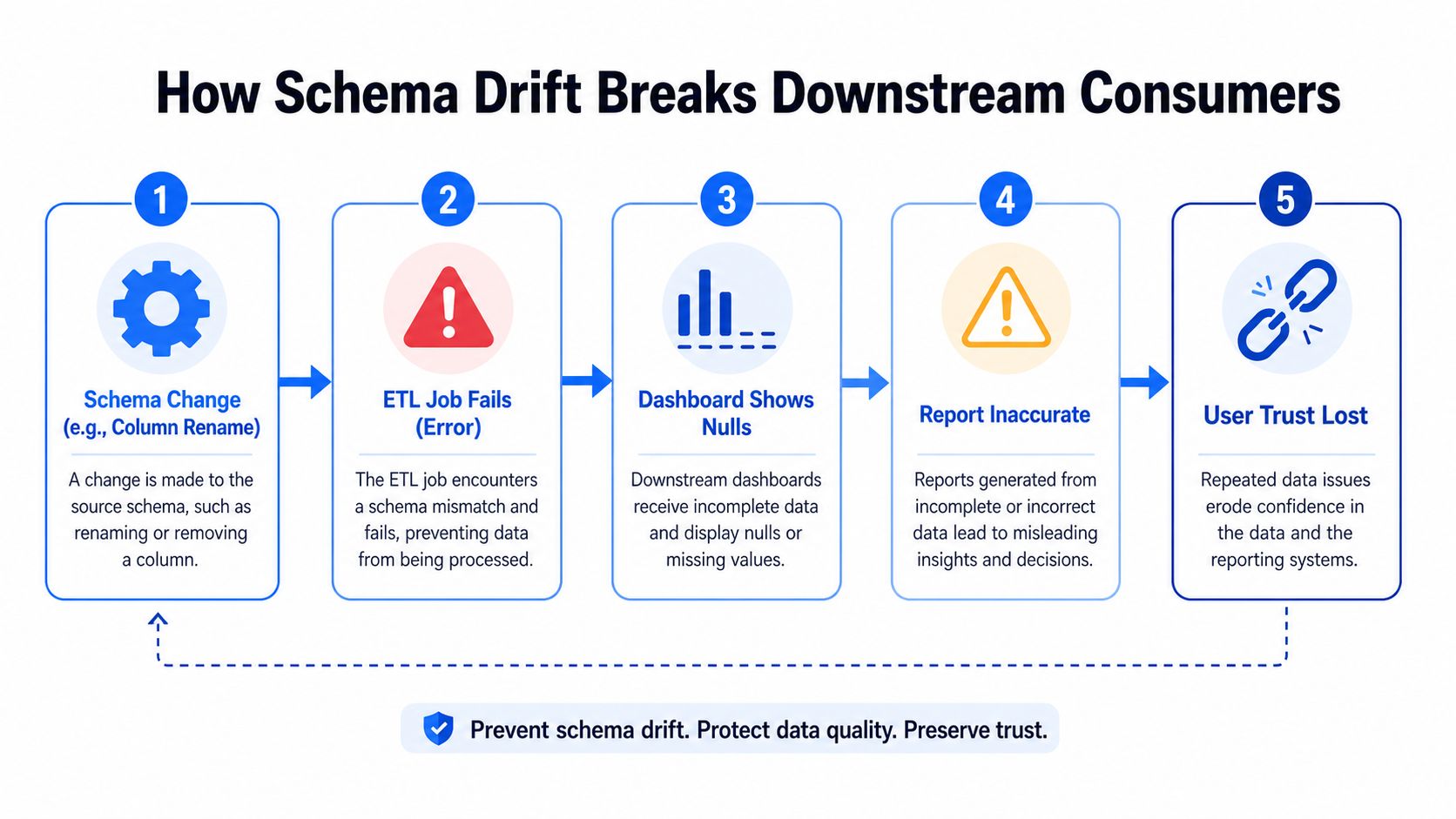
The failure chain
A source column gets renamed from status to order_status. The ETL job that selected * now lands the wrong field order or fails outright. The BI semantic layer still looks for the old field name, so dashboards show blanks. A dbt model that casts the column can throw an error, and a downstream machine learning model may ingest a different distribution than the one it was trained on without raising an alert.
That's why schema tracking exists. Teams watch for added or removed columns, data type changes, and constraint drift because those are the structural deltas most likely to break consumers Wikipedia schema article. The point isn't just to spot change, it's to spot it before business users do.
Where monitoring fits
Operational tooling matters. The documentation gap between schema diagrams and living systems is real, and schema tracking closes part of it by tying structural change to incident response, validation, and timeliness checks. digna's Schema Tracker is one example of a tool in that category. It fits when a team wants continuous detection of structural changes instead of relying on manual audits.
Schema drift and broken pipelines is the exact failure mode many teams see in practice.
A healthy observability setup treats schema as part of the monitoring surface. If the structure changes, the pipeline owner should know immediately, the BI owner should know which fields are affected, and the analyst should know whether yesterday's report can still be trusted. That's not extra process. It's the minimum needed to keep data consumers from discovering breakage after the fact.
Best Practices for Writing and Maintaining Schema Descriptions
A schema description gets useful when it reads like a working asset, not a one-time design note. That starts with naming. Table and column names should carry business meaning, because a good name reduces the amount of context someone needs before using the data.
Make the document explain the data
Column comments matter more than many teams think. A comment can tell a new analyst whether status means payment status, shipment status, or account status. A data dictionary or catalog view should surface those descriptions beside the data so people don't need to hunt across Slack or tickets to interpret a field.
Practical rule: every column that can be misunderstood should have a comment or dictionary entry that makes the meaning explicit.
Track change like code
Schema change logs should record the author, reviewer, rationale, and timestamp for each modification. Six months later, that history is the only reliable way to reconstruct why a field type changed or why a constraint was removed. Versioning DDL or migration scripts gives you that traceability, and it also makes review part of the normal release path.
A few additions are often skipped but worth documenting:
Sample queries: show how the schema is meant to be joined or filtered.
Security notes: record who can read sensitive fields and what should stay restricted.
Upstream process links: connect the schema to the business workflow that creates the data.
Ownership: name the team responsible for approving future changes.
Keep documentation close to the system
Documentation decays when it lives far from the code. The safer pattern is to keep the schema description near the DDL, the migrations, and the data catalog entry that describes the table. That way, the same review path that approves code changes also reviews structural changes. The result is simpler for on-call work, easier for audits, and far less fragile for onboarding.
Building a Documentation and Tracking Workflow
A good workflow turns the schema description into an operating system for change. Start with version-controlled DDL or migrations as the canonical definition, then make schema review part of the same discipline you already use for code review. That gives every structural change a visible trail before it lands in production.
Close the loop with observability
Once the definition is in source control, the next problem is drift. Schema tracking, validation, and timeliness monitoring catch the unintended changes that code review can't see after deployment. That's the point where data observability becomes operational, because the system has to compare what you intended with what exists in the warehouse or pipeline.
digna's platform combines modules for Schema Tracker, validation, timeliness, anomalies, and other monitoring needs inside the customer's own environment. The schema piece matters here because it continuously checks for structural changes while the rest of the stack watches whether the data still behaves as expected. If your team needs one place to watch a schema contract alongside other reliability signals, that's the role this kind of platform fills.
Make the workflow repeatable
Keep the loop simple enough that people will use it.
Pick one canonical format. Use DDL or another authoritative definition so everyone knows where the truth lives.
Document with intent. Add comments, ownership, and business context instead of treating the schema as just a list of columns.
Track changes as code. Require review, history, and a reason for every structural update.
Monitor the live system. Compare the expected schema to the observed schema and alert on drift.
The main takeaway is direct. A schema description is not a diagram you finish and file away. It's a contract, a design artifact, and a monitoring target at the same time. If those three roles stay connected, the warehouse is easier to trust and much easier to debug.
If you want a practical way to keep schema descriptions, drift detection, validation, and timeliness checks in one operational loop, visit digna and see how its platform fits alongside your warehouse and pipelines. It's built for teams that need the schema they documented to match the schema their consumers are reading.


